
Innovair WIN12H1V51
Buku Panduan Pengguna Pompa Panas Sistem Mini Split Tanpa Saluran Inverter Innovair 36000 BTUH 230V
Model: WIN12H1V51
1. Produk Lebihview
The Innovair 36000 BTUH 230V Inverter Ductless Mini Split System Heat Pump is a high-efficiency solution for both cooling and heating. This system is designed for flexible installation in various environments, providing comfortable climate control with advanced features.

Figure 1: Innovair Mini Split System components including indoor unit, outdoor unit, remote control, and installation kit.
Fitur Utama:
- High Efficiency AHRI certified Inverter technology Heat Pump.
- Multiple Operating Modes: Turbo Cool, Sleep Mode, Dehumidifier, Hyper Heat.
- Beroperasi dalam mode pendinginan AC dan pemanasan pompa panas.
- Includes a 16FT Installation Kit and is pre-charged up to 25FT.
- Multiple Protections: Gold-Fin Outdoor unit, Multi-Layer Filter system.
2. Pengaturan dan Instalasi
Proper installation is crucial for the optimal performance and longevity of your Innovair Mini Split System. It is highly recommended that installation be performed by a qualified HVAC professional.
2.1 Kit Instalasi
The system includes a 16-foot installation kit with necessary components for connecting the indoor and outdoor units. The system is pre-charged with refrigerant for line sets up to 25 feet.

Gambar 2: Komponen kit instalasi yang disertakan.
2.2 Pertimbangan Penempatan
The Innovair Mini Split System is versatile and can be installed in various room types where ductwork is not present or desired. Ensure adequate space for airflow and maintenance around both indoor and outdoor units.

Gambar 3: Contohamplebih sedikit lingkungan instalasi yang sesuai.
3. Petunjuk Pengoperasian
Your Innovair Mini Split System offers various modes and controls for optimal comfort.
3.1 Kontrol Jarak Jauh
The system is controlled via an advanced remote control with a large digital display. Familiarize yourself with the buttons and their functions for efficient operation.

Figure 4: Advanced Remote Control Layout and Functions.
- Tombol ON/OFF: Menyalakan atau mematikan unit.
- Tombol MODE: Selects operating modes (Cool, Heat, Fan, Dry, Auto).
- Tombol KIPAS: Mengatur kecepatan kipas (Otomatis, Rendah, Sedang, Tinggi).
- ROOM TEMPERATURE Setting Buttons: Mengatur suhu ruangan yang diinginkan.
- Tombol CERDAS: Activates fuzzy logic operation for automatic comfort.
- Tombol TIDUR: Engages sleep mode for quiet, energy-efficient operation.
- Tombol SWING: Controls vertical and horizontal louver movement.
- IFeel Button: Activates IFeel mode, sensing temperature at the remote's location.
- Tombol JAM: Mengatur waktu saat ini.
- TIMER ON/OFF Button: Mengatur atau membatalkan pengatur waktu untuk pengoperasian otomatis.
- Tombol SUPER: Initiates fast cooling or heating.
- Tombol Peredup: Menyalakan atau mematikan lampu tampilan pada unit dalam ruangan.
- Tombol MUTE: Mengaktifkan mode operasi senyap.
- Tombol HEAT: Directly sets the unit to 8°C heating mode (for anti-freeze).
Mode Pengoperasian 3.2
The system provides year-round comfort with its cooling and heating capabilities.

Figure 5: All-season climate control.
3.3 WiFi Control
The system is WiFi-ready, allowing you to control your unit remotely from any location using a compatible smartphone application. Refer to the separate WiFi module instructions for setup.

Figure 6: Remote control via WiFi.
4. Pemeliharaan
Regular maintenance ensures the efficiency and longevity of your Innovair Mini Split System. Always disconnect power before performing any maintenance.
4.1 Sistem Filter Udara
The indoor unit features a multi-layer filter system designed to improve air quality. Regular cleaning or replacement of these filters is essential.
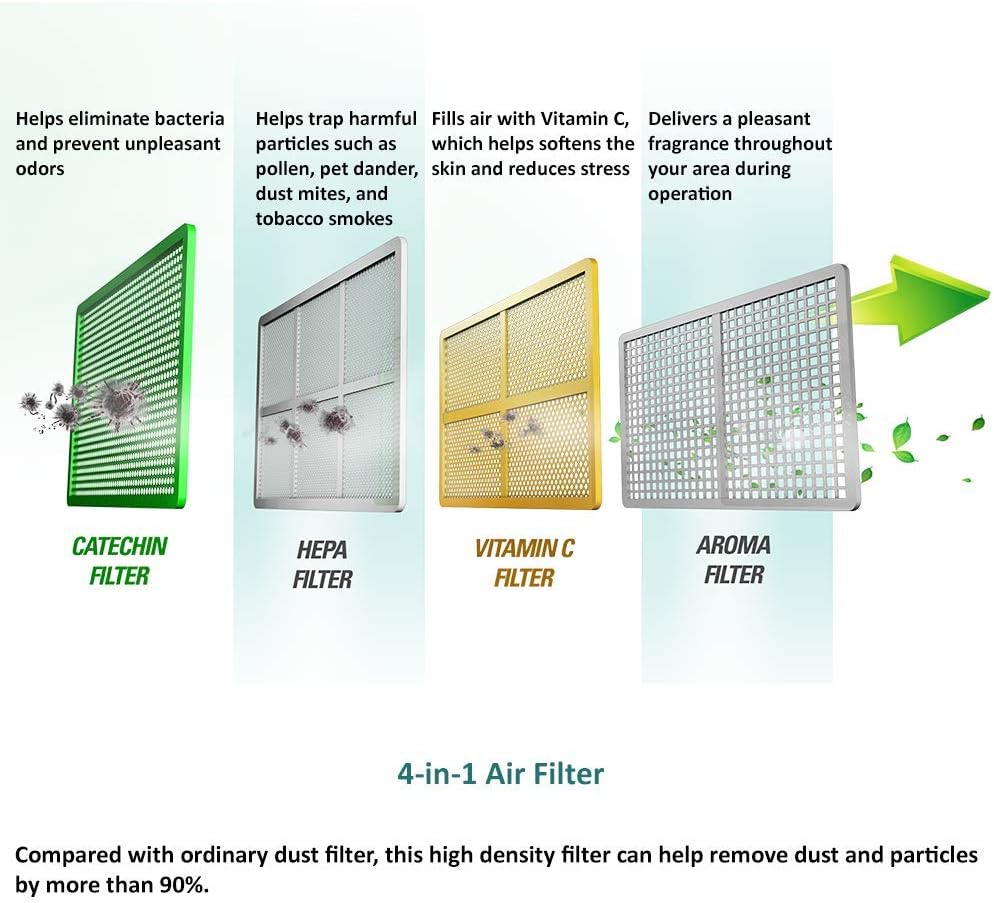
Figure 7: 4-in-1 Air Filter System.
- Filter Katekin: Helps eliminate bacteria and prevent unpleasant odors.
- Filter HEPA: Traps harmful particles such as pollen, pet dander, dust mites, and tobacco smoke.
- Filter Vitamin C: Fills air with Vitamin C, which helps soften the skin and reduces stress.
- Aroma Filter: Delivers a pleasant fragrance throughout your area during operation.
Compared with ordinary dust filters, this high-density filter can help remove dust and particles by more than 90%. Clean filters monthly or as needed, depending on usage and air quality.
4.2 Perawatan Unit Luar Ruangan
The outdoor unit features Gold-Fin protection for enhanced durability. Keep the outdoor unit clear of debris, leaves, and other obstructions to ensure proper airflow and efficient operation. Periodically inspect the coils for dirt buildup and clean gently if necessary. Ensure the condensate drain is not blocked.

Figure 8: Outdoor unit with anti-freeze protection.
5. Penyelesaian masalah
If your Innovair Mini Split System is not operating as expected, refer to the following general troubleshooting tips. For complex issues, contact a qualified technician.
- Tidak Ada Daya: Periksa pemutus sirkuit dan pastikan unit terhubung dengan benar.
- Tidak Mendinginkan/Memanaskan Secara Efektif:
- Ensure air filters are clean.
- Check for obstructions around indoor and outdoor units.
- Verify the remote control settings (mode, temperature).
- Ensure windows and doors are closed.
- Suara-suara yang Tidak Biasa: Minor noises during operation are normal. If loud or unusual noises occur, power off the unit and contact support.
- Kebocoran Air: Check the condensate drain line for blockages or improper installation.
If these steps do not resolve the issue, please contact Innovair customer support or a certified HVAC professional.
6. Spesifikasi
| Fitur | Detil |
|---|---|
| Merek | Inovasi |
| Nomor Model | WIN12H1V51 |
| Kapasitas | 3 Tons (36000 BTUH) |
| Jil.tage | 230 Volt |
| Efisiensi | High (AHRI certified Inverter technology) |
| Rasio Efisiensi Energi Musiman (SEER) | 19 |
| Pendingin | R410A (Ringan) |
| Jenis Filter | High Density (Multi-Layer: Catechin, HEPA, Vitamin C, Aroma) |
| Jenis Instalasi | Sistem Split |
| Faktor Bentuk | Wall-mounted indoor unit and compact outdoor condenser |
| Berat Barang | 24 pon (Note: This likely refers to the indoor unit or a component, not the full system weight) |
| Dimensi Produk (Unit Dalam Ruangan) | 32x11x8.5 inci |
| Warna | Putih |
| Fitur Khusus | Anti Bacterial Filter, WiFi Ready, Gold-Fin Outdoor |
Note: Specifications are subject to change without notice. Refer to the product packaging or official Innovair websitus untuk informasi terkini.
7. Garansi dan Dukungan
For warranty information, please refer to the documentation included with your product or visit the official Innovair websitus. Syarat dan ketentuan garansi dapat bervariasi.
For technical support, service inquiries, or to purchase replacement parts, please contact Innovair customer service. You can find more information and contact details on the official Innovair store page:
Ask a question about this manual
Ask about setup, troubleshooting, compatibility, parts, safety, or missing instructions. Manuals+ will review the question and use this page’s manual context to help answer it.