
1. Pendahuluan
This manual provides essential information for the safe and efficient operation of your RAGGIE RGS 1500W 12V Solar Power Inverter. This device is designed to convert 12V DC electricity from batteries or solar panels into 220V AC electricity, allowing you to power standard household appliances from a DC power source. Please read this manual thoroughly before installation and use.
2. Informasi Keselamatan
PERINGATAN: Kegagalan mengikuti petunjuk keselamatan ini dapat mengakibatkan sengatan listrik, kebakaran, cedera serius, atau kematian.
- Ensure the inverter is installed in a well-ventilated, dry, and cool environment, away from direct sunlight, heat sources, and flammable materials.
- Do not expose the inverter to rain, moisture, or liquids.
- Hubungkan inverter hanya ke sumber daya DC 12V. Menghubungkan ke tegangan yang berbedatagini dapat merusak unit.
- Always connect the battery terminals with correct polarity: positive (+) to positive, and negative (-) to negative. Reverse polarity will damage the unit.
- Pastikan semua sambungan kencang dan aman untuk mencegah panas berlebih dan percikan api.
- Jangan membuka inverter casing. Tidak ada komponen di dalamnya yang dapat diservis oleh pengguna. Serahkan semua servis kepada teknisi yang berkualifikasi.
- Keep children away from the inverter and its connections.
- Always disconnect the DC power source before performing any maintenance or troubleshooting.
- Pastikan inverter terhubung ke ground dengan benar.
3. Produk Lebihview
The RAGGIE RGS 1500W inverter features robust construction and essential ports for reliable power conversion.
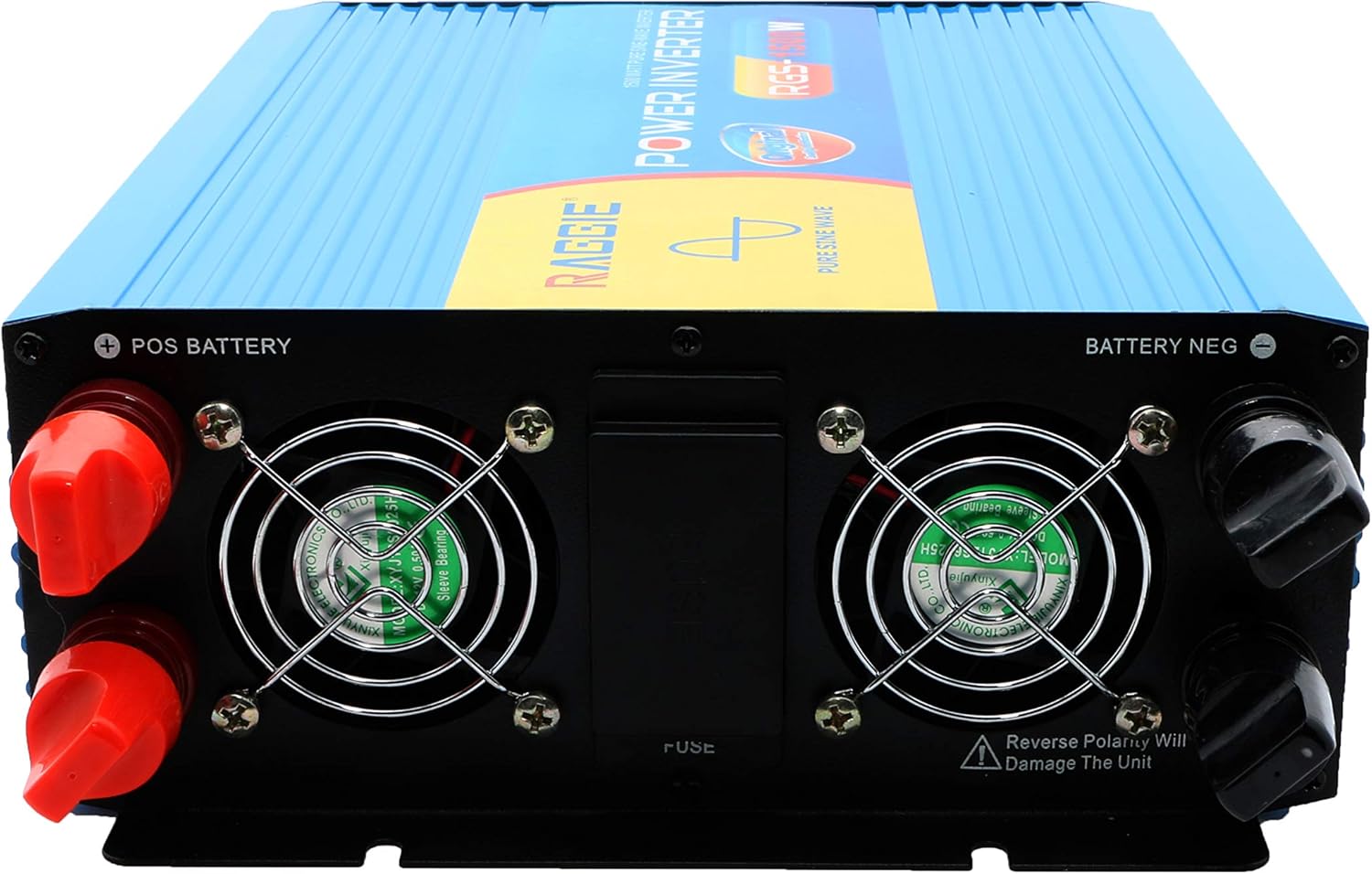
3.1 Komponen Panel Belakang
The rear panel includes the DC input terminals for connecting to your 12V battery or solar array, along with cooling fans and a fuse compartment.
3.2 Komponen Panel Depan
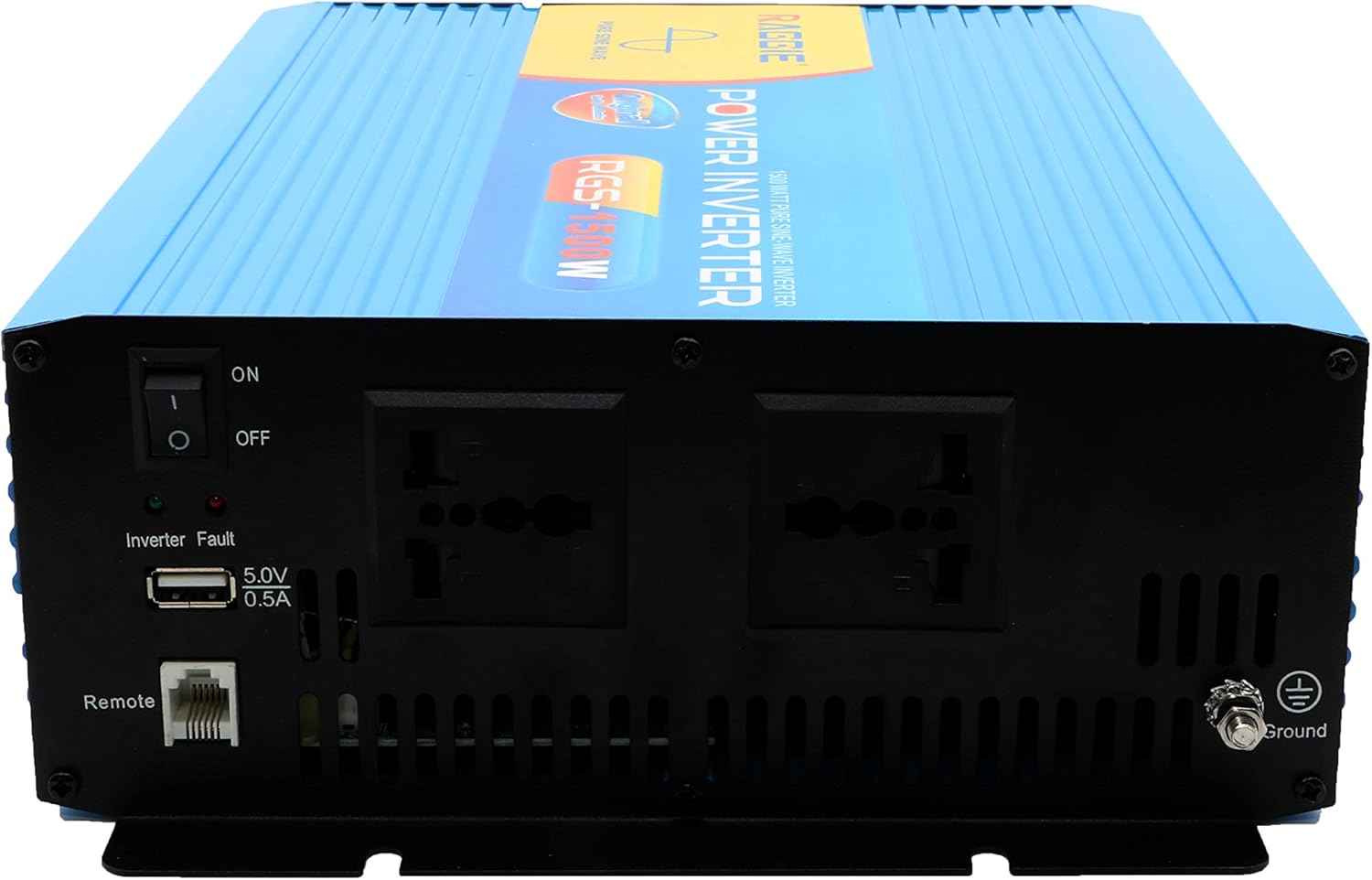
The front panel provides the AC output sockets for connecting your appliances, the main power switch, a USB charging port, and a remote control port.
4. Pengaturan dan Instalasi
Follow these steps for proper installation of your inverter.
4.1 Pembongkaran dan Pemeriksaan
- Keluarkan inverter dari kemasannya dengan hati-hati.
- Inspect the unit for any signs of damage during transit. If damage is found, do not proceed with installation and contact your supplier.
- Pastikan semua aksesori tersedia.
4.2 Penempatan
- Pilihlah lokasi yang kering, sejuk, dan berventilasi baik.
- Hindari area dengan sinar matahari langsung, suhu tinggi, atau debu berlebihan.
- Pasang inverter dengan aman pada permukaan yang stabil.
- Ensure there is adequate clearance around the cooling fans for proper airflow.
4.3 DC Input Connection (Battery/Solar)
IMPORTANT: Ensure the inverter's power switch is in the OFF position before making any connections.
- Use appropriate gauge cables for your 12V DC input. Refer to the specifications for recommended cable sizes.
- Hubungkan MERAH (+) cable to the positive terminal of your 12V battery/solar array.
- Hubungkan ujung lainnya dari MERAH (+) cable to the positive terminal (POS BATTERY) on the inverter's rear panel.
- Hubungkan HITAM (-) cable to the negative terminal of your 12V battery/solar array.
- Hubungkan ujung lainnya dari HITAM (-) cable to the negative terminal (BATTERY NEG) on the inverter's rear panel.
- Pastikan semua sambungan kencang dan aman.
4.4 Pembumian
For safety, the inverter must be properly grounded.
- Connect a grounding wire from the ground terminal on the inverter's front panel to a suitable earth ground point (e.g., vehicle chassis, ground rod).
4.5 AC Output Connection (Appliances)
- Plug your AC appliances directly into the AC output sockets on the inverter's front panel.
- Pastikan total watttage of all connected appliances does not exceed the inverter's continuous output power (1500W).
5. Petunjuk Pengoperasian
5.1 Turning On the Inverter
- Ensure all DC and AC connections are correctly made and secure.
- Switch the main power switch on the inverter's front panel to the ON posisi.
- The inverter will typically emit a short beep and an indicator light will illuminate, indicating it is operational.
5.2 Turning Off the Inverter
- Disconnect all AC appliances from the inverter.
- Switch the main power switch on the inverter's front panel to the MATI posisi.
5.3 Port Pengisian USB
- The inverter includes a 5.0V 0.5A USB port for charging small electronic devices.
- Plug your USB device into this port for charging.
6. Pemeliharaan
Perawatan rutin memastikan kinerja optimal dan umur panjang inverter Anda.
- Pembersihan: Bersihkan bagian luar inverter secara berkala dengan kain kering dan lembut. Pastikan ventilasi pendingin bebas dari debu dan kotoran. Jangan gunakan cairan pembersih.
- Pemeriksaan Koneksi: Regularly inspect all DC and AC connections to ensure they remain tight and free from corrosion. Loose connections can cause overheating and power loss.
- Penggantian Sekring: The inverter is equipped with internal fuses. If the inverter stops working and troubleshooting does not resolve the issue, the fuse may need replacement. This should only be performed by qualified personnel.
7. Penyelesaian masalah
Bagian ini membahas masalah umum yang mungkin Anda temui dengan inverter Anda.
| Masalah | Kemungkinan Penyebab | Larutan |
|---|---|---|
| Tidak ada keluaran daya / Inverter tidak menyala | Loose DC connections Volume baterai rendahtage Sekring putus Saklar inverter MATI | Check and tighten DC cables Isi ulang atau ganti baterai Check and replace fuse (by qualified personnel) Turn inverter switch ON |
| Overload warning / Inverter shuts down | Beban terhubung melebihi 1500W Surge power too high | Mengurangi total airtage of connected appliances Ensure appliance starting current is within inverter's peak capacity |
| Overheating warning / Inverter shuts down | Ventilasi buruk Suhu lingkungan yang berlebihan Blocked cooling fans | Ensure adequate airflow around the inverter Move inverter to a cooler location Clean cooling fans and vents |
| Volume baterai rendahtage peringatan | Daya baterai rendah | Isi ulang baterainya |
8. Spesifikasi
| Fitur | Spesifikasi |
|---|---|
| Merek | RAGGIE |
| Nomor Model | RGS 1500W |
| Daya Keluaran Berkelanjutan | 1500 Watt |
| Masukan Voltage | Tegangan DC 12 Volt |
| Volume Keluarantage | AC (Standard for region, typically 220V) |
| Sumber Daya | External (Battery/Solar) |
| Penggunaan yang Direkomendasikan | Provide AC power from a DC source, operate AC devices using DC power. |
| Daya Keluaran Puncak | 18000 Watts (Momentary Surge) |
| Sertifikasi | UL, ETL, CE |
| Tanggal Pertama Tersedia | 9 Juli 2019 |
9. Garansi dan Dukungan
Untuk informasi garansi atau dukungan teknis, silakan merujuk ke dokumentasi yang disertakan dengan pembelian Anda atau hubungi langsung produsen. Simpan tanda terima pembelian Anda sebagai bukti pembelian.