
1. Pendahuluan
Thank you for choosing the Awei A831BL Bluetooth In-Ear Headset. This manual provides essential information for the safe and efficient use of your device. Please read it carefully before use and retain it for future reference.
The Awei A831BL is a wireless in-ear headset designed for mobile phone use, offering up to 8 hours of continuous talk and music playback. It features pure, high-quality bass sound and is suitable for various activities.
2. Isi Paket
Silakan periksa paket untuk item berikut:
- Awei A831BL Bluetooth In-Ear Headset
- Kabel Pengisian Daya USB
- Ujung Telinga (berbagai ukuran)
- Panduan Pengguna
3. Produk Lebihview
Familiarize yourself with the components of your Awei A831BL headset.
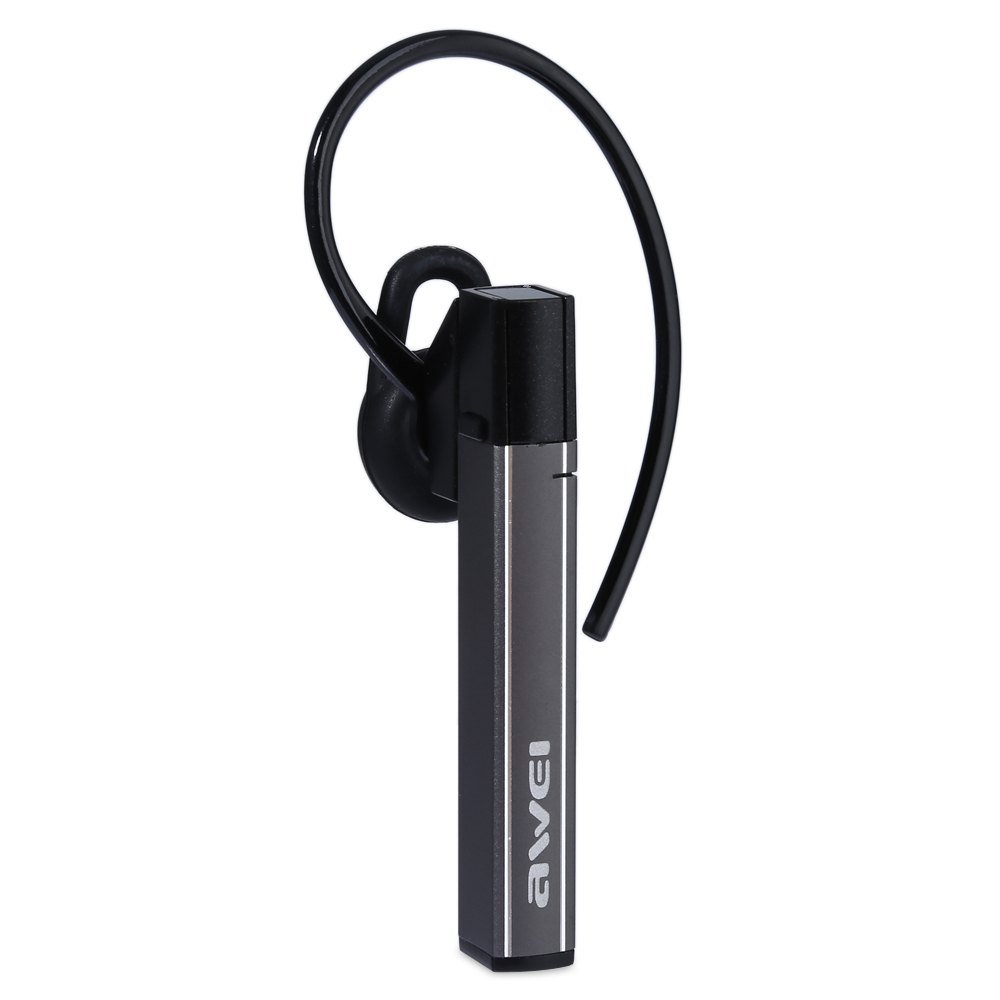
Image: The Awei A831BL Bluetooth In-Ear Headset in grey, showing the earbud design and inline controls.
The headset features an ergonomic in-ear design for comfortable wear, especially during activities. It includes an integrated microphone for hands-free calls and inline controls for managing audio and calls.
4. Pengaturan
4.1 Mengisi Daya Headset
- Sambungkan kabel pengisi daya USB ke port pengisian daya pada headset.
- Hubungkan ujung lain kabel USB ke adaptor daya USB (tidak disertakan) atau port USB komputer.
- The indicator light will illuminate (e.g., red) during charging.
- Once fully charged, the indicator light will change (e.g., turn blue or turn off).
A full charge provides up to 8 hours of talk or music playback time.
4.2 Pemasangan Bluetooth
- Pastikan headset terisi penuh dan dimatikan.
- Press and hold the Multi-function button (usually the center button on the inline control) for approximately 5-7 seconds until the indicator light flashes red and blue alternately, indicating pairing mode.
- Pada ponsel atau perangkat berkemampuan Bluetooth Anda, aktifkan Bluetooth dan cari perangkat yang tersedia.
- Pilih "Awei A831BL" dari daftar perangkat yang ditemukan.
- Jika diminta kata sandi, masukkan "0000" (empat angka nol).
- Once successfully paired, the indicator light will flash blue slowly, and you may hear a confirmation tone.
Headset akan secara otomatis mencoba menyambung kembali ke perangkat terakhir yang dipasangkan saat dihidupkan.
5. Petunjuk Pengoperasian
5.1 Daya Hidup/Mati
- Nyalakan: Press and hold the Multi-function button for about 3 seconds until the blue indicator light flashes.
- Matikan: Press and hold the Multi-function button for about 3-4 seconds until the red indicator light flashes briefly and then turns off.
5.2 Pemutaran Musik
- Putar/Jeda: Tekan tombol Multifungsi sekali.
- Volume Naik: Tekan tombol '+'.
- Volume Turun: Tekan tombol '-'.
- Lagu Berikutnya: Tekan dan tahan tombol '+'.
- Lagu Sebelumnya: Tekan dan tahan tombol '-'.
5.3 Manajemen Panggilan
- Menjawab Panggilan: Tekan tombol Multifungsi sekali saat ada panggilan masuk.
- Akhiri Panggilan: Tekan tombol Multifungsi sekali selama panggilan.
- Tolak Panggilan: Press and hold the Multi-function button for about 2 seconds when a call comes in.
- Panggil Ulang Nomor Terakhir: Tekan dua kali tombol Multifungsi.
Mikrofon terintegrasi memungkinkan komunikasi bebas genggam yang jernih.
6. Pemeliharaan
- Bersihkan headset secara teratur dengan kain lembut dan kering.
- Avoid exposing the headset to extreme temperatures, humidity, or corrosive substances.
- Do not attempt to disassemble or modify the headset, as this will void the warranty and may cause damage.
- Simpan headset di tempat yang sejuk dan kering saat tidak digunakan.
7. Penyelesaian masalah
| Masalah | Larutan |
|---|---|
| Headset tidak menyala. | Pastikan headset terisi penuh. Sambungkan ke sumber daya dan coba lagi. |
| Tidak dapat dipasangkan dengan perangkat. | Ensure the headset is in pairing mode (flashing red and blue). Turn off and on your device's Bluetooth. Move closer to the device. Clear previous Bluetooth connections on your device. |
| Tidak ada suara atau volume rendah. | Periksa level volume pada headset dan perangkat yang terhubung. Pastikan headset terhubung dengan benar. |
| Kualitas panggilan buruk. | Ensure the microphone is not obstructed. Move to an area with less interference. Check your phone's signal strength. |
8. Spesifikasi
| Fitur | Detil |
|---|---|
| Merek | Awei |
| Nomor Model | A831BL |
| Warna | Abu-abu |
| Teknologi Konektivitas | Nirkabel (Bluetooth) |
| Jenis Headset | Di telinga |
| Mikropon | Ya |
| Pembatalan Kebisingan | TIDAK |
| Daya Tahan Baterai | Up to 8 hours (talk/music) |
| Fitur Suara | Pure, high-quality bass sound |
| Bahan | Plastik |
| Perangkat yang Kompatibel | Ponsel |
9. Garansi dan Dukungan
Awei products are designed and manufactured to the highest quality standards. For warranty information and customer support, please refer to the warranty card included in your package or contact your local retailer. Keep your purchase receipt as proof of purchase.
For further assistance, please visit the official Awei websitus atau hubungi departemen layanan pelanggan mereka.