
Perkenalan
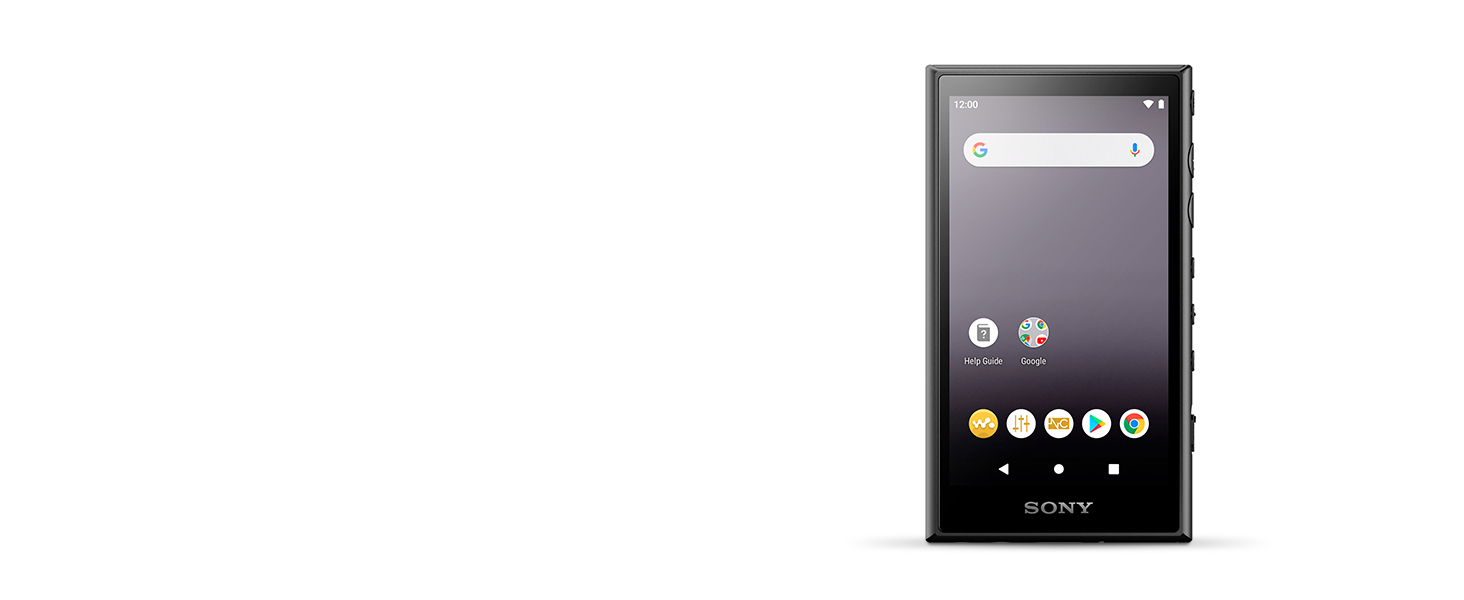
The Sony Walkman NW-A105 is a high-resolution digital music player designed to deliver exceptional audio quality. Running on the Android operating system, it allows users to stream and download music from various platforms via Wi-Fi. With its S-Master HX digital amplifier and DSEE HX AI technology, the NW-A105 enhances your listening experience by restoring compressed audio files and providing pure sound quality. It features a 16GB internal storage, expandable via a microSD card slot, and offers up to 45 hours of battery life for extended playback.
Apa yang ada di dalam kotak
- Sony Walkman NW-A105
- Kabel USB Tipe-C
- Panduan Memulai
- Instruksi Manual (dokumen ini)
Produk Selesaiview


Fitur Utama
- Audio Resolusi Tinggi: Compatible with various high-resolution audio formats for superior sound quality.
- S-Master HX Digital Amppengangkat: Delivers pure sound quality by reducing distortion and noise.
- DSEE HX AI: Analyzes song type and intelligently restores compressed audio files to near high-resolution quality.
- OS Android: Provides access to streaming services and apps via Wi-Fi.
- Konektivitas Wi-Fi dan Bluetooth: For wireless streaming and connecting to headphones or speakers.
- Penyimpanan Internal 16GB: Ampruang untuk perpustakaan musik Anda.
- Slot Kartu MicroSD: Memori yang dapat diperluas untuk penyimpanan tambahan.
- USB Tipe-C: Modern and reversible connector for charging and data transfer.
- Daya Tahan Baterai yang Lama: Hingga 45 jam pemutaran audio.
Pengaturan
1. Mengisi Daya Perangkat
Before initial use, fully charge your Walkman. Connect the supplied USB Type-C cable to the Walkman's USB-C port and the other end to a USB charging adapter (not supplied) or a computer's USB port. The charging indicator will illuminate.

2. Menghidupkan/Mematikan
- Untuk menghidupkan: Press and hold the Power button (located on the side) until the Sony logo appears on the screen.
- Untuk mematikan: Tekan dan tahan tombol Daya hingga opsi daya muncul, lalu pilih 'Matikan daya'.
3. Pengaturan Awal Android
Upon first power-on, follow the on-screen instructions to complete the initial Android setup. This includes selecting your language, connecting to a Wi-Fi network, and signing in with your Google account (optional, but recommended for app access).
4. Expanding Storage with a MicroSD Card
The Walkman supports microSDXC cards for additional storage. Locate the microSD card slot on the bottom of the device. Gently insert the microSD card until it clicks into place.

Operating the Walkman
1. Physical Controls


- Tombol Daya: Turns the device on/off, or puts it to sleep/wakes it up.
- Tombol Volume Naik / Turun: Mengatur volume keluaran audio.
- Tombol Putar/Jeda: Mengontrol pemutaran musik.
- Tombol Lewati Maju/Mundur: Berpindah antar trek.
- Tahan Saklar: Locks all physical buttons to prevent accidental presses.
2. Pemutaran Musik
Use the pre-installed music player app or download your preferred music app from the Google Play Store. Navigate your music library using the touchscreen or the physical control buttons.

3. Streaming dan Aplikasi
Connect to a Wi-Fi network to access streaming services like Spotify, Apple Music, or YouTube Music. Download apps from the Google Play Store to expand the functionality of your Walkman.
4. Konektivitas Bluetooth
Untuk menghubungkan headphone atau speaker Bluetooth:
- Buka Pengaturan > Perangkat terhubung > Bluetooth.
- Nyalakan Bluetooth.
- Masukkan perangkat Bluetooth Anda ke mode berpasangan.
- Select your device from the list of available devices on the Walkman screen.

Pemeliharaan
Membersihkan Perangkat
- Use a soft, dry cloth to wipe the exterior of the Walkman.
- For the screen, use a microfiber cloth specifically designed for electronics to avoid scratches.
- Do not use abrasive cleaners, solvents, or alcohol-based solutions, as these can damage the finish or screen.
Perawatan Baterai
- Hindari memaparkan perangkat pada suhu ekstrem, yang dapat menurunkan kinerja baterai.
- Untuk masa pakai baterai yang optimal, hindari sering-sering mengosongkan daya baterai sepenuhnya.
Penyelesaian Masalah
Masalah Umum dan Solusinya
| Masalah | Solusi yang mungkin |
|---|---|
| Daya Tahan Baterai Pendek | Turn off Wi-Fi and Bluetooth when not in use. Close background applications. Enable Airplane Mode if only listening to downloaded content. Adjust screen brightness. |
| Perangkat Tidak Merespons | Tekan dan tahan tombol Daya selama sekitar 10 detik untuk memaksa memulai ulang. |
| Music Skipping or Glitching | Pastikan musik Anda files are not corrupted. Try playing from internal memory versus microSD card, or vice-versa. Update the music player app or device firmware. |
| Cannot Connect to Wi-Fi/Bluetooth | Ensure Wi-Fi/Bluetooth is enabled. Restart the Walkman and the router/Bluetooth device. Check network settings. |
| Tidak ada Keluaran Suara | Check volume levels. Ensure headphones/speakers are properly connected or paired via Bluetooth. Test with different headphones/speakers. |
Spesifikasi
| Fitur | Detil |
|---|---|
| Merek | Sony |
| Nama Model | NW-A105 |
| Fitur Khusus | Hi-Res Audio, Bluetooth |
| Teknologi Konektivitas | USB, Wi-Fi |
| Kapasitas Penyimpanan Memori | 16 GB (expandable via Micro SDXC) |
| Warna | Hitam |
| Ukuran Layar | 3.6 inci |
| Perangkat yang Kompatibel | Smartphone, Headphone, Personal Computer |
| Jenis Media | Mikro SDXC |
| Teknologi Tampilan | Layar LCD |
| Standar yang Didukung | MP3 and other Hi-Res formats |
| Rata-rata Umur Baterai | Hingga 45 Jam |
| Berat Barang | 136 gram |
| Dimensi Barang (P x L x T) | 0.44"Panjang x 2.21"Lebar x 3.9"T |
| Pabrikan | SONY |
| Nomor Model | NWA105/B |
| UPC | 027242916838 |
Informasi Garansi
The Sony Walkman NW-A105 comes with a Garansi terbatas 1 tahun from the date of purchase. This warranty covers manufacturing defects under normal use. For specific terms and conditions, please refer to the warranty card included with your product or visit the official Sony support weblokasi.
Mendukung
For further assistance, technical support, or to download the latest firmware updates, please visit the official Sony support website for your region. You can also find FAQs and community forums for additional help.
Dukungan Sony Weblokasi: www.sony.com/electronics/support/