
1. Pendahuluan
Thank you for choosing the Silvergear Lollipop Kids Camera. This digital camera is designed for children, featuring a durable silicone case, 5.0-megapixel photo resolution, and video recording capabilities. It also includes built-in games for entertainment. This manual provides essential information for the safe and effective use of your camera.
2. Produk Lebihview
Familiarize yourself with the components of your Silvergear Lollipop Kids Camera.
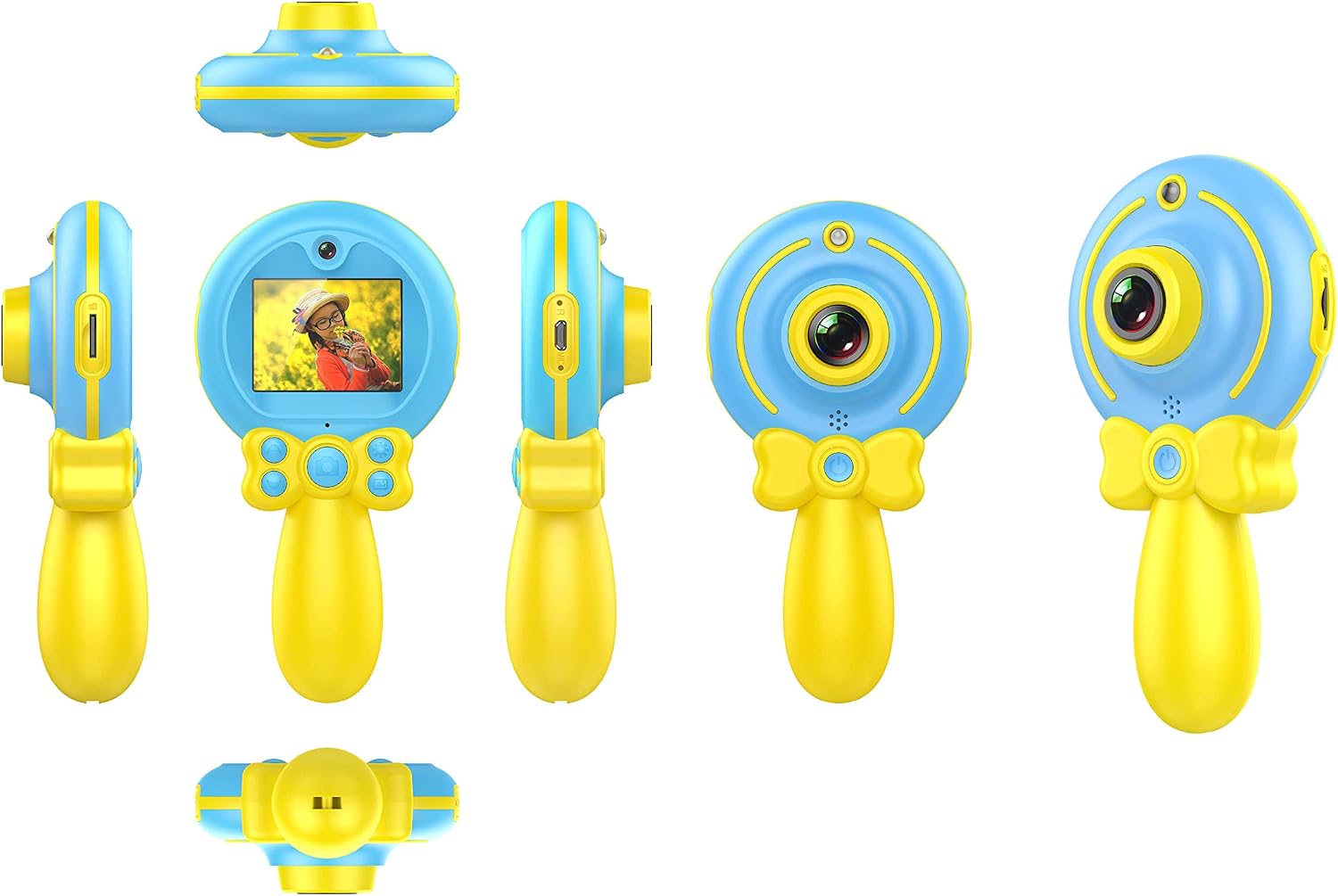
Gambar 2.1: Bermacam-macam views of the Silvergear Lollipop Kids Camera, illustrating its compact design, front and rear lenses, 2-inch display, and control buttons. The camera features a yellow handle and blue body with a silicone protective case.
- Lensa Depan: Untuk mengambil foto dan video.
- Lensa Belakang: For selfies.
- 2-inch Display Screen: Untuk viewMengunggah foto, video, dan menavigasi menu.
- Tombol Kontrol: For power, navigation, and selection.
- Port USB Mikro: Untuk pengisian dan transfer data.
- Slot Kartu Micro SD: Untuk penyimpanan yang dapat diperluas.
- Wrist Strap Attachment Point: For securing the camera.
3. Pengaturan
3.1 Mengisi Baterai
The camera is equipped with a built-in rechargeable Lithium-polymer battery. Before first use, fully charge the camera.
- Connect the included Micro USB cable to the camera's Micro USB port.
- Hubungkan ujung kabel lainnya ke adaptor daya USB (tidak disertakan) atau port USB komputer.
- Lampu indikator pengisian daya akan menyala. Setelah terisi penuh, lampu mungkin berubah warna atau mati.
3.2 Memasukkan Kartu Micro SD
A Micro SD card (not included) is required to save photos and videos. The camera supports cards up to 32GB.
- Temukan slot kartu Micro SD pada kamera.
- Gently insert the Micro SD card into the slot with the metal contacts facing down until it clicks into place.
- Untuk melepasnya, tekan kartu sedikit hingga terlepas.
3.3 Menghidupkan/Mematikan
- Untuk menghidupkan: Tekan dan tahan tombol daya selama beberapa detik hingga layar menyala.
- Untuk mematikan: Tekan dan tahan tombol daya selama beberapa detik hingga layar mati.
4. Petunjuk Pengoperasian
4.1 Mengambil Foto
The camera features a 5.0-megapixel resolution for still images.

Gambar 4.1: A child demonstrating the use of the Silvergear Lollipop Kids Camera for taking photographs.
- Ensure the camera is powered on and in photo mode. Use the navigation buttons to select photo mode if necessary.
- Frame your shot using the 2-inch display screen.
- Press the Shutter button to capture the photo. The camera has autofocus for clear images.
4.2 Merekam Video
The camera can record videos at 640 x 480 pixels resolution at 30 frames per second in MP4 format.
- Switch the camera to video recording mode using the mode selection button.
- Press the Record button to start recording. A timer or indicator will appear on the screen.
- Tekan tombol Rekam lagi untuk berhenti merekam.
4.3 Bermain Game
The camera includes three built-in games for entertainment.

Gambar 4.2: A child interacting with the Silvergear Lollipop Kids Camera, viewing content on its screen.
- Navigate to the 'Games' menu option using the navigation buttons.
- Select one of the three available games.
- Use the camera's control buttons to play the game.
4.4 Mentransfer Files
Untuk mentransfer foto dan video ke komputer:
- Connect the camera to a computer using the Micro USB cable.
- Kamera tersebut akan muncul sebagai drive disk yang dapat dilepas di komputer Anda.
- Open the camera's folder to access and copy your files.
5. Pemeliharaan
- Pembersihan: Gunakan kain lembut dan kering untuk membersihkan bodi kamera dan layar. Jangan gunakan cairan pembersih atau bahan abrasif.
- Penyimpanan: Simpan kamera di tempat yang sejuk dan kering, jauhkan dari sinar matahari langsung dan suhu ekstrem.
- Perawatan Baterai: For optimal battery life, avoid fully discharging the battery frequently. Charge the camera regularly, even if not in use for extended periods.
- Tahan Air: Kamera ini adalah tidak tahan airHindari paparan air atau kelembapan tinggi.
6. Penyelesaian masalah
- Kamera tidak menyala: Pastikan baterai terisi penuh. Sambungkan kamera ke sumber daya dan coba lagi.
- Tidak dapat mengambil foto/video: Check if a Micro SD card is inserted correctly and has sufficient free space.
- Kualitas gambar buruk: Ensure the lens is clean and free from smudges. Check lighting conditions.
- Kamera membeku: Press and hold the Power button to force a shutdown, then restart the camera.
- Komputer tidak mengenali kamera: Ensure the USB cable is properly connected. Try a different USB port or cable.
7. Spesifikasi
| Fitur | Spesifikasi |
|---|---|
| Nomor Model | 1087-B |
| Merek | perlengkapan perak |
| Dimensi (P x L x T) | Ukuran 9x5x15 cm |
| Berat | 140 gram |
| Resolusi Gambar Diam | 5 Megapiksel |
| Resolusi Video | 640 x 480 pixels (30 FPS) |
| Format Video | MP4 |
| Format Gambar | Format JPEG |
| Ukuran Layar | 2 inci |
| Penyimpanan | Micro SD card support up to 32 GB |
| Baterai | 1. Polimer litium (termasuk) |
| Konektivitas | USB |
| Fokus otomatis | Ya |
| Tahan Air | Tidak tahan air |
| Fitur Khusus | Video recording, filters, 3 built-in games |
8. Isi Kotak
- Silvergear Lollipop Kids Camera (Blue)
- Casing Pelindung Silikon
- Kabel Pengisian Daya Mikro USB
- Tali Pergelangan Tangan
9. Garansi dan Dukungan
Informasi mengenai garansi produk dan dukungan pelanggan tidak tersedia dalam data produk yang diberikan. Silakan merujuk ke kemasan produk atau situs web resmi produsen. webKunjungi situs web untuk detail mengenai cakupan garansi dan cara menghubungi dukungan pelanggan.