
1. Pendahuluan dan Informasi Keselamatan
Thank you for choosing the ANENG V8 Digital Multimeter. This device is designed for safe and accurate measurement of AC/DC voltage, AC/DC current, resistance, capacitance, frequency, temperature, diode, continuity, and battery testing. Please read this manual thoroughly before use to ensure proper operation and to prevent potential hazards.
1.1 Tindakan pencegahan keselamatan
- Selalu pastikan multimeter dalam kondisi kerja yang baik sebelum digunakan. Periksa kabel uji apakah ada kerusakan.
- Jangan gunakan vol.tage or current that exceeds the maximum rated values for the multimeter.
- Berhati-hatilah saat bekerja dengan voltagJangan gunakan tegangan di atas 36V DC atau 25V AC RMS, karena tegangan tersebut dapat menimbulkan bahaya sengatan listrik.
- Selalu putuskan aliran listrik ke sirkuit dan buang semua muatan tegangan tinggi.tagkapasitor sebelum mengukur resistansi, kontinuitas, dioda, atau kapasitansi.
- Pastikan sakelar putar berada pada posisi yang tepat untuk pengukuran yang diinginkan sebelum menghubungkan kabel uji ke rangkaian.
- Jangan mengoperasikan multimeter di lingkungan yang mengandung gas, uap, atau debu yang mudah meledak.
- Segera ganti baterai saat indikator baterai lemah muncul untuk memastikan pembacaan yang akurat.
2. Produk Lebihview
2.1 Isi Paket
The ANENG V8 Digital Multimeter package typically includes the following items:
- ANENG V8 Digital Multimeter
- Kabel Uji (Merah dan Hitam)
- Probe Suhu
- Kotak Pembawa
- Panduan Pengguna

Image: ANENG V8 Digital Multimeter with its standard accessories, including test leads, a temperature probe, and a protective carrying case.
2.2 Kontrol dan Tampilan
The multimeter features an 8000-count LCD backlight display for clear readings in various lighting conditions. Key controls include a rotary switch for function selection and buttons for range, data hold, and other features.

Gambar: Detail view of the multimeter's front panel, highlighting the LCD screen, the central rotary selector, and various control buttons.
3. Pengaturan
3.1 Pemasangan Baterai
The ANENG V8 Digital Multimeter is powered by batteries. To install or replace batteries:
- Pastikan multimeter dimatikan dan lepaskan semua kabel uji.
- Temukan penutup ruang baterai di bagian belakang perangkat.
- Gunakan obeng untuk melonggarkan sekrup yang mengencangkan penutup baterai.
- Lepaskan penutupnya.
- Insert new batteries, observing the correct polarity (+ and -) as indicated inside the compartment. The device typically uses AA batteries.
- Pasang kembali penutup baterai dan kencangkan dengan sekrup.
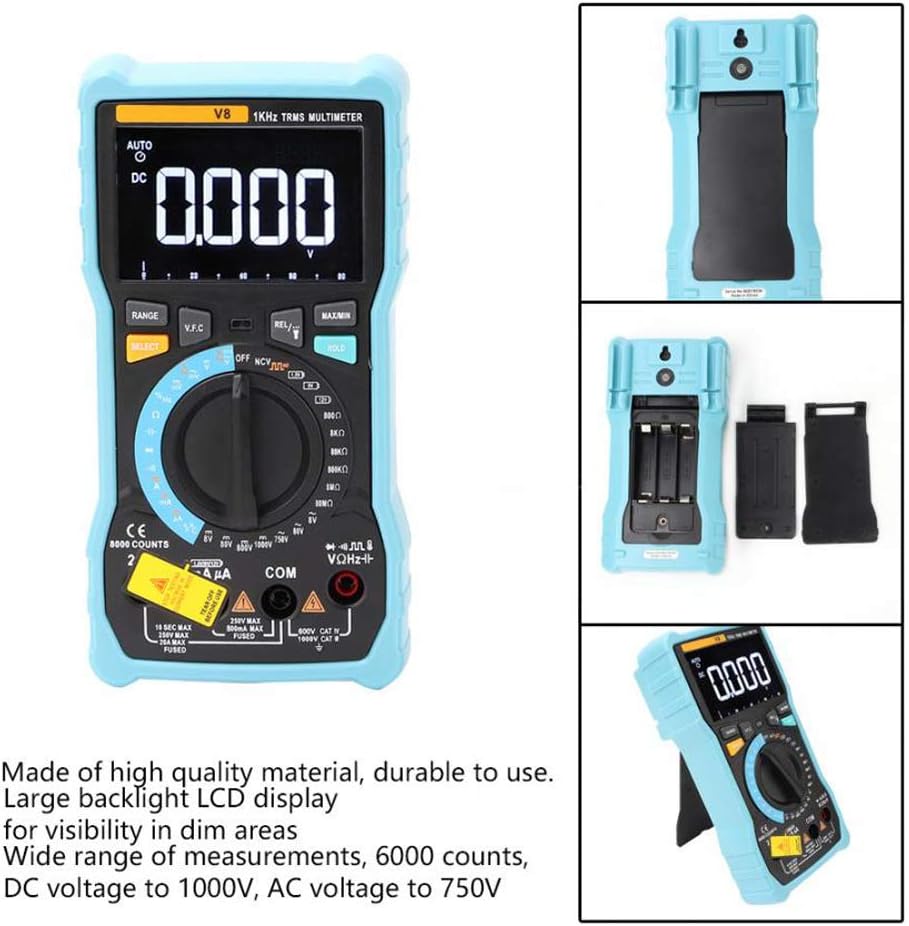
Gambar: Bagian belakang view of the multimeter with the battery compartment open, illustrating the correct placement for three AA batteries.
4. Petunjuk Pengoperasian
Before any measurement, ensure the test leads are correctly inserted into the input jacks and the rotary switch is set to the appropriate function.
4.1 Measuring DC/AC Voltage
- Set the rotary switch to the 'V–' (DC Voltage) atau 'V~' (AC Voltage) posisi.
- Hubungkan kabel uji merah ke jack 'VΩmA' dan kabel uji hitam ke jack 'COM'.
- Hubungkan kabel uji secara paralel ke rangkaian atau komponen yang ingin Anda ukur.
- Baca vol.tagnilai e pada layar.
4.2 Mengukur Arus DC/AC
- Set the rotary switch to the 'A–' (DC Current) or 'A~' (AC Current) position. For milliampere (mA) atau mikroampere (µA) measurements, select the corresponding range.
- For current up to 800mA, connect the red test lead to the 'VΩmA' jack. For current up to 20A, connect the red test lead to the '20A' jack. Connect the black test lead to the 'COM' jack.
- Disconnect power to the circuit. Open the circuit where you want to measure current. Connect the multimeter in series with the circuit.
- Berikan daya ke rangkaian dan baca nilai arus pada layar.
4.3 Mengukur Resistansi
- Set the rotary switch to the 'Ω' (Resistance) position.
- Hubungkan kabel uji merah ke jack 'VΩmA' dan kabel uji hitam ke jack 'COM'.
- Ensure the circuit is de-energized and all capacitors are discharged. Connect the test leads across the component to be measured.
- Baca nilai resistansi di layar.
4.4 NCV (Volume Non-Kontak)tage) Deteksi
- Atur sakelar putar ke posisi 'NCV'.
- Dekatkan ujung atas multimeter ke konduktor atau stopkontak.
- The multimeter will emit an audible beep and the NCV indicator light will flash if AC voltage is detected, indicating the presence of live voltage tanpa kontak fisik.
4.5 Pengukuran Suhu
- Set the rotary switch to the '°C/°F' (Temperature) position.
- Connect the temperature probe to the 'VΩmA' and 'COM' jacks, observing polarity if applicable.
- Letakkan ujung probe suhu di atas atau di dekat objek yang suhunya ingin Anda ukur.
- Bacalah nilai suhu yang ditampilkan.
4.6 Fungsi Lainnya
- Kapasitansi: Set the rotary switch to the 'F' position. Connect leads across the discharged capacitor.
- Frekuensi/Siklus Kerja: Set the rotary switch to the 'Hz/%' position. Connect leads to the signal source.
- Tes Dioda: Set the rotary switch to the 'Diode' position. Connect leads across the diode.
- Uji Kontinuitas: Set the rotary switch to the 'Continuity' position. Connect leads across the circuit. An audible beep indicates continuity.
- Tes Baterai: Set the rotary switch to the 'Battery' position. Connect leads to the battery terminals (1.5V, 9V, or 12V).
- Data terus: Tekan tombol 'TAHAN' untuk membekukan pembacaan saat ini pada layar. Tekan lagi untuk melepaskan.
- Lampu latar/Senter: Press the backlight button to turn on/off the display backlight or flashlight.
- Mati Otomatis: Multimeter akan mati secara otomatis setelah beberapa waktu tidak aktif untuk menghemat daya baterai.
5. Pemeliharaan
5.1 Pembersihan
Bersihkan casing dengan iklanamp Gunakan kain dan deterjen ringan. Jangan gunakan bahan abrasif atau pelarut. Jaga agar terminal input bebas dari kotoran dan kelembapan.
5.2 Penggantian Sekring
Jika fungsi pengukuran arus gagal, sekring mungkin perlu diganti. Lihat spesifikasi untuk jenis dan nilai sekring yang benar. Penggantian sekring hanya boleh dilakukan oleh personel yang berkualifikasi.
5.3 Penyimpanan
When not in use for extended periods, remove the batteries to prevent leakage and store the multimeter in a dry, cool place.
6. Penyelesaian masalah
- Tidak Ada Tampilan: Periksa pemasangan dan pengisian daya baterai. Ganti baterai jika perlu.
- Bacaan yang Salah: Ensure the rotary switch is set to the correct function and range. Check test lead connections. Verify battery charge.
- Pengukuran Arus Tidak Berfungsi: Check the fuse. Replace if blown (refer to fuse replacement section).
- NCV Tidak Terdeteksi: Ensure the NCV function is selected and the multimeter is close enough to the AC voltagsumber.
7. Spesifikasi
| Parameter | Nilai |
|---|---|
| Menampilkan | LCD 8000 Hitungan dengan Lampu Latar |
| DC Jiltage (V) | Tegangan 8.000V/80.00V/800.0V/1000V |
| DC Jiltage (mV) | 800mV |
| AC Jiltage (V) | 8.000V / 80.00V / 750V |
| AC Jiltage (mV) | 800mV |
| Arus DC (A) | 8.000A / 20.00A |
| Arus DC (mA) | Tegangan 8.000mA/80.00mA/800.0mA |
| Arus DC (µA) | 800µA / 8000µA |
| Arus AC (A) | 8.000A / 20.00A |
| Arus AC (mA) | Tegangan 8.000mA/80.00mA/800.0mA |
| AC Current (µA) | 800µA / 8000µA |
| Perlawanan | 800.0Ω / 8.000kΩ / 80.00kΩ / 800.0kΩ / 8.000MΩ / 80.00MΩ |
| Kapasitansi | 9.999nF / 99.99nF / 999.9nF / 9.999µF / 99.99µF / 999.9µF / 9.999mF / 99.99mF |
| Frekuensi | 9.999Hz / 99.99Hz / 999.9Hz / 9.999kHz / 99.99kHz / 999.9kHz / 9.999MHz |
| Siklus Tugas | 1% ~ 99% |
| Kisaran Suhu | -20°C ~ 1000°C (-4°F ~ 1832°F) |
| Uji Baterai | 1.5V / 9V / 12V |
| Berkisar | Otomatis / Manual |
| Tingkat Pembaruan | 3 kali / detik |
| RMS sejati | Ya |
| Penyimpanan Data | Ya |
| Lampu Latar/Senter | Ya |
| Peringatan Baterai Lemah | Ya |
| Mati Otomatis | Ya |
| Bahan | ABS / PVC |
| Sumber Daya | Bertenaga Baterai |
8. Garansi dan Dukungan
This product is covered by a standard manufacturer's warranty against defects in materials and workmanship. Please refer to the warranty card included with your purchase for specific terms and conditions. For technical support or service inquiries, please contact your retailer or the manufacturer's customer service department.
9. Video Produk Resmi
Tidak ada video produk resmi dari penjual yang tersedia untuk disematkan saat ini.


