

Perkenalan
Thank you for choosing the XO B24 Foldable Bluetooth Headphones. This manual provides essential information for the safe and efficient use of your device. Please read it carefully before use and retain it for future reference.
The XO B24 headphones are designed for comfort and portability, featuring high-quality materials and a secure fit for an optimal audio experience.
Produk Selesaiview
The XO B24 headphones offer both wired and wireless connectivity, a built-in microphone for calls, and a foldable design for easy storage and transport.
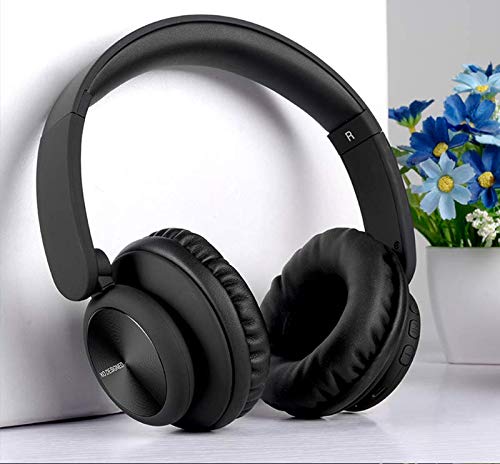
Image: XO B24 Foldable Bluetooth Headphones, showcasing their over-ear design and black color.
Spesifikasi
| Fitur | Keterangan |
|---|---|
| Nama Merek | XO |
| Nama Model | B24 |
| Nomor Model | XO-B24 |
| Warna | Hitam |
| Faktor Bentuk Headphone | Di Telinga |
| Teknologi Konektivitas | Berkabel, Nirkabel (Bluetooth) |
| Soket Headphone | 3.5 mm Jack |
| Teknologi Komunikasi Nirkabel | Bahasa Indonesia: Bluetooth |
| Fitur Khusus | Includes Microphone, Foldable Design |
| Mikropon | Ya |
| Pembatalan Kebisingan | TIDAK |
| Jenis Kontrol | Kontrol Volume, Kontrol Sentuh |
| Perangkat yang Kompatibel | Multiperangkat |
| Baterai Diperlukan | Ya |
Pengaturan
1. Mengisi Daya Headphone
- Hubungkan kabel pengisi daya USB yang tersedia ke port pengisian daya pada headphone.
- Colokkan ujung kabel USB lainnya ke sumber daya USB yang kompatibel (misalnya, komputer, adaptor dinding).
- The LED indicator will illuminate during charging and turn off or change color once fully charged.
2. Pemasangan Bluetooth
- Pastikan headphone terisi penuh.
- Press and hold the Power button on the headphones until the LED indicator flashes rapidly, indicating pairing mode.
- Pada perangkat Anda (ponsel pintar, tablet, komputer), aktifkan Bluetooth dan cari perangkat yang tersedia.
- Select "XO B24" from the list of found devices.
- Once paired, the LED indicator will stop flashing and may show a solid light or flash slowly.
3. Koneksi Kabel (Opsional)
- Insert one end of the 3.5mm audio cable into the headphone jack on the XO B24.
- Plug the other end of the 3.5mm audio cable into the audio output jack of your device.
- The headphones will operate in wired mode, conserving battery life.
Petunjuk Pengoperasian
Daya Hidup/Mati
- Nyalakan: Tekan dan tahan tombol Daya selama sekitar 3 detik hingga indikator LED menyala.
- Matikan: Tekan dan tahan tombol daya selama kurang lebih 3-5 detik hingga indikator LED mati.
Putar Musik
- Putar/Jeda: Tekan tombol multifungsi (biasanya tombol daya) sekali.
- Lagu Berikutnya: Press and hold the Volume Up button or a dedicated 'Next' button.
- Lagu Sebelumnya: Press and hold the Volume Down button or a dedicated 'Previous' button.
Kontrol Volume
- Tingkatkan Volume: Tekan tombol Volume Naik.
- Kurangi Volume: Tekan tombol Volume Turun.
Manajemen Panggilan
- Menjawab/Mengakhiri Panggilan: Tekan tombol Multifungsi sekali.
- Tolak Panggilan: Tekan dan tahan tombol multifungsi selama kurang lebih 2 detik.
Mekanisme Lipat
- To fold the headphones for storage, gently rotate the earcups inwards towards the headband until they are compact.
- To unfold, reverse the process, ensuring the earcups click securely into place.
Pemeliharaan
- Pembersihan: Gunakan kain lembut dan kering untuk membersihkan headphone. Jangan gunakan pembersih atau pelarut abrasif.
- Penyimpanan: Saat tidak digunakan, simpan headphone di tempat yang sejuk dan kering, jauhkan dari sinar matahari langsung dan suhu ekstrem. Manfaatkan desain yang dapat dilipat untuk penyimpanan yang ringkas.
- Perawatan Baterai: Untuk memperpanjang masa pakai baterai, hindari sering-sering mengosongkan daya headphone. Isi daya secara teratur, meskipun tidak digunakan terus-menerus.
- Hindari Kelembaban: Jauhkan headphone dari air dan kelembapan yang berlebihan.
Penyelesaian Masalah
| Masalah | Larutan |
|---|---|
| Headphone tidak menyala. | Pastikan headphone terisi penuh. Sambungkan ke sumber daya dan coba lagi. |
| Tidak dapat dipasangkan melalui Bluetooth. | Make sure the headphones are in pairing mode (LED flashing rapidly). Disable and re-enable Bluetooth on your device. Move closer to the headphones. |
| Tidak ada suara atau volume rendah. | Check the volume levels on both the headphones and your connected device. Ensure the headphones are properly paired or the 3.5mm cable is securely connected. |
| Kualitas suara buruk. | Ensure there are no obstructions between the headphones and your device. Try moving closer to your device. Disconnect and reconnect the Bluetooth connection. |
| Mikrofon tidak berfungsi. | Ensure the headphones are properly connected and selected as the audio input device on your system. Check if the microphone is muted on your device. |
Garansi dan Dukungan
The XO B24 Foldable Bluetooth Headphones come with a standard manufacturer's warranty. Please refer to the warranty card included in your product packaging for specific terms and conditions.
For technical support, troubleshooting assistance, or warranty claims, please contact your retailer or the official XO customer service. Contact information can typically be found on the product packaging or the manufacturer's weblokasi.