
1. Pendahuluan
This manual provides essential information for setting up, operating, and maintaining your Lenovo ThinkCentre Tiny M70q Gen 5 Desktop PC. Designed for business and professional use, this compact desktop offers powerful performance and efficient operation. Please read this manual thoroughly to ensure proper usage and to maximize the lifespan of your device.
2. Produk Lebihview
The Lenovo ThinkCentre Tiny M70q Gen 5 is a high-performance mini desktop PC featuring an Intel 10-Core i5-14400T processor, 32GB DDR5 RAM, and a 1TB NVMe SSD. It comes pre-installed with Windows 11 Pro and offers robust connectivity options including WiFi 6 and Bluetooth 5.1.

Figure 2.1: Lenovo ThinkCentre Tiny M70q Gen 5 highlighting Intel Core i5 14th Gen, 32GB DDR5 Memory, and 1TB NVMe Storage.
Fitur Utama:
- Prosesor: Intel i5-14400T (10 Cores, 2.5GHz base, up to 4.4GHz turbo, 20MB Cache)
- Ingatan: 32GB DDR5 RAM for smooth multitasking
- Penyimpanan: 1TB NVMe Solid State Drive for rapid boot-up and data access
- Grafik: Intel UHD Graphics 770 Terintegrasi
- Sistem Operasi: Windows 11 Pro
- Konektivitas: WiFi 6, Bluetooth 5.1, RJ-45 Ethernet
Port dan Konektor:

Gambar 2.2: Rinci view of the Lenovo ThinkCentre Tiny M70q Gen 5 ports, including USB-A, USB-C, HDMI, DisplayPort, and Ethernet.
The ThinkCentre M70q Gen 5 provides a comprehensive array of ports for all your peripheral needs:
- 3.5mm Audio Jack
- Multiple USB-A (USB 5Gbps and 10Gbps) ports, including one with Smart Power On
- USB-C (USB 5Gbps) port
- Konektor daya
- DisplayPort 1.4a
- HDMI 2.1 TMDS
- Ethernet (RJ-45)
Video 2.1: Sebuah overview of the Lenovo ThinkCentre Tiny Business Computer, showcasinberkat desain dan fitur-fiturnya yang ringkas.
3. Panduan Pengaturan
Follow these steps to set up your Lenovo ThinkCentre Tiny M70q Gen 5 Desktop PC.
3.1 Pembongkaran dan Penempatan
- Keluarkan PC dan semua aksesori dari kemasan dengan hati-hati.
- Place the ThinkCentre Tiny M70q Gen 5 on a stable, flat surface with adequate ventilation. Ensure no vents are obstructed.
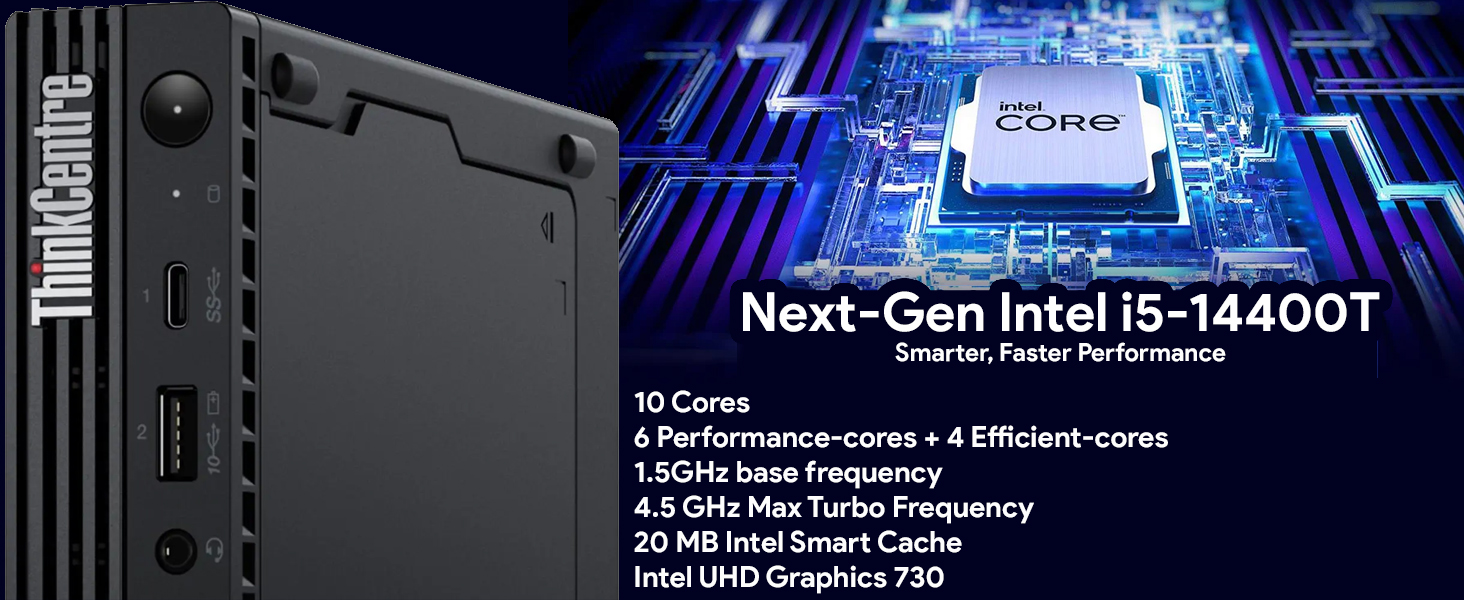
Figure 3.1: The Lenovo ThinkCentre Tiny M70q Gen 5 set up with a monitor, keyboard, and mouse, demonstrating its compact footprint.
3.2 Menghubungkan Periferal
- Memantau: Connect your monitor to the PC using either the HDMI or DisplayPort.
- Keyboard dan Mouse: Hubungkan keyboard dan mouse yang disertakan ke port USB yang tersedia.
- Jaringan: For wired internet, connect an Ethernet cable to the RJ-45 port. For wireless, ensure the Wi-Fi antenna is securely attached (if applicable).
- Kekuatan: Connect the power adapter to the PC's power input and then plug it into a power outlet.

Gambar 3.2: Depan view of the ThinkCentre M70q Gen 5, showing accessible USB and audio ports for easy peripheral connection.
3.3 Penyalaan Awal
- Tekan tombol daya yang terletak di bagian depan PC.
- Follow the on-screen instructions to complete the Windows 11 Pro setup. This may include setting up your user account, network connection, and privacy settings.
4. Petunjuk Pengoperasian
Your ThinkCentre Tiny M70q Gen 5 runs on Windows 11 Pro, offering a user-friendly interface and powerful features for productivity and security.
4.1 Operasi Dasar
- Daya Hidup/Mati: Tekan tombol daya untuk menghidupkan PC. Untuk mematikan, klik tombol Mulai, lalu Daya > Matikan.
- Mulai ulang: To restart the PC, click the Start button, then Power > Restart.
- Mode tidur: Untuk mengaktifkan mode tidur pada PC, klik tombol Mulai, lalu Daya > Tidur.
4.2 Fitur Windows 11 Pro
- Menu Mulai: Access all your applications, settings, and files from the redesigned Start Menu.
- Melakukan banyak tugas sekaligus: Use Snap Layouts and Snap Groups to organize your open windows efficiently.
- Keamanan: Benefit from advanced security features including Windows Defender and BitLocker (if enabled).
- Pembaruan: Ensure your system is always up-to-date by regularly checking for Windows Updates.
5. Pemeliharaan
Regular maintenance helps ensure the longevity and optimal performance of your ThinkCentre Tiny M70q Gen 5.
5.1 Pembersihan
- Luar: Gunakan kain yang lembut dan tidak berbulu dampened with a mild cleaning solution to wipe the exterior. Avoid harsh chemicals.
- Ventilasi: Periodically clean the ventilation grilles with compressed air to prevent dust buildup, which can affect cooling.
5.2 Pemeliharaan Perangkat Lunak
- Pembaruan Sistem Operasi: Install Windows updates regularly to ensure security and performance improvements.
- Pembaruan Driver: Keep device drivers updated for optimal hardware compatibility and performance.
- Perangkat Lunak Antivirus: Maintain active antivirus protection and perform regular scans.
- Pembersihan Disk: Use Windows Disk Cleanup utility to remove unnecessary filedan mengosongkan ruang penyimpanan.
6. Penyelesaian masalah
This section addresses common issues you might encounter with your ThinkCentre Tiny M70q Gen 5.
6.1 Tidak Ada Daya
- Pastikan adaptor daya terhubung dengan aman ke PC dan stopkontak yang berfungsi.
- Uji stopkontak dengan perangkat lain untuk memastikan stopkontak tersebut berfungsi.
6.2 Tidak Ada Tampilan di Monitor
- Verify that the monitor is powered on and the video cable (HDMI or DisplayPort) is securely connected to both the PC and the monitor.
- Cobalah menghubungkan monitor ke port video lain di PC, jika tersedia.
- Pastikan sumber input yang benar telah dipilih pada monitor Anda.
6.3 Perlambatan Sistem
- Tutup aplikasi yang tidak diperlukan yang berjalan di latar belakang.
- Periksa dan instal pembaruan Windows yang tertunda.
- Jalankan pembersihan disk dan defragmentasi (untuk HDD, tidak diperlukan untuk SSD).
- Pindai malware atau virus.
6.4 Masalah Konektivitas (Wi-Fi/Bluetooth)
- Pastikan Wi-Fi dan Bluetooth diaktifkan di pengaturan Windows.
- Mulai ulang router/modem Anda.
- Update wireless and Bluetooth drivers.
7. Spesifikasi
Detailed technical specifications for the Lenovo ThinkCentre Tiny M70q Gen 5.
| Fitur | Spesifikasi |
|---|---|
| Prosesor | Intel i5-14400T (10 Cores, 2.5GHz base - 4.4GHz max turbo, 20MB Cache) |
| RAM | Memori DDR32 5GB |
| Penyimpanan | SSD NVMe 1TB |
| Grafik | Intel UHD Graphics 770 (Terintegrasi) |
| Sistem Operasi | Windows 11 Pro |
| Konektivitas Nirkabel | Wi-Fi 6, Bluetooth 5.1 |
| Eternet | RJ-45 |
| Pelabuhan Video | HDMI 2.1, DisplayPort 1.4a |
| Port USB | USB-A (5Gbps, 10Gbps), USB-C (5Gbps) |
| Suara | 3.5mm Audio Jack |
| Dimensi (P x L x T) | 7.05x7.2x1.36 inci |
| Berat | 2.91 pon |
| Warna | Hitam |
8. Garansi dan Dukungan
Your Lenovo ThinkCentre Tiny M70q Gen 5 comes with a comprehensive warranty to ensure peace of mind.
8.1 Informasi Garansi
- Garansi Standar: 3 Year Lenovo Warranty.
- Garansi Tambahan: 3 Year Oemgenuine Limited Warranty.
For detailed terms and conditions of your warranty, please refer to the documentation included with your product or visit the official Lenovo support weblokasi.
8.2 Dukungan Teknis
If you encounter any issues that cannot be resolved using the troubleshooting steps in this manual, please contact Lenovo technical support or Oemgenuine support for assistance. Have your product model and serial number ready when contacting support.