
BESDER ZX-X2-W/200W
BESDER Smart Home Security FULL HD 1080P IP WiFi Camera User Manual
Model: ZX-X2-W/200W
Perkenalan
Thank you for choosing the BESDER Smart Home Security Camera. This manual provides detailed instructions for setting up, operating, and maintaining your camera. Please read this manual carefully before use to ensure proper functionality and safety.
This camera offers Full HD 1080P resolution, Pan/Tilt functionality, Two-Way Audio, and IR Night Vision for comprehensive home surveillance. It supports both wired and WiFi connections, mobile monitoring via iOS and Android apps, and cloud services.
Isi Paket
Harap periksa isi kemasan setelah dibuka. Jika ada barang yang hilang atau rusak, silakan hubungi layanan pelanggan.
- 1 x BESDER IP Camera 1080P
- 1 x Panduan Pengguna
- 1 x Catu Daya DC 5V
- 1 x Braket Kecil
- Sekrup Pemasangan dan Sumbat Dinding
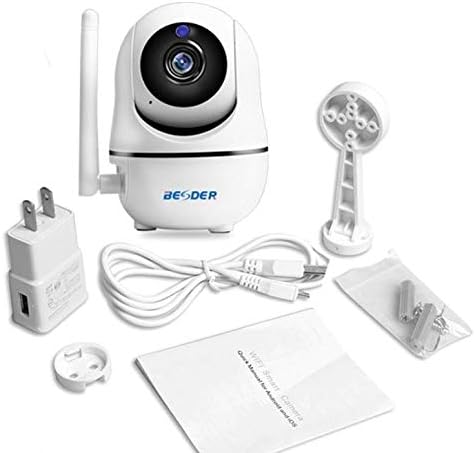
Gambar 1: Package contents of the BESDER Smart Home Security Camera, showing the camera unit, power adapter, USB cable, mounting bracket, screws, and the user manual.
Produk Selesaiview
Familiarize yourself with the various components of your BESDER Smart Home Security Camera.
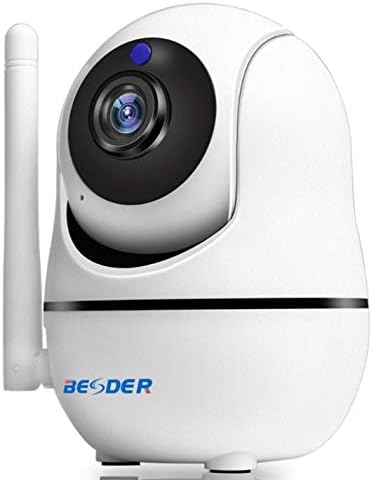
Gambar 2: Depan view of the BESDER Smart Home Security Camera, highlighting the camera lens, infrared LEDs for night vision, and the status indicator light.

Gambar 3: Belakang view of the BESDER Smart Home Security Camera, detailing the memory card slot (for microSD up to 128GB), reset button, built-in speaker, DC 5V power input, and the Ethernet network port for wired connection.
Komponen Utama:
- Lensa Kamera: Merekam video footage.
- LED IR: Memberikan penerangan inframerah untuk penglihatan malam.
- Lampu Indikator Status: Indicates camera status (e.g., power on, network connection).
- Mikropon: For audio input and two-way audio communication.
- Pembicara: For audio output and two-way audio communication.
- Slot Kartu Memori: Supports microSD cards up to 128GB for local storage.
- Tombol Reset: Digunakan untuk mengembalikan pengaturan pabrik.
- Masukan Daya DC 5V: Hubungkan ke adaptor daya yang disediakan.
- Port Jaringan (RJ45): Untuk koneksi Ethernet kabel.
Pengaturan
1. Menghidupkan
- Connect the DC 5V power adapter to the camera's power input port.
- Hubungkan adaptor daya ke stopkontak di dinding.
- The camera will power on, and the status indicator light will illuminate. Wait for the camera to complete its self-test (it may pan and tilt).
2. Network Connection (Wired or Wireless)
The camera supports both wired (Ethernet) and wireless (Wi-Fi) connections.
Koneksi Kabel:
- Connect one end of an Ethernet cable (not included) to the camera's network port.
- Hubungkan ujung kabel Ethernet lainnya ke router atau switch jaringan Anda.
- The camera will automatically connect to the network.
Wireless (Wi-Fi) Connection:
- Download the recommended mobile application (e.g., XMEYE or iCsee) from your device's app store (iOS or Android).
- Daftarkan akun dan masuk.
- Follow the in-app instructions to add your camera. This typically involves scanning a QR code on the camera or using a Wi-Fi configuration method (e.g., AP mode, SmartLink).
- Ensure your mobile device is connected to the 2.4GHz Wi-Fi network you intend to connect the camera to.
- Enter your Wi-Fi password when prompted by the app.
- The camera will attempt to connect to your Wi-Fi network. Once connected, the status indicator light will change (refer to app or camera manual for specific light indications).
3. Instalasi Kartu MicroSD (Opsional)
- Ensure the camera is powered off before inserting or removing the microSD card.
- Locate the microSD card slot (refer to Figure 3).
- Gently insert the microSD card into the slot with the gold contacts facing down until it clicks into place.
- Power on the camera. You may need to format the SD card via the mobile app settings for optimal performance.
Petunjuk Pengoperasian
1. Mobile Monitoring (iOS/Android)
- Open the XMEYE or iCsee app on your smartphone.
- Pilih kamera Anda dari daftar perangkat untuk view pakan hidup.
- Use the on-screen controls to pan (horizontal rotation) and tilt (vertical rotation) the camera lens.
- Access playback of recorded footage stored on the microSD card or cloud service.
2. Audio Dua Arah
- Ketika viewing the live feed in the app, tap the microphone icon to speak through the camera's speaker.
- Ketuk ikon speaker untuk mendengarkan audio dari mikrofon kamera.
3. Penglihatan Malam IR
- The camera automatically switches to IR night vision mode in low-light conditions.
- The IR LEDs will illuminate, providing clear black and white video up to 15 meters.
4. Deteksi Gerakan dan Alarm
- Aktifkan deteksi gerakan di pengaturan aplikasi.
- Configure sensitivity levels and detection zones as needed.
- When motion is detected, the camera can send push notifications to your phone and/or record footage.
5. Layanan Cloud
- The camera supports cloud storage services (subscription may be required).
- Refer to the mobile app for details on activating and managing cloud storage.
Pemeliharaan
- Pembersihan: Gunakan kain lembut dan kering untuk membersihkan lensa dan bodi kamera. Jangan gunakan cairan pembersih atau aerosol.
- Pembaruan Firmware: Regularly check for firmware updates via the mobile app to ensure optimal performance and security.
- Penempatan: Ensure the camera is placed in a location where it is protected from direct water exposure and extreme temperatures.
- Manajemen Kartu SD: Periodically check the status of your microSD card. If it becomes full, older recordings may be overwritten, or recording may stop.
Penyelesaian Masalah
| Masalah | Kemungkinan Penyebab | Larutan |
|---|---|---|
| Kamera offline/Tidak dapat terhubung ke Wi-Fi | Incorrect Wi-Fi password; Camera too far from router; Router issues; 5GHz Wi-Fi network. |
|
| No image/Black screen | Power issue; Network issue; Lens obstruction. |
|
| Audio dua arah tidak berfungsi | Microphone/speaker disabled in app; Volume too low; Network latency. |
|
| Deteksi gerakan tidak terpicu. | Motion detection disabled; Sensitivity too low; Incorrect detection zone. |
|
| Kartu SD tidak merekam | SD card full/corrupted; Incorrect format; SD card not inserted properly. |
|
Spesifikasi
| Fitur | Detil |
|---|---|
| Nama Model | BESDER Smart Home Security |
| Referensi Produsen | ZX-X2-W/200W |
| Resolusi Video | Full HD 1080P (1920x1080) |
| Sensor | 1/2.8'' F22 CMOS sensor (for 1080P) |
| Kompresi Video | H.264, supports dual stream, 0.1 – 6 Mpbs |
| Lensa | 3.6 mm G7 (default) |
| Jarak Penglihatan Malam IR | Max 15 meters (6 IR LEDs) |
| Konektivitas | Wi-Fi (2.4GHz), Ethernet Berkabel |
| Penyimpanan | MicroSD card up to 128GB (not included), Cloud Service |
| Suara | Audio dua arah (mikrofon dan speaker internal) |
| Pemantauan Seluler | iOS, Android (APP: XMEYE or iCsee) |
| Catu Daya | Tegangan DC5V 2A |
| Suhu Kerja | -5 to 60°C (23 - 140°F) |
| Ukuran | 6.39 x 4.33 x 3.11 cm (perkiraan dimensi paket) |
Garansi dan Dukungan
For warranty information and technical support, please refer to the contact details provided with your purchase or visit the official BESDER websitus. Simpan struk pembelian Anda sebagai bukti pembelian.
Pabrikan: TERBAIK
Ask a question about this manual
Ask about setup, troubleshooting, compatibility, parts, safety, or missing instructions. Manuals+ will review the question and use this page’s manual context to help answer it.