1. Petunjuk Keselamatan Penting
Please read all instructions carefully before using the appliance and retain for future reference. Always follow basic safety precautions when using electrical appliances.
- Jangan merendam alat, kabel, atau steker dalam air atau cairan lainnya.
- Pastikan voltage yang ditunjukkan pada alat sesuai dengan voltase listrik lokal Andatage sebelum menghubungkan.
- Pengawasan ketat diperlukan saat peralatan apa pun digunakan oleh atau di dekat anak-anak.
- Cabut kabel dari stopkontak saat tidak digunakan dan sebelum dibersihkan. Biarkan dingin sebelum memasang atau melepas komponen.
- Jangan mengoperasikan peralatan apa pun dengan kabel atau steker yang rusak, atau setelah peralatan tersebut mengalami kegagalan fungsi atau telah rusak dengan cara apa pun.
- Jangan letakkan alat ini menempel ke dinding atau ke alat lain. Sisakan ruang kosong minimal 10 cm di bagian belakang dan samping, serta 10 cm di atas alat.
- Jangan meletakkan apapun di atas alat ini.
- Jangan gunakan alat ini untuk tujuan apa pun selain yang dijelaskan dalam buku petunjuk ini.
- Kehati-hatian yang ekstrim harus digunakan saat memindahkan peralatan yang berisi minyak panas atau cairan panas lainnya.
- Peralatan ini hanya untuk penggunaan rumah tangga.
2. Produk Lebihview
2.1 Fitur Utama
- Large digital touch display for instant cooking mode adjustments.
- Smart knob for easy start/stop and precise time/temperature control.
- Powerful 1800W heating element with rapid hot air circulation for perfect cooking.
- Temperature range: 65-200°C for cooking, 30-80°C for dehydration.
- 8 preset cooking settings for various meals including chicken, seafood, and desserts.
- Spacious 12L cooking capacity with 3 rack levels for family-sized portions.
- Interior light to monitor cooking progress.
- Dishwasher-safe accessories for easy cleaning.
- Sleek black body with cool-touch silver handle.
- EU certified, LFGB food-safe material, PFOA and PTFE free.
2.2 Komponen dan Aksesoris
Familiarize yourself with the main unit and included accessories:


Alat ini dilengkapi dengan aksesori berikut:
- 3 x Removable Air Flow Racks
- 1 x Rotisserie Spit and Forks
- 1 x Keranjang Putar
- 1 x Retrieval Tool
- 1 x Removable Drip Tray
3. Pengaturan dan Penggunaan Pertama
3.1 Membongkar
- Lepaskan semua bahan kemasan dan label promosi dari penggorengan udara dengan hati-hati.
- Remove all accessories from inside the appliance.
- Simpan bahan kemasan untuk penyimpanan atau pembuangan di kemudian hari.
3.2 Membersihkan Sebelum Penggunaan Pertama
- Lap bagian luar penggorengan udara dengan kain bersih dan kering.amp kain.
- Wash all removable accessories (air flow racks, rotisserie spit, rotating basket, drip tray) with warm, soapy water. Rinse thoroughly and dry completely. All accessories are dishwasher safe.
- Jangan merendam unit utama di dalam air.
3.3 Penempatan
- Tempatkan alat penggoreng udara di atas permukaan yang stabil, rata, dan tahan panas.
- Ensure there is at least 10 cm of clear space around the back and sides, and 10 cm above the appliance for proper ventilation.
- Jangan letakkan penggoreng udara di dekat bahan yang mudah terbakar atau sumber panas.
4. Petunjuk Pengoperasian
4.1 Panel Kontrol Digital
The air fryer features a large digital touch display and a smart knob for intuitive control. Refer to Figure 2.2 for a visual guide.
- Tombol Daya: Tekan untuk menghidupkan/mematikan unit.
- Ikon Preset: Touch an icon to select a pre-programmed cooking mode (e.g., Fries, Meat, Fish, Shrimp, Chicken, Rotisserie, Bake, Dehydrate).
- Tampilan Suhu/Waktu: Shows current temperature and remaining cooking time.
- Smart Knob: Rotate to adjust temperature or time. Press to confirm selection or to start/pause cooking.
- Internal Light Button: Tekan untuk menyalakan/mematikan lampu interior.
- Tombol Putar: Activates the rotisserie function for the rotating basket or rotisserie spit.
4.2 Memasak dengan Pengaturan Awal
The air fryer includes 8 optimized cooking presets for convenience:

- Place food inside the air fryer using the appropriate accessory (rack, basket, or spit).
- Tutup pintu alat dengan aman.
- Tekan tombol daya untuk menghidupkan layar.
- Touch the desired preset icon on the digital display. The air fryer will automatically set the optimal temperature and time for that food type.
- If desired, you can adjust the preset time or temperature by rotating the smart knob.
- Press the smart knob or the Start/Stop button to begin cooking.
- The interior light can be turned on/off to check cooking progress.
- When cooking is complete, the air fryer will beep and automatically shut off.
4.3 Memasak Manual
- Place food inside the air fryer and close the door.
- Tekan tombol Daya.
- Rotate the smart knob to set the desired temperature (65-200°C). Press the knob to confirm.
- Rotate the smart knob again to set the desired cooking time. Press the knob to confirm and start cooking.
4.4 Menggunakan Fungsi Rotisserie
The rotisserie function is ideal for whole chickens or using the rotating basket for fries or nuts.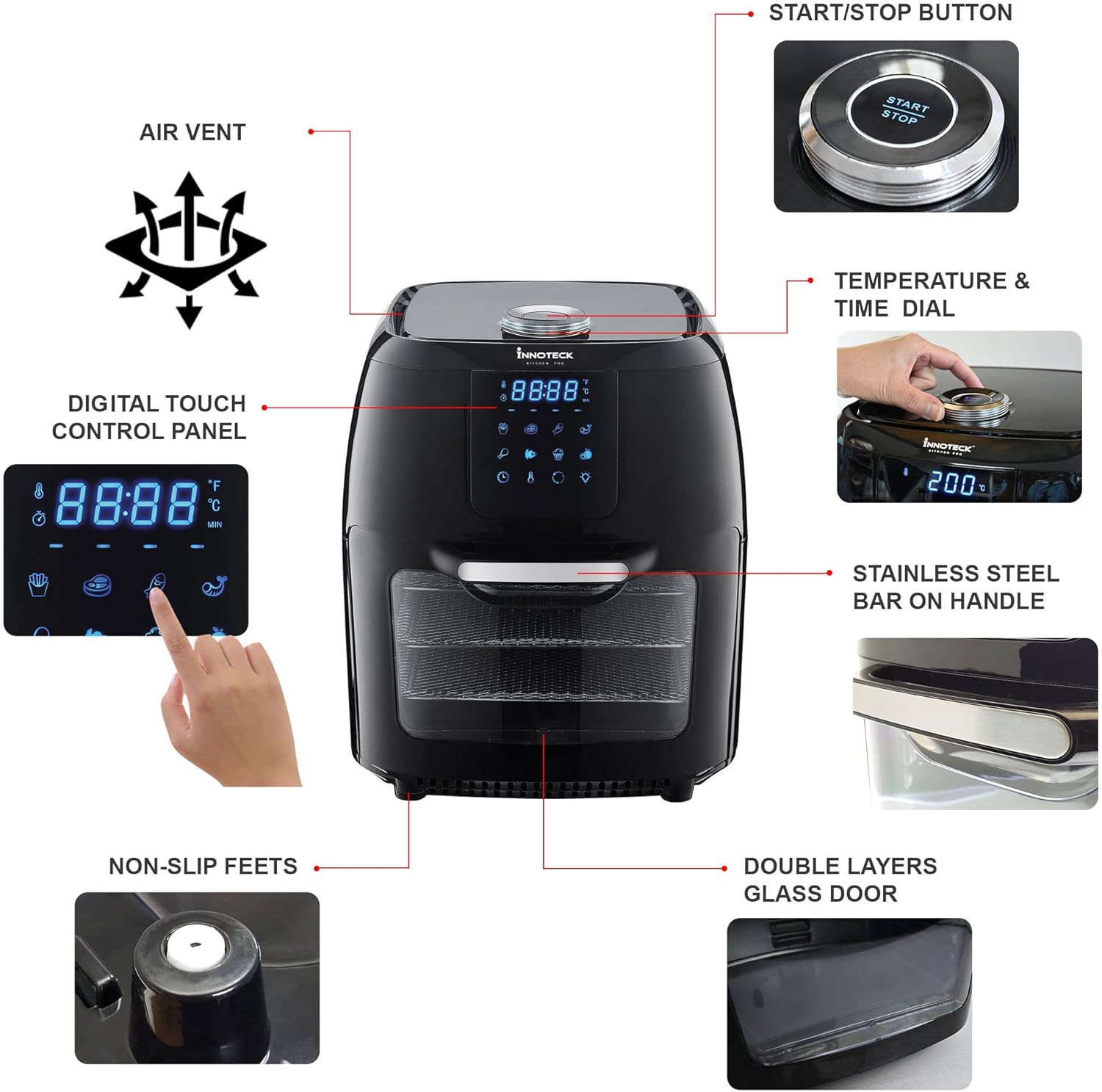
- Prepare your food and secure it onto the rotisserie spit or place it inside the rotating basket.
- Insert the rotisserie assembly into the air fryer's internal slots.
- Select a cooking preset or set manual temperature and time.
- Press the 'Rotate' button on the control panel to activate the rotation.
- Monitor cooking through the glass door and interior light.
- Once cooking is complete, use the retrieval tool to safely remove the hot rotisserie assembly.
5. Perawatan dan Pembersihan
Pembersihan secara teratur akan memastikan umur panjang dan kinerja optimal dari air fryer Anda.
- Selalu cabut steker air fryer dan biarkan dingin sepenuhnya sebelum dibersihkan.
- Unit Utama: Bersihkan bagian luar dengan iklanamp kain. Jangan gunakan pembersih abrasif atau merendamnya dalam air.
- Pedalaman: Lap interior dengan iklanamp cloth and mild detergent if necessary. For stubborn food residue, use a non-abrasive sponge.
- Aksesoris: All removable accessories (air flow racks, rotisserie spit, rotating basket, drip tray) are dishwasher safe. Alternatively, wash them with warm, soapy water, rinse, and dry thoroughly.
- Baki Tetes: Empty and clean the drip tray after each use to prevent smoke and odors.
- Ensure all parts are completely dry before storing or using the appliance again.
6. Penyelesaian masalah
Jika Anda menemui masalah, silakan lihat tabel di bawah ini sebelum menghubungi dukungan pelanggan.
| Masalah | Kemungkinan Penyebab | Larutan |
|---|---|---|
| Penggorengan udara tidak menyala. | Perangkat tidak tercolok; Stopkontak tidak berfungsi; Tombol daya tidak ditekan. | Ensure plug is securely in outlet; Test outlet with another appliance; Press the Power button on the control panel. |
| Makanan tidak dimasak secara merata. | Too much food in the basket/on racks; Food not shaken/rotated during cooking; Incorrect temperature/time. | Cook in smaller batches; Shake/rotate food halfway through cooking; Adjust temperature and time as needed. |
| Asap putih keluar dari alat. | Sisa minyak dari penggunaan sebelumnya; Makanan berlemak yang sedang dimasak. | Clean the drip tray and interior thoroughly; For fatty foods, add a small amount of water to the drip tray to prevent smoke. |
| Makanannya tidak renyah. | Minyak kurang (jika ada); Suhu terlalu rendah; Waktu memasak terlalu singkat. | Lightly coat food with oil; Increase temperature or cooking time. |
7. Spesifikasi
Detailed technical specifications for the Innoteck Kitchen Pro 12L Digital Air Fryer.

| Fitur | Detil |
|---|---|
| Merek | Innoteck |
| Nomor Model | DS-5894 |
| Warna | Hitam & Perak |
| Dimensi Produk (P x L x T) | Ukuran 31x32x39 cm |
| Kapasitas | 12 liter |
| Daya / Wattage | 1800 Watt |
| Jil.tage | 230 Volt |
| Bahan | Aluminium |
| Fitur Khusus | Kontrol Suhu |
| Berat Barang | 9.1 Kilogram |
| Penggunaan yang Direkomendasikan | Roasting, Dehydrating, Baking |
| Tanggal Pertama Tersedia | 13 Mei 2022 |
8. Garansi dan Dukungan
Your Innoteck Kitchen Pro 12L Digital Air Fryer comes with a standard manufacturer's warranty. Please refer to the warranty card included in your product packaging for specific terms and conditions.
For technical support, troubleshooting assistance, or warranty claims, please contact Innoteck Customer Service:
- Weblokasi: Visit the official Innoteck websitus untuk Tanya Jawab dan sumber daya dukungan.
- E-mail: Refer to your warranty card for the dedicated support email address.
- Telepon: Contact numbers may vary by region; please check the product packaging or website for local support lines.
When contacting support, please have your model number (DS-5894) and purchase date ready.