
Perkenalan
Terima kasih sudah membeliasing the MIPOW Mini Electric USB Fan F01. This portable and rechargeable fan is designed to provide personal cooling with adjustable airflow and angle. Please read this manual carefully before use to ensure proper operation and maintenance.
Isi Paket
- MIPOW Mini Electric USB Fan F01
- Kabel Pengisian Daya USB
- Panduan Pengguna
Petunjuk Keselamatan
Untuk mencegah cedera atau kerusakan pada produk, harap perhatikan tindakan pencegahan keselamatan berikut:
- Jangan merendam kipas di dalam air atau cairan lain.
- Jauhkan kipas angin dari api terbuka, sumber panas, dan sinar matahari langsung.
- Jangan memasukkan jari atau benda asing ke dalam kisi-kisi kipas.
- Peralatan ini tidak ditujukan untuk digunakan oleh orang (termasuk anak-anak) dengan keterbatasan fisik, sensorik, atau mental, atau kurang pengalaman dan pengetahuan, kecuali mereka telah diberi pengawasan atau petunjuk mengenai penggunaan peralatan oleh orang yang bertanggung jawab atas keselamatan mereka.
- Gunakan hanya kabel pengisi daya USB yang disediakan atau kabel setara yang bersertifikasi.
- Jangan mencoba membongkar, memperbaiki, atau memodifikasi kipas. Hubungi dukungan pelanggan jika memerlukan perbaikan.
- Ensure the fan is placed on a stable, flat surface during operation.
Produk Selesaiview
Familiarize yourself with the components of your MIPOW Mini Electric USB Fan F01.
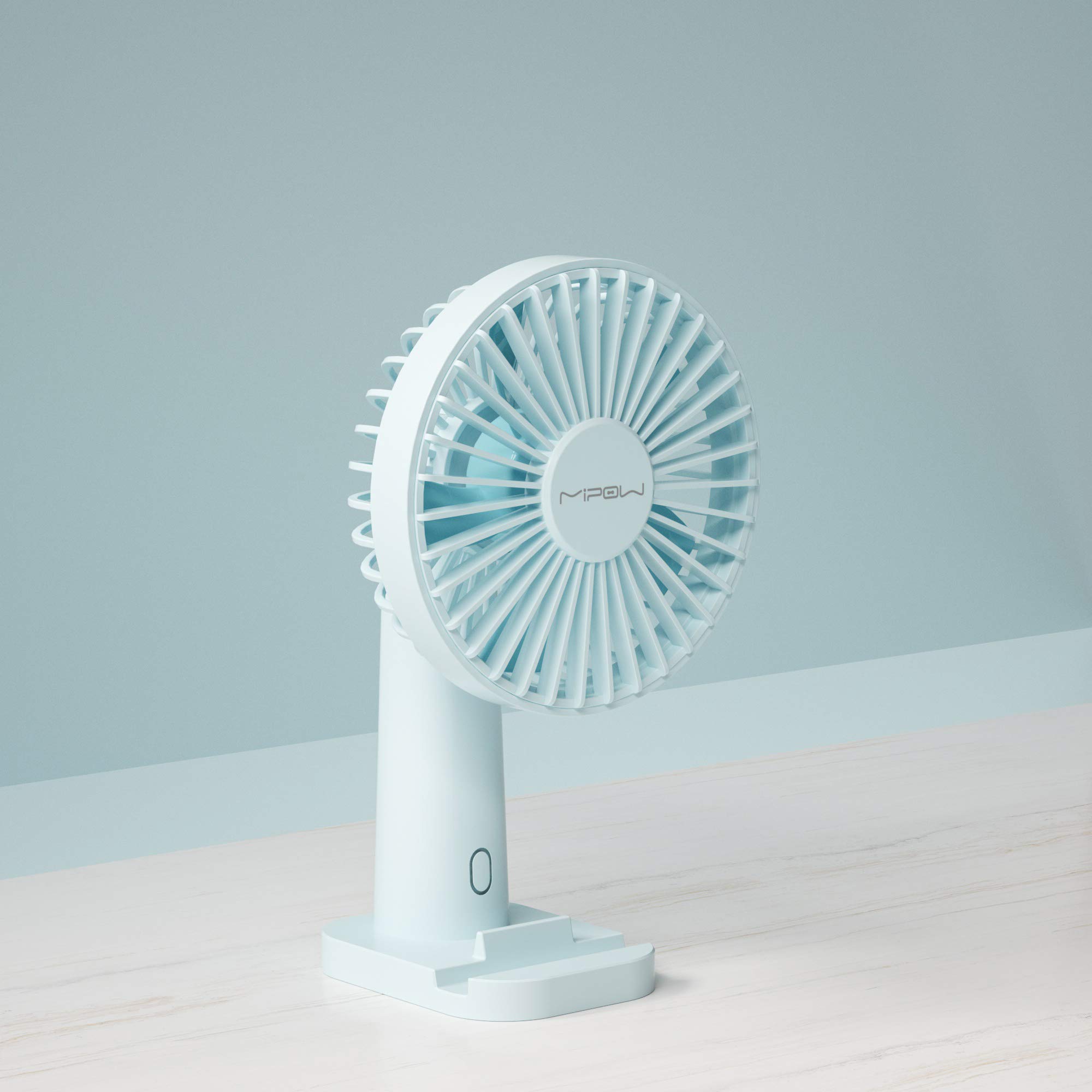
Gambar 1: Depan view of the MIPOW Mini Electric USB Fan F01. This image displays the fan's compact design, the protective grille covering the fan blades, and the stable base. The fan is shown in a Tiffany Blue color.
- Kisi-kisi Kipas: Penutup pelindung untuk bilah kipas.
- bilah kipas: Menghasilkan aliran udara.
- Tombol Kontrol: Powers the fan on/off and adjusts speed settings.
- Basis: Memberikan stabilitas pada kipas.
- Port Pengisian Daya (USB): Located on the back or side of the base, used for charging the internal battery.
- Lampu Indikator: Shows charging status or power status.
Pengaturan
1. Charging the Fan
- Connect the small end of the USB charging cable to the charging port on the fan.
- Connect the larger end of the USB cable to a USB power adapter (not included), computer USB port, or power bank.
- The indicator light will illuminate (e.g., red) during charging and turn off or change color (e.g., blue) when fully charged.
- Berikan waktu sekitar 2-3 jam untuk pengisian daya penuh.
2. Penempatan
- Place the fan on a flat, stable surface to prevent it from tipping over.
- Ensure there are no obstructions to the airflow around the fan.
Petunjuk Pengoperasian
Tombol Hidup/Mati dan Pengaturan Kecepatan
- Untuk menghidupkan: Press the control button once. The fan will start at Speed 1 (low).
- Untuk Mengatur Kecepatan: Press the control button repeatedly to cycle through the speed settings:
- First press: Speed 1 (Low)
- Second press: Speed 2 (Medium)
- Third press: Speed 3 (High)
- Untuk mematikan: After Speed 3, press the control button a fourth time to turn the fan off.
Menyesuaikan Sudut Kipas
The fan head can be manually tilted up or down to direct the airflow as desired. Gently hold the base and adjust the fan head to your preferred angle.
Pemeliharaan
Pembersihan
- Pastikan kipas dimatikan dan dicabut sebelum dibersihkan.
- Usap bagian luar kipas dengan kain lembut dan kering.
- Jangan gunakan pembersih abrasif, pelarut, atau merendam kipas dalam air.
- For dust accumulation on the grille, use a soft brush or compressed air to gently remove it.
Penyimpanan
- Saat tidak digunakan dalam jangka waktu lama, simpan kipas angin di tempat yang sejuk dan kering.
- It is recommended to fully charge the fan before storing and recharge it every 3 months to maintain battery health.
Penyelesaian Masalah
| Masalah | Kemungkinan Penyebab | Larutan |
|---|---|---|
| Kipas tidak menyala. | Baterai habis. | Isi daya kipas menggunakan kabel USB yang disediakan. |
| Aliran udara kipas lemah. | Kipas angin beroperasi pada kecepatan rendah. | Press the control button to increase the speed. |
| Fan is not charging. | USB cable or power adapter is faulty; connection is loose. | Pastikan kabel USB terhubung dengan aman. Coba port USB atau adaptor daya yang berbeda. |
| Kebisingan yang tidak biasa selama pengoperasian. | Ada halangan pada bilah kipas; kipas tidak berada di permukaan yang stabil. | Turn off and unplug the fan. Carefully check for any obstructions and remove them. Place the fan on a stable surface. |
Spesifikasi
| Merek | MIPOW |
| Nomor Model | F01 |
| Sumber Daya | Bertenaga Baterai (Dapat Diisi Ulang) |
| Jumlah Kecepatan | 3 |
| Metode Kontrol | Kontrol Tombol |
| Fitur Khusus | Portabel |
| Berat Barang | 172 gram |
| Bahan Pisau | Plastik |
| Warna | Tiffany Blue |
Garansi dan Dukungan
MIPOW products are manufactured to high-quality standards. For information regarding warranty coverage, technical support, or service inquiries, please refer to the warranty card included with your purchase or visit the official MIPOW websitus. Harap simpan bukti pembelian Anda untuk klaim garansi.