Perkenalan
Welcome to the world of Laser X Revolution! This instruction manual provides essential information for setting up, operating, and maintaining your Laser X Revolution 4 Players Set. Please read this manual thoroughly before use to ensure a safe and enjoyable experience. This set allows for real-life laser gaming, enabling players to engage in exciting laser tag pertempuran.
Informasi Keselamatan
- Do not aim blasters directly at eyes or face.
- Use only as intended for laser tag bermain.
- Keep away from small children due to small parts.
- Pengawasan orang dewasa disarankan untuk pemain yang lebih muda.
- Jangan memodifikasi produk dengan cara apa pun.
Apa yang Termasuk
Your Laser X Revolution 4 Players Set typically includes:
- 4 Laser X Revolution Blasters
- 4 Arm Receivers
- Batteries (4 AA batteries per blaster, included)
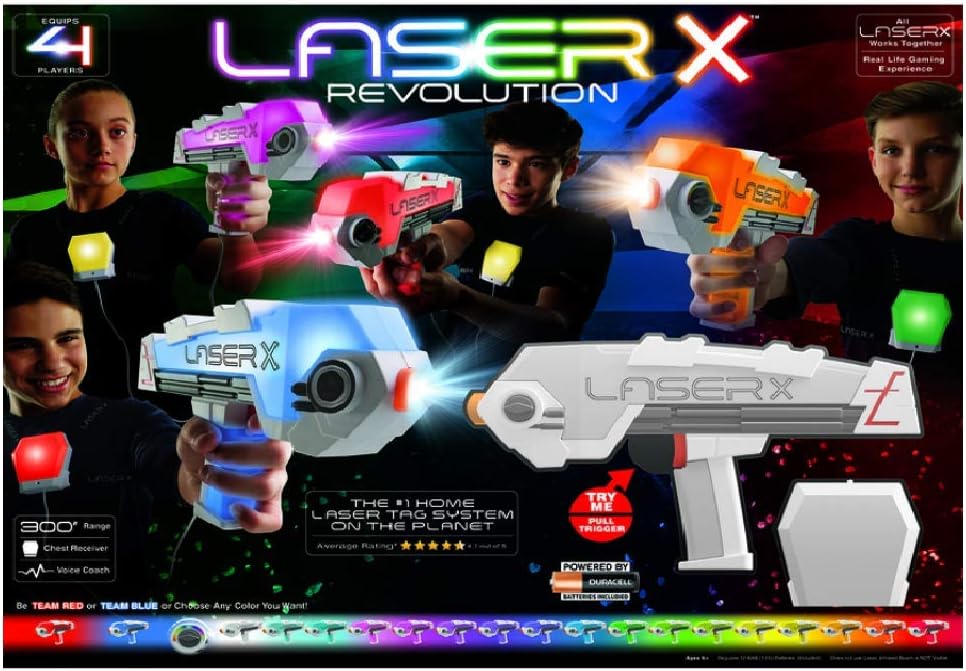
Image: The complete Laser X Revolution 4 Players Set in action, featuring four blasters and arm receivers, demonstrating the multi-player experience.
Pengaturan
Instalasi Baterai
Each Laser X Revolution Blaster requires 4 AA batteries. These batteries are included with your set.
- Locate the battery compartment on the blaster (usually on the handle or underside).
- Dengan menggunakan obeng kepala Phillips, buka sekrup penutup kompartemen baterai.
- Masukkan 4 baterai AA, pastikan polaritas yang benar (+/-) seperti yang ditunjukkan di dalam kompartemen.
- Pasang kembali penutup dan kencangkan dengan sekrup.
Initial Power-On and Pairing
Once batteries are installed, power on each blaster. The blasters and arm receivers are designed to pair automatically. Follow the on-screen or audio prompts from the blaster for initial setup.

Gambar: Detail view of one Laser X Revolution blaster, highlighting its design and light-up elements during operation.

Image: A display of individual Laser X Revolution blasters and their arm receivers, showcasing the different color options available.
Petunjuk Pengoperasian
Mode Permainan
The Laser X Revolution set supports both team-based and individual play. Refer to the blaster's voice coach for instructions on selecting game modes and team assignments (e.g., Team Red or Team Blue).
Blaster Operation
- Blasting: Aim your blaster at an opponent's arm receiver and pull the trigger to fire. The blasters have a range of up to 300 feet.
- Memuat ulang: Utilize the quick-slide reload mechanism on your blaster to prepare for your next shot.
- Hit Indicator: When hit, your arm receiver will register the hit, and the blaster will indicate a hit through lights and sounds. The blaster will temporarily stop firing until the game round is over or reset.
- Light-up Colors: Blasters feature more than 20 different light-up colors, which can indicate team affiliation, health status, or other game-specific information.
- Digital Light and Sound: The blasters provide immersive digital light and sound effects to enhance the gaming experience.

Image: Children actively playing laser tag with the Laser X Revolution blasters, demonstrating the interactive nature of the game.
Important Notes for Play
- Optimal performance is achieved in low-light conditions. Direct sunlight may affect blaster range and accuracy.
- Ensure clear line of sight between blasters and receivers for best results.
Pemeliharaan
Pembersihan
To clean your Laser X Revolution blasters and receivers, wipe them with a soft, dry cloth. Do not use harsh chemicals or abrasive cleaners. Do not submerge in water.
Penyimpanan
When not in use, store the set in a cool, dry place away from direct sunlight. Remove batteries if the product will not be used for an extended period to prevent leakage.
Penyelesaian Masalah
| Masalah | Kemungkinan Penyebab | Larutan |
|---|---|---|
| Blaster not powering on. | Baterai mati atau tidak terpasang dengan benar. | Check battery polarity or replace with fresh AA batteries. |
| Blaster not firing or registering hits. | Obstruction, out of range, or bright sunlight interference. | Ensure clear line of sight. Move closer to target. Play in shaded areas or indoors for best results. |
| Blaster sounds are distorted or low. | Baterai lemah. | Ganti baterai. |
| Difficulty changing team colors. | Urutan atau waktu penekanan tombol tidak tepat. | Refer to the blaster's voice coach or quick start guide for specific instructions on team selection. |
Spesifikasi
- Dimensi Produk: 22.5x18x3 inci
- Berat Barang: 3.53 pon
- Nomor Model: 1427699
- ASIN: B08FD93BB9
- Usia yang Direkomendasikan Pabrikan: 6 months - 6 years (Note: This age range seems unusually broad for a laser tag product, but it's from the provided data. User discretion advised.)
- Baterai: 4 AA batteries required per blaster (included)
- Jangkauan: Hingga 300 kaki
- Pabrikan: Laser X
- Tanggal Rilis: 1 Nopember 2020
Garansi dan Dukungan
For warranty information and customer support, please refer to the packaging or visit the official LASER X websitus. Simpan struk pembelian Anda sebagai bukti pembelian.