
Claymore Ultra 3.0
Panduan Pengguna Lampu Area Portabel CLAYMORE Ultra 3.0 (X-Large)
Model: Ultra 3.0 (CLC-2800BK)
Perkenalan
This manual provides essential instructions for the safe and efficient use of your CLAYMORE Ultra 3.0 (X-Large) portable area light. Please read this manual thoroughly before operating the device and retain it for future reference.
The CLAYMORE Ultra 3.0 (X-Large) is a versatile, USB-C rechargeable outdoor portable area light designed for various activities including camping, fishing, backpacking, and construction. It features adjustable brightness, multiple color modes, and can also function as a power bank.

Gambar: Depan view of the CLAYMORE Ultra 3.0 (X-Large) portable area light, showcasing its rectangular design with LED panel and integrated handles.

Gambar: Sebuah overview of the CLAYMORE Ultra 3.0, emphasizing its maximum brightness of 3,200 lumens, up to 150 hours of usage, 23,200mAh battery capacity, and 680g weight.
Isi Paket
Verifikasi bahwa semua item ada dalam paket:
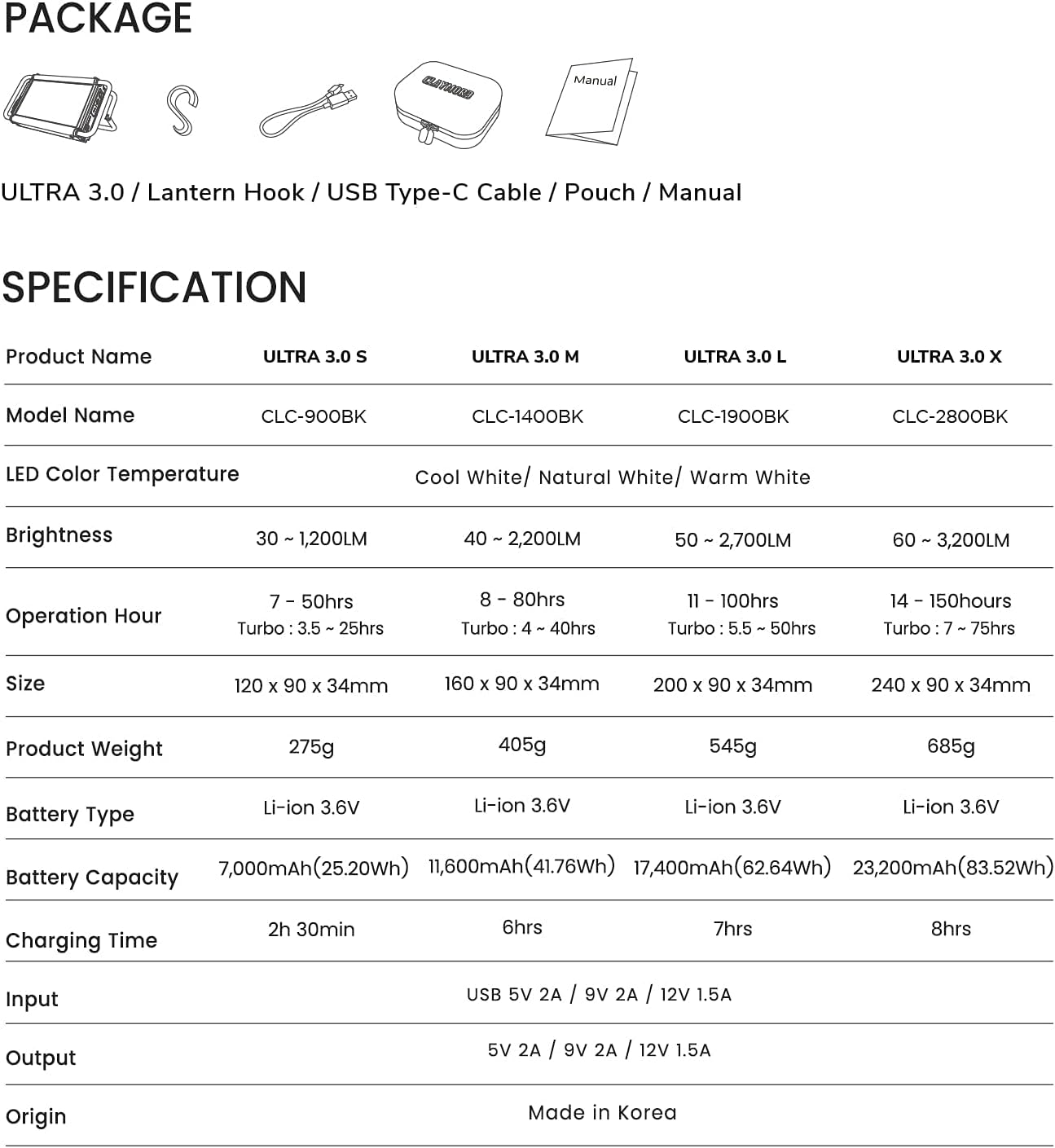
- CLAYMORE Ultra 3.0 (X-Large) Portable Area Light (Model CLC-2800BK)
- Kabel Pengisi Daya USB Type-C
- kait lentera
- Kantong
- User Manual (dokumen ini)

Image: Visual representation of the CLAYMORE Ultra 3.0 package contents, including the light unit, charging cable, lantern hook, and storage pouch.
Informasi Keselamatan
Harap perhatikan tindakan pencegahan keselamatan berikut untuk mencegah cedera atau kerusakan pada produk:
- Jangan membongkar, memperbaiki, atau memodifikasi perangkat.
- Keep away from direct sunlight and high temperatures.
- Jangan gunakan di dekat bahan yang mudah terbakar.
- Hindari paparan langsung cahaya LED ke mata.
- Simpan di tempat yang kering saat tidak digunakan.
- Jauhkan dari jangkauan anak-anak.
Pengaturan
Mengisi Daya Perangkat
Before first use, fully charge the CLAYMORE Ultra 3.0. Use the provided USB Type-C cable to connect the device to a compatible USB power adapter (not included).
- The charging indicator lights will show the charging status.
- A full charge typically takes approximately 8 hours for the X-Large model.
Petunjuk Pengoperasian
Panel Kontrol Berakhirview
Gambar: Detail view of the control panel on the CLAYMORE Ultra 3.0, showing the power button, brightness adjustment buttons (+/-), and mode button.
- ⏻ Power Button: Tekan dan tahan selama 2 detik untuk menyalakan atau mematikan lampu.
- + / - Brightness Buttons: Short press to adjust brightness levels (5 modes).
- ↻ Mode Button: Short press to change color temperature. Press and hold for 2 seconds for SOS function.
Menyesuaikan Kecerahan
With the light on, short press the brightness adjustment buttons (+ / -) to cycle through the 5 available brightness levels. The brightness ranges from 60 to 3,200 lumens.
Mengubah Suhu Warna
Tekan sebentar tombol mode (↻) to switch between the three color temperature modes:
- Putih Dingin (6500 ribu)
- Putih Alami (4200 ribu)
- Putih Hangat (3000 ribu)

Image: Three CLAYMORE Ultra 3.0 units demonstrating the distinct light outputs for Cool (6500K), Natural (4200K), and Warm (3000K) color temperatures.
Mode Turbo
The Ultra 3.0 features an upgraded turbo mode for maximum brightness. Activate this mode by pressing a specific button (refer to device for exact button, usually a quick double-press of power or mode button). This mode provides enhanced lighting performance, particularly in Natural White mode.
SOS Flash Function
For emergency situations, press and hold the mode button (↻) for 2 seconds while the power is on. The LED will flash an SOS signal.
Fungsi Power Bank
The CLAYMORE Ultra 3.0 can function as a power bank to charge other electronic devices. Connect your device to the Ultra 3.0's USB-C port using a compatible cable. It provides a 5V – 2A output.

Image: The CLAYMORE Ultra 3.0 acting as a power bank, charging a smartphone via its USB-C port.
Pemasangan dan Pemosisian
The Ultra 3.0 offers flexible mounting options:
- Use the integrated handle wires to hang the light.
- Attach S-hooks (included) for hanging on ropes or branches.
- Place the light on any flat surface using the adjustable back handle, which can be set up to 90 degrees for optimal lighting angles.

Image: A collage of six images illustrating different ways to position the CLAYMORE Ultra 3.0, including standing on its adjustable handle and hanging from a hook.
Pemeliharaan
- Bersihkan perangkat dengan kain lembut dan kering. Jangan gunakan pembersih atau pelarut abrasif.
- Pastikan port pengisian daya bebas dari debu dan kotoran.
- Store the device in its pouch in a cool, dry place when not in use for extended periods.
- Hindari memaparkan perangkat pada suhu dan kelembapan ekstrem.
Penyelesaian Masalah
| Masalah | Kemungkinan Penyebab | Larutan |
|---|---|---|
| Lampu tidak menyala. | Baterai habis. | Isi daya perangkat menggunakan kabel USB-C yang disediakan. |
| Keluaran cahaya redup. | Low battery or brightness setting is low. | Charge the device or increase brightness using the '+' button. |
| Perangkat tidak mengisi daya. | Kabel atau adaptor daya rusak. | Cobalah kabel USB-C atau adaptor daya yang berbeda. Pastikan sambungan terpasang dengan aman. |
| Tidak dapat mengisi daya perangkat eksternal. | Light battery is too low or external device is incompatible. | Ensure the Ultra 3.0 has sufficient charge. Verify compatibility of the external device. |
Spesifikasi
| Fitur | Detil |
|---|---|
| Nama Model | CLC-2800BK |
| Suhu Warna LED | Cool White (6500K), Natural White (4200K), Warm White (3000K) |
| Kecerahan | 60 - 3,200 Lumens |
| Operation Hour (Max) | 150 hours (low brightness) |
| Operation Hour (Turbo) | 7 - 75 jam |
| Ukuran | 240 x 90 x 34 mm (7.87 x 3.54 x 1.34 inci) |
| Berat Produk | 685g (1.5 pon) |
| Jenis Baterai | Li-ion 3.6V |
| Kapasitas Baterai | 23,200mAh (83.52Wh) |
| Waktu Pengisian Daya | 8 jam |
| Masukan | USB 5V 2A / 9V 2A / 12V 1.5A |
| Keluaran | 5V 2A / 9V 2A / 12V 1.5A |
| Asal | Dibuat di Korea |
| Tingkat Tahan Air | Tidak Tahan Air |
Catatan: Spesifikasi dapat berubah tanpa pemberitahuan sebelumnya.
Garansi dan Dukungan
For warranty information and customer support, please refer to the official Claymore websitus web atau hubungi distributor lokal Anda. Simpan bukti pembelian untuk klaim garansi.
Pabrikan: Claymore
Weblokasi: Visit the Claymore Store on Amazon