
1. Pendahuluan
This user manual provides detailed instructions for the installation, setup, operation, and maintenance of your Elsys ESF-DE4000B Wi-Fi Digital Lock. Please read this manual thoroughly before using the product to ensure proper function and safety. The Elsys ESF-DE4000B offers secure access via biometrics, numeric passwords, and remote control through the Elsys Casa+ application, enhancing the security and convenience of your home or office.
2. Produk Lebihview
The Elsys ESF-DE4000B Wi-Fi Digital Lock is designed to simplify your daily life with multiple access options and smart home integration capabilities. It combines advanced technology with a sleek design to provide both security and aesthetic appeal.

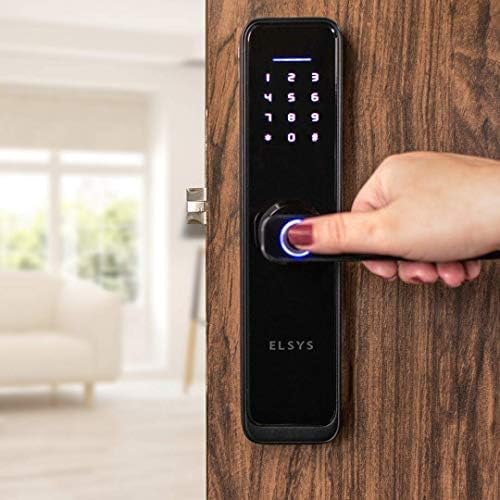
Gambar: Depan view of the Elsys ESF-DE4000B Wi-Fi Digital Lock, showcasing its modern design and numeric keypad.
Fitur Utama:
- Berbagai Metode Akses: Unlock using biometrics (fingerprint), numeric passwords, or remotely via the Elsys Casa+ smartphone application.
- Elsys Casa+ App Integration: Manage access history, create temporary passwords, and control the lock from anywhere.
- Kompatibilitas Rumah Pintar: Integrate with other Elsys Smart Home products for advanced automation, such as lighting control upon entry.
- Konstruksi Berkualitas Tinggi: Made with durable metal and a sleek glass finish, available in black and silver to complement various decors.
- Emergency Power & Access: Operates on batteries, with a USB port for emergency charging and two mechanical keys for backup access during power outagatau baterai lemah.
- Fitur Keamanan: Includes automatic locking, anti-spy password function, and a violation attempt lockout mechanism.

Image: Visual representation of the lock's primary features including biometric, numeric, and app access.
Video Produk Selesaiview:
Video: Penjelasan singkatview demonstrating the design, technology, and security features of the Elsys ESF-DE4000B digital lock.
3. Termasuk Komponen
Please ensure all the following components are present in your package before proceeding with installation:
- 1 Internal Unit
- 1 External Unit
- 1 Mekanisme Pengunci
- 1 Finish Kit
- 1 Kit Instalasi
- 2 Tombol Darurat
- 4 Baterai Alkaline AAA
- 1 Panduan Instalasi
- 1 Template Pengeboran
4. Instalasi
Proper installation is crucial for the optimal performance and security of your digital lock. It is highly recommended to seek professional installation services, especially if replacing a conventional lock, as additional drilling may be required.
Pedoman Umum:
- Refer to the included 'Installation Guide' and 'Drilling Template' for precise measurements and steps.
- Ensure the door thickness and frame are compatible with the lock mechanism.
- Install the internal and external units according to the guide, ensuring all cables are correctly connected.
- Test the mechanical operation of the lock before closing the door.
Professional Installation Service:
For a guaranteed and hassle-free installation, consider using Elsys's authorized installation service. Scan the QR code below or visit the provided link to schedule an appointment.

Image: A technician installing the Elsys digital lock. Scan the QR code to access the official installation service.
For installation service, visit: https://lp.loja.elsys.com/instalacao-amazon
5. Initial Setup and App Integration
After physical installation, proceed with the digital setup of your Elsys ESF-DE4000B lock.
5.1. Download Elsys Casa+ App:
Download the Elsys Casa+ application from your smartphone's app store (Google Play Store for Android or Apple App Store for iOS).

Image: The Elsys Casa+ application interface, displaying lock status, remote unlock option, and access history.
5.2. Pair the Lock with the App:
- Open the Elsys Casa+ app and create an account or log in.
- Follow the in-app instructions to add a new device. Select your ESF-DE4000B digital lock.
- Pastikan ponsel cerdas Anda terhubung ke jaringan Wi-Fi 2.4 GHz selama proses pemasangan.
- The app will guide you through connecting the lock to your home Wi-Fi network.
5.3. Initial User and Password Setup:
Once paired, use the app to set up your administrator password and register your primary fingerprints. You can also create additional user profiles and temporary passwords as needed.
6. Mengoperasikan Kunci
The Elsys ESF-DE4000B offers several convenient ways to unlock your door.
Gambar: Lebih dariview of the three primary methods to open the Elsys digital lock: via the Elsys Casa+ app, numeric password, or biometric fingerprint.
6.1. Biometric (Fingerprint) Access:
- Place your registered finger on the fingerprint sensor located on the handle.
- The lock will verify your fingerprint and unlock if recognized.
- Tekan gagang pintu ke bawah untuk membukanya.

Image: A user activating the biometric sensor on the lock's handle for fingerprint recognition.
6.2. Numeric Password Access:
- Sentuh papan tombol untuk mengaktifkannya.
- Enter your registered numeric password.
- Press '#' to confirm. The lock will unlock.
- Tekan gagang pintu ke bawah untuk membukanya.
Anti-Spy Password Function:
To prevent others from guessing your password, you can enter random numbers before or after your actual password. For example, if your password is '12345', you can enter '6781234590' and the lock will still recognize it.

Image: Details on the secure password feature, allowing random digits before or after the actual code, and the lock's response to violation attempts.
6.3. Elsys Casa+ App Remote Access:
- Open the Elsys Casa+ app on your smartphone.
- Select your ESF-DE4000B lock from the device list.
- Tap the unlock icon to remotely open the door.
- Aplikasi ini juga memungkinkan Anda untuk view access history and create temporary passwords for guests.
6.4. Mechanical Key Access (Emergency):
In case of battery depletion or electronic malfunction, use the provided mechanical keys for emergency access. The keyhole is typically located at the bottom of the external unit.
6.5. Reversible Handle:
The lock features a reversible handle for comfortable use, allowing it to be configured for left or right-hand opening during installation.

Image: Features for emergency access including mechanical keys and a micro USB port for power, alongside the reversible handle design.
7. Integrasi Alexa
Integrate your Elsys ESF-DE4000B digital lock with Amazon Alexa for voice control and enhanced smart home automation.

Image: The Elsys digital lock integrated with Alexa, allowing voice commands to open the door.
Steps for Alexa Integration:
- Configure in Elsys Casa+ App: Ensure your lock is fully configured and operational within the Elsys Casa+ app.
- Unduh Aplikasi Alexa: Download and set up the Amazon Alexa app on your smartphone.
- Enable Elsys Skill: In the Alexa app, search for and enable the 'Elsys Casa+' skill. Link your Elsys account when prompted.
- Buat Rutinitas: Create a routine in the Alexa app. For example, set a voice command like "Alexa, open the door" to trigger an action in the Elsys Casa+ app that unlocks your door.
- Visitor Notification: You can also set up routines to receive voice notifications from Alexa when a visitor arrives and presses the doorbell (if integrated with other Elsys smart devices).

Image: Step-by-step guide for setting up voice commands with Alexa for your Elsys digital lock.
Alexa Integration Video:
Video: A demonstration of how to integrate your Elsys digital lock with Amazon Alexa for voice control.
8. Pemeliharaan
8.1. Penggantian Baterai:
The lock is powered by 4 AAA alkaline batteries. When the battery indicator shows low power, replace all four batteries promptly. The lock will provide warnings when the battery level is low. Use only high-quality alkaline batteries for optimal performance.
8.2. Daya Darurat:
If the batteries completely drain, you can temporarily power the lock using a power bank connected to the micro USB port on the external unit. This will allow you to enter your password or use a registered fingerprint to unlock the door.
8.3. Pembersihan:
Clean the lock's surface with a soft, dry cloth. Avoid using abrasive cleaners, solvents, or harsh chemicals, as these can damage the finish and electronic components. Regularly wipe the fingerprint sensor to ensure accurate readings.
9. Penyelesaian masalah
Berikut adalah solusi untuk masalah umum yang mungkin Anda temui:
- Kunci Tidak Merespons: Check battery levels. If low, replace batteries or use emergency USB power.
- Sidik Jari Tidak Dikenali: Ensure your finger is clean and dry. Try re-registering your fingerprint in the app. The biometric sensor will lock out for several minutes after 3 consecutive failed attempts. During this time, use a numeric password or the app.
- Numeric Password Not Working: Ensure you are entering the correct password. If using the anti-spy function, ensure the correct password sequence is embedded. The lock will block access for 1 minute after 5 consecutive incorrect password attempts or a violation attempt.
- Pembukaan Kunci Jarak Jauh Tidak Berfungsi: Verify that the lock is connected to Wi-Fi and your smartphone has an internet connection. Check the Elsys Casa+ app for any error messages or connectivity issues.
- Kunci Mekanik Tidak Berfungsi: Ensure the key is fully inserted and turned correctly. Do not force the key.
- Door Not Locking Automatically: Check if the automatic lock function is enabled in the Elsys Casa+ app settings. Ensure the door is properly closed and aligned.
10. Spesifikasi

Image: Detailed dimensions of the Elsys ESF-DE4000B digital lock.
| Fitur | Detil |
|---|---|
| Merek | Elsys |
| Nomor Model | ESF-DE4000B |
| Nama Jenis Produk | Kunci Digital |
| Warna | Hitam |
| Gaya | Black with Glass finish |
| Bahan | Logam |
| Jenis Selesai | Kaca |
| Bentuk Barang | Persegi panjang |
| Dimensi Barang (P x L x T) | 6x2.1x26 sentimeter |
| Berat Barang | 2.22 Kilogram |
| Jenis Konektivitas | Wifi gratis |
| Jenis Kunci | App, Biometric, Numeric Password |
| Control Type / Method | Menyentuh |
| Fitur Khusus | Automatic lock, Fingerprint, Battery indicator, Anti-spy password |
| Penggunaan Produk yang Direkomendasikan | Protect and lock the main door of a residence |
11. Garansi dan Dukungan
11.1. Informasi Garansi:
This Elsys ESF-DE4000B Digital Lock comes with a Garansi 12 bulan from the date of purchase. The warranty covers manufacturing defects under normal use. Please retain your proof of purchase for warranty claims. Note that the warranty may not cover devices installed without authorized installers.
11.2. Dukungan Pelanggan:
For technical assistance, troubleshooting, or any questions regarding your Elsys digital lock, please contact Elsys customer support. Refer to the official Elsys websitus atau kemasan produk untuk informasi kontak terkini.
Sumber Daya Daring: Visit the Elsys website for FAQs, video tutorials, and additional support documents.


