
Sorand AC 230V Floor Heating Thermostat
Sorand AC 230V Digital Programmable Floor Heating Thermostat User Manual
Model: AC 230V Floor Heating Thermostat
Perkenalan
This manual provides comprehensive instructions for the installation, operation, and maintenance of your Sorand AC 230V Digital Programmable Floor Heating Thermostat. Please read this manual carefully before installation and use to ensure proper function and safety.
The thermostat is designed for electronic floor heating systems and other electrical heating elements. It features a large LCD with backlight, programmable temperature settings, and internal/external temperature sensing capabilities.
Informasi Keselamatan
- Pemasangan harus dilakukan oleh teknisi listrik yang berkualifikasi.
- Pastikan daya listrik telah diputus sebelum pemasangan atau pemeliharaan.
- Jangan biarkan termostat terkena air atau kelembapan yang berlebihan.
- Beroperasi dalam volume yang ditentukantage dan batas arus.
Isi Paket
Verifikasi bahwa semua item ada dalam paket:
- 1 x Sorand AC 230V Digital Programmable Floor Heating Thermostat
- 1 x External Temperature Sensor Cable (approx. 3 meters)
- 2 x Sekrup Pemasangan
- 1 x Panduan Pengguna (dokumen ini)

Image: Contents of the Sorand thermostat package, showing the main unit, external sensor cable, mounting screws, and the instruction manual.
Pengaturan dan Instalasi
Penting: Installation should only be carried out by a qualified electrician. Ensure the main power supply is turned off before commencing any wiring work.
Diagram Pengkabelan
Refer to the wiring diagram on the back of the thermostat unit for correct connections. The terminals are typically labeled as follows:
- L1, N1: Power input (AC 230V)
- LOAD (1, 2): Connection to the heating element
- NTC (5, 6): Connection for the external floor temperature sensor

Gambar: Belakang view of the Sorand thermostat, displaying the wiring terminals and a simplified diagram for electrical connections.
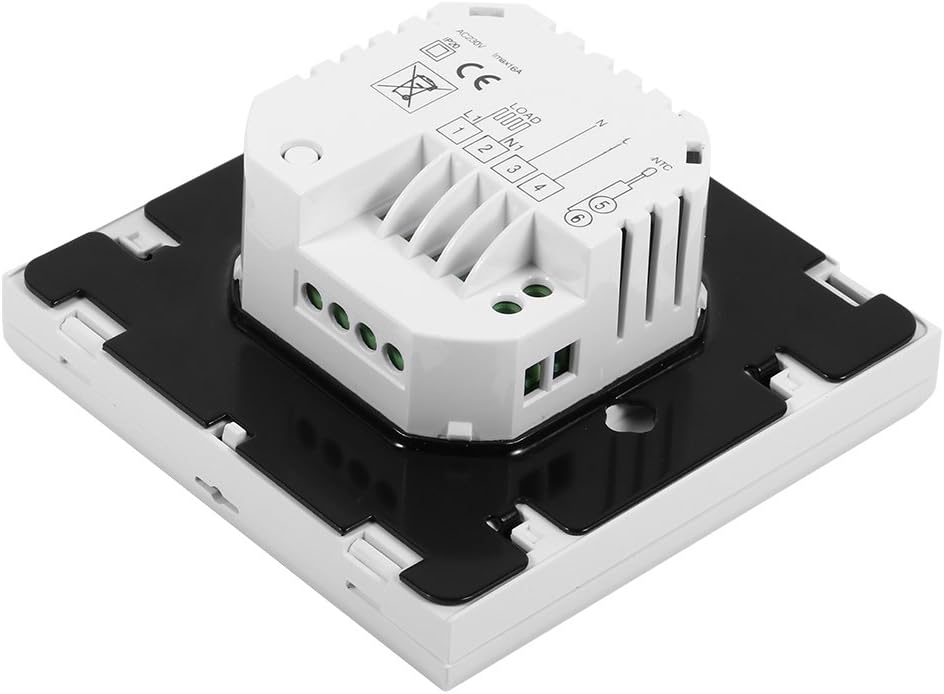
Gambar: Samping view of the Sorand thermostat, illustrating the internal components and ports for wiring connections.
Pemasangan
- Prepare a standard electrical wall box (86x86mm recommended).
- Connect the power supply, heating load, and external sensor wires according to the wiring diagram.
- Carefully push the wired thermostat into the wall box.
- Pasang termostat ke kotak dinding menggunakan sekrup yang disediakan.
- Pasang panel depan termostat.
Petunjuk Pengoperasian
The thermostat features a large LCD and touch-sensitive buttons for easy operation.
Fungsi Tombol
- ⏻ (Kekuasaan): Menghidupkan/mematikan termostat.
- ↻ (Mode/Cycle): Switches between manual mode and programmable mode.
- ⏱ (Jam/Waktu): Sets the time and enters programming mode.
- ▲ (Panah Atas): Increases temperature setting or adjusts values.
- ▼ (Panah Bawah): Decreases temperature setting or adjusts values.

Gambar: Depan view of the Sorand thermostat, highlighting the LCD screen and the five touch-sensitive control buttons below it.
Menetapkan Waktu dan Hari
- Tekan dan tahan tombol ⏱ tombol selama 3 detik untuk masuk ke mode pengaturan waktu.
- Gunakan ▲ Dan ▼ tekan tombol untuk mengatur jam, lalu tekan ⏱ to confirm and move to minutes, then day of the week.
- Tekan ⏱ again to exit, or wait for 10 seconds for automatic exit.
Operasi Mode Manual
In manual mode, the thermostat maintains a constant temperature set by the user.
- Tekan tombol ↻ button to switch to manual mode (indicated by a hand icon or similar on the display).
- Gunakan ▲ Dan ▼ tombol untuk mengatur suhu yang Anda inginkan.
- Termostat sekarang akan mempertahankan suhu ini.
Programmable Mode Operation (6 Periods)
The thermostat allows for 6 programmable periods per day, enabling different temperature settings at different times.
- Tekan tombol ↻ button to switch to programmable mode (indicated by a clock icon or similar).
- Tekan dan tahan tombol ⏱ button for 3 seconds to enter programming mode.
- The display will show the first period (e.g., "Period 1"). Use ▲ Dan ▼ to set the start time and desired temperature for this period.
- Tekan ⏱ to move to the next period and repeat the process for all 6 periods.
- After setting all periods, press ⏱ again or wait for automatic exit to save settings.
The thermostat will automatically follow the programmed schedule.
Sensor Selection (Internal/External)
The thermostat can use its internal sensor or the external floor sensor. The selection method is typically found in advanced settings or by a specific button combination. Refer to the on-screen indicators for the active sensor.
Pemeliharaan
- Clean the thermostat's display and casinBersihkan dengan kain lembut dan kering. Jangan gunakan pembersih atau pelarut abrasif.
- Ensure the thermostat is free from dust and debris to maintain optimal performance.
- Tidak ada komponen yang dapat diperbaiki pengguna di dalamnya. Jangan mencoba membuka atau memperbaiki unit ini.
Penyelesaian Masalah
| Masalah | Kemungkinan Penyebab | Larutan |
|---|---|---|
| Termostat tidak menyala. | Tidak ada pasokan daya; kabel salah. | Check circuit breaker. Verify wiring connections (consult a qualified electrician). |
| Heating not turning on/off. | Incorrect temperature setting; thermostat in OFF mode; wiring issue. | Adjust set temperature. Ensure thermostat is ON. Check heating element wiring. |
| Pembacaan suhu tidak akurat. | Sensor malfunction; incorrect sensor selected. | Verify sensor connection. Check if internal or external sensor is active. |
| Layar kosong atau berkedip. | Fluktuasi daya; kerusakan internal. | Reset power to the thermostat. If issue persists, contact support. |
Spesifikasi
| Fitur | Detil |
|---|---|
| Merek | Sorand |
| Model | AC 230V Floor Heating Thermostat |
| Bekerja Voltage | Tegangan AC230V, 50/60Hz |
| Arus Beban | 12/16A (Electric Heating) |
| Ketepatan | ±0.5℃ |
| Set-point Temperature Range | 5℃ - 35℃ |
| Batas Kisaran Suhu | 5℃ - 99℃ |
| Konsumsi Daya | <0.3W |
| Sensor Suhu | NTC (Internal and External) |
| Surface Size | Kira-kira 86 x 86 x 40 mm (3.4 x 3.4 x 1.6 inci) |
| External Sensor Cable Length | Sekitar 3 meter (9.8 kaki) |
| Bahan | PC + ABS |
| Jenis Tampilan | LCD Digital dengan Lampu Latar |
| Metode Kontrol | Kontrol Panel Sentuh |
Garansi dan Dukungan
This product is covered by the manufacturer's standard warranty. Please refer to the product packaging or your point of purchase for specific warranty terms and conditions.
Untuk dukungan teknis, bantuan pemecahan masalah, atau klaim garansi, silakan hubungi pengecer atau produsen secara langsung. Simpan struk pembelian Anda sebagai bukti pembelian.