
Perkenalan
This manual provides comprehensive instructions for the Elekpia Universal Remote Control, model CT-RC1US-18. This remote is designed for seamless compatibility with a wide range of Toshiba LED LCD HDTV models, including but not limited to CT-90325, CT-90326, CT-90329, CT-8037, CT-90302, CT-90275, CT-90, CT-90366, and CT-RC1US-18. Please read this manual carefully to ensure proper setup and operation of your new remote control.
Pengaturan
Instalasi Baterai
The Elekpia Universal Remote Control requires two (2) 1.5V AA batteries for operation. No programming is needed; simply install the batteries, and the remote will be ready to use with your compatible Toshiba TV.
- Temukan penutup kompartemen baterai di bagian belakang remote control.
- Tekan tab ke bawah dan geser penutup ke bawah untuk membuka kompartemen.
- Masukkan dua (2) baterai AA, pastikan terminal positif (+) dan negatif (-) sejajar dengan tanda di dalam kompartemen.
- Geser penutup ruang baterai kembali ke tempatnya hingga terkunci dengan aman.

Gambar 1: Depan dan belakang view of the Elekpia Universal Remote Control, highlighting the battery compartment on the rear.
Once batteries are installed, the remote is ready for immediate use with your Toshiba TV. No additional setup or code entry is required.
Petunjuk Pengoperasian
This universal remote control is designed to replicate the functions of your original Toshiba TV remote. Point the remote directly at your television's infrared receiver for optimal performance.
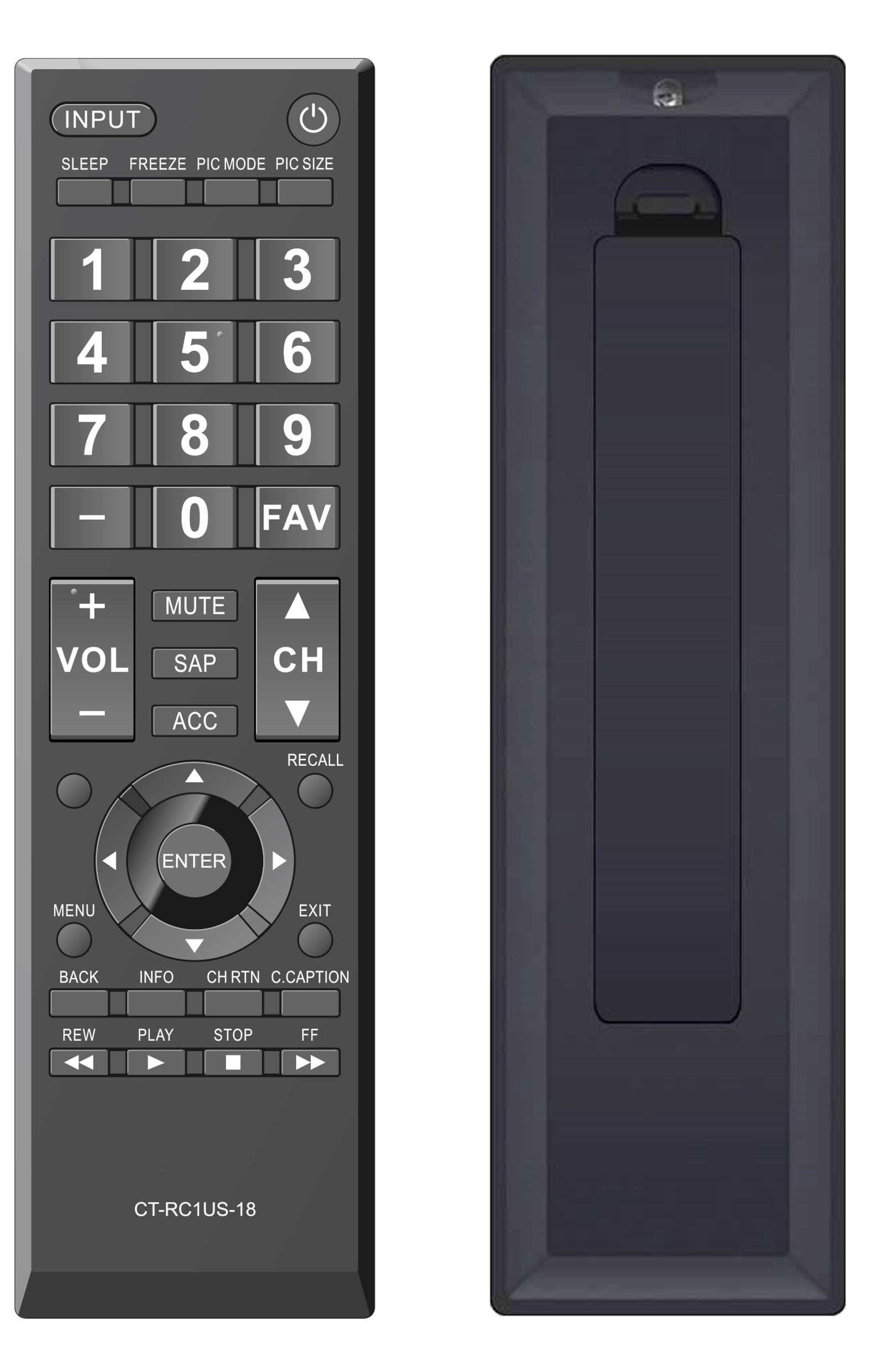
Gambar 2: Depan view of the Elekpia Universal Remote Control, displaying the layout of all buttons.
Fungsi Tombol
- KEKUASAAN (⏻): Menghidupkan atau mematikan televisi.
- MASUKAN: Cycles through available input sources (HDMI 1, HDMI 2, AV, etc.).
- TIDUR: Activates or adjusts the TV's sleep timer function.
- MEMBEKUKAN: Pauses the current image on the screen (functionality may vary by TV model).
- MODE GAMBAR: Adjusts picture modes (e.g., Standard, Movie, Dynamic).
- PIC SIZE: Changes the aspect ratio or picture size.
- Papan Angka (0-9): Langsung memasukkan nomor saluran.
- - (Dash): Used for entering sub-channels (e.g., 7-1).
- FAVMengakses daftar saluran favorit.
- VOL (+/-): Increases or decreases the volume level.
- BISU: Silences the television audio.
- GETAH: Selects Secondary Audio Program (SAP) or alternate audio tracks.
- AKSES: Accesses accessibility features or audio settings.
- CH (Up/Down): Changes the television channel up or down.
- MENGINGAT: Switches between the current and previously viewsaluran edisi.
- Navigation Pad (Up, Down, Left, Right, ENTER): Navigates through on-screen menus and confirms selections.
- MENU: Opens the main menu of the television.
- EXIT: Closes the current menu or returns to the previous screen.
- KEMBALI: Returns to the previous menu or screen.
- INFORMASIMenampilkan informasi tentang program atau input saat ini.
- CH RTN (Channel Return): Similar to RECALL, returns to the previous channel.
- C.CAPTION (Closed Caption): Toggles closed captions on or off.
- REW (Rewind), PLAY, STOP, FF (Fast Forward): Controls for media playback (e.g., when using a connected USB device or smart TV apps, if supported by the TV).
Pemeliharaan
Membersihkan Remote
Untuk menjaga tampilan dan fungsi remote control, bersihkan secara teratur:
- Gunakan kain lembut dan kering untuk menyeka permukaan remote.
- Untuk kotoran membandel, sedikit dampBilas kain dengan air atau pembersih ringan non-abrasif. Hindari kelembapan berlebih.
- Jangan gunakan bahan kimia keras, pelarut, atau bantalan pembersih abrasif, karena dapat merusak lapisan atau komponen internal remote.
Penggantian Baterai
Replace batteries when the remote's response becomes sluggish or stops working. Always replace both AA batteries at the same time with new ones. Do not mix old and new batteries, or different types of batteries, as this can lead to leakage or damage.
Penyimpanan
If the remote control will not be used for an extended period, remove the batteries to prevent potential leakage and damage to the device.
Penyelesaian Masalah
If you encounter issues with your Elekpia Universal Remote Control, please refer to the following common solutions:
- Remote tidak merespons:
- Ensure the batteries are correctly installed with the proper polarity (+/-).
- Ganti baterainya dengan baterai AA yang baru.
- Periksa apakah ada penghalang antara remote control dan sensor inframerah TV.
- Ensure you are pointing the remote directly at the TV.
- Beberapa tombol tidak berfungsi:
- This remote is pre-programmed for Toshiba TVs. Verify your TV model is compatible.
- Clean the remote's surface, especially around the unresponsive buttons, to remove any dirt or debris that might be interfering with button presses.
- TV tidak mau menyala/mati:
- Confirm the TV is plugged into a working power outlet.
- Try using the power button directly on the TV to confirm it is operational.
If these steps do not resolve the issue, please refer to the customer support section.
Spesifikasi
| Nomor Model | CT-RC1US-18 |
| Merek | listrik |
| Dimensi Produk | 7x2x0.6 inci |
| Berat Barang | 3 ons |
| Sumber Daya | 2 baterai AA 1.5V (tidak termasuk) |
| Perangkat yang Kompatibel | Toshiba LED LCD HDTVs |
| Jumlah Maksimum Perangkat yang Didukung | 1 |
| Warna | Hitam |
Informasi Garansi
Specific warranty details for the Elekpia Universal Remote Control CT-RC1US-18 are not provided in this manual. Please refer to the product packaging, the retailer's return policy, or the manufacturer's official webKunjungi situs ini untuk informasi mengenai cakupan dan ketentuan garansi.
Dukungan Pelanggan
For further assistance or inquiries regarding your Elekpia Universal Remote Control, please contact the retailer from whom you purchased the product. You may also visit the official Elekpia website for potential support resources or contact information.