
Perkenalan
This manual provides comprehensive instructions for the Vivitar Podcast and Social Media Microphone MIC918. This high-quality condenser microphone is designed for clear audio capture for various applications, including podcasting, live streaming, gaming, voice-overs, and vocal recording. It features a simple plug-and-play USB connection, integrated volume control, and a stable tripod stand for optimal positioning.
Informasi Keselamatan
- Jangan biarkan mikrofon terkena air atau kelembapan berlebihan.
- Hindari suhu ekstrem atau sinar matahari langsung.
- Jangan mencoba membongkar atau memodifikasi mikrofon. Hal ini akan membatalkan garansi.
- Jauhkan mikrofon dari medan magnet yang kuat.
- Gunakan hanya kain lembut dan kering untuk membersihkan.
Produk Selesaiview
Isi Paket
- Vivitar MIC918 Microphone Unit
- Penyangga Tripod
- Integrated USB Connection Cable
Komponen Mikrofon
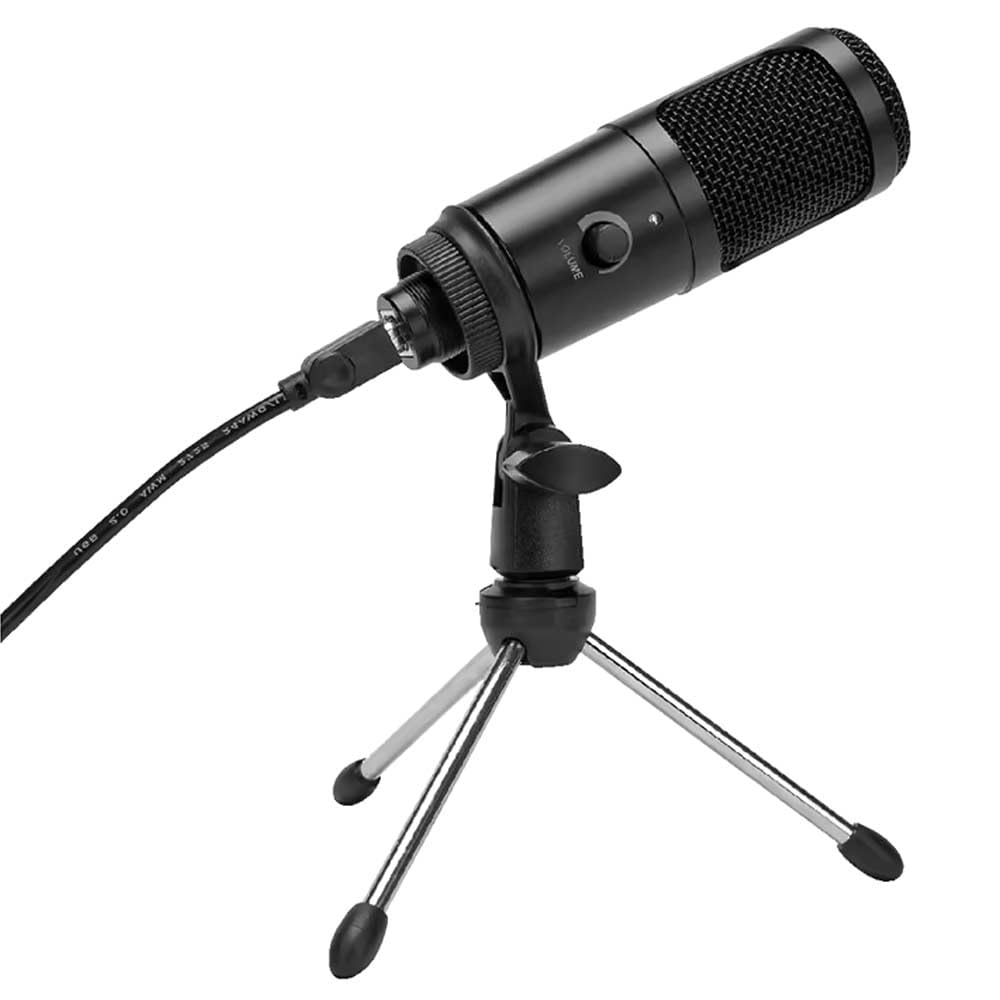
Gambar 1: Vivitar MIC918 Microphone unit attached to its tripod stand, showing the integrated USB cable.

Gambar 2: Samping view of the Vivitar MIC918 Microphone, highlighting the volume control knob and the Vivitar brand logo.
The microphone unit features a durable metal construction. The front side includes a volume control knob for easy audio level adjustments. The microphone is designed with a unidirectional polar pattern to focus on sound directly in front of it, reducing background noise.
Pengaturan
Menghubungkan Mikrofon
- Merakit Dudukan: If not already assembled, unfold the tripod stand and ensure it is stable on a flat surface. Securely attach the microphone unit to the stand's mounting point. The rotating shaft ring allows for angle adjustment.
- Hubungkan ke Perangkat: Plug the integrated USB cable from the microphone into an available USB port on your computer, laptop, or compatible gaming console.
- Pasang dan Mainkan: The Vivitar MIC918 is a plug-and-play device. Your operating system (Windows, macOS, etc.) should automatically detect and install the necessary drivers. No additional software installation is typically required.
- Pilih sebagai Perangkat Input: After connecting, navigate to your device's sound settings or the audio settings within your recording/streaming software. Select the "Vivitar MIC918" or similar USB audio device as your primary input (microphone) device.
Pengoperasian
Menyesuaikan Volume
The microphone features a built-in volume control knob located on its side (refer to Figure 2). Rotate this knob clockwise to increase the microphone's input sensitivity (volume) and counter-clockwise to decrease it. Adjust this to achieve the desired recording level without distortion.
Memposisikan Mikrofon
For optimal audio capture, position the microphone directly in front of the sound source (e.g., your mouth for speaking or singing). The tilting tripod stand allows you to adjust the microphone's angle to best suit your needs. Due to its unidirectional polar pattern, the microphone is most sensitive to sounds coming from the front and less sensitive to sounds from the sides or rear, helping to minimize ambient noise.
Pemeliharaan
- Pembersihan: Use a soft, dry, lint-free cloth to wipe the microphone's exterior. Do not use liquid cleaners, aerosols, or solvents.
- Penyimpanan: Saat tidak digunakan, simpan mikrofon di tempat yang bersih dan kering, jauh dari debu dan suhu ekstrem.
- Penanganan: Tangani mikrofon dengan hati-hati. Hindari menjatuhkannya atau terkena benturan keras.
Penyelesaian Masalah
| Masalah | Kemungkinan Penyebab | Larutan |
|---|---|---|
| Tidak ada suara yang keluar dari mikrofon. | Mikrofon tidak terhubung dengan benar. Perangkat input yang dipilih salah. Volume mikrofon terlalu rendah. | Pastikan kabel USB terpasang dengan aman ke mikrofon dan perangkat. Verify that "Vivitar MIC918" is selected as the input device in your system's sound settings or recording software. Increase the volume using the knob on the microphone and check system input levels. |
| Poor sound quality (e.g., muffled, too quiet, background noise). | Posisi mikrofon tidak tepat. Tingkat kebisingan lingkungan yang tinggi. Input level too high or too low. | Position the microphone closer to the sound source and ensure it's facing directly towards it. Rekam di lingkungan yang lebih tenang. Adjust the microphone's volume knob and system input levels to an optimal range, avoiding clipping or being too faint. |
| Mikrofon tidak dikenali oleh komputer. | Port atau kabel USB rusak. System driver issue. | Coba sambungkan mikrofon ke port USB lain di komputer Anda. Restart your computer. If the issue persists, check your operating system's device manager for any driver conflicts or updates. |
Spesifikasi
| Fitur | Spesifikasi |
|---|---|
| Merek | Vivitar |
| Nomor Model | MIC918 |
| Konektivitas | USB (Pasang dan Mainkan) |
| Jenis Mikrofon | Kondensator |
| Pola Kutub | searah |
| Signal-to-Noise Ratio | 78dB |
| Bahan Penutup | Logam |
| Berat Barang | 0.95 pon (sekitar 0.43 kg) |
| Dimensi Barang (P x L x T) | 8.86 x 5.36 x 2.49 inci (sekitar 22.5 x 13.6 x 6.3 cm) |
| Sumber Daya | Bertenaga Listrik Berkabel (melalui USB) |
| Perangkat yang Kompatibel | Computers, Laptops, Gaming Consoles |
Informasi Garansi
The Vivitar Podcast and Social Media Microphone MIC918 comes with a 3-Year USA Warranty. For specific terms, conditions, and to register your product, please refer to the official Vivitar websitus web atau hubungi dukungan pelanggan mereka secara langsung. Simpan bukti pembelian Anda untuk klaim garansi.
Dukungan Pelanggan
For further assistance, technical support, or inquiries regarding your Vivitar MIC918 microphone, please visit the official Vivitar website or contact their customer service department. Contact information can typically be found on the Vivitar websitus di bawah bagian 'Dukungan' atau 'Hubungi Kami'.