
Perkenalan
This manual provides detailed instructions for the proper use and maintenance of your Borofone BC26 Wireless FM Transmitter. Please read this manual thoroughly before operating the device to ensure optimal performance and safety.
Produk Selesaiview
The Borofone BC26 is a versatile car accessory that combines an FM transmitter, Bluetooth connectivity, and a dual USB car charger. It allows you to stream audio from your smartphone or USB flash drive to your car's FM radio and charge your devices simultaneously.
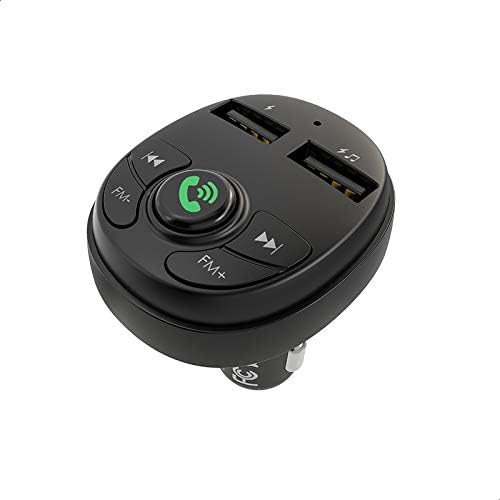
Gambar: Atas-bawah view of the Borofone BC26 FM Transmitter, highlighting its control buttons for FM tuning, call management, track control, and the two USB charging ports.
Fitur
- Wireless FM transmission for audio streaming.
- Bluetooth connectivity for hands-free calls and music playback.
- Dual USB ports for charging mobile devices (2.1A output).
- Supports USB flash drive for music playback.
- Compatible with MP3, WMA, WAV, and FLAC audio formats.
- Digital LED display for FM frequency.
- Universal compatibility with 12V-24V car power outlets.
Isi Paket
- Borofone BC26 Wireless FM Transmitter
- Panduan Pengguna

Image: The retail packaging for the Borofone BC26, displaying the device and its main functionalities such as Bluetooth 5.0, 2.1A output, and USB flash drive support.
Pengaturan
- Masukkan Pemancar: Plug the Borofone BC26 into your car's 12V or 24V cigarette lighter socket. The device will power on automatically, and the LED display will light up.
- Menyetel Frekuensi FM: Adjust your car's FM radio to an empty frequency (one with no broadcast). Then, press and hold the 'Call' button on the BC26 until the FM frequency on the LED display starts flashing. Use the 'FM-' and 'FM+' buttons to match the transmitter's frequency to your car's radio frequency. Once matched, press the 'Call' button again to confirm.
- Pemasangan Bluetooth: On your smartphone, enable Bluetooth and search for available devices. Select 'BC26' from the list to pair. A voice prompt will confirm successful connection.

Image: The Borofone BC26 FM Transmitter plugged into a car's power outlet, showing the digital display set to an FM frequency, ready for use.
Petunjuk Pengoperasian
Putar Musik
- Melalui Bluetooth: Once paired, open your music player on your smartphone. Audio will be transmitted to your car's FM radio. Use the 'Previous Track' and 'Next Track' buttons on the BC26 to control playback.
- Via USB Flash Drive: Insert a USB flash drive containing MP3/WMA/WAV/FLAC audio files into the designated USB port (usually marked with a music note or data symbol). The device will automatically detect and play music. Use the 'Previous Track' and 'Next Track' buttons to navigate.
Panggilan Bebas Genggam
- Menjawab/Mengakhiri Panggilan: Press the 'Call' button once to answer an incoming call or end an ongoing call.
- Tolak Panggilan: Press and hold the 'Call' button to reject an incoming call.
- Panggil ulang: Double-press the 'Call' button to redial the last number.
Perangkat Pengisian Daya
Connect your mobile device to either of the USB charging ports using a compatible USB cable. The ports provide a total output of 2.1A for efficient charging.
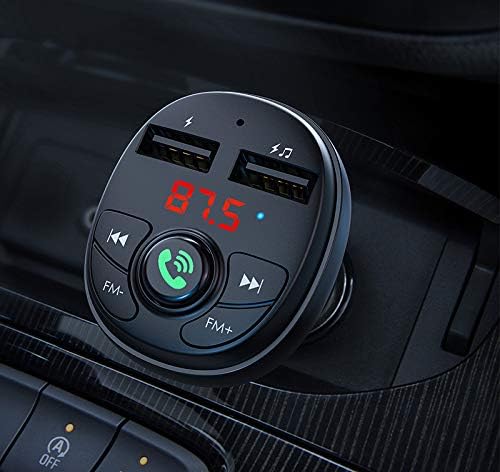
Gambar: Detail view of the Borofone BC26 in a car's console, illustrating the illuminated digital display, clearly labeled control buttons, and the dual USB charging ports.
Pemeliharaan
- Jaga agar perangkat tetap kering. Kelembapan dapat merusak sirkuit internal.
- Jangan biarkan perangkat terkena suhu ekstrem.
- Bersihkan perangkat dengan kain lembut dan kering. Hindari penggunaan bahan kimia keras atau pembersih abrasif.
- Ensure the cigarette lighter socket is clean and free of debris for proper connection.
Penyelesaian Masalah
- Tidak Ada Daya: Ensure the device is fully inserted into the car's cigarette lighter socket. Check if the car's power outlet is functioning.
- Kualitas Audio Buruk/Suara Statis: Adjust the FM frequency on both the transmitter and your car radio to an unused channel. Avoid frequencies occupied by strong radio stations. Ensure the volume on your phone and car radio is set appropriately.
- Pemutusan Bluetooth: Re-pair the device with your phone. Ensure your phone's Bluetooth is enabled and within range.
- USB Flash Drive Not Playing: Ensure the USB flash drive is formatted correctly (FAT32) and contains supported audio files (MP3/WMA/WAV/FLAC). Try a different USB flash drive.
Spesifikasi
| Fitur | Spesifikasi |
|---|---|
| Merek | Borofone |
| Model | SM26 |
| Masukan Voltage | DC 12-24V |
| Keluaran USB | 2.1A (Maks) |
| Versi Bluetooth | Supported (Specific version not provided, but typically 5.0 or higher for modern devices) |
| Format Audio yang Didukung | MP3, WMA, WAV, FLAC |
| Teknologi Konektivitas | Bluetooth, FM, dan lain-lain |
| Ukuran | 14 x 8.8 x 3.2 cm (approximate shipment dimensions) |
| Berat | 52 gram |
Informasi Keselamatan
- Jangan membongkar atau memodifikasi perangkat.
- Jauhkan dari jangkauan anak-anak.
- Avoid using the device in extremely dusty or humid environments.
- Do not expose to open flames or direct sunlight for extended periods.
- Ensure secure placement in the car's power outlet to prevent dislodging during driving.
Garansi dan Dukungan
Borofone products are designed for reliability and performance. For warranty information, technical support, or service inquiries, please refer to the documentation provided with your purchase or contact your local retailer. Keep your proof of purchase for warranty claims.