
1. Pendahuluan
Thank you for choosing the OSSURET Quad-Core Android 10 GPS Navigation System. This manual provides essential information for the proper installation, operation, and maintenance of your new car multimedia system. Please read this manual thoroughly before using the product to ensure optimal performance and safety. This unit is designed for Mitsubishi Lancer models manufactured between 2007 and 2017.
2. Informasi Keselamatan
- Selalu gunakan perangkat ini secara bertanggung jawab dan sesuai dengan peraturan lalu lintas setempat. Mengemudi sambil tidak fokus dapat menyebabkan kecelakaan.
- Do not attempt to install or repair the unit yourself if you are not qualified. Improper installation can cause damage to the vehicle's electrical system or the unit itself. Professional installation is recommended.
- Ensure all wiring connections are secure to prevent short circuits or electrical fires.
- Jaga agar layar tetap bersih dan bebas dari halangan untuk mempertahankan visibilitas yang jelas.
- Hindari memaparkan unit pada suhu ekstrem, sinar matahari langsung dalam jangka waktu lama, atau kelembapan berlebihan.
3. Produk Lebihview
3.1 Fitur Utama
- Sistem Operasi: Android 10
- Prosesor: Quad-Core ARM A7 4*1.2GHz
- Ingatan: 1GB RAM, 16GB Flash Storage
- Menampilkan: 10.1-inch Capacitive Touchscreen, 1024x600 Resolution
- Navigasi: Built-in GPS, supports offline maps, Google Maps, Waze, and other Android navigation apps.
- Konektivitas: Integrated WiFi, Bluetooth (Hands-free calling, A2DP music streaming), USB.
- Multimedia: Supports 1080P video decoding, various audio and video formats (MP4, AVI, MP3, WMA, JPEG, etc.).
- Fungsi Lanjutan: Split Screen, Steering Wheel Control, Mirror Link (AirPlay for iOS, Easy-Connect for Android), Rearview Camera Input support, Android Market access.
3.2 Package Contents (Accessories)
The package includes the main head unit and various cables and adapters necessary for installation and functionality. Please verify all components are present upon unboxing.

Gambar: Various wiring harnesses, USB cables, and adapters included with the OSSURET car multimedia system.
4. Pengaturan dan Instalasi
4.1 Kompatibilitas Kendaraan
This unit is specifically designed for Mitsubishi Lancer models from 2007 to 2017. It is intended for left-hand drive vehicles. Always confirm the center console of your vehicle matches the product's design before installation.

Gambar: This image shows the dashboard of a Mitsubishi Lancer before and after the installation of the OSSURET Android head unit, demonstrating the integrated fit.
4.2 Langkah-langkah Instalasi (Instalasi Profesional Disarankan)
- Persiapan: Disconnect the vehicle's battery to prevent electrical damage.
- Lepaskan Unit Asli: Lepaskan stereo mobil dan panel trim yang ada dengan hati-hati.
- Hubungkan Kabel: Connect the provided wiring harnesses to the vehicle's existing connectors. Ensure all connections are secure.
- Antena GPS: Pasang antena GPS di lokasi dengan pandangan yang jelas. view langit, biasanya di dasbor atau di bawah kaca depan.
- Kabel USB: Route the USB cables to an accessible location, such as the glove compartment.
- Uji Fungsionalitas: Before fully reassembling the dashboard, reconnect the battery and power on the unit to test basic functions (power, audio, touchscreen, GPS signal).
- Unit Aman: Pasang unit head unit baru dengan aman ke dalam lubang dasbor.
- Berkumpul kembali: Reinstall all trim panels and ensure a neat finish.
4.3 Pengaktifan dan Pengaturan Awal
After installation, power on the unit. The system will boot into the Android 10 interface. Follow any on-screen prompts for initial setup, such as language selection and time zone. Connect to a Wi-Fi network to enable online features and app downloads.
5. Petunjuk Pengoperasian
5.1 Navigasi Dasar
- Layar sentuh: The unit features a responsive touchscreen for all interactions. Tap to select, swipe to scroll, and pinch to zoom.
- Layar Beranda: The main interface provides access to frequently used applications and widgets.
- Laci Aplikasi: Swipe up from the bottom of the screen or tap the app icon to access all installed applications.
5.2 Navigasi GPS
The system comes with pre-loaded offline map data. It also supports online navigation applications like Google Maps and Waze when connected to the internet.
- Memulai Navigasi: Tap the 'Navigation' or 'Maps' icon on the home screen or app drawer.
- Memasuki Tujuan: Use the on-screen keyboard to enter your destination address or select from saved locations.
- Panduan Suara: The system provides voice-guided turn-by-turn directions.
- 2D/3D Map Views: Switch between 2D and 3D map views as preferred.
- Fungsi Zona Ganda: Navigate while listening to music or other audio sources simultaneously.
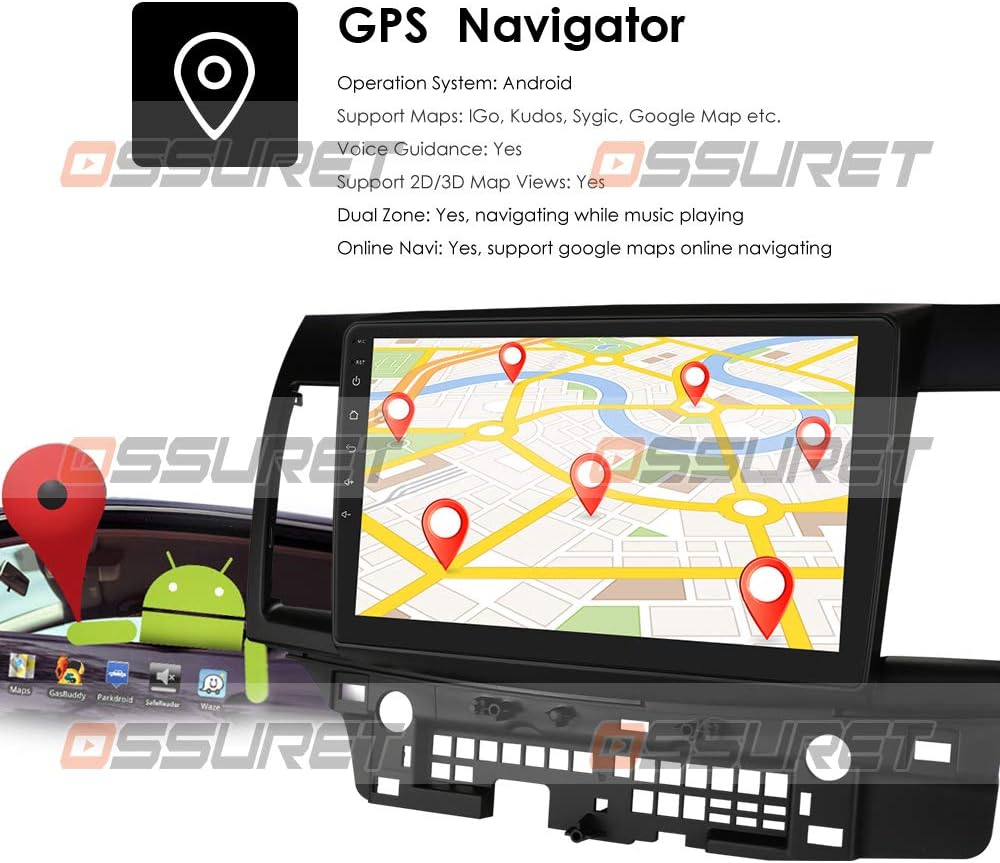
Gambar: A visual representation of the GPS navigation interface, showing a map with route markers and an Android robot icon, indicating Android OS functionality.
5.3 Radio (FM/DAB+)
- Radio FM: Access the FM radio application to scan for stations, save presets, and adjust settings. The FM frequency range is 87.5-108MHz.
- DAB/DAB+ (Optional): If a DAB+ box is connected (sold separately), you can enjoy digital audio broadcasting with higher sound quality and more channels. Connect the DAB+ box via a USB port.

Gambar: This image illustrates the connection of an optional DAB+ box via USB and provides a table comparing the advantages of DAB+ over traditional FM radio, such as CD-like quality and robust signal reception.
5.4 Fungsi Bluetooth
Hubungkan ponsel cerdas Anda melalui Bluetooth untuk panggilan bebas genggam dan streaming audio.
- Pasangan: Go to Bluetooth settings on the unit and your phone, search for available devices, and pair with the OSSURET unit.
- Panggilan bebas genggam: Make and receive calls directly from the unit's screen. The built-in microphone allows for clear communication.
- Bluetooth Music (A2DP): Stream audio from your phone to the car speakers. Control playback (play/pause, next/previous) from the unit.
- Buku telepon: Download your phone's contacts to the unit for easy access and searching.
- Log Panggilan: View dialed, received, and missed calls.

Gambar: This image displays the Bluetooth interface for phone calls, showing a dial pad on the car stereo screen and a smartphone displaying a similar interface, highlighting hands-free calling capability.
5.5 Pemutaran Multimedia
The unit supports various media formats for music, video, and images.
- Pemutar musik: Supports MP3, WMA, AAC, RM, FLAC, etc.
- Pemutar Video: Supports MPEG-1/2/4, H264, H263, VC1, RV, RMVB, DivX, VP8, AVS Stream, etc., with 1080P video decoding.
- Gambar Viewdia: Supports JPS, BMP, PNG, GIF formats.
5.6 Fungsi Layar Terpisah
Perform two tasks simultaneously by running two applications side-by-side on the screen. For example, navigate with Google Maps while listening to music or browsing a web halaman.
5.7 Kontrol Roda Kemudi
The unit supports your vehicle's original steering wheel controls, allowing you to manage music playback and volume without taking your hands off the wheel, enhancing driving safety.
5.8 Tautan Cermin
Mirror your smartphone's screen onto the head unit's display.
- For Apple iPhones (AirPin PRO): Connect your iPhone via Wi-Fi. The unit can create a Wi-Fi hotspot. Pencarian untuk this hotspot on your iPhone and connect. You can then mirror your iPhone's display, including the main menu, photos, videos, and online navigation maps.
- For Android Phones (Easy-Connect): Connect your Android phone using a USB charging cable. You can mirror the connected Android smartphone display, including the main menu, photos, videos, and online navigation maps.

Gambar: This image demonstrates the Mirror Link feature, showing an iPhone connected wirelessly via Wi-Fi (AirPlay) and an Android phone connected via USB (Easy-Connect), both mirroring their screens to the car stereo.
5.9 Belakangview Masukan Kamera
The system supports a rearview camera input (camera sold separately). When the vehicle is in reverse, the display automatically switches to the camera feed, providing a clear view of the area behind the car and assisting with parking and avoiding obstacles.

Gambar: This image illustrates the rearview camera input feature, showing a car backing up with a visual overlay of parking guidelines on the screen, indicating support for a backup camera system.
5.10 Android Market and App Installation
Access the Android Market (Google Play Store) to download and install a wide variety of applications, games, and utilities. The unit supports Android Package (APK) installer for manual app installation.

Gambar: This image depicts the Android Market feature, showing various app icons floating around a tablet-like device, symbolizing access to a wide range of applications. It also highlights the 16GB ROM and support for APK installation.
6. Pemeliharaan
- Pembersihan Layar: Gunakan kain lembut dan bebas serat untuk membersihkan layar sentuh. Untuk noda membandel, usap perlahan.ampBasahi kain dengan air atau cairan pembersih yang aman untuk layar. Hindari bahan kimia keras.
- Pembaruan Perangkat Lunak: Periodically check for system software updates to ensure optimal performance and access to new features. Updates can usually be found in the system settings menu.
- Pencadangan Data: Regularly back up important data or settings if applicable.
7. Penyelesaian masalah
| Masalah | Kemungkinan Penyebab | Larutan |
|---|---|---|
| Unit tidak menyala | Sambungan listrik longgar, sekering putus, masalah baterai kendaraan. | Check power cables and fuse. Ensure vehicle battery is charged. Consult a professional if needed. |
| Tidak ada suara | Volume terlalu rendah, mute diaktifkan, masalah kabel speaker. | Naikkan volume, periksa status bisu. Verifikasi koneksi speaker. |
| Sinyal GPS hilang atau tidak akurat | Antena GPS terhalang, penerimaan satelit buruk. | Pastikan antena GPS memiliki visibilitas yang jelas view dari langit. Pindah ke area terbuka. |
| Bluetooth tidak terhubung | Bluetooth off on unit or phone, device not in pairing mode. | Ensure Bluetooth is enabled on both devices. Put phone in pairing mode. Restart both devices. |
| Layar sentuh tidak responsif | Sistem membeku, gangguan perangkat lunak sementara. | Restart the unit. If issue persists, perform a factory reset (refer to system settings). |
8. Spesifikasi
| Fitur | Detil |
|---|---|
| Sistem Operasi | Android 10 |
| prosesor | Quad-Core ARM A7 4*1.2GHz |
| RAM | 1 GB |
| Memori Flash | 16 GB |
| Ukuran Layar | 10.1 inci |
| Resolusi | Ukuran 1024x600 |
| Dekode Video | 1080P HD H.265 2160p, Multi-format FHD video decoding |
| Rentang Frekuensi FM | 87.5-108MHz (EU/US) |
| Akses Internet Nirkabel | Sudah terpasang |
| Bahasa Indonesia: Bluetooth | Hands-free calls, A2DP music, Phonebook download |
| Bahasa Indonesia: GPS | Offline maps pre-loaded, supports Google Maps/Waze |
| Konektivitas | USB |
| Mode Keluaran Audio | Stereo |
| Jenis Instalasi | Dashboard Mount or Windshield Mount |
| Dimensi Produk | Ukuran 17.78x10.16x3.05 cm |
| Referensi Produsen | T1MTLC101001B |
9. Garansi dan Dukungan
OSSURET provides a garansi satu tahun and technical support for this car stereo system. If you have any questions regarding installation or the product itself, please contact us via message. We aim to respond within 24 hours to assist you.