
1. Pendahuluan
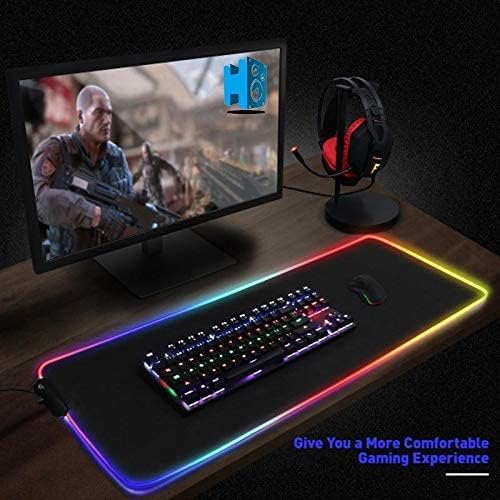
Terima kasih sudah membeliasing the RGB Gaming Mouse Pad. This large-sized mouse pad is designed to enhance your gaming and computing experience with its smooth surface, durable construction, and vibrant RGB LED lighting. This manual provides detailed instructions on how to set up, operate, and maintain your new mouse pad.

2. Isi Paket
- 1 x RGB Gaming Mouse Pad (80 x 30 cm)
- 1 x Kabel Daya USB
3. Spesifikasi
| Fitur | Detil |
|---|---|
| Nomor Model | JZL-001 |
| Dimensi (P x L x T) | 80 x 30 x 0.1 cm (31.5 x 11.8 x 0.04 inci) |
| Berat | 580 gram (1.28 pon) |
| Bahan | Karet |
| Jenis Pencahayaan | Lampu LED RGB |
| Warna | Hitam |
| Penggunaan yang Direkomendasikan | Permainan |
4. Pengaturan
Follow these steps to set up your RGB Gaming Mouse Pad:
- Unroll the mouse pad and place it on a flat, stable surface.
- Locate the USB port on the mouse pad's control module.
- Connect the provided USB power cable to the mouse pad's control module.
- Plug the other end of the USB cable into an available USB port on your computer or a compatible USB power adapter.
- The RGB lighting should illuminate automatically. If not, proceed to the operating instructions.

5. Petunjuk Pengoperasian
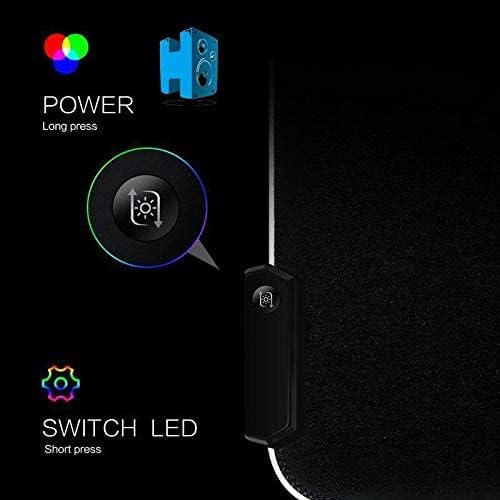
The RGB Gaming Mouse Pad features a single control button for managing its lighting effects:
- Daya Hidup/Mati: Press and hold the control button for approximately 3 seconds to turn the RGB lighting on or off.
- Switch LED Modes: Short press the control button to cycle through various lighting modes and colors. The available modes include:
- Pernapasan Asinkron
- Monochromatic Long Bright
- Asynchronous Neon
- Synchronous Neon
- Synchronous Discoloration
- Various static colors (Green, Red, Blue, White, Purple, Cyan, Light Green)

6. Pemeliharaan
To ensure the longevity and optimal performance of your mouse pad:
- Pembersihan: Gunakan yang lembut, damp cloth to wipe the surface of the mouse pad. Avoid using harsh chemicals or abrasive cleaners.
- Tumpahan: In case of liquid spills, immediately unplug the mouse pad and gently blot the liquid with a dry cloth. Allow it to air dry completely before reconnecting.
- Penyimpanan: When not in use, you can roll up the mouse pad for easy storage. Avoid sharp folds or creases.
- Hindari Suhu Ekstrem: Do not expose the mouse pad to extreme heat or cold, as this may damage the material or LED components.
7. Penyelesaian masalah
If you encounter any issues with your RGB Gaming Mouse Pad, please refer to the following common problems and solutions:
| Masalah | Kemungkinan Penyebab | Larutan |
|---|---|---|
| Lampu LED tidak menyala. | Tidak ada daya atau koneksi longgar. | Ensure the USB cable is securely connected to both the mouse pad and the power source. Try a different USB port or power adapter. Press and hold the power button for 3 seconds. |
| LED lights flicker or are dim. | Daya tidak mencukupi atau kabel rusak. | Connect to a USB port that provides sufficient power (e.g., a direct port on your computer, not a passive USB hub). Try using a different USB cable if available. |
| Cannot change LED modes. | Incorrect button press or unresponsive button. | Ensure you are performing a short press to cycle modes. If the button is unresponsive, try unplugging and re-plugging the mouse pad. |
8. Garansi dan Dukungan
This product comes with a standard manufacturer's warranty. For specific warranty terms and conditions, please refer to the product packaging or contact your retailer. If you require further assistance or have questions not covered in this manual, please contact the seller or manufacturer's customer support.
Harap simpan bukti pembelian Anda untuk klaim garansi.