
1. Pendahuluan
Thank you for choosing the Luminous Cruze 2.5 kVA Sine Wave Inverter and Red Charge RC 18000 Battery Combo. This system is designed to provide reliable power backup for your home, office, or shop. This manual provides essential information for the safe installation, operation, and maintenance of your inverter and battery system. Please read it thoroughly before use and retain it for future reference.
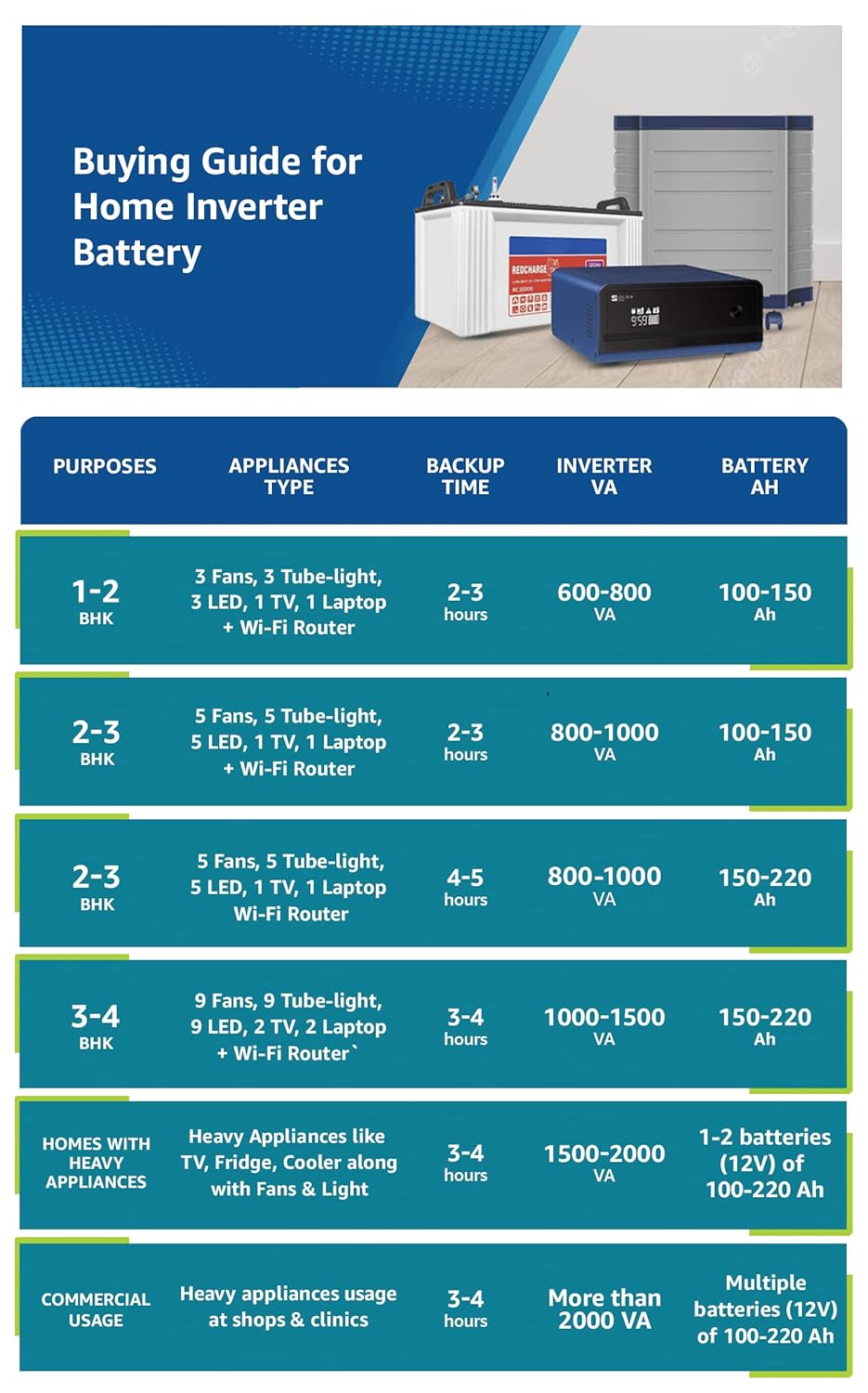
Image 1: Luminous Cruze 2.5 kVA Sine Wave Inverter and Red Charge RC 18000 Tall Tubular 150Ah Battery Combo. This image displays the inverter unit, a tall tubular battery, and a battery trolley, illustrating the complete power backup solution.
2. Informasi Keselamatan
Selalu perhatikan tindakan pencegahan keselamatan berikut untuk mencegah cedera atau kerusakan pada peralatan:
- Bahaya Listrik: Jangan membuka inverter casing. Tidak ada komponen di dalamnya yang dapat diservis oleh pengguna. Serahkan semua servis kepada teknisi yang berkualifikasi.
- Keamanan Baterai: Batteries contain corrosive acid. Avoid contact with skin, eyes, or clothing. Wear appropriate personal protective equipment (PPE) such as gloves and eye protection when handling batteries.
- Ventilasi: Ensure adequate ventilation around the inverter and batteries to prevent overheating and accumulation of flammable gases from batteries.
- Bahan Mudah Terbakar: Keep the system away from flammable liquids, gases, or other combustible materials.
- Air dan Kelembaban: Do not expose the inverter or batteries to rain, water splashes, or excessive humidity.
- Anak-anak dan Hewan Peliharaan: Jauhkan sistem dari jangkauan anak-anak dan hewan peliharaan.
- Pembumian yang Tepat: Pastikan inverter terhubung ke ground dengan benar sesuai dengan peraturan kelistrikan setempat.
3. Isi Paket
Verifikasi bahwa semua item ada dalam paket:
- 1 x Luminous Cruze 2.5KVA Sine Wave Inverter
- 3 x Luminous Red Charge RC 18000 150Ah Tall Tubular Batteries
- 1 x Buku Petunjuk
- 1 x Kartu Garansi
4. Petunjuk Penyiapan
Follow these steps for proper installation. It is recommended that installation be performed by a qualified technician.
4.1 Penempatan
- Pilihlah area yang sejuk, kering, dan berventilasi baik.
- Avoid direct sunlight, heat sources, and areas with high dust or humidity.
- Pastikan ada ruang yang cukup di sekitar inverter untuk aliran udara.
- Place the batteries on a sturdy, level surface, preferably in a battery trolley.
4.2 Koneksi Baterai
The Luminous Cruze 2.5 kVA Inverter operates on a 36V DC input, requiring three 12V batteries connected in series.
- Ensure the inverter is switched OFF and disconnected from the mains supply.
- Hubungkan terminal positif baterai pertama ke terminal negatif baterai kedua.
- Hubungkan terminal positif baterai kedua ke terminal negatif baterai ketiga.
- Hubungkan terminal negatif yang tersisa dari baterai pertama ke terminal negatif baterai inverter.
- Hubungkan terminal positif yang tersisa dari baterai ketiga ke terminal positif baterai inverter.
- Ensure all connections are tight and secure. Apply petroleum jelly to terminals to prevent corrosion.
4.3 Sambungan Listrik Utama dan Beban
- Connect the inverter's input power cord to a properly grounded wall outlet.
- Connect your appliances (lights, fans, TV, etc.) to the output sockets of the inverter. Do not overload the inverter.
5. Petunjuk Pengoperasian
5.1 Menghidupkan/Mematikan
- Untuk menghidupkan: After all connections are secure, switch on the main power supply to the inverter. Then, switch on the inverter's power button. The inverter will perform a self-test and then start operating.
- Untuk mematikan: First, switch off all connected appliances. Then, switch off the inverter's power button. Finally, disconnect the inverter from the mains supply.
5.2 Indicators and Display
The inverter features a display panel that provides real-time information about its status. Common indicators include:
- Mains ON: Indicates that the inverter is receiving power from the grid.
- Pengisian Baterai: Indicates that the batteries are being charged.
- Inverter ON: Indicates that the inverter is supplying power to the connected load from the batteries.
- Kelebihan muatan: Warns that the connected load exceeds the inverter's capacity. Reduce the load immediately.
- Baterai Lemah: Menunjukkan bahwa daya baterai rendah dan perlu diisi ulang.
5.3 Load Management and Backup Time
The backup time of your inverter system depends on the total load connected and the battery capacity. Refer to the guide below for typical appliance usage and estimated backup times.
| Tujuan | Appliances Type | Waktu Cadangan | Inverter VA | Baterai Ah |
|---|---|---|---|---|
| 1-2 BHK | 3 Fans, 3 Tube-light, 3 LED, 1 TV, 1 Laptop + Wi-Fi Router | 2-3 jam | 600-800VA | 100-150Ah |
| 2-3 BHK | 5 Fans, 5 Tube-light, 5 LED, 1 TV, 1 Laptop + Wi-Fi Router | 2-3 jam | 800-1000VA | 100-150Ah |
| 2-3 BHK | 5 Fans, 5 Tube-light, 5 LED, 1 TV, 1 Laptop Wi-Fi Router | 4-5 jam | 800-1000VA | 150-220Ah |
| 3-4 BHK | 9 Fans, 9 Tube-light, 9 LED, 2 TV, 2 Laptop + Wi-Fi Router | 3-4 jam | 1000-1500VA | 150-220Ah |
| Homes with Heavy Appliances | Heavy Appliances like TV, Fridge, Cooler along with Fans & Light | 3-4 jam | 1500-2000VA | 1-2 batteries (12V) of 100-220 Ah |
| Penggunaan Komersial | Heavy appliances usage at shops & clinics | 3-4 jam | More than 2000 VA | Multiple batteries (12V) of 100-220 Ah |
6. Pemeliharaan
Regular maintenance ensures optimal performance and longevity of your inverter and battery system.
6.1 Perawatan Baterai
- Pemeriksaan Ketinggian Air: For tall tubular batteries, regularly check the electrolyte level (every 2-3 months). Ensure the level is between the minimum and maximum marks.
- Mengisi ulang: If the water level is low, refill with distilled water only. Do not use tap water or acid.
- Pembersihan Terminal: Keep battery terminals clean and free from corrosion. If corrosion is present, clean with a wire brush and apply petroleum jelly.
6.2 Inverter Maintenance
- Pembersihan: Keep the inverter's exterior clean and free from dust. Use a dry cloth. Do not use liquid cleaners.
- Ventilasi: Ensure that the ventilation openings on the inverter are not blocked.
7. Penyelesaian masalah
Bagian ini membahas masalah umum yang mungkin Anda alami. Untuk masalah yang tidak tercantum di sini, hubungi dukungan pelanggan.
| Masalah | Kemungkinan Penyebab | Larutan |
|---|---|---|
| Inverter not turning ON | No mains supply, loose battery connections, discharged batteries, inverter switch OFF. | Check mains supply, ensure battery terminals are tight, allow batteries to charge, switch ON inverter. |
| Waktu pencadangan singkat | Overload, batteries not fully charged, old/weak batteries, low battery water level. | Reduce load, ensure proper charging, check battery health, refill battery water if low. |
| Alarm kelebihan beban | Terlalu banyak peralatan yang terhubung. | Segera cabut beberapa peralatan untuk mengurangi beban. |
| Inverter mengeluarkan suara yang tidak biasa. | Internal fault, fan obstruction. | Switch off the inverter and contact customer support. Ensure ventilation is clear. |
8. Spesifikasi
| Fitur | Spesifikasi |
|---|---|
| Tipe Inverter | Inverter Gelombang Sinus |
| Kapasitas Inverter | 2500VA / 36V |
| Max. Peak Load | 4368 Watt |
| Jenis Baterai | Baterai Tabung Tinggi |
| Kapasitas Baterai | 150 Ah / 12V (per battery) |
| Number of Batteries Supported | Tiga baterai 12V |
| Bentuk Gelombang Keluaran | Gelombang Sinus Murni |
| Frekuensi | 50Hz |
| Inverter Dimensions (LxWxH) | Ukuran 28x36.5x38 cm |
| Dimensi Baterai (PxLxT) | Ukuran 50.2x19.1x44.0 cm |
| Fitur Keamanan | MCB for input main protection, Auto over-load handling, Bypass switch |
9. Garansi dan Dukungan
9.1 Informasi Garansi
- Garansi Inverter: 2 tahun
- Garansi Baterai: 36 months (18 Months flat + 18 Months Pro-rata)
Harap simpan bukti pembelian dan kartu garansi Anda untuk klaim garansi apa pun.
9.2 Dukungan Pelanggan
For technical assistance, service, or warranty inquiries, please contact Luminous Power Technologies Private Limited:
Alamat: Plot 150 Honda City Road, Sector 44, Gurugram, Haryana, 122003
Refer to the warranty card or Luminous official websitus untuk rincian kontak terkini.