
Perkenalan
Terima kasih sudah membeliasing the Marvo Scorpion HG9055 USB Gaming Headset. This manual provides detailed instructions for setup, operation, maintenance, and troubleshooting to ensure optimal performance and longevity of your device. Please read this manual thoroughly before using the headset.
Informasi Keselamatan
- Avoid exposing the headset to extreme temperatures, humidity, or dust.
- Do not disassemble or attempt to repair the headset yourself. This may void the warranty and cause damage.
- Clean the headset with a soft, dry cloth. Do not use liquid cleaners.
- Mendengarkan dalam waktu lama dengan volume tinggi dapat menyebabkan kerusakan pendengaran. Sesuaikan volume ke tingkat yang nyaman.
- Jauhkan headset dari jangkauan anak-anak dan hewan peliharaan.
Isi Paket
Harap periksa isi kemasan setelah membuka kemasan. Jika ada barang yang hilang atau rusak, hubungi penjual.
- Marvo Scorpion HG9055 USB Gaming Headset
- User Manual (dokumen ini)
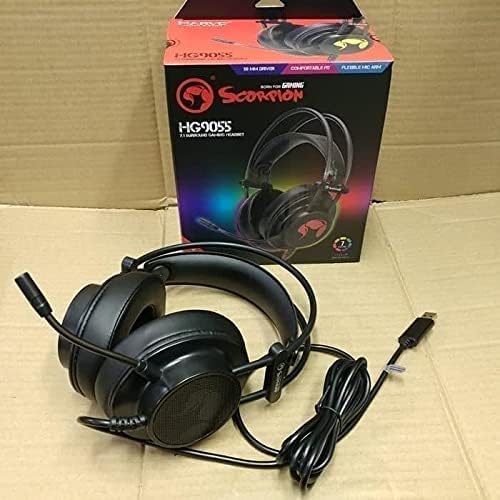
Image: The Marvo Scorpion HG9055 headset displayed next to its retail packaging, showing the product and its box.
Produk Selesaiview
The Marvo Scorpion HG9055 is a USB gaming headset designed for PC and laptop use, featuring 7.1 virtual surround sound, 50mm drivers, and a noise-cancelling microphone.

Image: A promotional view of the Marvo Scorpion HG9055 headset, detailing its 7.1 surround sound, USB connection, and customizable 7-color lighting features.
Komponen Utama:
- Ikat kepala yang dapat disesuaikan: Untuk kenyamanan saat dipakai.
- Earcup Over-Ear: Padded for comfort during extended use.
- Mikrofon Fleksibel: Noise-cancelling for clear communication.
- Konektor USB: For digital audio and power.
Petunjuk Pengaturan
- Hubungkan Headset: Plug the USB connector of the HG9055 headset into an available USB port on your PC or laptop.
- Instalasi Driver: The operating system (Windows/macOS) should automatically detect and install the necessary drivers. Allow a few moments for this process to complete.
- Verify Audio Output:
- Jendela: Right-click the speaker icon in the system tray, select "Sound Settings" or "Playback devices." Ensure "Marvo Scorpion HG9055" or a similar device name is selected as the default playback device.
- macOS: Go to "System Preferences" > "Sound" > "Output." Select "Marvo Scorpion HG9055" as the output device.
- Verify Microphone Input:
- Jendela: In "Sound Settings" or "Recording devices," ensure "Marvo Scorpion HG9055" is selected as the default recording device.
- macOS: In "System Preferences" > "Sound" > "Input," select "Marvo Scorpion HG9055" as the input device.
- Sesuaikan Kesesuaian: Adjust the headband and earcups for a comfortable and secure fit. Position the microphone approximately 2-3 cm from your mouth for optimal voice clarity.

Image: The Marvo Scorpion HG9055 headset resting on a stand, demonstrating its over-ear design and flexible microphone, ready for use.
Petunjuk Pengoperasian
Pemutaran Audio:
Once connected and configured, the headset will function as your primary audio output device.
- Kontrol Volume: Adjust the volume using the in-line control wheel on the headset cable or through your operating system's sound settings.
- Suara Surround Virtual 7.1: The headset supports 7.1 virtual surround sound. This feature may require specific software or settings within your game or audio application for full utilization. Refer to your game's audio settings for configuration.
Penggunaan Mikrofon:
- Microphone Activation: The microphone is active by default when connected. Use the in-line microphone mute switch (if present) to toggle the microphone on/off.
- Pembatalan Kebisingan: The integrated noise-cancelling microphone reduces background noise for clearer voice communication. Ensure the microphone is positioned correctly near your mouth.
- Volume Mikrofon: Adjust microphone sensitivity through your operating system's sound settings (Input/Recording devices).
Pemeliharaan
- Pembersihan: Use a soft, dry, lint-free cloth to wipe the earcups and headband. Do not use abrasive cleaners, alcohol, or solvents.
- Penyimpanan: Saat tidak digunakan, simpan headset di tempat yang bersih dan kering, jauhkan dari sinar matahari langsung dan suhu ekstrem. Hindari kabel yang kusut.
- Perawatan Kabel: Do not pull on the cable to disconnect the headset. Always grasp the USB plug.
Penyelesaian Masalah
| Masalah | Larutan |
|---|---|
| Tidak ada suara dari headset. |
|
| Mikrofon tidak berfungsi. |
|
| Kualitas suara buruk atau terdistorsi. |
|
Spesifikasi
| Nama Model | HG9055 |
| Konektivitas | USB (Kabel) |
| Faktor Bentuk Headphone | Di Atas Telinga |
| Pengemudi | 50MM |
| Suara Sekitar | 7.1 Suara Surround Virtual |
| Mikropon | Noise Cancellation, Included |
| Kontrol Kebisingan | Peredam Kebisingan Aktif (Mikrofon) |
| Kompatibel dengan | Komputer, Laptop |
| Warna | Hitam |
| Bahan | Plastik |
| Pabrikan | Marvo |
Garansi dan Dukungan
For warranty information and technical support, please refer to the warranty card included with your product or visit the official MARVO websitus. Simpan bukti pembelian Anda untuk klaim garansi apa pun.
Pabrikan: Marvo
Model: HG9055