
1. Pendahuluan
This manual provides essential information for the proper setup, operation, and maintenance of your TOSHIBA TS312 Sound Bar. Please read these instructions thoroughly before using the product to ensure optimal performance and safety.

Image 1: The TOSHIBA TS312 Sound Bar and its accompanying wireless subwoofer.
2. Pengaturan
2.1 Membongkar
Keluarkan semua komponen dari kemasan dengan hati-hati. Pastikan semua item yang tercantum di bawah ini ada:
- TOSHIBA TS312 Sound Bar
- Subwoofer Nirkabel
- Power Adapter/Cables
- Remote Control (dengan baterai)
- User Manual (dokumen ini)
2.2 Penempatan
Place the sound bar on a stable, flat surface directly in front of your television. Ensure there are no obstructions blocking the front of the sound bar. The wireless subwoofer can be placed anywhere in the room, preferably near a power outlet, for optimal bass performance. Maintain a minimum distance of 1 meter (3 feet) between the sound bar and the subwoofer for best wireless connection.
2.3 Koneksi
Before making any connections, ensure all devices are powered off.
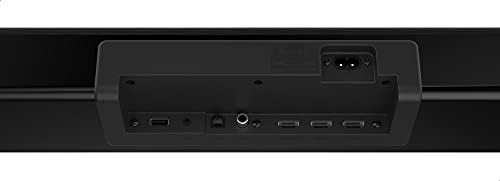
Image 2: Rear panel connections of the TOSHIBA TS312 Sound Bar, showing USB, optical, HDMI, and power inputs.
2.3.1 Sambungan Daya
- Connect the power cable to the AC IN port on the sound bar.
- Connect the power cable to the AC IN port on the subwoofer.
- Plug both power cables into a wall outlet.
2.3.2 Koneksi Audio
Pilih salah satu metode berikut untuk menghubungkan sumber audio Anda:
- HDMI (ARC): Connect an HDMI cable from the HDMI ARC port on the sound bar to the HDMI ARC port on your TV. This allows audio to be sent from the TV to the sound bar and enables TV remote control of the sound bar's volume.
- Optik: Connect an optical cable from the OPTICAL IN port on the sound bar to the optical output port on your TV or other audio device.
- Kabel USB: Masukkan drive USB ke port USB untuk pemutaran audio langsung.
3. Petunjuk Pengoperasian
3.1 Operasi Dasar

Image 3: Top-panel control buttons on the TOSHIBA TS312 Sound Bar, including power, input, and volume controls.
- Daya Hidup/Mati: Press the Power button on the sound bar or remote control.
- Kontrol Volume: Use the Volume + and Volume - buttons on the sound bar or remote control.
- Pemilihan Input: Press the Input button on the sound bar or remote control to cycle through available input sources (HDMI, Optical, Bluetooth, USB).
3.2 Pemasangan Bluetooth
- Turn on the sound bar and select the Bluetooth input mode. The indicator light will flash.
- Aktifkan Bluetooth di perangkat seluler Anda (ponsel pintar, tablet, dll.).
- Pencarian untuk 'TOSHIBA TS312' in the list of available devices and select it to pair.
- Once paired, the indicator light on the sound bar will stop flashing and remain solid. You can now play audio from your device through the sound bar.
3.3 Pemutaran USB
- Masukkan flash drive USB yang berisi audio filecolokkan ke port USB pada soundbar.
- Select the USB input mode using the Input button.
- Soundbar akan secara otomatis mulai memutar audio yang kompatibel. files from the USB drive. Use the remote control for playback controls (play/pause, skip track).
4. Pemeliharaan
4.1 Pembersihan
To clean the sound bar and subwoofer, use a soft, dry cloth. Do not use liquid cleaners, abrasive cleaners, or solvents, as these can damage the finish. Ensure the device is unplugged before cleaning.
4.2 Penyimpanan
If storing the unit for an extended period, unplug it from the power outlet and store it in a cool, dry place away from direct sunlight and extreme temperatures. It is recommended to keep the original packaging for storage.
5. Penyelesaian masalah
Lihat tabel di bawah untuk masalah umum dan solusinya.
| Masalah | Kemungkinan Penyebab | Larutan |
|---|---|---|
| Tidak ada daya | Kabel daya tidak tersambung; Stopkontak tidak berfungsi | Ensure power cables are securely connected to the sound bar, subwoofer, and a working wall outlet. |
| Tidak ada suara | Incorrect input selected; Volume too low; Audio cable not connected properly | Select the correct input source. Increase the volume. Check all audio cable connections. |
| Pemasangan Bluetooth gagal | Soundbar tidak dalam mode pemasangan; Perangkat terlalu jauh; Gangguan | Ensure sound bar is in Bluetooth pairing mode. Move device closer to sound bar. Turn off other Bluetooth devices. |
| Subwoofer tidak terhubung | Subwoofer tidak menyala; Gangguan | Ensure subwoofer is plugged in and powered on. Move subwoofer closer to the sound bar. |
6. Spesifikasi
Key technical specifications for the TOSHIBA TS312 Sound Bar:
| Fitur | Spesifikasi |
|---|---|
| Nama Merek | TOSHIBA |
| Nomor Model | TS312 |
| Daya Keluaran Maksimum Speaker | 300 Watt |
| Respon Frekuensi | Frekuensi 20kHz |
| Teknologi Konektivitas | Bluetooth, USB |
| Mode Keluaran Audio | Mengelilingi |
| Jenis Pemasangan | Meja |
| Jenis Pembicara | bilah suara |
| Fitur Khusus | Bahasa Indonesia: Bluetooth |
| Penggunaan yang Direkomendasikan untuk Produk | For Televisions, For Smartphones or Tablets, For Computers, For Gaming Consoles |
| Dimensi Paket | Ukuran 115x35x14 cm |
| Berat Barang | 11 kg |
7. Garansi dan Dukungan
Untuk informasi garansi dan dukungan pelanggan, silakan lihat kartu garansi yang disertakan dengan produk Anda atau kunjungi situs resmi TOSHIBA. websitus. Simpan bukti pembelian Anda untuk klaim garansi apa pun.