
Weilisi RL302W
Weilisi 12'' Ring Light Instruction Manual
Brand: Weilisi | Model: RL302W
Produk Selesaiview
The Weilisi 12-inch Ring Light is a versatile lighting solution designed for various applications, including photography, video recording, makeup application, and live streaming. It features 38 adjustable color modes, a sturdy 72-inch tall tripod stand, and two phone holders for enhanced functionality. Powered via USB, it offers convenient operation with an included Bluetooth remote control.
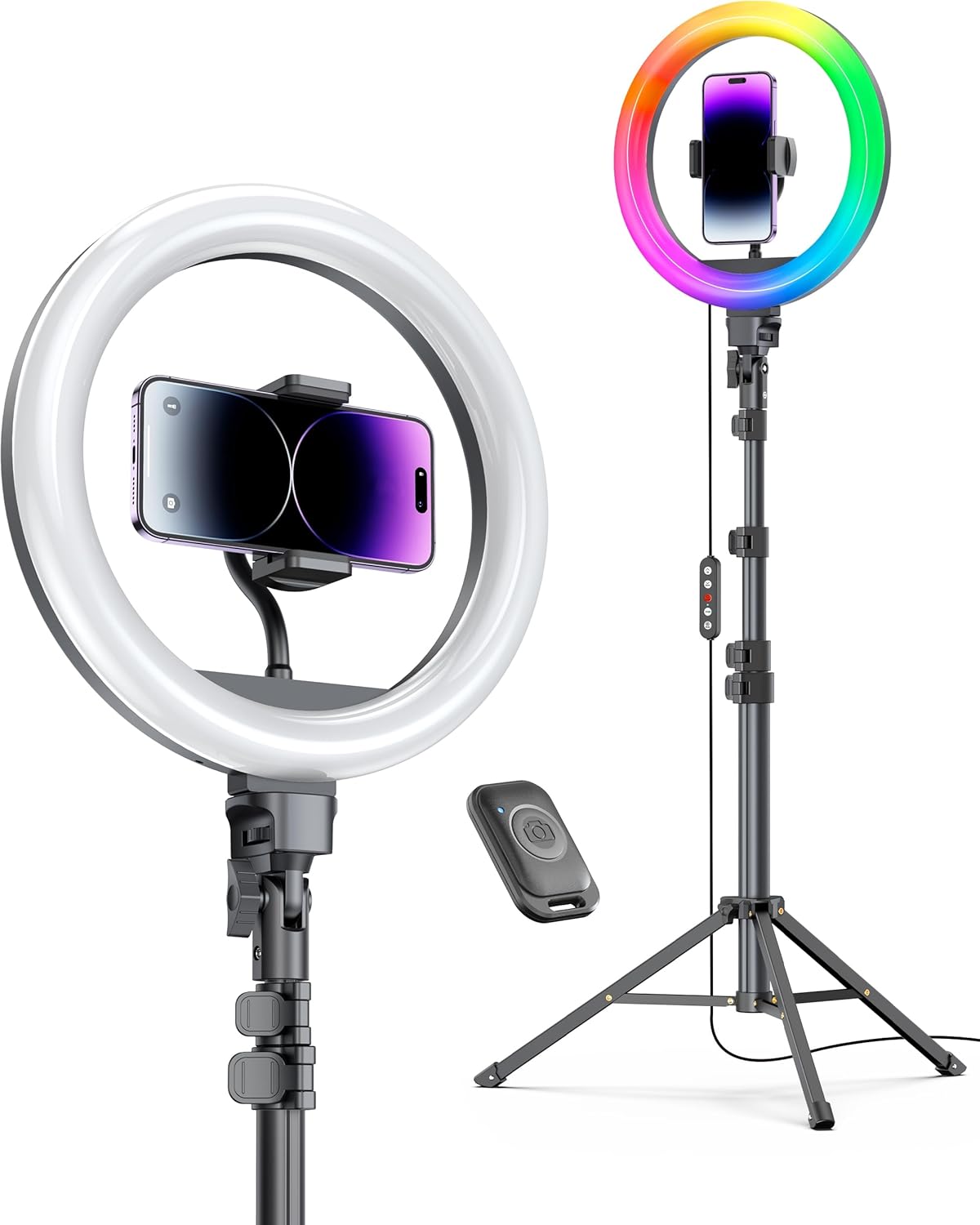
Image: The Weilisi 12-inch Ring Light, showcasing its circular LED light, adjustable tripod stand, and dual phone holders. One phone holder is positioned within the ring, and a Bluetooth remote is visible.
Panduan Pengaturan
Follow these steps to assemble and prepare your Weilisi Ring Light for use:
- Bongkar Komponen: Carefully remove all items from the packaging, including the ring light, tripod stand, phone holders, and USB cable.
- Assemble Tripod Stand:
Extend the tripod legs to a stable position. Loosen the locking clips on the stand sections to extend the height to your desired level (up to 72 inches). Securely tighten all locking clips.

Image: A person demonstrating the extension of the tripod stand, highlighting its adjustable sections and sturdy base.
- Attach Ring Light:
Screw the 12-inch ring light onto the top of the tripod stand. Ensure it is firmly attached to prevent wobbling.

Gambar: Close-up view of the ring light being screwed onto the tripod's mounting point, showing the secure connection.
- Install Phone Holders:
Insert the flexible arm of the phone holder into the designated slot within the ring light. Adjust the angle and position as needed. The phone holder allows for 360-degree rotation and 180-degree vertical rotation for optimal phone placement.

Image: A phone holder with a flexible arm being inserted into the center of the ring light, demonstrating its adjustable nature.
- Hubungkan Daya:
Plug the USB cable from the ring light into a compatible USB power source (e.g., USB wall adapter, power bank, computer USB port). For optimal performance, a 5V=2A adapter is recommended.
Petunjuk Pengoperasian
Control your Weilisi Ring Light using the inline remote and Bluetooth remote:
- Daya Hidup/Mati: Use the power button on the inline remote to turn the light on or off.
- Sesuaikan Kecerahan: Use the "Up" and "Down" buttons on the inline remote to increase or decrease the brightness level. The light offers 10 levels of adjustment.
- Ubah Mode Warna:
Press the "Mode" button on the inline remote to cycle through 3 normal light colors (Warm, Nature, Cold) and 35 special RGB color effects. The ring light smoothly simulates color temperatures from 2700K (warm) to 6500K (cool daylight).

Image: Depicts the three primary color temperature modes: Warm (2700K), Nature (4500K-5500K), and Cold (6500K), with a 10-level brightness adjustment scale.

Image: Illustrates the dynamic and static RGB color modes available, showcasing a spectrum of vibrant colors.
- Kontrol Jarak Jauh Bluetooth:
The included Bluetooth remote allows for hands-free control of your smartphone's camera shutter. Pair it with your iOS (6+) or Android device for convenient photo and video capture from up to 33 feet (10 meters) away.

Image: Shows the ring light in use with a smartphone, emphasizing the Bluetooth remote control's functionality and operating distance.
Pemeliharaan
To ensure the longevity and optimal performance of your Weilisi Ring Light, follow these general maintenance guidelines:
- Pembersihan: Use a soft, dry cloth to wipe down the ring light and tripod stand. Avoid using abrasive cleaners or solvents that could damage the finish.
- Penyimpanan: When not in use, collapse the tripod stand and store the ring light in a cool, dry place away from direct sunlight and excessive moisture.
- Tahan Air: The product has a "Waterproof" rating, but it is recommended to avoid prolonged exposure to water to prevent potential damage to electronic components.
Penyelesaian Masalah
If you encounter any issues with your Weilisi Ring Light, please refer to the following common solutions:
- Lampu Tidak Menyala:
- Ensure the USB cable is securely plugged into both the ring light and a working power source.
- Verify that the power source (e.g., wall adapter, power bank) is providing sufficient power (recommended 5V=2A).
- Check the inline remote for any damage or loose connections.
- Remote Bluetooth Tidak Terhubung:
- Pastikan Bluetooth diaktifkan pada telepon pintar Anda.
- Ensure the remote is within the 33ft (10m) operating distance.
- Unpair and re-pair the Bluetooth remote in your phone's settings.
- Check the remote's battery (if applicable, though typically USB powered).
- Tripod Tidak Stabil:
- Ensure all tripod locking clips are fully tightened after extending the stand.
- Letakkan tripod di atas permukaan yang datar dan stabil.
- Distribute the weight evenly if using multiple phone holders.
For further assistance, please contact Weilisi customer support.
Spesifikasi
| Fitur | Detil |
|---|---|
| Merek | Weilisi |
| Nomor Model | RL302W |
| Ukuran Cahaya Cincin | 12 inci |
| Tinggi Tripod | Hingga 72 inci (6 kaki) |
| Mode Warna | 38 (3 normal, 35 RGB effects) |
| Suhu Warna | 2700K - 6500K |
| Tingkat Kecerahan | 10 |
| Sumber Daya | USB (5V=2A adapter recommended) |
| Kompatibilitas Telepon | Most smartphones (iOS 6+, Android) |
| Jangkauan Jarak Jauh Bluetooth | Hingga 33 kaki (10 meter) |
| Berat Barang | 2.66 pon |
| Tingkat Tahan Air | Tahan air |
Informasi Garansi
Weilisi offers a Garansi Seumur Hidup for this product. This warranty covers manufacturing defects and ensures long-term reliability. Please retain your proof of purchase for any warranty claims.
Dukungan Pelanggan
For any questions, technical assistance, or warranty claims, please contact Weilisi customer support through their official channels. You can visit the Weilisi Store on Amazon untuk informasi lebih lanjut dan pilihan kontak.
Ask a question about this manual
Ask about setup, troubleshooting, compatibility, parts, safety, or missing instructions. Manuals+ will review the question and use this page’s manual context to help answer it.