
1. Pendahuluan
The BAOFENG UV-5R Pro is a high-performance, multi-functional two-way radio designed for reliable communication. It features long battery life, strong communication capabilities, flexible programming options, and multiple power adjustments, making it suitable for both professional and amateur radio enthusiasts. This manual provides essential information for the proper setup, operation, and maintenance of your device.
2. Isi Paket
Harap periksa paket dengan saksama untuk memastikan semua barang ada dan dalam kondisi baik. Jika ada barang yang hilang atau rusak, hubungi pengecer Anda.
- 1 × BAOFENG UV-5R Pro 8W Radio
- 1 × 3800mAh Li-ion Battery (Model: BL-5L)
- 1 × Support CHIRP Programming Cable
- 1 × Radio Case
- 1 × Handheld Microphone (MIC-01)
- 1 × Adaptor Daya
- 1 × Klip Sabuk
- 1 × Tali Tangan
- 1 × Panduan Pengguna (dokumen ini)
3. Produk Lebihview
Familiarize yourself with the main components of your BAOFENG UV-5R Pro radio and its accessories.

Gambar 3.1: BAOFENG UV-5R Pro Radio. This image displays the front of the UV-5R Pro radio, showing the display screen, keypad, and various function buttons. The antenna is attached at the top.
3.1. Mikrofon Genggam

Gambar 3.2: Handheld Microphone (Model: MIC-01). This image shows the handheld microphone accessory, which connects to the radio for external audio input and output. It features a speaker, microphone, and a coiled cable that can stretch up to 60 inches.
The included handheld microphone (MIC-01) provides convenient external control for transmitting and receiving audio. It features a speaker, microphone, and a push-to-talk (PTT) button. The coiled cable allows for flexible use.
3.2. Programming Cable

Gambar 3.3: Programming Cable. This image illustrates the USB programming cable used to connect the radio to a computer for channel and setting configuration via software like CHIRP.
The programming cable allows you to connect your UV-5R Pro radio to a computer for advanced configuration using compatible software, such as CHIRP. This enables customization of channels, frequencies, and other operational parameters.
3.3. 3800mAh Li-ion Battery

Gambar 3.4: 3800mAh Li-ion Battery (Model: BL-5L). This image shows the high-capacity Li-ion battery pack designed for the UV-5R Pro, providing extended operational time.
The radio is powered by a high-capacity 3800mAh Li-ion battery (Model: BL-5L), offering extended usage time. Proper battery installation and charging are crucial for optimal performance.
3.4. Radio Case
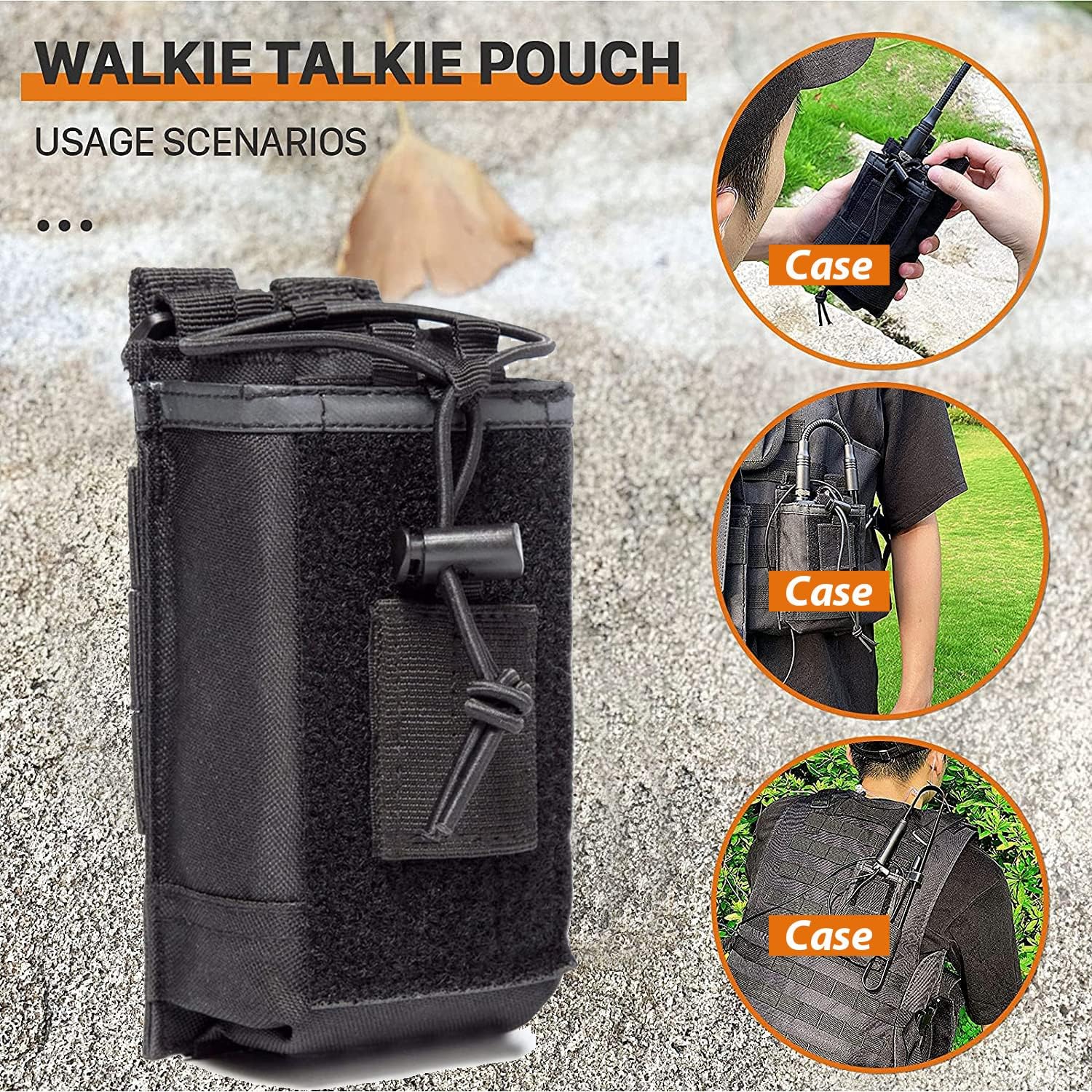
Gambar 3.5: Radio Case/Pouch. This image displays the included radio case, designed for secure and convenient carrying of the UV-5R Pro radio, suitable for various usage scenarios.
A durable radio case is included to protect your device during transport and use. It can be attached to belts or tactical gear for easy access.
4. Pengaturan
4.1. Pemasangan Baterai
- Sejajarkan baterai dengan alur di bagian belakang radio.
- Geser baterai ke atas hingga terkunci pada tempatnya.
- Untuk melepasnya, tekan kait pelepas baterai (biasanya di bagian bawah baterai) dan geser baterai ke bawah.
4.2. Pemasangan Antena
- Pasang antena searah jarum jam ke konektor di bagian atas radio hingga kencang dengan tangan. Jangan terlalu kencang.
- Ensure the antenna is securely attached before operation to prevent damage and ensure optimal signal.
4.3. Mengisi Baterai
- Hubungkan adaptor daya ke dudukan pengisi daya.
- Hubungkan adaptor daya ke stopkontak AC.
- Place the radio with the battery installed into the charging base. The charging indicator light will typically turn red while charging and green when fully charged.
- A full charge typically takes 4-5 hours. Do not overcharge the battery for extended periods.
5. Petunjuk Pengoperasian
5.1. Daya Hidup/Mati dan Kontrol Volume
- Nyalakan: Rotate the volume knob (located on top of the radio) clockwise until you hear a click.
- Matikan: Putar kenop volume berlawanan arah jarum jam hingga Anda mendengar bunyi klik.
- Penyesuaian Volume: Putar kenop volume searah jarum jam untuk menaikkan volume dan berlawanan arah jarum jam untuk menurunkan volume.
5.2. Pemilihan Saluran
- The UV-5R Pro supports both Frequency Mode (VFO) and Channel Mode (MR).
- Tekan tombol VFO/MR tombol untuk beralih antar mode.
- Dalam Mode Saluran, gunakan ATAS/BAWAH arrow keys or the keypad to select a stored channel.
- In Frequency Mode, enter the desired frequency directly using the keypad.
5.3. Mengirim dan Menerima
- Untuk mengirim, tekan dan tahan tombol PTT (Tekan-To-Talk) button on the side of the radio or the handheld microphone. Speak clearly into the microphone.
- Lepaskan PTT tombol untuk menghentikan transmisi dan kembali ke mode penerimaan.
- Pastikan Anda berada pada frekuensi atau saluran yang sesuai sebelum melakukan transmisi.
5.4. Penyesuaian Keluaran Daya
The UV-5R Pro offers multiple power output options (High, Medium, Low) up to 8W. This allows you to adapt to communication needs at different distances and environments, conserving battery life when high power is not required.
- Access the power setting through the radio's menu. Consult the on-screen menu for specific navigation steps.
- Select the desired power level (High, Medium, or Low).
5.5. Programming with CHIRP Software
For advanced channel management and customization, use the included programming cable and CHIRP software. CHIRP is a free, open-source program that allows you to manage your radio's memory channels, frequencies, and other settings from your computer.
- Instal driver yang diperlukan untuk kabel pemrograman di komputer Anda.
- Download and install the latest version of CHIRP software.
- Connect the programming cable to your computer's USB port and to the radio's accessory port.
- Nyalakan radio.
- Launch CHIRP and follow the software's instructions to read data from the radio, make changes, and write data back to the radio.
Note: Detailed instructions for CHIRP software can be found on the official CHIRP websitus atau melalui sumber online.
6. Pemeliharaan
- Pembersihan: Gunakan yang lembut, damp Gunakan kain untuk membersihkan bagian luar radio. Jangan gunakan bahan kimia keras atau pembersih abrasif.
- Perawatan Baterai: Simpan baterai di tempat yang sejuk dan kering saat tidak digunakan. Hindari sering mengosongkan daya baterai sepenuhnya untuk memperpanjang masa pakainya.
- Antena: Ensure the antenna connection is clean and free of debris. Avoid bending or stressing the antenna.
- Penyimpanan: Saat menyimpan radio untuk jangka waktu yang lama, lepaskan baterai dan simpan secara terpisah.
7. Penyelesaian masalah
| Masalah | Kemungkinan Penyebab | Larutan |
|---|---|---|
| Radio tidak menyala. | Baterai lemah atau tidak terpasang dengan benar. | Isi daya baterai atau pasang kembali dengan aman. |
| Tidak dapat mengirim atau menerima. | Frekuensi/saluran salah, antena tidak terhubung, atau baterai lemah. | Verify frequency/channel, ensure antenna is secure, charge battery. |
| Kualitas audio yang buruk. | Weak signal, incorrect squelch setting, or damaged microphone/speaker. | Adjust squelch, move to a better signal area, check microphone/speaker connections. |
| Masalah pemrograman dengan CHIRP. | Incorrect cable drivers, wrong COM port, or radio not in programming mode. | Install correct drivers, select proper COM port in CHIRP, ensure radio is on. |
8. Spesifikasi
| Fitur | Detil |
|---|---|
| Merek | BAOFENG |
| Nomor Model | UV-5R Pro |
| Warna | Hitam |
| Jumlah Saluran | 999 |
| Fitur Khusus | Dual Band, Long Range, Multiple Power Output Options (up to 8W) |
| Rentang Frekuensi | VHF/UHF (420-450MHz) |
| Jangkauan Bicara Maksimum | 8 Miles (approximate, depends on terrain and conditions) |
| Jil.tage | 7.4 Volt |
| Tingkat Tahan Air | Tahan Air |
| Jenis Baterai | 3800mAh Li-ion (Model: BL-5L) |
| Rata-rata Umur Baterai | 18 Jam (penggunaan umum) |
| Berat Barang | 250 gram |
| Impedansi | 50 Ohm |
| Jenis Tuner | Gelombang UHF/VHF |
| Pabrikan | Fujian Baofeng Electronics Co., Ltd |
9. Garansi dan Dukungan
BAOFENG offers a comprehensive warranty program for your UV-5R Pro radio:
- Badan Radio: Garansi 2 tahun.
- Aksesoris: Garansi 1 tahun.
- Kebijakan Pengembalian: Kebijakan pengembalian 30 hari tanpa alasan.
- Layanan Pasca Garansi: Maintenance services are available at your cost after the warranty period.
For any questions, technical assistance, or warranty claims, please contact BAOFENG customer support through the Amazon platform for a prompt response within 12 hours. Please provide your product model and purchase details when contacting support.