
1. Pendahuluan
The G-MARK G4000IEM is a professional UHF wireless in-ear monitor system designed for stage performances, studio recording, band rehearsals, and live events. It provides reliable, high-quality audio monitoring with features such as broad frequency response, low latency, strong anti-interference capabilities, and stable signal transmission over a wide coverage area.
Fitur Utama:
- Premium Monitoring System: Offers a broad frequency response of 50Hz-20KHz and less than 5ms latency for real-time audio monitoring.
- Anti-Interferensi Kuat: UHF receiver with PLL phase-locked frequency synthesis, covering 550 MHz-580 MHz with 100 adjustable frequencies.
- Stable Signal & Broad Coverage: Dual-antenna receiver with advanced digital signal processing for enhanced signal and extended range up to 160-320 feet.
- Practical & Durable Design: Constructed with high-quality brushed metal for longevity, featuring an intuitive LCD display and operation buttons.
- Sistem yang Dapat Diperluas: Designed to be an expandable wireless monitoring system.
- Pembatalan Kebisingan: Built-in noise cancellation for focused audio monitoring.
2. Informasi Keselamatan
Harap baca dan pahami semua petunjuk keselamatan sebelum mengoperasikan perangkat ini. Simpan manual ini untuk referensi di masa mendatang.
- Catu Daya: Use only the specified power adapter for the transmitter. Ensure the voltage sesuai dengan persyaratan perangkat.
- Baterai: The bodypack receiver requires two AA batteries (not included). Ensure correct polarity when inserting batteries. Do not mix old and new batteries, or different types of batteries. Remove batteries if the device will not be used for an extended period.
- Kelembaban: Do not expose the device to rain, moisture, or extreme humidity.
- Panas: Jauhkan perangkat dari sumber panas seperti radiator, ventilasi pemanas, kompor, atau peralatan penghasil panas lainnya.
- Ventilasi: Ensure proper ventilation for the transmitter unit, especially if rack-mounted. Do not block ventilation openings.
- Pembersihan: Bersihkan hanya dengan kain kering. Jangan gunakan pembersih cair atau aerosol.
- Pelayanan: Jangan mencoba untuk memperbaiki produk ini sendiri. Rujuk semua servis ke personel servis yang berkualifikasi.
- Perlindungan Pendengaran: Prolonged exposure to high volume levels can cause permanent hearing damage. Set the volume to a comfortable level before placing earphones in your ears.
3. Isi Paket
Carefully unpack your G-MARK G4000IEM system and verify that all items listed below are present and in good condition.
- G-MARK G4000IEM Transmitter Unit
- 2 x G-MARK G4000IEM Bodypack Receivers
- 2 x Earphone In-Ear
- 2 x Transmitter Antennas
- Adaptor Daya untuk Pemancar
- Audio Cables (e.g., 1/4" to 1/4" or XLR to 1/4")
- User Manual (dokumen ini)

Figure 3.1: G-MARK G4000IEM System Product List
4. Komponen Produk Lebih dariview
4.1. Bodypack Receiver
The bodypack receiver is a compact unit designed for personal monitoring. It features an antenna for signal reception, a frequency display, IR pairing window, battery compartment, volume adjustment knob, and a 3.5mm earphone input.

Figure 4.1: Bodypack Receiver Components
- Antena: Receives wireless signals from the transmitter.
- Tampilan Frekuensi: Menunjukkan frekuensi operasi saat ini.
- IR Pairing Window: Used for infrared synchronization with the transmitter.
- Kompartemen Baterai: Holds two AA batteries (not included).
- Tombol Pengatur Volume: Controls the output volume to the earphones.
- Masukan 3.5mm: Connects to the included in-ear earphones.
4.2. Unit Pemancar
The transmitter unit is the central hub of the system, sending audio signals wirelessly to the bodypack receivers. It features input jacks for audio sources, controls for channel selection, and a dampkenop penyesuaian.

Figure 4.2: Transmitter Unit Front Panel
- Damping Adjustment Knob: Reduces clicking sounds and provides a softer button feel.
- Layar LCD: Shows frequency, channel, and other operational information.
- Channel Controls (CH-A, CH-B): Buttons for selecting and adjusting frequencies for each channel.
- Tombol ATUR: Enters adjustment state for frequency selection.
- Jendela IR: For infrared synchronization with bodypack receivers.
- Tombol Daya: Turns the transmitter unit on or off.
- Port Antena: Connect the included antennas for signal transmission.
- Input Audio: (Typically XLR or 1/4" combo jacks on the rear, not visible in this image) Connect audio sources like mixing consoles.
5. Panduan Pengaturan
5.1. Koneksi Pemancar
- Connect the provided antennas to the antenna ports on the rear of the transmitter unit.
- Connect the power adapter to the transmitter's DC input and plug it into a suitable power outlet.
- Connect your audio source (e.g., mixing console, audio interface) to the audio input jacks on the transmitter using appropriate cables.
- Tekan tombol Daya untuk menghidupkan pemancar.
5.2. Pengaturan Penerima Bodypack
- Open the battery compartment on the bodypack receiver.
- Masukkan dua baterai AA, pastikan polaritasnya benar.
- Tutup tempat baterai.
- Connect the included in-ear earphones to the 3.5mm input jack on the bodypack receiver.
5.3. IR Pairing (Frequency Synchronization)
To ensure the bodypack receiver receives audio from the transmitter, you must synchronize their frequencies using the IR pairing function.

Figure 5.1: IR Match Process
- Pada pemancar, tekan MENGATUR button to enter the adjustment state for the desired channel (CH-A or CH-B).
- Gunakan ▲ (atas) atau ▼ (down) buttons to select the desired frequency.
- Turn on the bodypack receiver.
- Align the IR pairing window on the bodypack receiver with the IR window on the transmitter.
- Hold them in alignment until you hear a beep sound, indicating that the frequencies of the transmitter and the bodypack receiver are successfully matched. The frequency displayed on the bodypack should now match the transmitter.
6. Operasi
6.1. Daya Hidup/Mati
- Pemancar: Tekan tombol KEKUATAN button on the front panel. The display will illuminate.
- Bodypack Receiver: Putar HIDUP/MATI/Volume knob clockwise to power on. The display will illuminate. Turn counter-clockwise until it clicks to power off.
6.2. Pemilihan Frekuensi
The G4000IEM system offers 100 adjustable frequencies within the 550 MHz-580 MHz range to avoid interference.
- Pada pemancar, tekan MENGATUR button for the channel you wish to adjust (CH-A or CH-B). The frequency display will blink.
- Gunakan ▲ (atas) atau ▼ (down) buttons to cycle through available frequencies.
- Once the desired frequency is selected, press MENGATUR again to confirm, or wait a few seconds for it to automatically save.
- After changing the transmitter frequency, re-perform the IR pairing process (Section 5.3) to synchronize the bodypack receiver.
6.3. Penyesuaian Volume
Adjust the monitoring volume using the Tombol Penyesuaian Volume on the bodypack receiver. Start with a low volume and gradually increase it to a comfortable listening level to prevent hearing damage.
6.4. Jangkauan dan Kinerja Nirkabel
The system provides a stable signal range of 160-320 feet (approximately 50-100 meters) in optimal conditions. Obstacles such as walls and other wireless devices can affect performance.

Figure 6.1: Wireless Range and Dual Antenna System
6.5. Fungsionalitas Bluetooth
The G4000IEM system supports wireless Bluetooth transmission, allowing for additional connectivity options. Refer to the transmitter's display for Bluetooth pairing indicators.
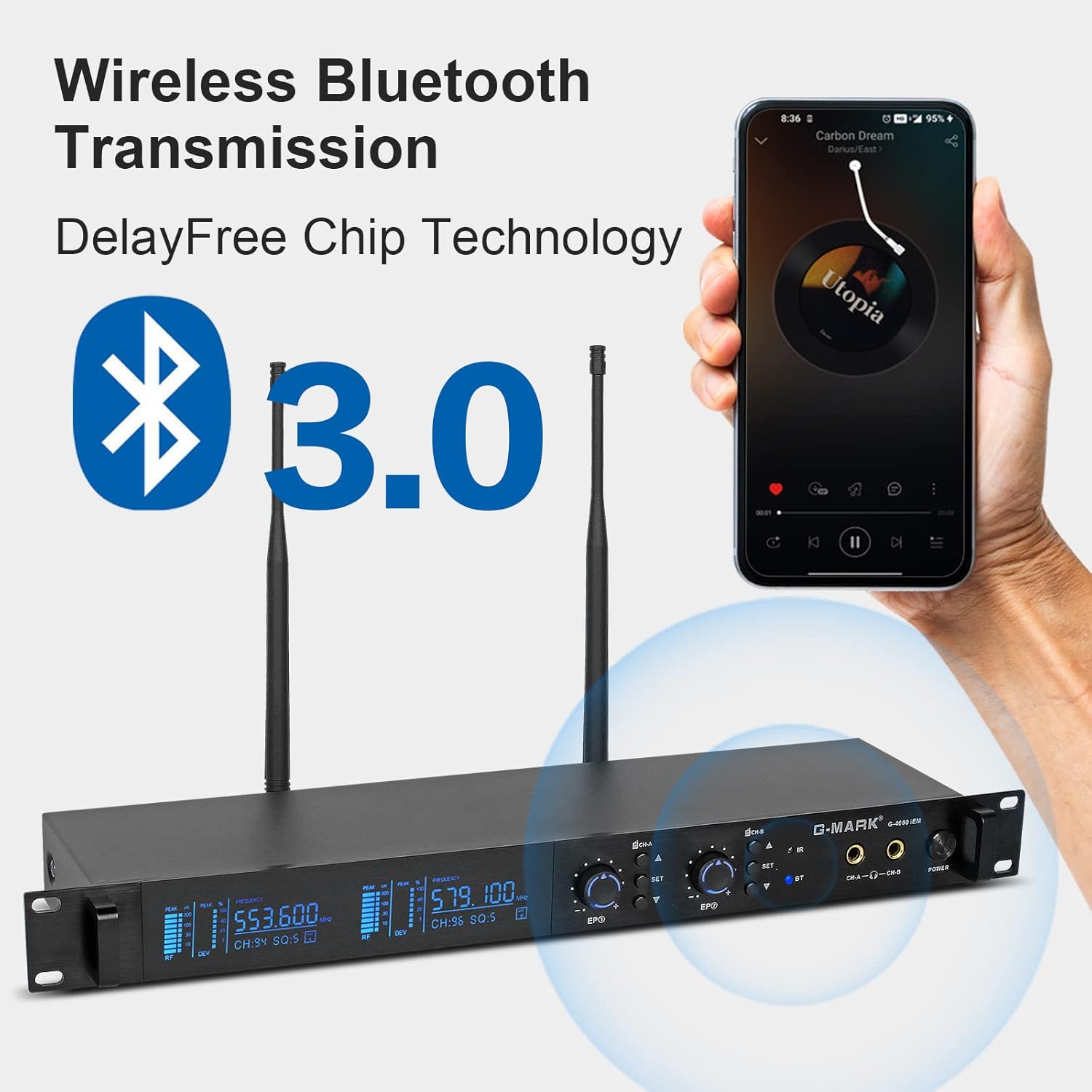
Figure 6.2: Wireless Bluetooth Transmission
7. Pemeliharaan
- Pembersihan: Use a soft, dry cloth to clean the surfaces of the transmitter and bodypack receivers. Do not use abrasive cleaners, solvents, or chemical sprays.
- Penyimpanan: Simpan sistem di tempat yang sejuk dan kering, jauh dari sinar matahari langsung dan suhu ekstrem saat tidak digunakan.
- Perawatan Baterai: Remove batteries from the bodypack receivers if they will not be used for an extended period to prevent leakage and damage.
- Manajemen Kabel: Avoid sharp bends or kinks in audio and power cables to prevent damage.
8. Penyelesaian masalah
If you encounter issues with your G-MARK G4000IEM system, refer to the following common problems and solutions:
- Tidak ada suara dari earphone:
- Ensure the bodypack receiver is powered on and has fresh batteries.
- Check that the earphones are securely plugged into the 3.5mm jack.
- Verify the bodypack receiver's volume knob is turned up.
- Confirm the transmitter is powered on and receiving an audio input signal.
- Perform IR pairing again to ensure frequencies are synchronized (Section 5.3).
- Interferensi atau Statis:
- Change the operating frequency on the transmitter (Section 6.2) and re-pair the bodypack.
- Ensure the transmitter and receiver antennas are fully extended and unobstructed.
- Move the transmitter and receiver away from other wireless devices, Wi-Fi routers, or large metal objects.
- Periksa keberadaan sumber interferensi RF lokal yang kuat.
- Jangkauan Nirkabel Pendek:
- Ensure antennas on both transmitter and receiver are properly connected and oriented.
- Minimize obstructions between the transmitter and receiver.
- Check battery levels in the bodypack receiver.
- Pemancar Tidak Menyala:
- Verify the power adapter is securely connected to both the transmitter and a working power outlet.
- Pastikan stopkontak listrik aktif.
9. Spesifikasi Teknis
| Fitur | Spesifikasi |
|---|---|
| Nomor Model | G4000IEM |
| Merek | TANDA G |
| Teknologi Konektivitas | Nirkabel (RF) |
| Teknologi Komunikasi Nirkabel | RF |
| Respon Frekuensi | 50Hz - 20KHz |
| UHF Frequency Coverage | 550 MHz - 580 MHz |
| Adjustable Frequencies | 100 |
| Latensi | Kurang dari 5ms |
| Range Nirkabel | 160FT - 320FT (approx. 50-100 meters) |
| Penempatan Telinga | Di Telinga |
| Faktor Bentuk | Di Telinga |
| Kontrol Kebisingan | Peredam Kebisingan Aktif |
| Soket Headphone | 3.5 mm Jack |
| Sumber Daya Bodypack | 2 x Baterai AA (tidak termasuk) |
| Bahan Penutup | Metal (Transmitter) |
| Jumlah Barang | 2 (Bodypacks) |
10. Garansi dan Dukungan
Genuine G-MARK audio products come with a Garansi produsen 1 tahun. This warranty covers defects in materials and workmanship under normal use. For troubleshooting, replacement of discontinuous/defective parts, or any other customer service inquiries, please contact G-MARK customer support through your retailer or the official G-MARK weblokasi.