
1. Pendahuluan
This user manual provides essential information for the safe and efficient operation of your Qoltec 51758 Mains & Inverter Adapter. This power adapter is designed to provide reliable power to compatible HP notebooks, featuring advanced protection mechanisms against overvoltage, overload, short circuit, and overheating. Please read this manual thoroughly before using the product to ensure proper functionality and longevity.
2. Petunjuk Keselamatan
To prevent injury or damage to your device, always follow these safety precautions:
- Jangan biarkan adaptor terkena air, uap air, atau kelembapan tinggi.
- Do not disassemble, modify, or attempt to repair the adapter. Refer all servicing to qualified personnel.
- Pastikan stopkontak listrik voltage is compatible with the adapter's specifications.
- Hindari meletakkan adaptor di bawah sinar matahari langsung atau di dekat sumber panas.
- Do not use the adapter if the cable or connector is damaged.
- Jauhkan dari jangkauan anak-anak.
- Unplug the adapter from the power outlet when not in use for extended periods.
3. Produk Lebihview
The Qoltec 51758 adapter is a compact and efficient power solution. It includes the main adapter unit and various interchangeable tips to ensure compatibility with a range of HP notebooks.
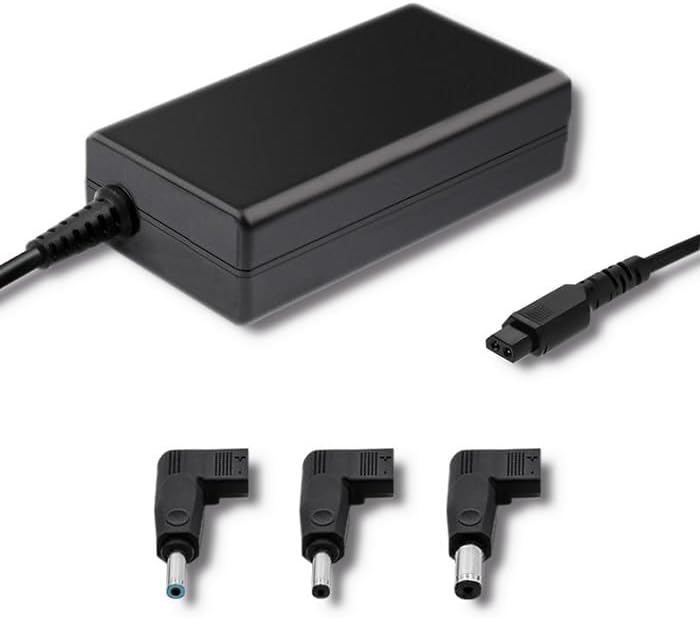
Gambar 3.1: Depan view of the Qoltec 51758 power adapter showing the main unit and three common interchangeable tips.

Gambar 3.2: Belakang view of the Qoltec 51758 power adapter, highlighting the AC input port and the three interchangeable tips.
The adapter features a robust design with a standard AC input port and a DC output cable that connects to the interchangeable tips. These tips ensure a secure and correct fit for various HP notebook models.
4. Pengaturan
- Identifikasi Ujung yang Tepat: Select the interchangeable tip that matches the power input port of your HP notebook. Ensure it fits snugly and securely.
- Connect the Tip: Attach the selected tip to the DC output cable of the Qoltec 51758 adapter.
- Connect to Notebook: Insert the connected tip into the power input port of your HP notebook.
- Hubungkan ke Stopkontak: Plug the AC input cable of the adapter into a standard wall power outlet.
- Verifikasi Koneksi: Confirm that the power indicator light (if present on your notebook or adapter) illuminates, indicating a successful power connection.
5. Operasi
Once properly set up, the Qoltec 51758 adapter operates automatically to provide power to your connected HP notebook. It will charge the notebook's battery and/or power the notebook directly.
- Pengisian daya: When connected, the adapter will charge your notebook's battery until it reaches full capacity.
- Daya Langsung: The adapter can also power your notebook directly, even if the battery is fully charged or removed (if supported by the notebook).
- Fitur Perlindungan: The adapter is equipped with built-in protections against overvoltage, overload, short circuit, and overheating. In case of an anomaly, the adapter may temporarily cease operation to protect itself and the connected device. Disconnect and reconnect to reset if this occurs.
6. Pemeliharaan
Proper maintenance ensures the longevity and optimal performance of your adapter.
- Pembersihan: Disconnect the adapter from all power sources and devices before cleaning. Use a soft, dry cloth to wipe the surface. Do not use liquid cleaners or aerosols.
- Penyimpanan: When not in use, store the adapter in a cool, dry place away from direct sunlight and extreme temperatures. Avoid tightly winding the cables to prevent damage.
- Perawatan Kabel: Regularly inspect the power cables and connectors for any signs of wear, cuts, or damage. Replace if necessary.
7. Penyelesaian masalah
| Masalah | Kemungkinan Penyebab | Larutan |
|---|---|---|
| Adapter not providing power. | No power from outlet; loose connection; damaged cable/adapter. | Check outlet with another device. Ensure all connections are secure. Inspect cables for damage. |
| Notebook not charging. | Incorrect tip used; notebook power port issue; adapter fault. | Verify the correct tip is used and fully inserted. Test with another compatible adapter if possible. |
| Adaptor terasa panas. | Normal operation under load; poor ventilation; overload. | Ensure adequate ventilation around the adapter. If excessively hot, disconnect and allow to cool. Reduce load if possible. |
If the problem persists after attempting these solutions, please contact Qoltec customer support.
8. Spesifikasi
| Fitur | Detil |
|---|---|
| Merek | Bahasa Indonesia: Qoltek |
| Model | 51758 |
| Apatage | 65 watt |
| Dimensi Produk | Ukuran 2.79x24.64x16.51 cm |
| Berat Barang | 214 gram |
| Perangkat yang Kompatibel | HP Notebooks |
| Fitur Perlindungan | Berlebihantage, Overload, Short Circuit, Overheat Protection |
| Jenis Konektor | Interchangeable DC Power Tips |
| Teknologi Konektivitas | Wired Power Adapter |
| Tanggal Pertama Tersedia | 29 April 2022 |
Catatan: Spesifikasi dapat berubah tanpa pemberitahuan.
9. Garansi dan Dukungan
Qoltec products are manufactured to high quality standards. For information regarding warranty coverage, terms, and conditions, please refer to the warranty card included with your product or visit the official Qoltec weblokasi.
For technical support, troubleshooting assistance, or inquiries about replacement parts, please contact Qoltec customer service through their official channels. Have your product model number (51758) and purchase details ready when contacting support.
Qoltec Official Weblokasi: www.qoltec.com (Catatan: Ini adalah tempat penampung URL, please refer to actual Qoltec websitus untuk dukungan.)