
1. Pendahuluan
This manual provides detailed instructions for the setup, operation, and maintenance of your WISE TIGER LED Digital Alarm Clock (Model CK-LED1302). Please read this manual thoroughly before use to ensure proper functionality and to maximize your product experience.

Image 1.1: WISE TIGER LED Digital Alarm Clock and its remote control.
2. Isi Paket
Harap verifikasi bahwa semua item ada dalam paket Anda:
- WISE TIGER LED Digital Alarm Clock (Model CK-LED1302)
- Kontrol Jarak Jauh
- Kabel Daya USB
- User Manual (dokumen ini)
- Fixed Bracket (for desk placement)
3. Produk Lebihview
The WISE TIGER LED Digital Alarm Clock features a modern 3D design, offering clear time display and multiple functions for various environments.
3.1 Fitur Utama
- Tampilan Waktu: Format 12 jam atau 24 jam.
- Tampilan Kalender: Shows date.
- Jam Alarm: With snooze function.
- Tampilan Suhu: Menunjukkan suhu sekitar.
- Kecerahan yang Dapat Disesuaikan: Automatic brightness sensor and manual adjustment via remote control.
- Fungsi Lampu Malam: Memberikan pencahayaan yang lembut.
- Fungsi Memori: Built-in battery retains time settings for 4-8 hours during power disconnection.
- Penempatan Serbaguna: Suitable for desk or wall mounting.

Image 3.1: Visual representation of the clock's main functions.
3.2 Komponen
Lihat diagram di bawah untuk penjelasan lebih lanjutview of the clock's components and connection points.
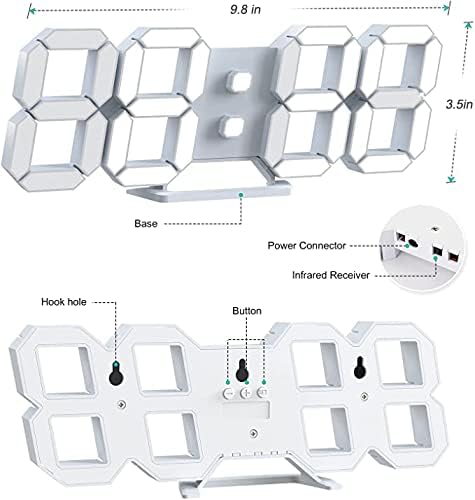
Gambar 3.2: Belakang view and dimensions of the clock, highlighting the power connector, infrared receiver, and mounting options.
- Menampilkan: Large 3D LED digits for time, date, and temperature.
- Basis: Removable stand for desk placement.
- Konektor Daya: USB port for power input.
- Penerima inframerah: Untuk sinyal kendali jarak jauh.
- Hook Holes: Untuk pemasangan di dinding.
- Tombol Kontrol: Located on the back for basic settings (Power, Up, Down, Set).
4. Pengaturan
4.1 Sambungan Daya
- Connect the provided USB power cable to the power connector on the back of the clock.
- Colokkan ujung lain kabel USB ke adaptor daya USB standar (tidak disertakan) atau port USB komputer.
- The clock will power on and display the time.
The clock is powered by the USB cable only. A built-in battery serves to record time settings when power is disconnected, ensuring settings are retained for 4-8 hours.

Image 4.1: Explanation of the clock's power and memory function.
4.2 Pilihan Penempatan
The clock can be used as a desk clock or a wall clock.
- Penempatan Meja: Attach the fixed bracket to the bottom of the clock. The angle of the bracket can be adjusted for optimal viewing.
- Pemasangan di dinding: Remove the fixed bracket if attached. Use the installation slots (hook holes) on the back of the clock to hang it securely on a wall using appropriate fasteners (not included).

Image 4.2: The clock configured for wall mounting and desk placement.
5. Petunjuk Pengoperasian
The clock's functions are primarily controlled using the included remote control. Basic settings can also be adjusted via the buttons on the back of the clock.
5.1 Pengaturan Waktu dan Tanggal
- Tekan tombol WAKTU button on the remote control to enter time setting mode.
- Gunakan UP Dan TURUN arrows to adjust the hour.
- Tekan WAKTU again to move to minute setting, then use UP Dan TURUN untuk menyesuaikan.
- Lanjutkan menekan WAKTU untuk beralih melalui pengaturan tahun, bulan, dan hari, menyesuaikan masing-masing dengan UP Dan TURUN.
- Tekan WAKTU Sekali lagi atau tunggu beberapa detik hingga pengaturan tersimpan secara otomatis.
5.2 Format 12/24 Jam
Untuk beralih antara format waktu 12 jam dan 24 jam, tekan tombol 12/24 jam pada kendali jarak jauh.

Gambar 5.1: Contohample of 12-hour and 24-hour time display.
5.3 Mengatur Alarm
- Tekan tombol ALARM button on the remote control to enter alarm setting mode.
- Gunakan UP Dan TURUN arrows to set the desired alarm hour.
- Tekan ALARM again to move to minute setting, then use UP Dan TURUN untuk menyesuaikan.
- Tekan ALARM sekali lagi atau tunggu hingga pengaturan tersimpan.
- Untuk mengaktifkan/menonaktifkan alarm, tekan tombol ALARM button briefly outside of setting mode. An alarm icon will appear/disappear on the display.
5.4 Fungsi Tunda
Saat alarm berbunyi, tekan tombol TIDUR SEBENTAR button on the remote control to temporarily silence the alarm. The alarm will sound again after a set interval (typically 5-10 minutes).

Image 5.2: The snooze alarm function in use.
5.5 Penyesuaian Kecerahan
The clock features both automatic and manual brightness control.
- Kecerahan Otomatis: The built-in sensor automatically adjusts the display brightness based on ambient light conditions.
- Kecerahan Manual: Tekan tombol TERANG button on the remote control to cycle through different brightness levels (e.g., high, medium, low).

Image 5.3: Automatic brightness adjustment based on ambient light.

Image 5.4: Manual adjustment through three brightness levels.
5.6 Tampilan Suhu
The clock automatically displays the ambient temperature. No manual adjustment is typically required for this function.
6. Pemeliharaan
To ensure the longevity and optimal performance of your WISE TIGER LED Digital Alarm Clock, follow these maintenance guidelines:
- Pembersihan: Use a soft, dry cloth to wipe the display and casing. Avoid abrasive cleaners, solvents, or spray cleaners directly on the clock.
- Kekuatan: Always use the provided USB cable for power. Ensure the power source is stable.
- Lingkungan: Jauhkan jam dari suhu ekstrem, sinar matahari langsung, dan kelembapan tinggi.
- Kontrol Jarak Jauh: Store the remote control in a safe place to prevent loss or damage. Ensure batteries are replaced when needed (typically 2 Lithium Ion batteries, included).
7. Penyelesaian masalah
If you encounter issues with your clock, refer to the following common problems and solutions:
| Masalah | Kemungkinan Penyebab | Larutan |
|---|---|---|
| Jam tidak menyala | Tidak ada listrik atau koneksi longgar | Ensure USB cable is securely connected and power source is active. Try a different USB port or adapter. |
| Kontrol jarak jauh tidak berfungsi | Remote batteries are dead or remote is out of range/blocked | Replace remote control batteries. Ensure remote is pointed at the clock's infrared receiver (refer to Image 3.2) and within 8 meters. Remove any obstructions. |
| Waktu tidak tepat | Time was not set precisely | Reset the time carefully, ensuring you set it at the exact second of the desired time. |
| Layar terlalu redup atau terlalu terang | Brightness setting needs adjustment | Tekan tombol TERANG button on the remote to cycle through manual brightness levels. Check if automatic brightness is functioning correctly in different light conditions. |
| Alarm tidak berbunyi | Alarm tidak diaktifkan atau disetel dengan tidak benar. | Ensure the alarm is set and activated (alarm icon visible). Verify the alarm time is correct. |
8. Spesifikasi
| Fitur | Detil |
|---|---|
| Merek | HARIMAU BIJAK |
| Nomor Model | CK-LED1302 |
| Jenis Tampilan | Digital |
| Warna | Putih |
| Dimensi Produk | 9.7"L x 3.5"T |
| Sumber Daya | Kabel Listrik (USB) |
| Baterai Memori | 2 Lithium Ion batteries (included), retains settings for 4-8 hours |
| Jenis Pemasangan | Wall Mount, Desk Mount |
| Fitur Khusus | Adjustable Brightness, Alarm Clock, Temperature Display, Date Display, 12/24 Hour Format |
| Bahan | Styrene Butadiene Acrylonitrile |
| Berat Barang | 0.317 ons (sekitar 9 gram) |
| UPC | 728990655931 |
9. Garansi dan Dukungan
For warranty information or technical support, please refer to the product packaging or contact the retailer where the product was purchased. Keep your purchase receipt as proof of purchase.