
GOCOM G9
Panduan Pengguna Radio Dua Arah Tahan Air GOCOM G9 IP67
Model: G9
Perkenalan
Thank you for choosing the GOCOM G9 IP67 Waterproof Two Way Radios. This manual provides essential information for the safe and efficient operation of your device. Please read it thoroughly before use and retain it for future reference. The G9 radios are designed for reliable communication in various environments, featuring IP67 waterproofing, NOAA weather alerts, and a built-in SOS function.
Apa yang ada di dalam kotak
Upon opening your GOCOM G9 package, please verify that all the following components are included:
- 2 x GOCOM G9 Walkie Talkies
- 1 x Headset
- 4 x Lubang Suara
- 1 x Charger (Original Fast Charger)
- 1 x Antena
- 1 x Tali
- Rechargeable Ni-MH Batteries (1200 mAh)
- Kabel Pengisian Daya USB

Image: The complete package contents of the GOCOM G9 Two Way Radios, including the radios, charging docks, batteries, and various accessories.
Fitur Produk
The GOCOM G9 Two Way Radios are equipped with a range of features designed for robust and reliable communication:
- 22 Saluran & 121 Kode Privasi: Offers 2,662 combinations for clear and private conversations.
- Peringatan Cuaca NOAA: Automatically scans 11 weather (WX) band channels and alerts you to severe weather updates (US only).
- Pengisian Daya USB: Comes with 18 AA Ni-MH rechargeable batteries (1200 mAh) and supports convenient USB charging via PC, car charger, or power bank.
- SOS Emergency Button & Flashlight: A dedicated red SOS button activates an emergency signal and a bright LED flashlight.
- IP67 Tahan Air & Tahan Debu: Provides complete protection from dust and can withstand water immersion for 30 minutes in 1-meter deep water.
- Water Activated LED & Floating Design: If dropped in water, a white LED activates automatically, and the radio floats, aiding in recovery in dark environments.
- Jarak jauh: Capable of up to 32 miles in open environments.
- High & Crystal Clear Audio: Ensures clear communication.
- VOX Hands-free: Allows for voice-activated transmission.

Image: Visual representation of the GOCOM G9's main features, such as its high luminous flashlight, NOAA weather channel, clear audio, floating design, SOS emergency light, and 22 channels.

Image: The GOCOM G9 radio demonstrating its IP67 waterproof capabilities, showing it submerged in water and highlighting its ability to float and its dewatering system.
Pengaturan
1. Pemasangan Baterai
- Pastikan radio dalam keadaan mati.
- Temukan penutup ruang baterai di bagian belakang radio.
- Open the cover and insert the provided Ni-MH rechargeable batteries, observing the correct polarity (+/-).
- Tutup penutup kompartemen baterai dengan aman.
2. Mengisi Baterai
The GOCOM G9 radios can be charged using the included original fast charger or a standard USB charging cable.
- Using the Fast Charger: Place the radio into the charging cradle. Ensure the charging contacts align. The indicator light on the charger will show charging status.
- Using USB Charging: Connect the USB charging cable to the Micro-USB Charging Port on the radio. Connect the other end to a PC, car charger, or power bank.
Berikan waktu yang cukup untuk pengisian penuh sebelum penggunaan pertama.
Petunjuk Pengoperasian

Image: Detailed diagram of the GOCOM G9 radio, labeling all buttons and ports for easy identification and function understanding.
1. Daya Hidup/Mati
Tekan dan tahan tombol Daya Hidup/Mati button (usually located on the side or front) until the display lights up or turns off.
2. Menyesuaikan Volume
Gunakan Atas/Bawah buttons (often integrated with channel selection) to adjust the listening volume.
3. Pemilihan Saluran
Tekan tombol Menu button to enter channel selection mode. Use the Atas/Bawah buttons to cycle through the 22 available channels. Press Menu again or wait for a few seconds to confirm your selection.
4. Setting Privacy Codes (CTCSS/DCS)
To ensure privacy, you can set privacy codes. After selecting a channel, press the Menu button again to access privacy code settings. Use Atas/Bawah to select one of the 121 privacy codes. Both radios must be on the same channel and privacy code to communicate.
5. Mengirim dan Menerima
- Untuk Mengirimkan: Tekan dan tahan tombol Tekan untuk Bicara (PTT) button located on the side of the radio. Speak clearly into the microphone. Release the PTT button when you are finished speaking.
- Untuk Menerima: Ensure the PTT button is not pressed. The radio will automatically receive transmissions on the selected channel and privacy code.
6. NOAA Weather Alert (US Only)
The G9 radio can scan for NOAA weather alerts.
- To activate NOAA Weather Scan, press the Weather Switch button (often labeled WX or similar). The radio will automatically scan through 11 available weather (WX) band channels and lock onto the strongest signal.
- If a severe weather alert is issued, the radio will sound an alarm.
Note: NOAA radio service may not be available in all areas.

Image: The GOCOM G9 radio shown in a cold, snowy setting, illustrating its durability and the NOAA Weather Alert function for extreme conditions.
7. SOS Emergency Button & Flashlight
For emergencies, the G9 features a dedicated SOS button and a powerful LED flashlight.
- Sinyal SOS: With the walkie talkie turned on, press and hold the red SOS button for 3 seconds. A red LED light will activate and emit an SOS signal.
- Senter: The built-in LED bulb provides strong illumination, functioning as a reliable flashlight. The Lamp Aktif/Nonaktif button controls the flashlight.
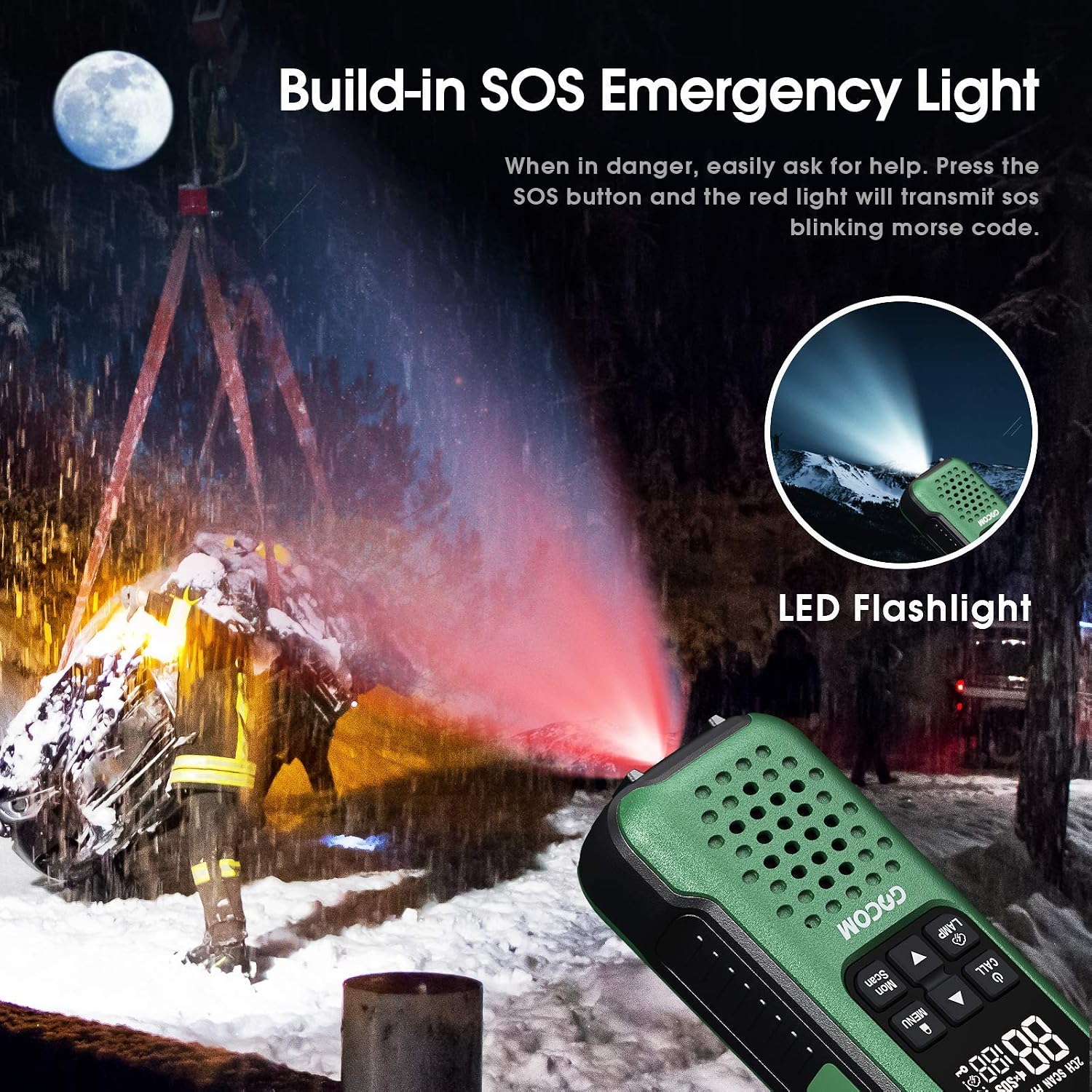
Image: The GOCOM G9 radio's SOS emergency light in action, emitting a red signal in a dark setting, alongside an illustration of its bright LED flashlight.
8. VOX Hands-free Operation
The VOX (Voice Operated Exchange) feature allows you to transmit without pressing the PTT button.
- To enable VOX, access the menu settings (refer to the full manual for detailed menu navigation).
- Adjust the VOX sensitivity level to suit your environment.
- Saat VOX aktif, radio akan secara otomatis mengirimkan sinyal ketika mendeteksi suara Anda.
9. Lock/Menu/Scan Functions
- Kunci: Tekan dan tahan tombol Kunci button to prevent accidental changes to settings. Repeat to unlock.
- Menu: Tekan tombol Menu button to access various settings such as channel, privacy codes, VOX, call tones, etc. Use Atas/Bawah untuk menavigasi dan Menu sekali lagi untuk konfirmasi.
- Pindai: Tekan tombol Pindai button to scan through active channels. The radio will stop on an active channel. Press Pindai untuk melanjutkan pemindaian.
Pemeliharaan
Proper maintenance will ensure the longevity and optimal performance of your GOCOM G9 radios.
- Pembersihan: Usap radio dengan lembut, damp cloth. Do not use harsh chemicals or abrasive cleaners. Despite its waterproof rating, avoid unnecessary exposure to water or submersion unless required.
- Perawatan Baterai:
- Always use the provided rechargeable Ni-MH batteries and charger.
- Jangan mencoba mengisi daya baterai yang tidak dapat diisi ulang.
- If storing the radios for an extended period, remove the batteries to prevent leakage.
- Recharge batteries fully before long-term storage and periodically during storage to maintain battery health.
- Penyimpanan: Simpan radio di tempat yang sejuk dan kering, jauhkan dari sinar matahari langsung dan suhu ekstrem.
- Perendaman Air: While IP67 rated, after immersion, ensure the radio is thoroughly dried, especially around the speaker and microphone areas, to maintain clear audio. The dewatering system helps, but manual drying is recommended.
Penyelesaian Masalah
| Masalah | Kemungkinan Penyebab | Larutan |
|---|---|---|
| Tidak Ada Daya | Batteries are low or not installed correctly. | Charge batteries fully. Ensure batteries are inserted with correct polarity. |
| Tidak dapat berkomunikasi dengan radio lain. | Different channel or privacy code. Out of range. | Pastikan semua radio berada pada saluran dan kode privasi yang sama. Dekati radio lainnya. |
| Poor Audio Quality / Static | Out of range. Interference. Low battery. | Move closer. Change channel/privacy code. Recharge batteries. |
| Radio Floats but LED doesn't activate in water | Water sensor obstructed or malfunction. | Ensure water sensor area is clean. If issue persists, contact support. |
| Peringatan Cuaca NOAA tidak berfungsi | Not in a NOAA service area. Feature not activated. | Verify you are in a NOAA service area. Ensure NOAA scan is activated via the Weather Switch button. |
Spesifikasi
| Fitur | Detil |
|---|---|
| Nomor Model | G9 |
| Merek | GOCOM |
| Saluran | 22 Saluran FRS |
| Kode Privasi | 121 (CTCSS/DCS) |
| Tingkat Tahan Air | IP67 Waterproof & Dustproof (Submersible 1m for 30 mins) |
| Jenis Baterai | Ni-MH Rechargeable (1200 mAh) |
| Pengisian daya | USB Charging, Original Fast Charger |
| Fitur Khusus | NOAA Weather Alert, SOS Emergency Button, LED Flashlight, Floating Design, Water Activated LED |
| Warna | White (as per product data, though images show green) |
| Komponen yang Termasuk | 2 Walkie Talkies, 1 Headset, 4 Earpieces, 1 Charger, 1 Antenna, 1 Lanyard |
Garansi dan Dukungan
For warranty information, technical support, or customer service inquiries regarding your GOCOM G9 Two Way Radios, please visit the official GOCOM store on Amazon or contact GOCOM customer support directly.