
1. Petunjuk Keselamatan Penting
Before operating your Kirby G6 Upright Vacuum Cleaner, please read and understand all safety instructions. Failure to follow these instructions may result in electric shock, fire, or serious injury.
- Selalu cabut steker penyedot debu dari stopkontak sebelum melakukan perawatan atau pembersihan.
- Jangan gunakan penyedot debu pada permukaan basah atau untuk menyedot cairan.
- Jauhkan rambut, pakaian longgar, jari, dan semua bagian tubuh dari celah dan bagian yang bergerak.
- Jangan mengambil apa pun yang terbakar atau berasap, seperti rokok, korek api, atau abu panas.
- Gunakan hanya sesuai petunjuk dalam manual ini. Gunakan hanya aksesori yang direkomendasikan produsen.
- Jangan gunakan dengan kabel atau steker yang rusak. Jika alat tidak berfungsi sebagaimana mestinya, terjatuh, rusak, ditinggalkan di luar ruangan, atau jatuh ke air, kembalikan ke pusat layanan.
- Berhati-hatilah saat membersihkan di tangga.
2. Produk Lebihview
The Kirby G6 Upright Vacuum Cleaner is designed for effective cleaning of various surfaces. It features a robust motor and a versatile design for both upright and handheld use with its included tool kit.

Gambar 2.1: Penuh view of the Kirby G6 Upright Vacuum Cleaner.

Figure 2.2: Close-up of the Kirby G6 vacuum cleaner head.
3. Pengaturan dan Perakitan
Your Kirby G6 vacuum cleaner comes partially assembled. Follow these steps to prepare it for use.
3.1 Handle Attachment
- Keluarkan semua komponen dari kemasannya dengan hati-hati.
- Align the handle assembly with the main vacuum body.
- Insert the handle into the designated slot until it clicks securely into place. Ensure the locking mechanism is engaged to prevent wobbling during operation.
3.2 Koneksi Kabel Listrik
The Kirby G6 operates on a standard 120 Volt corded electric power source. Ensure the power cord is untangled before plugging it into a grounded electrical outlet.
3.3 Tool Kit Assembly
Your vacuum includes a full tool kit for versatile cleaning. Refer to the specific tool instructions for attachment and use. Common tools include brushes for upholstery and crevice tools for tight spaces.
4. Petunjuk Pengoperasian
The Kirby G6 is designed for efficient cleaning across various indoor and outdoor surfaces, including upholstery. It features a single power level controlled by a push button and touch interface.

Figure 4.1: The Kirby G6 in operation on a carpeted surface.
4.1 Menghidupkan/Mematikan
- Sambungkan kabel daya ke stopkontak listrik yang sesuai.
- Locate the power button, typically on the main unit or handle. Press the button to turn the vacuum cleaner on.
- Untuk mematikan, tekan kembali tombol daya.
4.2 Adjusting for Different Surfaces
The vacuum head may have height adjustments for different carpet pile heights or hard floors. Consult the markings on the vacuum head for appropriate settings. For upholstery, use the specialized brush attachment from the tool kit.
4.3 Menggunakan Lampiran
To use attachments, detach the main vacuum head or convert the unit to handheld mode as per the design. Connect the desired tool (e.g., crevice tool, upholstery brush) firmly to the hose or attachment port.
5. Pemeliharaan
Regular maintenance ensures optimal performance and extends the life of your Kirby G6 vacuum cleaner. Always unplug the unit before performing any maintenance.

Figure 5.1: Airflow diagram showing the path of air and debris through the vacuum.

Figure 5.2: Filtration diagram detailing how dust and allergens are captured.
5.1 Changing Filter Bags
The Kirby G6 uses cloth filter bags for filtration. Replace the filter bag when it is approximately two-thirds full to maintain suction power and filtration efficiency.
- Cabut steker penyedot debu.
- Locate the filter bag compartment, usually on the side or front of the main unit.
- Open the compartment and carefully remove the full filter bag. Dispose of it properly.
- Insert a new Kirby filter bag, ensuring it is seated correctly and the seal is tight.
- Tutup kompartemennya dengan aman.

Gambar 5.3: Contohample of Kirby Micron Magic Filter Bags.
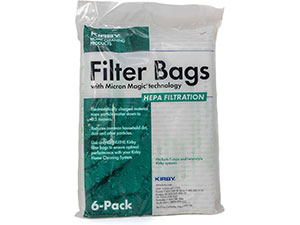
Gambar 5.4: Contohample of Kirby HEPA Filtration Filter Bags.
5.2 Brush Roll and Belt Inspection
Periodically check the brush roll for tangled hair or debris. Clean as necessary. Inspect the drive belt for wear or damage. Replace worn belts to maintain effective brush roll rotation.

Figure 5.5: Kirby replacement drive belts.
5.3 Pembersihan Umum
Lap bagian luar penyedot debu dengan iklanamp cloth. Do not use harsh chemicals or abrasive cleaners. Ensure all air vents are clear of obstructions.
6. Penyelesaian masalah
If you encounter issues with your Kirby G6, refer to the following common problems and solutions.
| Masalah | Kemungkinan Penyebab | Larutan |
|---|---|---|
| Kehilangan Hisap | Full filter bag, clogged hose/attachments, obstructed brush roll. | Replace filter bag, clear any blockages from hose/attachments, clean brush roll. |
| Mesin Penyedot Debu Tidak Menyala | Tidak ada aliran listrik, steker longgar, pemutus sirkuit terputus. | Check power cord connection, try a different outlet, reset circuit breaker. |
| Suara-suara yang Tidak Biasa | Object caught in brush roll or fan, worn belt, loose component. | Unplug and inspect brush roll for obstructions. Check belt for wear. Ensure all parts are securely fastened. |
| Rol Sikat Tidak Berputar | Broken or worn belt, brush roll jammed. | Replace drive belt. Clear any debris from brush roll. |
Jika masalah berlanjut setelah mencoba solusi ini, silakan hubungi dukungan pelanggan.
7. Spesifikasi
- Merek: Kirby
- Model: G6
- Sumber Daya: Listrik Kabel
- Jil.tage: 120 Volt
- Jenis Filter: Cloth (Note: While some specifications may list 'Bagless', this model utilizes replaceable cloth filter bags for optimal filtration.)
- Hisap Maksimum: 114.7 Centimeters (measurement unit as provided)
- Tingkat Kebisingan: 70 Desibel
- Faktor Bentuk: Upright, Handheld (with attachments)
- Komponen yang Termasuk: Main unit, Handle, Full Tool Kit (including various brushes)
- Metode Kontrol: Tombol Tekan, Sentuh
- Pemakaian Dalam/Luar Ruangan: Dalam Ruangan, Luar Ruangan
8. Informasi Garansi
This Kirby G6 Upright Vacuum Cleaner comes with a 5-year warranty. Please retain your proof of purchase for warranty claims. The warranty covers manufacturing defects and malfunctions under normal use. It does not cover damage caused by misuse, neglect, or unauthorized repairs.
For specific warranty terms and conditions, please refer to the warranty card included with your product or visit the official Kirby weblokasi.
9. Dukungan Pelanggan
For further assistance, technical support, or to order replacement parts, please contact Kirby customer service. You can typically find contact information on the official Kirby websitus atau dalam dokumentasi yang disertakan dengan pembelian Anda.
When contacting support, please have your model number (G6) and serial number (if applicable) ready.