
Perkenalan
This manual provides essential information for setting up, operating, maintaining, and troubleshooting your HP 2021 15.6-inch Full HD Laptop. This device is equipped with an Intel Celeron N4020 Processor, 8GB DDR4 RAM, and a 256GB Solid State Drive, designed for everyday computing tasks.
Apa yang ada di dalam kotak
Carefully unpack your new HP laptop and ensure all components are present.
- Laptop HP 15
- Adaptor daya AC Cerdas 45 W.
- Documentation (Setup poster)

Image: Contents of the HP laptop box, showing the laptop, AC adapter, and setup poster.
Pengaturan
1. Pengaktifan dan Pengisian Daya Awal
Before first use, connect the AC power adapter to the laptop's power port and then to a wall outlet. Allow the battery to charge sufficiently before disconnecting the power adapter.
2. Windows 10 S Mode Setup
Follow the on-screen prompts to complete the initial Windows 10 S mode setup. This includes selecting your region, keyboard layout, connecting to a Wi-Fi network, and signing in with or creating a Microsoft account.
3. Activating Microsoft Office 365
Your laptop includes a 1-year subscription to Microsoft Office 365. To activate:
- Luncurkan aplikasi Office apa pun (misalnya, Word, Excel).
- Start activation by signing in with your Microsoft account. Create one if you do not have one.
- Klik "Aktifkan Office."
- Sign in to your account and follow the prompts.
- Complete steps 1, 2, and 3 as indicated.
- Click "Refresh" once Office is ready.
- Open a document and accept the license agreement.
4. Switching Out of Windows 10 S Mode (Optional)
Windows 10 S mode is designed for security and performance, limiting app installations to the Microsoft Store. If you need to install apps from outside the Microsoft Store, you can switch to regular Windows 10 Home or Pro. This process is irreversible.
- Di PC Anda yang menjalankan Windows 10 dalam mode S, buka Pengaturan > Pembaruan & Keamanan > Pengaktifan.
- Di bagian "Beralih ke Windows 10 Home" atau "Beralih ke Windows 10 Pro", pilih Pergi ke Toko. (Ensure you do not click a "Go to the Store" link in an "Upgrade your edition of Windows" section if present.)
- Pada halaman "Keluar dari mode S" (atau yang serupa) yang muncul di Microsoft Store, pilih Mendapatkan tombol.
- After you see a confirmation message on the page, you will be able to install apps from outside of the Microsoft Store.
Gambar: Samping view of the HP laptop highlighting the SuperSpeed USB Type-C, SuperSpeed USB Type-A, HDMI 1.4b, RJ-45 Ethernet port, headphone/microphone combo, and media card reader.
Petunjuk Pengoperasian
Papan Ketik dan Touchpad
The laptop features a full-size keyboard with an integrated numeric keypad for enhanced productivity. The precision touchpad supports multi-touch gestures for intuitive navigation.
Menghubungkan Periferal
- Perangkat USB: Connect USB devices such as external drives, mice, or keyboards to the SuperSpeed USB Type-A or Type-C ports.
- Tampilan Eksternal: Gunakan port HDMI 1.4b untuk menghubungkan monitor atau proyektor eksternal.
- Jaringan: Connect an Ethernet cable to the RJ-45 port for a wired network connection.
- Suara: Colokkan headphone atau mikrofon eksternal ke jack kombinasi headphone/mikrofon.
Webkamera dan Mikrofon
The integrated HP True Vision 720p HD camera and dual array digital microphones are ready for online meetings and video calls. Ensure appropriate privacy settings are configured in Windows.
Pembaca Kartu Media
Insert compatible SD media cards into the multi-format SD media card reader to access photos and files.

Image: The HP laptop's display area, highlighting the HP True Vision 720p HD Camera, rich 6.5 mm micro-edge Full HD IPS display, Intel UHD Graphics, and tuned stereo speakers.
Pemeliharaan
Perawatan Baterai
To prolong battery life, avoid fully discharging the battery frequently. For optimal performance, use the provided HP 45W Smart AC power adapter. The laptop supports HP Fast Charge, allowing it to charge up to 50% in approximately 45 minutes when powered off.
Membersihkan Laptop
Gunakan kain lembut dan bebas serat untuk sedikit membersihkannya.ampBersihkan layar dengan air atau cairan pembersih layar. Untuk keyboard dan sasis, gunakan kain lembut dan kering. Hindari bahan kimia keras atau bahan abrasif.
Pembaruan Perangkat Lunak
Regularly check for and install Windows updates to ensure your system has the latest security patches and performance improvements. You can find these in Pengaturan > Pembaruan & Keamanan > Pembaruan Windows.
Penyelesaian Masalah
Laptop Not Powering On
- Pastikan adaptor AC terhubung dengan aman ke laptop dan stopkontak yang berfungsi.
- Verifikasi apakah stopkontak berfungsi dengan mencolokkan perangkat lain.
- Jika baterai benar-benar habis, mungkin diperlukan beberapa menit pengisian daya sebelum laptop dapat dinyalakan.
Battery Not Holding Charge / Only Works When Plugged In
- Check the battery health status in Windows settings.
- Ensure all drivers, especially power management drivers, are up to date.
- If the issue persists, the battery may require service or replacement. Contact HP Support for assistance.
Tidak Ada Koneksi Wi-Fi
- Periksa apakah Wi-Fi diaktifkan di pengaturan Windows.
- Mulai ulang router dan modem Anda.
- Pastikan driver Wi-Fi sudah terpasang dan selalu terbaru.
Masalah Tampilan
- If the screen is blank, try connecting an external monitor to determine if the issue is with the laptop's display or graphics card.
- Sesuaikan kecerahan layar menggunakan tombol fungsi.
Untuk masalah yang lebih rumit, lihat dukungan HP websitus atau hubungi layanan pelanggan mereka.
Spesifikasi
Below are the key technical specifications for your HP 2021 15.6" FHD Laptop:
| Fitur | Spesifikasi |
|---|---|
| Merek | HP |
| Nama Model | HP 2021 |
| Ukuran Layar | 15.6 inci |
| Resolusi Tampilan | FHD (1920 x 1080) IPS, Anti-Glare |
| Prosesor | Intel Celeron N4020 (up to 2.8 GHz, 2 Cores, 4MB Cache) |
| Memori RAM | Memori RAM DDR8 4 GB |
| Penyimpanan | SSD (Solid State Drive) 256GB |
| Grafik | Grafis Intel UHD |
| Sistem Operasi | Windows 10 S |
| Pelabuhan | 1x SuperSpeed USB Type-C, 2x SuperSpeed USB Type-A, 1x HDMI 1.4b, 1x RJ-45, 1x Headphone/Microphone Combo, 1x AC Smart Pin |
| Konektivitas Nirkabel | Wi-Fi 802.11a/b/g/n/ac, Bluetooth |
| Webkamera | Kamera HP True Vision 720p HD dengan mikrofon digital array ganda terintegrasi |
| Baterai | 3-Cell, 41 WHr, Integrated Lithium Ion |
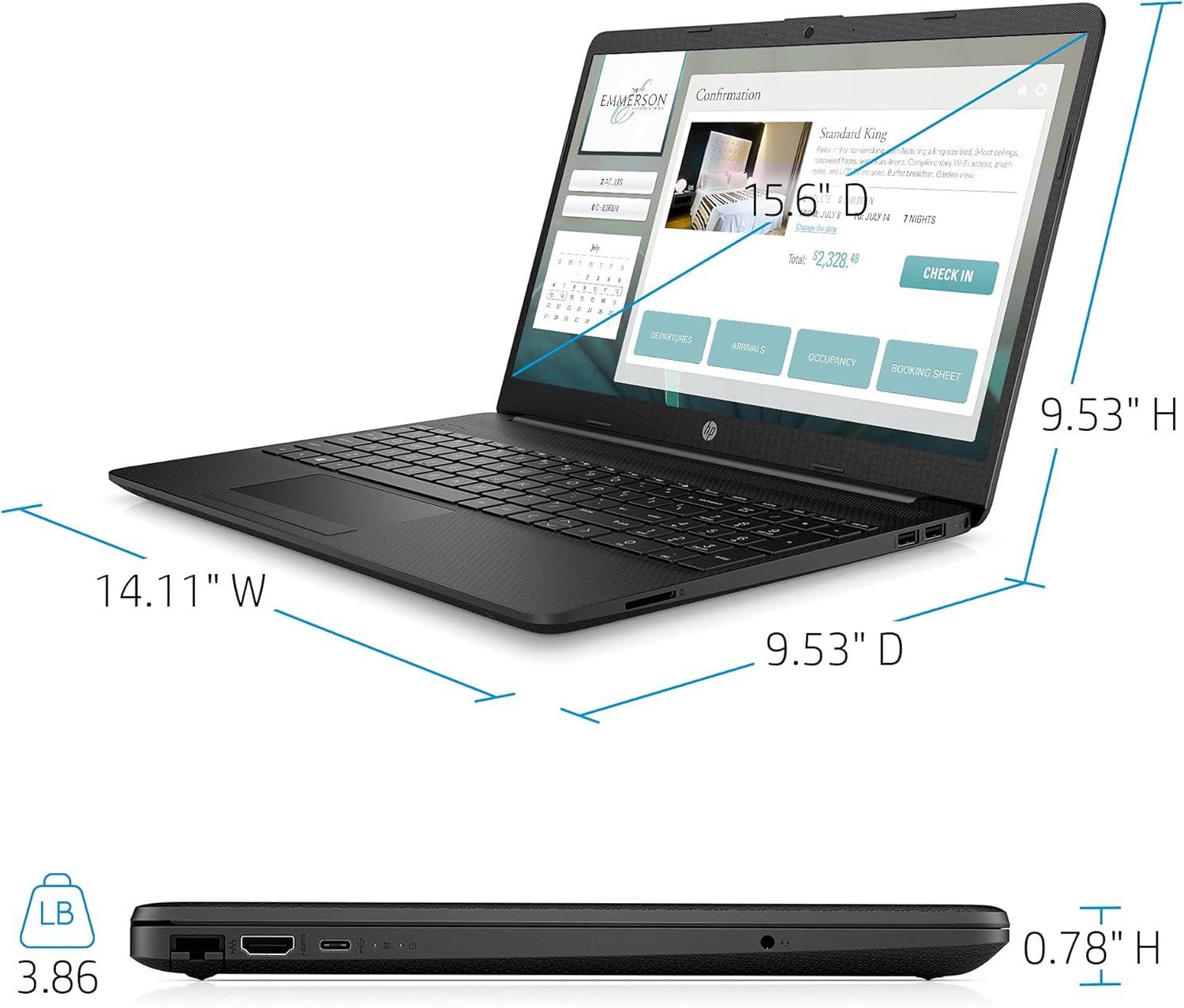
| Berat | 3.86 pon |
| Warna | Hitam |

Image: Physical dimensions of the HP laptop (14.11" W x 9.53" D x 0.78" H) and weight (3.86 lbs).
Informasi Garansi
Your HP 2021 15.6" FHD Laptop comes with a limited manufacturer's warranty. Please refer to the documentation included in the box for specific terms, conditions, and duration of your warranty. Keep your proof of purchase for warranty claims.
Mendukung
Untuk bantuan lebih lanjut, dukungan teknis, atau pertanyaan layanan, silakan kunjungi dukungan resmi HP. website or contact HP customer service directly. You can find contact information and resources on the HP weblokasi: