Perkenalan
The FreedConn T-COMVB Bluetooth Helmet Headset is designed to provide wireless communication for motorcyclists. This system allows for hands-free phone calls, music listening, FM radio, GPS voice prompts, and intercom communication between riders. It features Bluetooth 5.0 technology, noise cancellation, and a waterproof design for various riding conditions.
Apa yang ada di dalam kotak
Verifikasi bahwa semua komponen ada dalam paket Anda:
- FreedConn T-COMVB Bluetooth Headset Unit (x2 for 2-pack)
- Speaker Stereo
- Boom Microphone (for open-face/modular helmets)
- Soft-Wire Microphone (for full-face helmets)
- Helmet Mount Bracket (clip-on and adhesive options)
- Kabel Pengisian Daya USB
- Panduan Pengguna
- Bantalan Velcro untuk Speaker dan Mikrofon
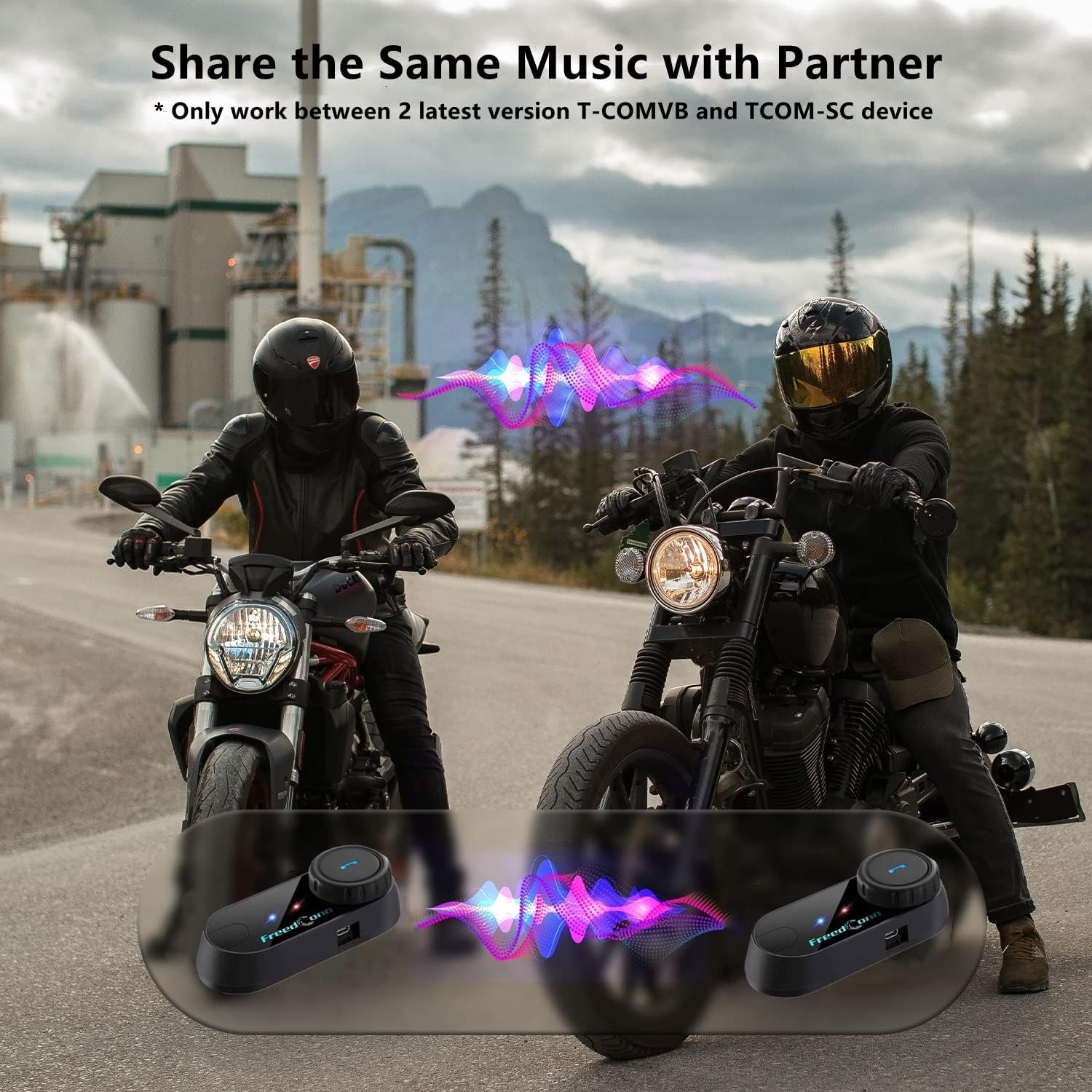
Image: Package contents for the FreedConn T-COMVB Bluetooth Helmet Headset 2-pack, showing all included accessories.
Pengaturan
1. Mengisi Daya Perangkat
Before first use, fully charge the T-COMVB unit. Connect the USB charging cable to the headset's charging port and a USB power source. The indicator light will show charging status.
- Waktu Pengisian: Kurang lebih 3-4 jam.
- Daya Tahan Baterai: Up to 7-8 hours of intercom, 10 hours of phone calls/music, 300 hours standby.

Image: Visual representation of the 400mAh battery capacity and estimated usage times for intercom, phone calls, and standby.
2. Microphone Selection
Pilih mikrofon yang sesuai dengan jenis helm Anda:
- Mikrofon Boom: Recommended for open-face, half, and modular flip-up helmets.
- Soft-Wire Microphone: Recommended for full-face and off-road helmets.
Connect the chosen microphone and speakers to the corresponding ports on the headset unit.
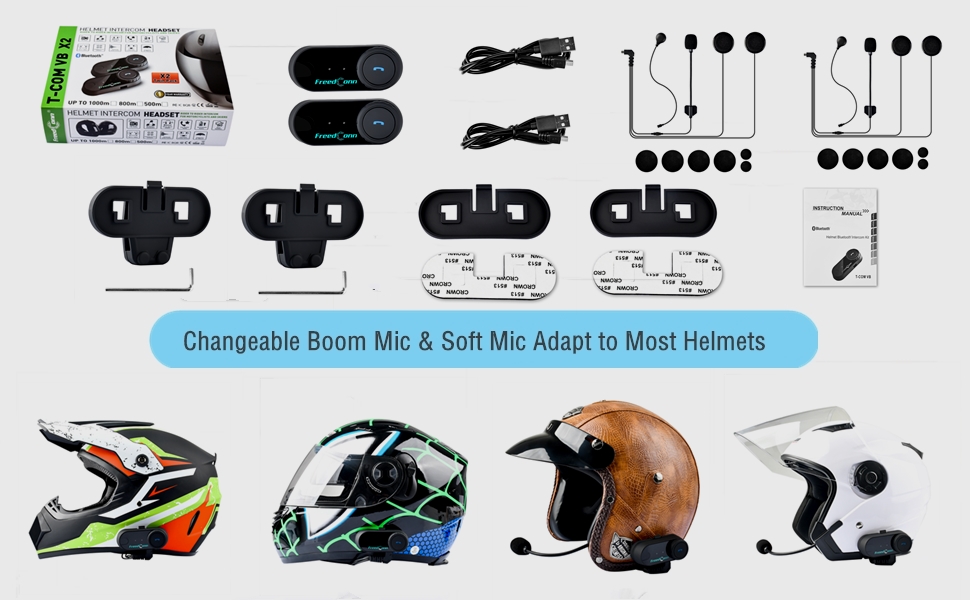
Image: Illustration demonstrating the compatibility of boom and soft-wire microphones with various helmet styles.
3. Pemasangan Helm
Mount the T-COMVB unit to the side of your helmet using either the clip-on bracket or the adhesive bracket. Ensure the unit is securely attached and the speakers are positioned correctly inside the helmet for optimal audio.

Image: A FreedConn T-COMVB unit securely installed on the exterior of a motorcycle helmet.
Petunjuk Pengoperasian
1. Daya Hidup/Mati
- Nyalakan: Tekan dan tahan tombol Daya hingga lampu indikator berkedip.
- Matikan: Tekan dan tahan tombol Daya hingga lampu indikator mati.
2. Pemasangan Bluetooth (dengan Ponsel/GPS)
To connect your T-COMVB to a Bluetooth-enabled device (phone, GPS):
- Ensure the T-COMVB is off.
- Tekan dan tahan tombol Daya selama kurang lebih 5-7 detik hingga lampu indikator berkedip merah dan biru bergantian, yang menandakan mode pemasangan.
- Aktifkan Bluetooth di ponsel atau GPS Anda dan cari perangkat yang tersedia.
- Select "FreedConn T-COMVB" from the list. If prompted, enter "0000" as the PIN.
- Setelah terhubung, lampu indikator akan berkedip biru perlahan.

Image: The T-COMVB headset demonstrating its Bluetooth 5.0 and universal connectivity with different devices and helmet types.
3. Intercom Communication (Rider to Rider)
The T-COMVB supports intercom communication with other T-COMVB or TCOM-SC units.
- Ensure both units are powered on and not connected to other Bluetooth devices.
- On one unit, press and hold the Intercom button until the indicator light flashes red and blue alternately.
- On the second unit, press the Intercom button once.
- Perangkat akan secara otomatis mencari dan memasangkan. Setelah terhubung, lampu indikator akan berkedip biru perlahan.
- To initiate intercom, press the Intercom button once. To end, press it again.
4. Pemutaran dan Berbagi Musik
Once paired with your phone, you can play music. Music sharing is supported between two latest version T-COMVB and TCOM-SC devices.
- Putar/Jeda: Tekan tombol Multifungsi sekali.
- Lagu Berikutnya: Rotate the Multi-function button clockwise.
- Lagu Sebelumnya: Rotate the Multi-function button counter-clockwise.
- Berbagi Musik: While music is playing, press and hold the Intercom button on both units to initiate music sharing.

Image: Two riders sharing music through their FreedConn T-COMVB headsets, highlighting the music sharing feature.
5. Radio FM
To activate the built-in FM radio:
- Nyalakan FM: Tekan tombol FM sekali.
- Pindai Saluran: Rotate the Multi-function button to scan for stations.
- Matikan FM: Press the FM button again.
6. Panggilan Telepon
When paired with your phone, the T-COMVB allows for hands-free calls.
- Menjawab Panggilan: Tekan tombol Multifungsi sekali.
- Akhiri Panggilan: Tekan tombol Multifungsi sekali selama panggilan.
- Tolak Panggilan: Tekan dan tahan tombol Multifungsi selama 2 detik.
- Panggil Ulang Nomor Terakhir: Tekan dua kali tombol Multifungsi.
- Voice Assistant (Siri/Google Voice): Press the Voice Assistant button to activate your phone's voice assistant.

Image: Icons representing voice assistant activation (Siri, Google Voice) for hands-free calling functionality.
Pemeliharaan
- Pembersihan: Gunakan yang lembut, damp cloth to clean the unit. Do not use harsh chemicals or solvents.
- Tahan Air: The unit is waterproof, but avoid submerging it in water. Ensure all ports are securely closed when exposed to rain.
- Perawatan Baterai: If the device is not used for an extended period, charge it at least once a month to preserve battery life.

Image: The FreedConn T-COMVB headset on a helmet, illustrating its waterproof feature in rainy conditions.
Penyelesaian Masalah
- Tidak Ada Daya: Ensure the unit is fully charged. Connect to a power source and check the charging indicator.
- Tidak Dapat Memasangkan Bluetooth: Ensure the unit is in pairing mode (red and blue flashing light). Make sure other Bluetooth devices are disconnected. Try restarting both the headset and your phone/GPS.
- Tidak Ada Suara dari Speaker: Check that the speakers are securely plugged into the headset unit. Ensure volume is not set to minimum.
- Interkom Tidak Terhubung: Ensure both units are T-COMVB or TCOM-SC models and are in intercom pairing mode. Keep units within range (up to 800 meters).
- Kualitas Audio Buruk/Kebisingan: Ensure the microphone is positioned correctly, close to your mouth. The T-COMVB features advanced noise cancellation technology.

Image: A visual representation of the advanced noise cancellation technology, demonstrating its effect on sound quality.
Spesifikasi
| Model | T-COMVB |
| Versi Bluetooth | 5.0 + EDR |
| Jangkauan Interkom | Hingga 800 meter (2-3 pengendara) |
| Kapasitas Baterai | 400 mAh |
| Waktu Pengisian Daya | 3-4 jam |
| Waktu Interkom | 7-8 jam |
| Phone Call/Music Time | 10 jam |
| Waktu Siaga | 300 jam |
| Tahan Air | Tahan air |
| Metode Kontrol | Voice, Manual Buttons |
| Fitur Khusus | Microphone Included, Noise Cancellation, FM Radio |
| Bahan | Polimer |
| Berat Barang | Approximately 1.15 pounds (for 2 units) |
Garansi dan Dukungan
For warranty information, technical support, or service inquiries, please refer to the contact details provided with your purchase or visit the official FreedConn websitus. Simpan bukti pembelian Anda untuk klaim garansi.