
1. Pendahuluan
This manual provides detailed instructions for the installation, operation, and maintenance of your Podofo Double Din Car Stereo. This unit features a 7-inch touchscreen, Android 10.1 operating system, Wireless Apple CarPlay, Wired Android Auto, GPS navigation, Bluetooth, WiFi, USB connectivity, FM/RDS radio, and support for a backup camera. Please read this manual thoroughly before use to ensure proper functionality and safety.

Gambar: Lebih dariview of the Podofo Double Din Car Stereo in a vehicle dashboard, highlighting its main functionalities.
2. Pengaturan dan Instalasi
2.1 Isi Paket
Sebelum pemasangan, verifikasi apakah semua komponen tersedia:
- Podofo Double Din Car Stereo Unit
- Kamera Cadangan
- Kabel listrik
- Antena GPS
- Kabel Masukan Kamera
- RCA Input and Output Cables
- 2 Kabel USB
- Screw/Metal Frame for installation
- Instruksi Manual (dokumen ini)

Gambar: Isi kemasan produk.
2.2 Dimensi
The installation size of the unit is 178mm x 103mm. The depth is 60mm. Ensure your vehicle's dashboard opening is compatible with these dimensions for a proper fit.
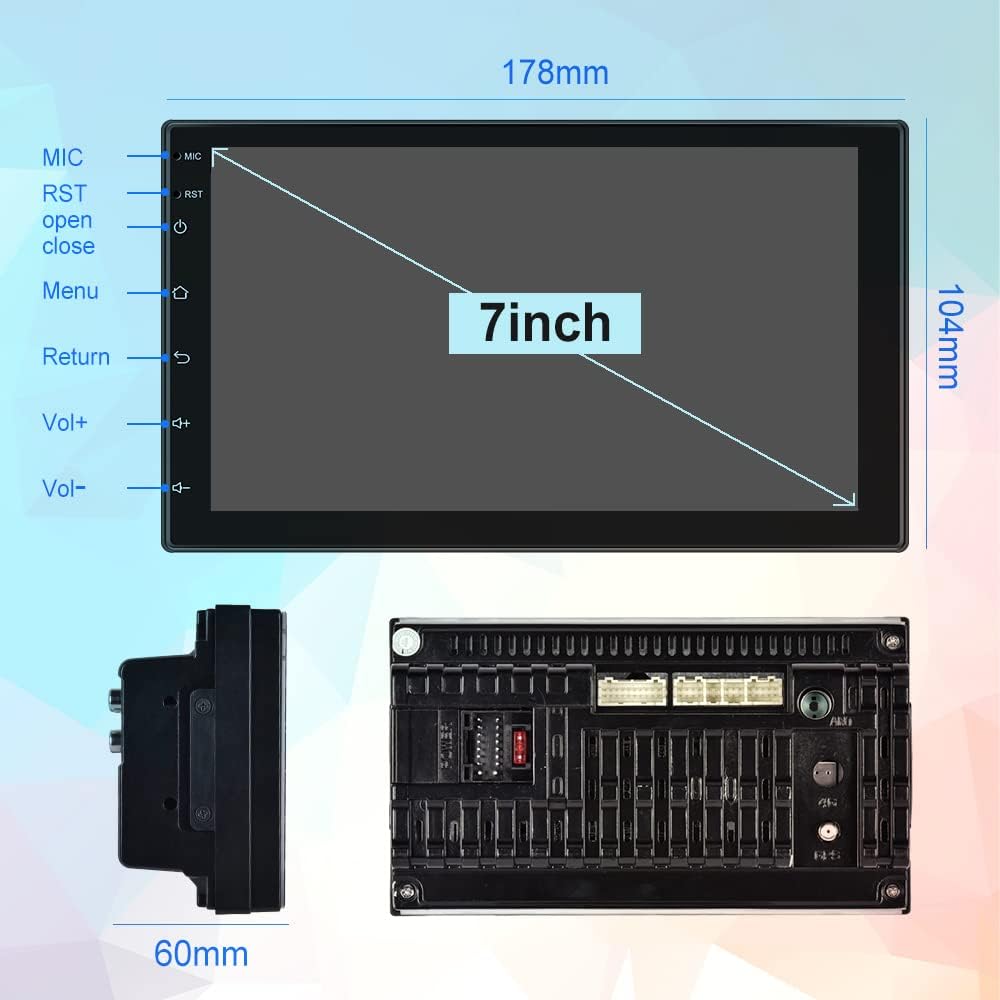
Image: Physical dimensions of the head unit.
2.3 Diagram Pengkabelan
Refer to the following diagram for correct wiring connections. Incorrect wiring can damage the unit or your vehicle's electrical system. If you are unsure, consult a professional installer.
- Kuning (B+): Constant Power Supply (+12V)
- Merah (ACC): Ignition Switch (+12V)
- Hitam (GND): Kabel tanah
- Orange (ILL): Illumination Backlight
- Blue (ANT CONT): Daya Antena Otomatis
- Brown (SW1) & Pink (SW2): Steering Wheel Control (connect to vehicle's steering wheel control wires)
- White/White-Black: Speaker Depan Kiri (+/-)
- Gray/Gray-Black: Speaker Depan Kanan (+/-)
- Green/Green-Black: Speaker Belakang Kiri (+/-)
- Purple/Purple-Black: Speaker Belakang Kanan (+/-)
- Reverse Input: Connect to vehicle's reverse light signal for backup camera activation.
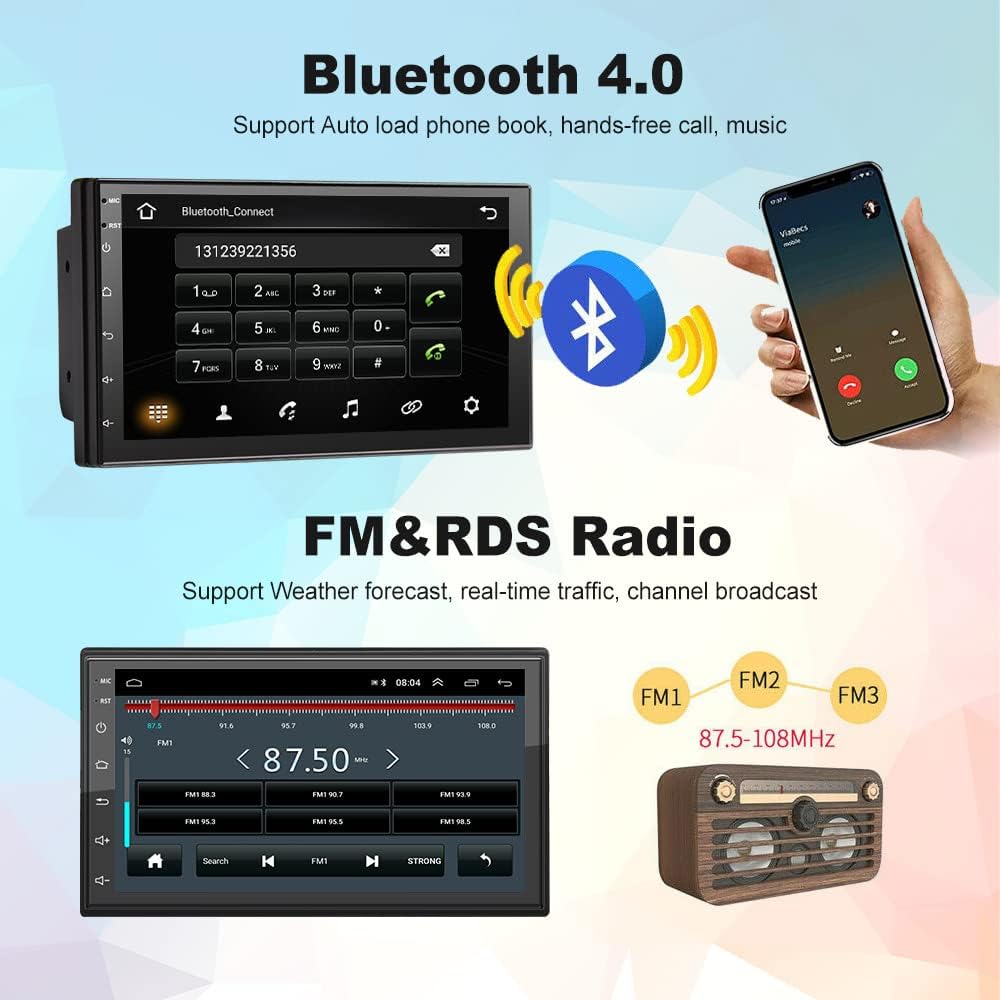
Image: Comprehensive wiring diagram for the car stereo.
2.4 Penyalaan Awal
After completing all wiring, turn on your vehicle's ignition. The unit should power on automatically. Follow any on-screen prompts for initial setup.
3. Petunjuk Pengoperasian
3.1 Wireless Apple CarPlay / Wired Android Auto
This unit supports both wireless Apple CarPlay and wired Android Auto. Connect your smartphone to access navigation, music, calls, and more directly on the stereo's screen.
- Koneksi CarPlay Nirkabel:
- Ensure Bluetooth is enabled on your iPhone and the car stereo.
- Pair your iPhone with the car stereo via Bluetooth (device name: CarBT, PIN: 0000).
- Open the 'ZLINK' application on the car stereo.
- If the connection is not successful, manually connect your iPhone to the car stereo's WiFi hotspot. Go to Car Settings > Android Settings > Network & Internet > Hotspot & tethering > Wi-Fi hotspot. Turn on the hotspot and note the network name (e.g., AndroidAP_B442). Connect your iPhone to this WiFi network.
- Once connected via WiFi, the ZLINK app should prompt you to use CarPlay. Confirm the connection.
- After manually connecting to the WiFi of the vehicle, delete the history record in the ZLINK app and then click ZLINK again to connect.
- Koneksi Otomatis Android Berkabel: Connect your Android phone to the stereo via a USB cable. Follow the on-screen prompts to enable Android Auto.
Video: Demonstrates the steps to connect an Android Double Din Car Stereo, including Bluetooth and ZLINK connections for smartphone integration.

Image: Wireless Apple CarPlay and Android Auto interfaces.
3.2 Konektivitas Bluetooth
The unit features Bluetooth 4.2 for hands-free calling, music streaming, and automatic phonebook loading. To connect:
- Go to the Bluetooth application on the stereo.
- Enable Bluetooth on your smartphone and search for 'CarBT'.
- Pair the devices using the default PIN '0000' if prompted.
- Once connected, you can make/receive calls and play audio through the stereo.
Image: Bluetooth connection interface on the car stereo.
3.3 Navigasi GPS & WiFi
The stereo includes built-in GPS navigation and WiFi connectivity.
- Navigasi GPS: Supports online and offline maps. You can download offline maps directly from the Play Store.
- Akses internet nirkabel: Connect to your phone's hotspot or a local WiFi network to browse websites and download apps like Chrome, Waze, IGO, Sygic, etc.
Radio 3.4 FM/RDS
Access FM radio stations and receive RDS (Radio Data System) information, which displays station names, program content, and other relevant data.
Image: FM radio interface with RDS display.
3.5 Kontrol Roda Kemudi (SWC)
The unit supports learning functions for your original car's steering wheel controls. This allows you to control the stereo's functions (e.g., volume, track skip) directly from your steering wheel for convenience and safety.
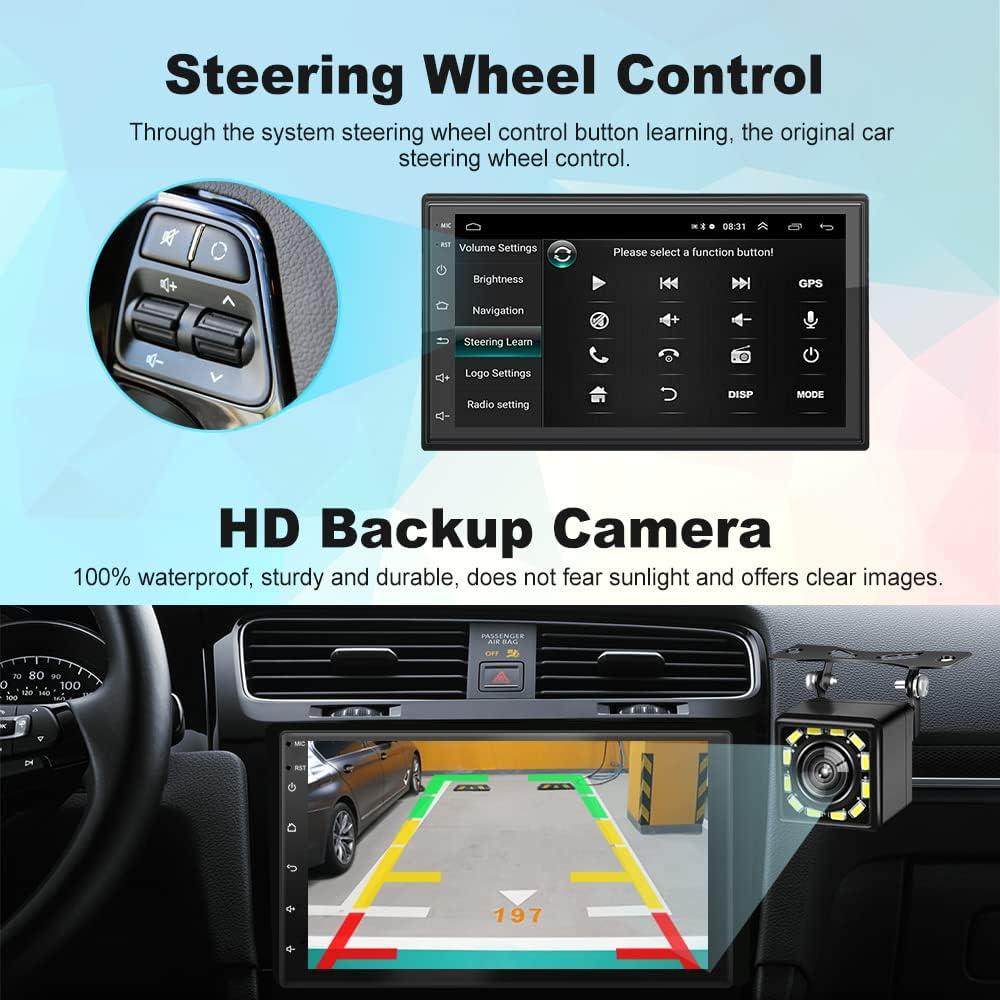
Gambar: Antarmuka pengaturan Kontrol Roda Kemudi.
3.6 HD Backup Camera
The included 12-light HD backup camera is waterproof and provides high-definition night vision. When reversing, the stereo automatically switches to display the camera's feed, showing the area behind your vehicle.
Image: Backup camera view on the car stereo display.
3.7 Fungsi Layar Terpisah
The split-screen feature allows you to run two applications simultaneously, such as navigation and music playback, without performance issues.

Image: Split Screen functionality displaying two applications simultaneously.
3.8 10-Band EQ Settings
Adjust the audio output to your preference with the integrated 10-band equalizer. This allows for fine-tuning of sound effects for each seat in the car.
Image: 10-band EQ settings interface.
4. Pemeliharaan
Untuk memastikan umur panjang dan kinerja optimal stereo mobil Anda, ikuti panduan perawatan berikut:
- Pembersihan: Gunakan kain lembut dan kering untuk membersihkan layar sentuh dan bagian luar perangkat. Hindari pembersih abrasif atau pelarut.
- Pembaruan Perangkat Lunak: Periksa secara berkala produsen website or the unit's settings for available software updates to improve performance and add new features.
- Suhu: Hindari memaparkan unit pada suhu ekstrem, sinar matahari langsung dalam jangka waktu lama, atau kelembapan berlebih.
5. Penyelesaian masalah
If you encounter issues with your Podofo Car Stereo, refer to the following common problems and solutions:
- Tidak Ada Daya:
- Check the yellow (B+) and red (ACC) power wires for proper connection to a constant 12V and ignition 12V source, respectively.
- Ensure the black (GND) wire is securely connected to a vehicle ground.
- Verify that the fuse on the power cable is intact. Replace if blown.
- Tidak ada suara:
- Check all speaker wire connections (White, Gray, Green, Purple and their black-striped counterparts) to ensure they are correctly connected to your vehicle's speakers.
- Pastikan volume tidak dimatikan atau diatur ke minimum.
- Verify that the correct audio source is selected.
- Masalah Koneksi Wireless CarPlay/Android Auto:
- Ensure Bluetooth is on and paired correctly.
- If using wireless CarPlay, ensure your iPhone is connected to the stereo's WiFi hotspot as described in section 3.1.
- Restart both your phone and the car stereo.
- Delete any existing Bluetooth/WiFi connections on both devices and attempt to reconnect.
- Kontrol Setir Tidak Berfungsi:
- Ensure the SW1 and SW2 wires are correctly connected to your vehicle's steering wheel control wires.
- Access the 'Steering Learn' function in the stereo's settings and follow the on-screen instructions to program the controls.
- Kamera Mundur Tidak Menampilkan:
- Check the camera input cable connection to the stereo.
- Ensure the reverse input wire is correctly connected to your vehicle's reverse light signal.
- Verify the camera itself is powered and functioning.
If problems persist after attempting these solutions, please contact Podofo customer support.
6. Spesifikasi
| Fitur | Spesifikasi |
|---|---|
| Merek | Podofo |
| Model | B09C2ZQLDW |
| Ukuran Layar | 7 inci |
| Sistem Operasi | Android 10.1 |
| prosesor | 8227L, 4-core 1.3GHz processor |
| Ingatan | RAM 1GB + ROM 16GB |
| Resolusi | Ukuran 1024x600 |
| Teknologi Konektivitas | USB, Bluetooth, WiFi |
| Versi Bluetooth | 4.2 |
| Fitur Khusus | Wireless Apple CarPlay, Wired Android Auto, GPS Navigation, FM RDS, Backup Camera, Split Screen, Steering Wheel Control |
| Mode Keluaran Audio | APE/FLAC/WAV/MP3/WMA dll. |
| Jenis Pemasangan | Dashboard Mount (Double Din) |
| Berat Barang | 941 gram |
7. Garansi dan Dukungan
Your Podofo Double Din Car Stereo comes with a Garansi 2 tahun sejak tanggal pembelian. Garansi ini mencakup cacat produksi dan malfungsi dalam penggunaan normal.
For technical support, warranty claims, or any questions not covered in this manual, please contact Podofo customer service through the retailer where you purchased the product or visit the official Podofo websitus untuk informasi kontak.
Harap simpan bukti pembelian Anda untuk tujuan garansi.