
Rossetta Star Projector-RT008
Rossetta Galaxy Projector User Manual
Model: Star Projector-RT008 | Brand: Rossetta
Perkenalan
The Rossetta Star Projector is a versatile 4-in-1 device designed to enhance your environment. It functions as a galaxy projector, a nightlight lamp, a white noise machine, and a Bluetooth speaker. This device projects stunning stars and nebula clouds in 14 vibrant colors, transforming any room into a serene or dynamic cosmic space. It is suitable for all ages, from children's rooms to adult living spaces, and is certified for safety (FCC, RoHS, CE).
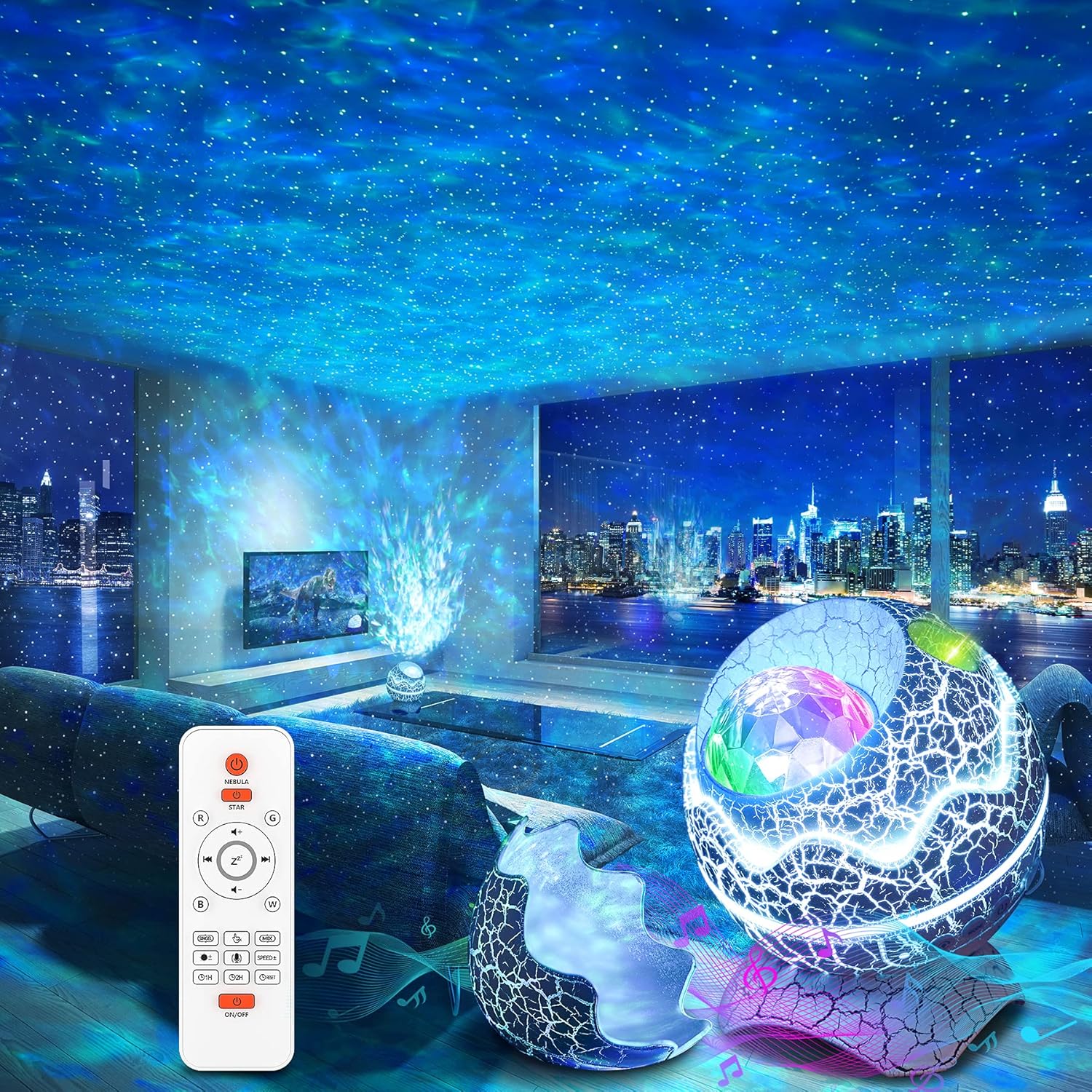
Figure 1: The Rossetta Galaxy Projector creating a starry night effect in a living room, with the remote control visible.
Isi Paket
Harap centang kotak untuk item berikut:
- Rossetta Star Projector
- Kontrol Jarak Jauh
- Kabel listrik
- User Manual (dokumen ini)
Fitur Produk
- Fungsionalitas 4-in-1: Combines a galaxy projector, nightlight lamp, white noise machine, and Bluetooth speaker for a comprehensive audio-visual experience.
- Vibrant Projection: Projects shining stars and mesmerizing nebula clouds in 14 vibrant colors, with 15 projection varieties.
- Mesin Suara Kebisingan Putih: Includes 10 popular white noise sounds to aid relaxation, sleep, or meditation.
- Pembicara Bluetooth 5.1: Built-in speaker allows connection to your device via Bluetooth to play music, podcasts, or audiobooks. Features sound-activated mode where lights flash and change rhythmically to music or claps.
- Kendali Jarak Jauh & Pengatur Waktu: Full control over color lighting, projection mode, brightness, speed, music selection, volume, and timer settings (1 or 2 hours). Automatic power-off after 4 hours if no timer is set.
- Desain Tahan Lama & Aman: Designed for durability and ease of use, with FCC, RoHS, and CE certifications.
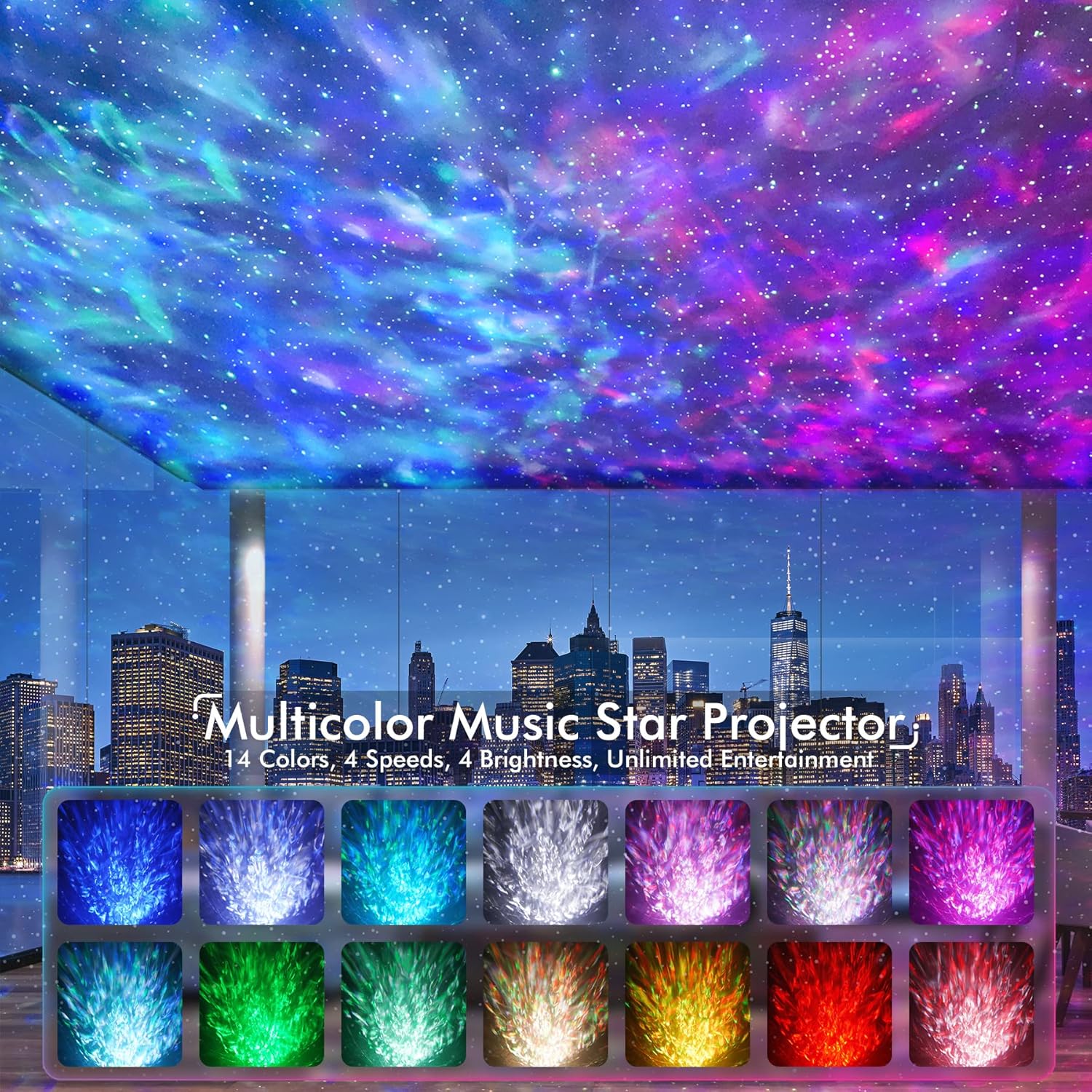
Figure 2: Visual representation of the 14 available color modes for the projector.

Figure 3: The projector's Bluetooth 5.1 speaker functionality, allowing music playback from connected devices.

Figure 4: Illustration of the white noise sound machine feature, showing various sound options like train, bird, bonfire, fan, rain, sea, soft music, and frog.
Pengaturan
- Membongkar: Keluarkan semua komponen dari kemasannya dengan hati-hati.
- Sambungan Daya: Connect the provided power cable to the projector and plug the adapter into a standard electrical outlet.
- Baterai Pengendali Jarak Jauh: Masukkan 2 baterai AAA (tidak termasuk) ke dalam remote control, pastikan polaritasnya benar.
- Penempatan: Place the projector on a stable, flat surface. For optimal projection, position it in a dark room, ideally facing a ceiling or wall.

Figure 5: The remote control and timer functions of the projector, indicating 1-hour and 2-hour auto-off options.
Petunjuk Pengoperasian
Daya Hidup/Mati
Tekan tombol AKTIF/NONAKTIF button on the projector or the remote control to turn the device on or off.
Kontrol Proyeksi
- Gunakan NEBULA button on the remote to cycle through nebula colors and effects.
- Gunakan BINTANG button to control the green stars (on/off, brightness).
- Adjust brightness with the B+ Dan B- tombol.
- Change projection speed with the KECEPATAN + Dan KECEPATAN- tombol.
- Select specific colors (Red, Green, Blue, White) using the R, G, B, W tombol.
Mesin Kebisingan Putih
Tekan tombol Kebisingan Putih button on the remote to activate the white noise function. Use the arrow buttons to cycle through the 10 available sounds. Adjust volume with the VOL+ Dan VOL- tombol.
Pembicara Bluetooth
Untuk menggunakan speaker Bluetooth:
- Pastikan proyektor dihidupkan.
- On your mobile device, enable Bluetooth and search for "Star Projector".
- Select "Star Projector" to pair. A confirmation sound will indicate successful pairing.
- Play music from your device. The projector lights can sync to the music rhythm when sound-activated mode is enabled.
Activate sound-activated mode by pressing the Ikon mikrofon button on the remote. The lights will respond to music or claps.
Fungsi Pengatur Waktu
Set an automatic shut-off timer using the remote control:
- Tekan 1H for a 1-hour timer.
- Tekan 2H for a 2-hour timer.
- If no timer is set, the projector will automatically power off after 4 hours of continuous operation.
Pemeliharaan
The Rossetta Galaxy Projector is designed for easy maintenance.
- Pembersihan: To clean the projector, gently wipe the exterior with a soft, dry cloth. Do not use abrasive cleaners or immerse the device in water.
- Penyimpanan: When not in use, store the projector in a cool, dry place away from direct sunlight and extreme temperatures. The removable top portion of the "egg" design can be re-attached to protect the projector lens from dust.
Penyelesaian Masalah
| Masalah | Kemungkinan Penyebab / Solusi |
|---|---|
| Proyektor tidak menyala. | Pastikan kabel daya terhubung dengan aman ke proyektor dan stopkontak. Coba stopkontak lain. |
| Pengendali jarak jauh tidak berfungsi. | Check if the batteries are inserted correctly and are not depleted. Replace with new AAA batteries if necessary. If the issue persists, unplug the projector from power for a few seconds, then plug it back in. |
| Masalah koneksi Bluetooth. | Ensure Bluetooth is enabled on your device and the projector is in pairing mode. Move your device closer to the projector. Disconnect and re-pair the device. |
| Lampu mati secara tiba-tiba. | Check if a timer (1H or 2H) has been set. The device also has an automatic 4-hour shut-off feature. Ensure stable power supply. |
| Proyeksi redup atau tidak jelas. | Ensure the room is sufficiently dark. Adjust brightness settings using the remote. Clean the projector lens if it appears dusty. |
Spesifikasi
| Atribut | Detil |
|---|---|
| Nama Model | Proyektor Bintang-RT008 |
| Dimensi Produk | 6.3"Panjang x 4.3"Lebar x 6.3"T |
| Berat Barang | 0.96 Pound (15.4 ons) |
| Sumber Daya | Listrik Kabel |
| Jil.tage | 5 Volt (DC) |
| Apatage | 6 Watt |
| Jenis Sumber Cahaya | DIPIMPIN |
| Teknologi Konektivitas | Bluetooth 5.1 |
| Metode Kontrol | Kontrol Jarak Jauh, Tombol Tekan |
| Fitur Khusus | 360° Projection, Bluetooth, Color Changing, Green Stars, White Noise, Sound Activated |
| Bahan | Plastik |
| Warna | Putih |
| Sertifikasi | CE, FCC, RoHS |
| Rentang Usia (Deskripsi) | Semua Usia |
Garansi dan Dukungan
Rossetta is committed to providing high-quality products and customer satisfaction. Your Rossetta Galaxy Projector is backed by:
- 24/7 Quick Response: Layanan pelanggan khusus tersedia sepanjang waktu.
- Easy Return/Replacement: Hassle-free process for returns or replacements if needed.
- Dukungan Profesional Seumur Hidup: Ongoing technical assistance and support for the lifespan of your product.
For any inquiries or support, please visit the official Rossetta store or contact customer service through your purchase platform.