
1. Pendahuluan
Thank you for choosing the UUMAO Invisible Wireless Charger. This product is designed to provide convenient and discreet wireless charging for compatible devices by installing the charging pad underneath a non-metallic surface. Please read this manual carefully before use to ensure proper installation and operation.
2. Informasi Keselamatan
- Do not place metal objects, magnets, credit cards, or other foreign objects between your device and the charging pad, as this may interfere with charging or damage the charger.
- Ensure the charging surface is non-metallic and within the specified thickness range (0.19-0.59 inches / 5-15mm).
- Avoid exposing the charger to water, moisture, or extreme temperatures.
- Jangan membongkar, memperbaiki, atau memodifikasi produk.
- Use only the provided PD 20W adapter and Type-C cable to ensure optimal performance and safety.
- This charger provides over-charge, over-current, over-voltage, dan perlindungan hubung singkat.
3. Isi Paket
Harap verifikasi bahwa semua item ada dalam paket Anda:
- UUMAO Long-Distance Wireless Charger Unit
- Adaptor PD 20W
- Kabel Tipe-C
- Wireless Charger-Charging Label Sticker
- User Manual (affixed to product)
- Sekrup (x5)
- Kotak pembungkus

Image: The package contents include the wireless charger unit, power adapter, Type-C cable, charging area sticker, and screws.
4. Pengaturan dan Instalasi
The UUMAO Invisible Wireless Charger can be installed under various non-metallic surfaces such as wood, granite, marble, glass, plastic, and quartz. The optimal charging distance is between 0.19 inches (5mm) and 0.59 inches (15mm).

Image: This diagram illustrates compatible desktop materials including wooden, glass, marble, and plastic tables.

Gambar: Sisi profile view demonstrating the charger's ability to charge through desktops with a thickness between 5mm and 13mm.
4.1. Memilih Lokasi Pemasangan
Select a flat, non-metallic surface under your desk, bedside table, or other furniture where you wish to have wireless charging. Ensure the chosen spot is free from obstructions and metal components.
4.2. Metode Instalasi
There are two primary methods for installing the charger:
- Menggunakan Sekrup: The four corners of the product are designed for screw installation. Secure the charger firmly to the underside of the table top using the provided screws.
- Using Double-Sided Tape: For a less permanent installation, peel off the release paper from the blue double-sided tape on the charger. Press the charger firmly onto the desired location under the desktop.

Image: This graphic illustrates two installation options: securing the charger with screws or attaching it with double-sided tape.
4.3. Finding the Optimal Charging Position
After installation, use the standard charging area signal detector (included) to find the best charging position on the top surface of your furniture. The brightest light on the detector indicates the optimal charging spot. Apply the charging area label sticker to this spot for easy reference.
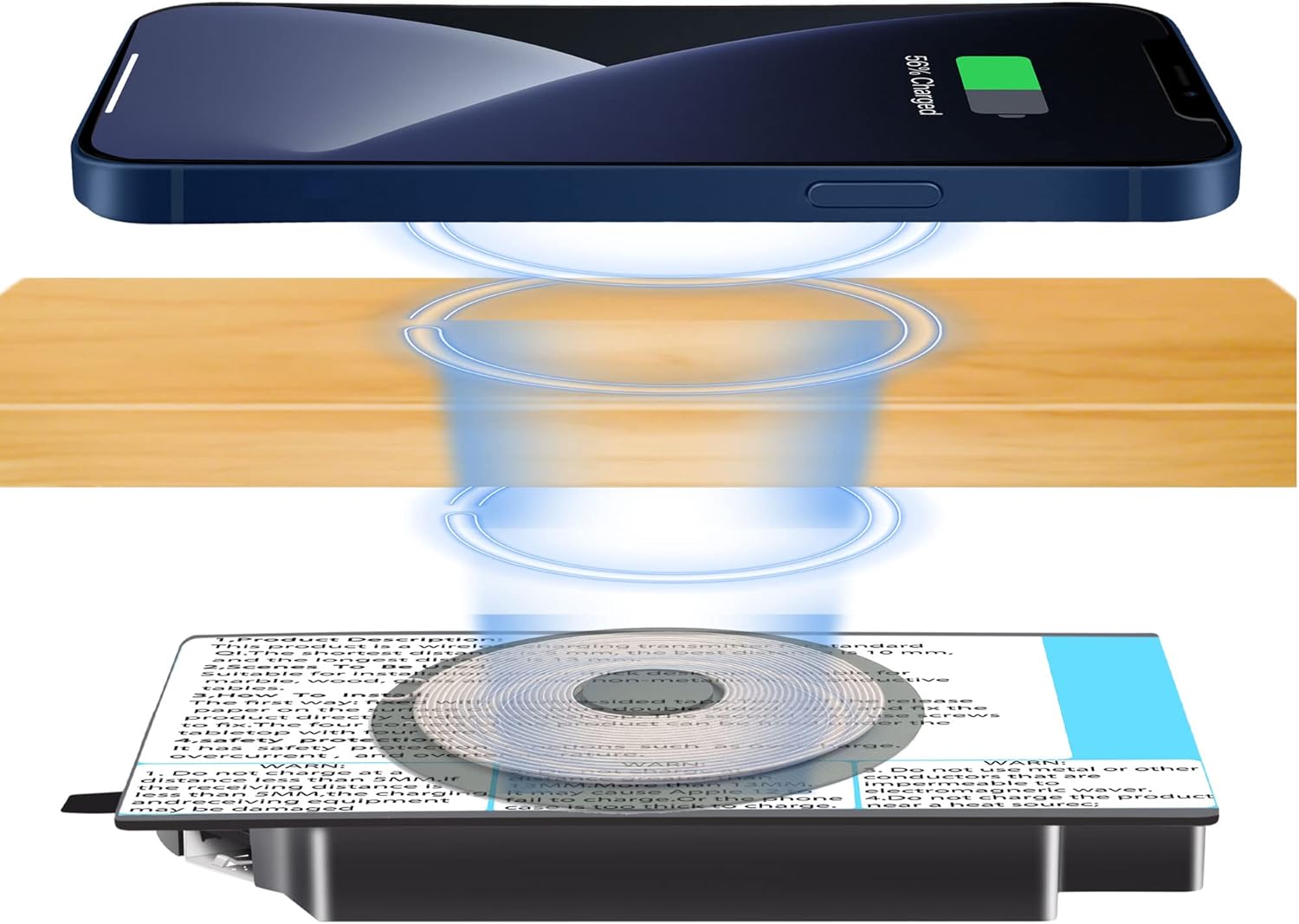
Image: A visual representation of a smartphone charging wirelessly through a wooden desk, with the invisible charger mounted underneath. Blue rings illustrate the wireless power transfer.
5. Petunjuk Pengoperasian
5.1. Menghubungkan Daya
Connect the provided Type-C cable to the wireless charger unit and the PD 20W adapter. Plug the adapter into a standard wall outlet.
5.2. Mengisi Daya Perangkat Anda
Place your compatible wireless charging device (e.g., smartphone, earphones) directly on the marked charging area on the surface of your furniture. The device should begin charging automatically. The indicator light on the charger, hidden under the table, will not disturb your sleep if installed in a bedroom.
5.3. Kompatibilitas
This wireless charger is universally compatible with all Qi-standard wireless charging phones and earphones. Compatible Apple devices include iPhone 14/13/13 Pro/13 Mini/13 Pro Max/12/12 Pro/12 Pro Max/12 Mini/SE/11/11 Pro/11 Pro Max/X/Xs/Xs Max/8/8 Plus. Compatible Samsung phones include Galaxy S20, S20+, S20 Ultra, S10, S10 Plus, S10E, S9 Plus. Note: This charger cannot wirelessly charge smartwatches.
5.4. USB-5V Interface
The charger unit includes a reserved USB-5V interface. This port can be used to plug in a charging cable for other devices such as iPads or smartwatches that require wired charging.

Gambar: Pameran kolaseasing the versatility of the invisible wireless charger in different environments, including offices, cafes, meeting rooms, hotels, restaurants, and bookstores.
6. Pemeliharaan
- Keep the charger clean and free from dust. Use a soft, dry cloth to wipe the surface.
- Jangan gunakan bahan kimia keras atau pembersih abrasif.
- Ensure the area around the charger is well-ventilated to prevent overheating.
- Regularly check the power cable for any signs of damage.
7. Penyelesaian masalah
- Perangkat tidak mengisi daya:
- Pastikan perangkat Anda kompatibel dengan Qi.
- Verify the charger is properly connected to power.
- Check the placement of your device on the charging area. Use the signal detector to confirm the optimal spot.
- Remove any metal objects, magnets, or thick phone cases (especially those containing metal) between the device and the charging surface.
- Ensure the desktop thickness is within the 0.19-0.59 inch (5-15mm) range.
- Pengisian daya lambat:
- Ensure you are using the provided PD 20W adapter and Type-C cable.
- Confirm your device supports fast wireless charging.
- Check for proper alignment of the device on the charging spot.
- Indicator light not on:
- Verify the power adapter is securely plugged into both the charger and the wall outlet.
- Coba stopkontak yang lain.
8. Spesifikasi
| Fitur | Spesifikasi |
|---|---|
| Dimensi Produk | 5.31x4.53x0.79 inci |
| Berat Barang | 7.4 ons |
| Merek | UUMAO |
| Jenis Konektor | USB (untuk masukan daya) |
| Masukan Voltage | 12 Volt |
| Ampmarah | 0.83 Amps |
| Jumlah Port USB | 2 (1 for power input, 1 reserved USB-5V output) |
| Jarak pengisian | 0.19in - 0.59in (5mm - 15mm) |
| Fitur Khusus | Long-distance invisible wireless charging under the table |
9. Garansi dan Dukungan
UUMAO provides reliable customer service. For any issues or inquiries, please refer to the contact information provided with your product or visit the official UUMAO store on Amazon: UUMAO Store.