
Perkenalan
Thank you for choosing the Borofone BR15 Portable Bluetooth Speaker. This manual provides essential information for the safe and efficient use of your device. Please read it thoroughly before operating the speaker and keep it for future reference.
Produk Selesaiview
The Borofone BR15 is a versatile portable Bluetooth speaker designed for various environments, including sports activities. It features Bluetooth 5.0 connectivity, a durable plastic build, and water resistance.
Fitur Utama:
- Bluetooth 5.0: Memastikan koneksi nirkabel yang stabil dan efisien.
- Desain tahan air: Provides protection against water splashes, suitable for outdoor use.
- Beberapa Mode Pemutaran: Supports Bluetooth, FM Radio, TF Card, USB Disk, and TWS (True Wireless Stereo).
- Portabel dan Tahan Lama: Compact size with a robust plastic construction.
- Daya Tahan Baterai yang Lama: 1200 mAh battery offers up to 2.5 hours of music or talk time.
Komponen Pembicara:
Familiarize yourself with the speaker's layout:
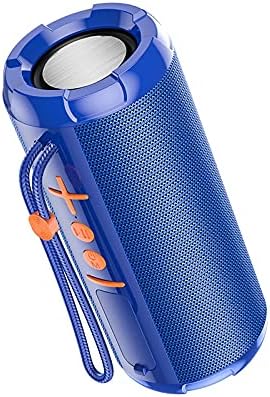
Gambar 1: Depan view of the Borofone BR15 speaker, showing the control panel with power, volume, and mode buttons.

Gambar 2: Samping view of the Borofone BR15 speaker, highlighting its cylindrical design and the Borofone branding.
- Tombol Daya: Menyalakan/mematikan speaker.
- Tombol Volume Naik/Lagu Berikutnya: Menaikkan volume atau melompati ke trek berikutnya.
- Tombol Volume Turun/Lagu Sebelumnya: Mengurangi volume atau kembali ke lagu sebelumnya.
- Tombol Putar/Jeda: Mengontrol pemutaran musik dan menjawab/mengakhiri panggilan.
- Tombol Mode: Switches between Bluetooth, FM Radio, TF Card, and USB Disk modes.
- Port Pengisian Daya: Untuk menghubungkan kabel pengisian daya.
- Slot Kartu TF: Untuk memasukkan kartu MicroSD.
- Port USB: For connecting a USB flash drive.
Pengaturan
1. Mengisi Daya Speaker:
- Hubungkan kabel pengisian daya yang disediakan ke port pengisian daya speaker.
- Hubungkan ujung kabel lainnya ke adaptor daya USB (tidak disertakan) atau port USB komputer.
- The charging indicator light will illuminate. Charging takes approximately 2 hours.
- Setelah terisi penuh, lampu indikator akan berubah atau mati. Lepaskan kabel pengisi daya.
2. Menghidupkan/Mematikan:
- To power on, press and hold the Power button for a few seconds until you hear an audible prompt.
- Untuk mematikan, tekan dan tahan tombol Daya lagi hingga speaker mati.
3. Penyandingan Bluetooth:
- Ensure the speaker is powered on and in Bluetooth mode (indicated by a flashing LED or audible prompt). If not, press the Mode button to switch to Bluetooth.
- Aktifkan Bluetooth di telepon pintar, tablet, atau perangkat lain yang kompatibel.
- Pencarian untuk "BR15" in the list of available Bluetooth devices.
- Select "BR15" to connect. Once paired, you will hear a confirmation sound, and the LED indicator will stop flashing.
- Speaker akan secara otomatis terhubung kembali ke perangkat yang terakhir dipasangkan saat dihidupkan, jika Bluetooth perangkat tersebut aktif dan berada dalam jangkauan.
Petunjuk Pengoperasian
Pemutaran Musik:
- Putar/Jeda: Tekan tombol Putar/Jeda sekali.
- Lagu Berikutnya: Tekan dan tahan tombol Volume Naik.
- Lagu Sebelumnya: Tekan dan tahan tombol Volume Turun.
- Volume Naik: Tekan sebentar tombol Volume Naik.
- Volume Turun: Tekan sebentar tombol Volume Turun.
Call Handling (in Bluetooth mode):
- Menjawab Panggilan: Tekan tombol Putar/Jeda sekali.
- Akhiri Panggilan: Tekan tombol Putar/Jeda sekali selama panggilan.
- Tolak Panggilan: Tekan dan tahan tombol Putar/Jeda.
Pergantian Mode:
Press the Mode button repeatedly to cycle through available modes:
- Mode Bluetooth: Untuk streaming audio nirkabel.
- Modus Radio FM: Automatically scans and plays FM stations.
- Mode Kartu TF: Memutar audio files from a MicroSD card (insert card before selecting mode).
- Mode Disk USB: Memutar audio files from a USB flash drive (insert drive before selecting mode).
- Mode TWS (Stereo Nirkabel Sejati): Connects two BR15 speakers for stereo sound. (Instructions for TWS pairing are typically separate and more detailed, but I'll keep it brief here as the JSON doesn't provide specifics).
Pemeliharaan
- Pembersihan: Use a soft, dry cloth to wipe the speaker. Do not use abrasive cleaners or solvents.
- Tahan Air: The speaker is waterproof, but it is not designed for submersion. Ensure the charging port cover is securely closed to maintain water resistance. Avoid exposing it to strong jets of water.
- Penyimpanan: Simpan speaker di tempat yang sejuk dan kering, jauhkan dari sinar matahari langsung dan suhu ekstrem.
- Perawatan Baterai: To prolong battery life, charge the speaker fully before first use and at least once every three months if not used regularly.
Penyelesaian Masalah
| Masalah | Larutan |
|---|---|
| Speaker tidak menyala. | Pastikan baterai terisi daya. Hubungkan speaker ke sumber daya dan coba lagi. |
| Tidak dapat dipasangkan melalui Bluetooth. |
|
| Tidak ada suara atau volume rendah. |
|
| Penerimaan sinyal radio FM buruk. | Move the speaker to an open area, away from obstructions or interference. Some speakers use the charging cable as an antenna; try connecting it. |
Spesifikasi
| Nama Model: | BR15 |
| Merek: | Borofone |
| Versi Bluetooth: | 5.0 |
| Chip Bluetooth: | Jerry JL |
| Kapasitas Baterai: | 1200 mAh |
| Waktu Pengisian: | Sekitar 2 jam |
| Waktu Musik/Bicara: | Hingga 2.5 jam |
| Unit Pembicara: | 45mm x 2 |
| Daya Keluaran: | 5W x 2 |
| Dimensi (P x L x T): | Ukuran 162x70x70 mm |
| Bahan: | Plastik |
| Tahan air: | Ya |
| Konektivitas: | Bahasa Indonesia: Bluetooth |
| Sumber Daya: | Bertenaga Baterai |
| Mode Keluaran Audio: | Stereo |
| Tipe Pemasangan: | Meja |
| Perangkat yang Kompatibel: | Laptop, Ponsel Pintar, Tablet |
| Mode yang Didukung: | Bluetooth, FM Radio, TF Card, USB Disk, TWS |
Garansi dan Dukungan
For warranty information and technical support, please refer to the warranty card included with your product or visit the official Borofone websitus. Simpan struk pembelian Anda sebagai bukti pembelian.
If you encounter any issues not covered in this manual, please contact Borofone customer service for assistance.