
suitU B09L4JQSLF
suitU Handheld Cordless Wet & Dry Vacuum Cleaner Instruction Manual
Model: B09L4JQSLF
1. Produk Lebihview
The suitU Handheld Cordless Wet & Dry Vacuum Cleaner is designed for efficient cleaning in various environments, including homes and vehicles. It features a powerful 120W motor providing 12000Pa suction, a high-efficiency HEPA filter system, and a rechargeable battery for cordless operation.
Fitur utama meliputi:
- Daya Hisap Kuat 12000Pa: Equipped with a 120W high-power motor for effective debris, dust, and pet hair pickup.
- Daya Tahan Lama: Features a 3*2000 mAh lithium-ion battery, offering up to 35 minutes of runtime on lower suction and 15 minutes on higher suction after a 3-4 hour charge.
- Ringan dan Portabel: Designed for easy maneuverability, making it suitable for cleaning stairs, kitchens, cars, and hard-to-reach areas.
- Wet & Dry Capability: Capable of vacuuming both solid debris and liquid spills.
- Fungsionalitas 2-in-1: Easily converts between an upright stick vacuum and a handheld vacuum cleaner.

Image 1.1: The suitU Handheld Cordless Wet & Dry Vacuum Cleaner shown in both stick and handheld modes, alongside its included attachments.

Image 1.2: Visual representation of the vacuum's ability to clean both dry debris (like pet food) and wet spills (like liquids).
2. Isi Paket
Harap verifikasi bahwa semua item yang tercantum di bawah ini disertakan dalam paket Anda:
- 1 x Vacuum Cleaner (Main Host)
- 1 x Adjustable Metal Tube
- 1 x Sikat Lantai
- 1 x Long Flat Nozzle (Crevice Nozzle)
- 1 x Small Brush (Brush Nozzle)
- 1 x Extension Hose
- 1 x Auxiliary Connector
- 1 x Kabel Pengisian Daya USB
- 1 x Panduan Pengguna
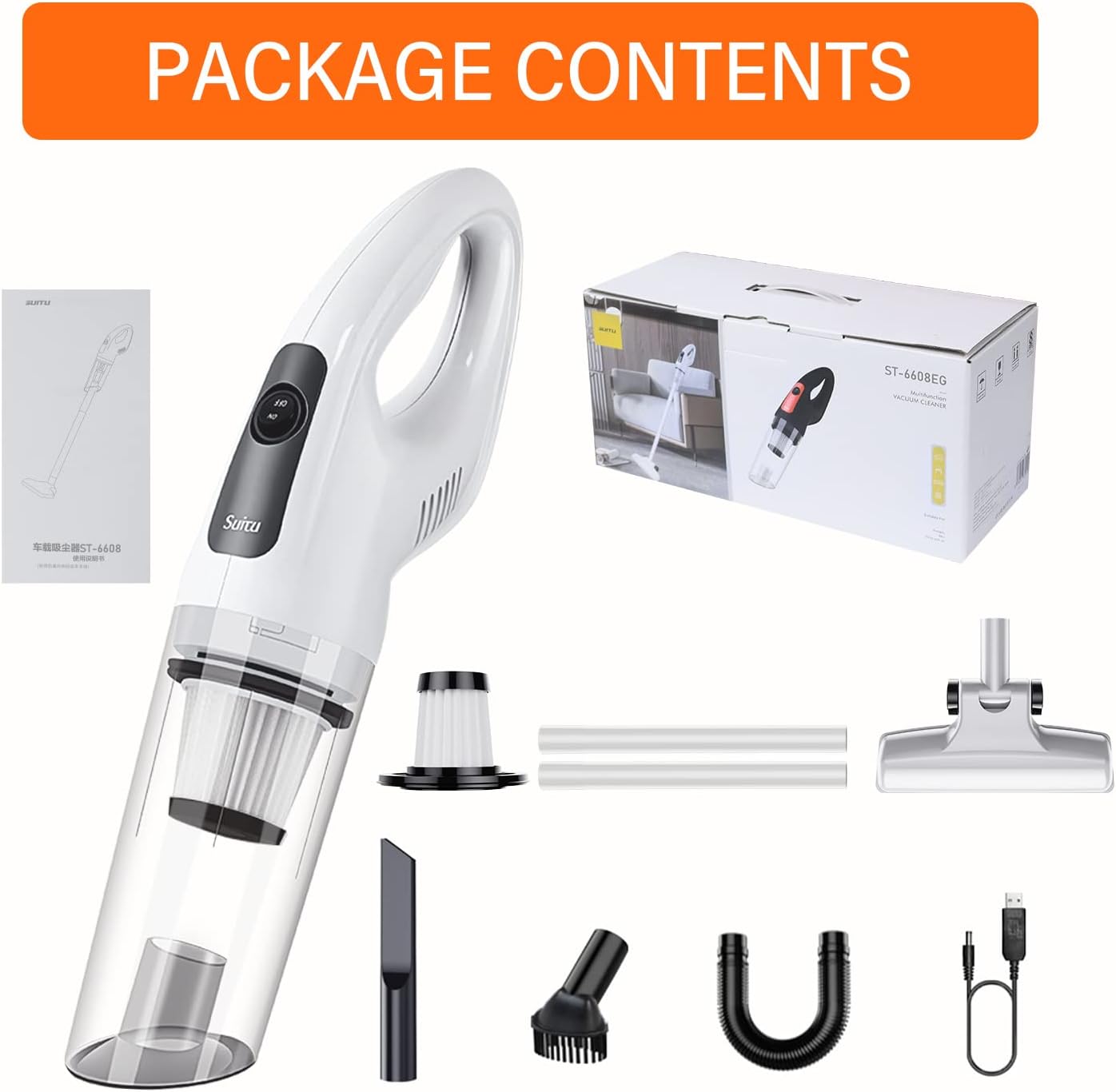
Image 2.1: Contents of the product package, showing the vacuum unit, attachments, and accessories.
3. Pengaturan
Before first use, ensure the vacuum is fully charged.
- Mengisi Baterai:
- Connect the USB charging cable to the vacuum's charging port and to a suitable USB power adapter (not included).
- The charging indicator light will show red during charging and turn green when fully charged.
- Pengisian daya penuh biasanya memakan waktu sekitar 3-4 jam.
- Perakitan Lampiran:
- For handheld use, directly attach the desired nozzle (Flat Crevice Nozzle or Brush Nozzle) to the vacuum's suction inlet.
- For stick vacuum use, connect the adjustable metal tube to the main vacuum unit, then attach the floor brush to the other end of the metal tube.
- The extension hose and auxiliary connector can be used with various nozzles for extended reach or specific cleaning tasks.
4. Petunjuk Pengoperasian
Ikuti langkah-langkah berikut untuk pembersihan yang efektif:
- Daya Hidup/Mati: Locate the power switch on the vacuum cleaner. Press it to turn the unit on. Press it again to turn it off.
- Pilih Tingkat Daya Hisap: The vacuum may have different suction levels. Refer to the device's controls to adjust as needed. Higher suction is suitable for stubborn debris, while lower suction conserves battery life.
- Pilih Nosel yang Tepat:
- Flat Crevice Nozzle: Ideal for narrow gaps, corners, and hard-to-reach areas (e.g., car seats, sofa crevices).
- Nosel Kuas: Suitable for cleaning delicate surfaces, upholstery, and pet hair.
- Floor Brush with Extension Tube: For general floor cleaning, converting the unit into a stick vacuum.
- Selang Ekstensi: Provides flexibility for cleaning awkward angles or inside vehicles.
- Mulai Membersihkan: Move the vacuum slowly over the surface to be cleaned, allowing the suction to pick up debris. For wet spills, ensure the dustbin is empty and clean before use, and empty it immediately after vacuuming liquids.
- Memantau Baterai: The charging indicator light will provide feedback on battery status. Recharge when the battery is low to avoid interruption.

Image 4.1: Demonstrates the handheld vacuum's power and its effectiveness against various types of debris.

Image 4.2: The vacuum being used in stick configuration to clean elevated surfaces, highlighting its lightweight design.

Image 4.3: The vacuum in use on a carpet, illustrating its role in maintaining a clean living space.

Gambar 4.4: Contohamples of the vacuum's application in cleaning car interiors, sofas, and pet areas.
5. Pemeliharaan
Perawatan rutin memastikan kinerja optimal dan memperpanjang umur penyedot debu Anda.
- Mengosongkan Tempat Sampah:
- After each use, or when the dustbin is full, detach it from the main unit.
- Buang puing-puing yang terkumpul ke tempat sampah.
- Membersihkan Filter:
- The vacuum is equipped with a high-efficiency HEPA filter. Remove the filter from the dustbin.
- Ketuk filter perlahan untuk melepaskan debu. Untuk pembersihan yang lebih menyeluruh, bilas filter di bawah air mengalir.
- Penting: Ensure the filter is completely dry before reinserting it into the vacuum. Using a wet filter can damage the motor.
- Cleaning the Main Unit and Attachments:
- Wipe the exterior of the vacuum and attachments with a soft, damp kain.
- Jangan gunakan bahan kimia keras atau pembersih abrasif.
- Penyimpanan:
- Store the vacuum cleaner and its accessories in a cool, dry place, away from direct sunlight and moisture.
6. Penyelesaian masalah
Jika Anda mengalami masalah dengan penyedot debu Anda, lihat masalah umum dan solusi berikut:
- Vacuum does not turn on:
- Pastikan baterai terisi penuh.
- Check that the power switch is pressed firmly.
- Daya hisap rendah:
- Empty the dustbin if it is full.
- Clean or replace the HEPA filter. A clogged filter significantly reduces suction.
- Check for blockages in the nozzle, extension tube, or main suction inlet.
- Ensure all attachments are securely connected.
- Baterai tidak mengisi daya:
- Verify the USB charging cable is properly connected to both the vacuum and the power source.
- Ensure the USB power adapter is functional.
- Periksa apakah ada kerusakan pada kabel atau port pengisi daya.
- Kebisingan yang tidak biasa selama pengoperasian:
- Turn off the vacuum and check for any foreign objects lodged in the brush roll (if applicable) or suction path.
- Ensure the dustbin and filter are correctly installed.
Jika masalah berlanjut setelah mencoba solusi ini, silakan hubungi dukungan pelanggan.
7. Spesifikasi
| Fitur | Spesifikasi |
|---|---|
| Merek | suitU |
| Model | B09L4JQSLF |
| Daya Terukur | 120W |
| Derajat Vakum | 12000Pa |
| Nilai Kecepatan | 36000rpm |
| Kapasitas Baterai | 3*2000mAh (6000mAh total) Lithium-ion |
| Metode Pengisian Daya | USB |
| Waktu Pengisian Daya | Sekitar 3-4 jam |
| Waktu berjalan | Up to 35 minutes (low suction), 15 minutes (high suction) |
| Tingkat Kebisingan | ≤78dB |
| Jenis Filter | HEPA |
| Warna | Putih |
| Berat Barang | 454 gram |
| Kapasitas | 1.3 pon |
8. Garansi dan Dukungan
For warranty information or technical support, please refer to the documentation included with your purchase or contact the manufacturer directly. Keep your proof of purchase for any warranty claims.
Ask a question about this manual
Ask about setup, troubleshooting, compatibility, parts, safety, or missing instructions. Manuals+ will review the question and use this page’s manual context to help answer it.