
1. Pendahuluan
This manual provides detailed instructions for the installation, operation, and maintenance of your podofo 9-inch 4-Split IP69 Night Vision Backup Camera System. This system is designed to enhance safety and visibility for large vehicles such as RVs, trucks, trailers, pickups, vans, and buses by providing multiple camera views on a single monitor.

Figure 1: Complete podofo 9-inch Backup Camera System components.
2. Isi Paket
Harap verifikasi bahwa semua item yang tercantum di bawah ini disertakan dalam paket Anda:
- 1 x 9-inch LCD Color Monitor
- 4 x AHD Cameras (2 Front, 2 Rear)
- 2 x 65ft (20m) 4-pin Aviation Cables
- 2 x 32ft (10m) 4-pin Aviation Cables
- 1x Kontrol Jarak Jauh
- 1 x Monitor Mounting Bracket
- 1 x Power Cable for Monitor
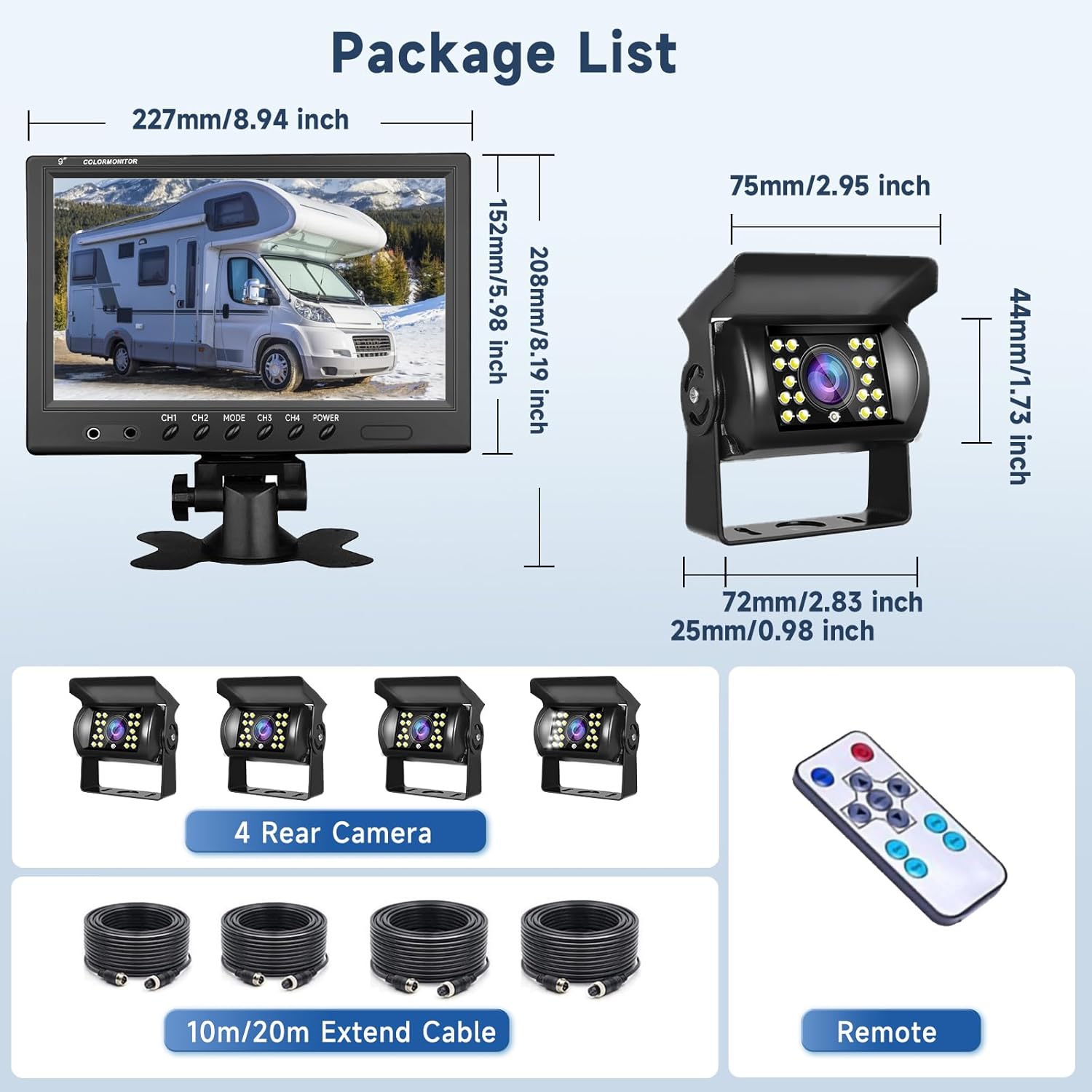
Figure 2: Package contents and component dimensions.
3. Fitur Produk
- 9-inch Split Screen Monitor: Supports 4-channel video input, allowing simultaneous display of up to four camera views. The screen can be configured for single, dual, or quad-view menampilkan.
- Image Rotation and Mirroring: Images can be rotated horizontally and vertically for mirror or normal viewing, providing flexibility for various mounting positions.
- High-Definition Cameras: Equipped with AHD cameras for clear image display.
- Peringkat Tahan Air IP68: Kamera dirancang untuk tahan terhadap kondisi cuaca buruk.
- 18-LED Night Vision: Memastikan visibilitas yang jelas dalam kondisi cahaya redup.
- Lebar Viewsudut: Cameras offer a 170-degree wide viewsudut pandang untuk cakupan yang komprehensif.
- Sudut yang dapat disesuaikan: Cameras feature an adjustable mounting bracket for optimal positioning.
- Reverse Parking Lines: Option to enable or disable reverse parking guidelines on the monitor.

Figure 3: Monitor split-screen display options.

Figure 4: Image mirroring effect.

Figure 5: Reverse parking line on/off feature.

Figure 6: Camera features and specifications.
4. Panduan Instalasi
This section outlines the steps for installing your backup camera system. Professional installation is recommended for optimal performance and safety.
4.1 Memasang Monitor
- Choose a suitable location on your dashboard or overhead console that does not obstruct your view atau mengganggu kendali kendaraan.
- Attach the monitor to the included mounting bracket.
- Secure the bracket to the chosen surface using appropriate fasteners. Ensure the monitor is stable and positioned for easy viewing.
4.2 Mounting the Cameras
The system includes two front and two rear cameras. Select mounting locations that provide the desired field of view and are protected from direct impact.
- For rear cameras, common locations include above the license plate, near the top of the rear bumper, or on the rear of an RV/trailer.
- For front cameras, consider mounting near the front grille or bumper.
- Use the adjustable bracket to angle the camera for the best view.
- Securely fasten each camera using the provided hardware.

Figure 7: Suitable vehicle types and camera placement exampsedikit.
4.3 Koneksi Kabel
The system uses 4-pin aviation cables for a secure and stable connection. Ensure all connections are tight and protected from moisture.
- Connect each camera to the monitor using the appropriate length 4-pin aviation cable (10m or 20m).
- Connect the monitor's power cable to a 12V/24V DC power source in your vehicle.
- Connect the ground wire (black) to a chassis ground point.
- Connect the positive wire (red) to a switched power source.
- For automatic activation of a specific camera view (e.g., when reversing), connect the corresponding trigger wire (blue for V1, white for V2, green for V3, brown for V4) to the vehicle's backup light circuit or other desired trigger.
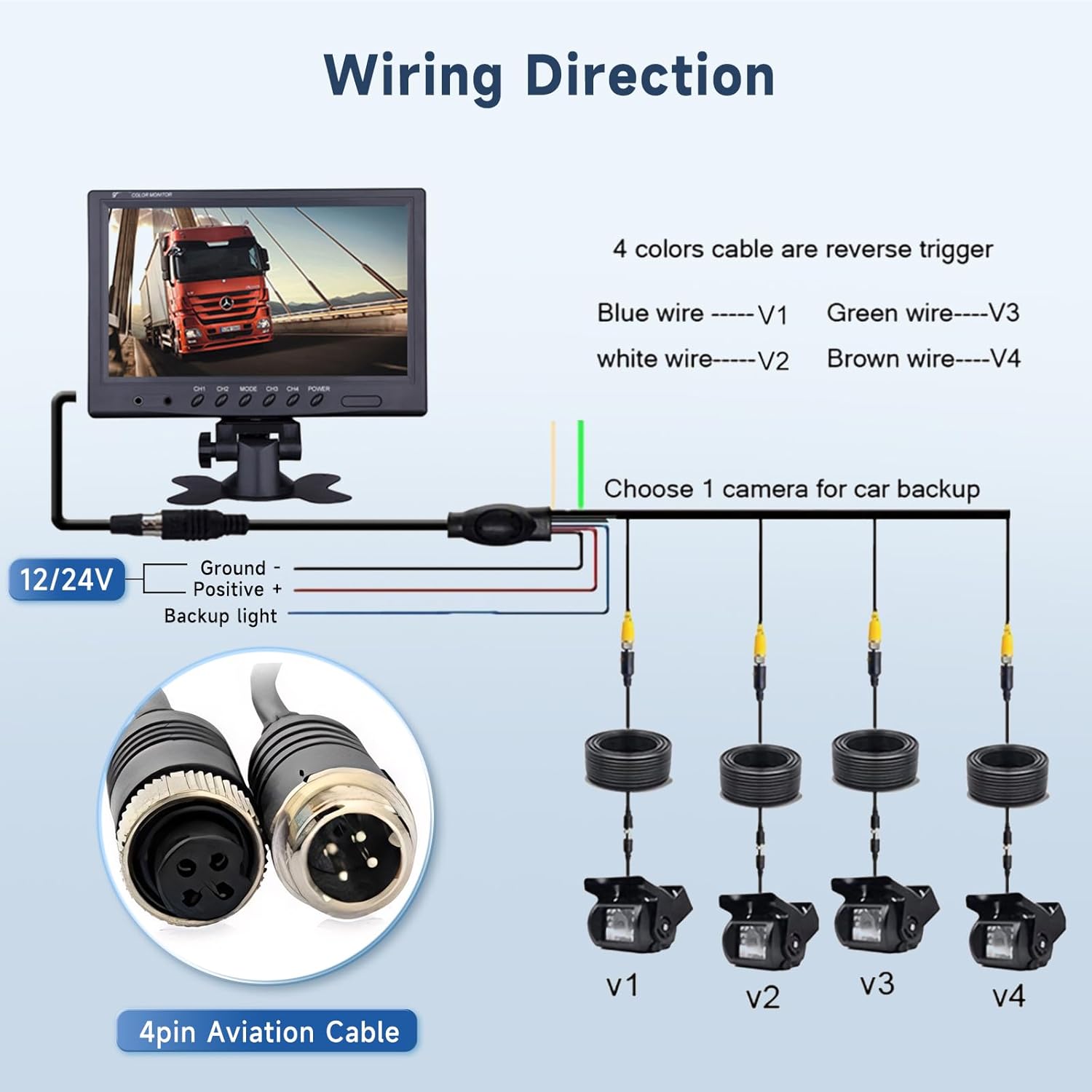
Figure 8: Wiring diagram for the camera system.

Figure 9: Cable routing and connection exampsaya.
5. Petunjuk Pengoperasian
Once installed, operating the system is straightforward using the monitor buttons or the remote control.
5.1 Kontrol Pengawasan
- KEKUATAN: Menyalakan/mematikan monitor.
- CH1-CH4: Selects individual camera views.
- ARAH: Cycles through different display modes (single, dual, quad-view).
- TIDAK BISA: Accesses system settings (brightness, contrast, color, image flip, parking lines, etc.). Use CH buttons to navigate and MODE to confirm.
5.2 Kontrol Jarak Jauh
Remote control yang disertakan memberikan akses mudah ke semua fungsi monitor dari jarak jauh.
- Buttons on the remote correspond to the functions on the monitor.
- Point the remote control directly at the monitor's IR receiver for best performance.
6. Pemeliharaan
To ensure the longevity and optimal performance of your camera system, follow these maintenance guidelines:
- Pembersihan: Bersihkan lensa kamera dan layar monitor secara teratur dengan kain lembut.amp cloth. Avoid abrasive cleaners that may scratch surfaces.
- Pemeriksaan Kabel: Periodically check all cables for signs of wear, damage, or loose connections. Secure any loose cables to prevent interference or disconnection.
- Camera Position: Ensure cameras remain securely mounted and their angles are not altered by vibrations or impacts. Re-adjust if necessary.
- Perlindungan Lingkungan: While cameras are waterproof, avoid directing high-pressure water jets directly at them during vehicle washing.
7. Penyelesaian masalah
If you encounter issues with your system, refer to the following troubleshooting steps:
| Masalah | Kemungkinan Penyebab | Larutan |
|---|---|---|
| Tidak ada gambar di monitor | Sambungan listrik longgar Camera cable disconnected Input yang dipilih salah. | Check power cable connection to monitor and vehicle. Ensure all 4-pin aviation cables are securely connected. Press CH1-CH4 or MODE button to cycle through inputs. |
| Gambarnya buram atau terdistorsi | Lensa kamera kotor Kabel rusak Catu daya yang buruk | Clean camera lens with a soft cloth. Inspect cables for damage; replace if necessary. Ensure stable 12V/24V power supply. |
| Penglihatan malam tidak berfungsi | IR LEDs obstructed Camera malfunction | Pastikan tidak ada yang menghalangi LED IR pada kamera. Hubungi dukungan pelanggan jika masalah berlanjut. |
| Kontrol jarak jauh tidak berfungsi | Baterai mati Halangan Not pointed correctly | Ganti baterai kendali jarak jauh. Ensure no objects are between remote and monitor. Point remote directly at the monitor's IR receiver. |
8. Spesifikasi
| Fitur | Spesifikasi |
|---|---|
| Merek | podofo |
| Ukuran Layar Monitor | 9 inci |
| Teknologi Tampilan | LCD, LED |
| Resolusi Pengambilan Video | 480p |
| Volume Operasitage | Tegangan DC 9-35 Volt |
| Camera Lens Type | Sudut Lebar |
| Sebenarnya Viewsudut ing | 170 Derajat |
| Teknologi Sensor Optik | Bahasa Indonesia: CMOS |
| Ukuran Sensor Optik | ukuran 7.2mm |
| Jenis Konektor | 4-pin Aviation |
| Peringkat Tahan Air | IP68 (Kamera) |
| Perangkat yang Kompatibel | Car Console (Monitor) |
| Panjang Kabel | 2 x 65ft (20m), 2 x 32ft (10m) |
9. Garansi dan Dukungan
podofo is committed to providing excellent customer service and technical support.
- Jaminan: This product comes with a 2-year replacement warranty.
- Jaminan Uang Kembali: A 30-day money-back guarantee is offered.
- Dukungan Teknis: Dukungan teknis seumur hidup tersedia.
If you have any questions regarding installation, operation, or require technical assistance, please contact podofo customer service. You can typically find contact information by visiting the seller's page on the platform where you purchased the product and selecting 'Ask a question'.