
Perkenalan
This manual provides comprehensive instructions for the use and care of your new Remote brand compatible remote control. This remote is specifically designed to function seamlessly with Nordmende ND40S3000J SMART televisions, offering full functionality without the need for complex programming.
Harap baca manual ini dengan saksama untuk memastikan pengaturan dan pengoperasian remote control Anda yang benar.
Pengaturan
1. Pemasangan Baterai
The remote control requires alkaline batteries (not included). Follow these steps to install them:
- Temukan penutup kompartemen baterai di bagian belakang remote control.
- Geser penutup ke bawah atau tekan kait untuk membukanya.
- Insert two new alkaline batteries, ensuring the positive (+) and negative (-) terminals match the diagrams inside the compartment.
- Pasang kembali penutup ruang baterai, geser kembali ke tempatnya hingga terkunci dengan aman.
Penting: Always use new alkaline batteries for optimal performance. Do not mix old and new batteries, or different types of batteries.
2. Initial Use (No Programming Required)
This compatible remote control is pre-programmed for the Nordmende ND40S3000J SMART TV model. No additional programming or setup steps are required. Once batteries are installed, the remote is ready for immediate use with your television.
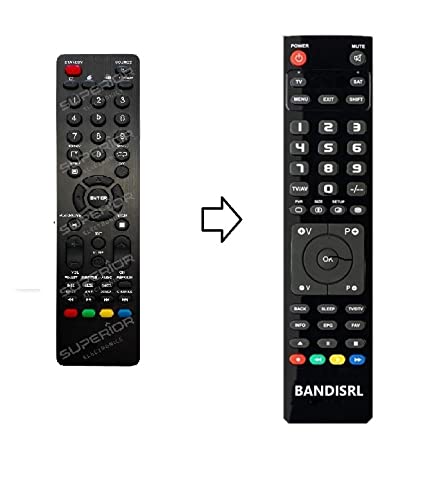
Gambar 1: The Remote compatible remote control. This image displays the layout of the buttons and the overall design of the remote, ready for use with your Nordmende TV.
Petunjuk Pengoperasian
To operate your Nordmende ND40S3000J SMART TV with this remote control, point the remote directly at the television's infrared receiver. Ensure there are no obstructions between the remote and the TV.
- Tombol Daya: Tekan untuk menghidupkan atau mematikan TV.
- Volume Naik/Turun: Menyesuaikan volume audio.
- Saluran Atas/Bawah: Mengubah saluran TV secara berurutan.
- Tombol Angka (0-9): Directly select TV channels.
- Tombol Navigasi (Tombol Panah, OK): Navigasi melalui menu dan pilih opsi.
- Tombol TV Pintar: Access specific Smart TV functions or applications (e.g., Home, Apps, Netflix, YouTube, etc., depending on the remote's layout and TV's features).
- Tombol Bisu: Mematikan suara TV.
- Tombol Sumber/Masukan: Bergantian menampilkan sumber input yang tersedia (HDMI, AV, dll.).
Refer to your Nordmende TV's original user manual for specific details on its menu structure and Smart TV functionalities.
Pemeliharaan
Membersihkan Kendali Jarak Jauh
Untuk membersihkan remote control Anda, gunakan kain lembut dan kering. Untuk kotoran yang membandel, gunakan kain yang sedikit kering.ampen the cloth with water. Do not use abrasive cleaners, alcohol, or solvents, as these can damage the remote's surface and internal components.
Penggantian Baterai
Replace batteries when the remote control's response becomes sluggish or stops working. Always replace both batteries simultaneously with new alkaline batteries. Dispose of used batteries according to local regulations.
Penyimpanan
Simpan remote control di tempat yang sejuk dan kering, jauhkan dari sinar matahari langsung dan suhu ekstrem. Jika remote tidak akan digunakan dalam jangka waktu lama, sebaiknya lepaskan baterai untuk mencegah kebocoran.
Penyelesaian Masalah
- Remote control tidak berfungsi:
- Periksa apakah baterai telah dimasukkan dengan benar dengan polaritas yang tepat (+/-).
- Replace the batteries with new alkaline batteries.
- Ensure there are no obstructions between the remote control and the TV's infrared receiver.
- Pastikan Anda mengarahkan remote langsung ke TV.
- Pastikan TV dalam keadaan menyala.
- Some buttons are not responding:
- This remote is designed for the Nordmende ND40S3000J SMART TV. If you are using it with a different model, some advanced functions may not be compatible.
- Ensure the buttons are clean and free from debris.
- TV responds intermittently:
- Baterai mungkin lemah; gantilah.
- Ensure a clear line of sight to the TV's infrared sensor.
- Avoid strong light sources (like direct sunlight) that might interfere with the infrared signal.
If troubleshooting steps do not resolve the issue, please refer to the Support section.
Spesifikasi
| Merek: | Remote (Manufacturer: Bandisrl) |
| Perangkat yang Kompatibel: | Nordmende ND40S3000J SMART Television |
| Teknologi Konektivitas: | Infrared (IR) |
| Fitur Khusus: | Tidak memerlukan pemrograman |
| Jenis Baterai: | basa |
| Baterai Termasuk: | TIDAK |
| Warna: | Hitam |
| Jumlah Tombol: | 25 |
| Tipe Pengontrol: | Kontrol Tombol |
Garansi dan Dukungan
Informasi Garansi
Specific warranty details for this compatible remote control are not provided in this manual. Please refer to the purchase documentation or contact the seller/manufacturer (Bandisrl) for information regarding warranty coverage and terms.
Dukungan Pelanggan
For further assistance, technical support, or inquiries regarding compatibility with other TV models, please contact the manufacturer, Bandisrl. Contact information can typically be found on the product packaging or the seller's weblokasi.
If you own a different TV model than the Nordmende ND40S3000J SMART, it is recommended to contact Bandisrl to confirm compatibility before purchase or use.