
1. Pendahuluan
This user manual provides comprehensive instructions for the installation, operation, and maintenance of your OAE 40A MPPT Solar Charge Controller. This device is designed to efficiently manage power flow from your solar panels to your battery bank, ensuring optimal charging and system longevity. It is compatible with 12V, 24V, 36V, and 48V battery systems and supports various battery types.
2. Fitur Utama
- Automatic 12V/24V/36V/48V battery system recognition.
- Vol input PV maksimumtage dari 150V.
- Suitable for solar panel arrays up to 570W (12V), 1130W (24V), 1710W (36V), and 2270W (48V).
- Compatibility with Sealed, Gel, Flooded, and Lithium battery types.
- Integrated battery temperature compensation function.
- Multiple protection features: overcharge, over-discharge, overheat, reverse polarity, overload, and short-circuit protection.
- RS485 communication port for Wi-Fi remote monitoring (Wi-Fi module sold separately).
3. Produk Lebihview

Depan view of the OAE 40A MPPT Solar Charge Controller, showcasing. tombol tampilan dan kontrol.

Lebihview of the AP-Series MPPT Solar Charge Controller highlighting its tracing efficiency, max PV input voltage, and APP monitoring capability.
3.1. Komponen dan Port
Detailed diagram illustrating the main components and connection ports of the controller.
- 1. Cooling Fan: Untuk pembuangan panas.
- 2. Hang Bracket: Untuk memasang pengontrol.
- 3. Layar LCD: Shows system status and settings.
- 4. Tombol Menu: Mengakses menu utama.
- 5. Tombol Bawah: Navigates down through menu options or decreases values.
- 6. Tombol Atas: Navigates up through menu options or increases values.
- 7. Enter Button: Mengkonfirmasi pilihan atau masuk ke sub-menu.
- 8. Temperature Interface: For connecting the external temperature sensor.
- 9. Solar Panel Terminals: Connects to the solar panel array.
- 10. Battery Terminals: Menghubungkan ke bank baterai.
- 11. DC Load Terminals: Connects to DC loads (if used).
- 12. RS485 Port: For communication with external devices like Wi-Fi modules.
3.2. Dimensi Produk
The controller measures approximately 8.7 inches (220mm) in height, 6.3 inches (160mm) in width, and 3.1 inches (80mm) in depth.
4. Pengaturan
4.1. Peringatan Penting Sebelum Pemasangan
- Always connect the battery first to the controller before connecting the solar panel array. Ensure the battery voltage is sufficient for the controller to recognize the correct system voltage.
- NEVER connect the solar panel array to the controller without a battery connected.
- DO NOT connect any Inverter, wind turbine, alternator, or external charger directly to the charge controller. Inverters should be connected directly to the battery bank.
- Ensure the solar input voltage is at least 3V higher than the battery voltage and that the total input power is within the specified range.
- Ensure all connections to and from the controller are tight to prevent loose connections and potential hazards.
- DO NOT allow the positive (+) and negative (-) terminals of the battery to touch each other.
4.2. Instruksi Pengkabelan

Visual guide for connecting solar panels, battery, and DC load to the controller.
- Hubungkan Baterai: Connect the positive and negative terminals of your battery bank to the corresponding battery terminals on the charge controller. Observe polarity.
- Hubungkan Panel Surya: Connect the positive and negative leads from your solar panel array to the solar panel terminals on the controller. Ensure correct polarity and that the open-circuit voltage (Voc) of your array does not exceed 150V.
- Hubungkan Beban DC (Opsional): If you have DC loads, connect their positive and negative leads to the DC load terminals on the controller.
- Hubungkan Sensor Suhu: Plug the included temperature sensor into the designated temperature interface. This ensures accurate battery charging based on ambient temperature.
- RS485 Communication (Optional): If using a Wi-Fi module or other communication device, connect it to the RS485 port.
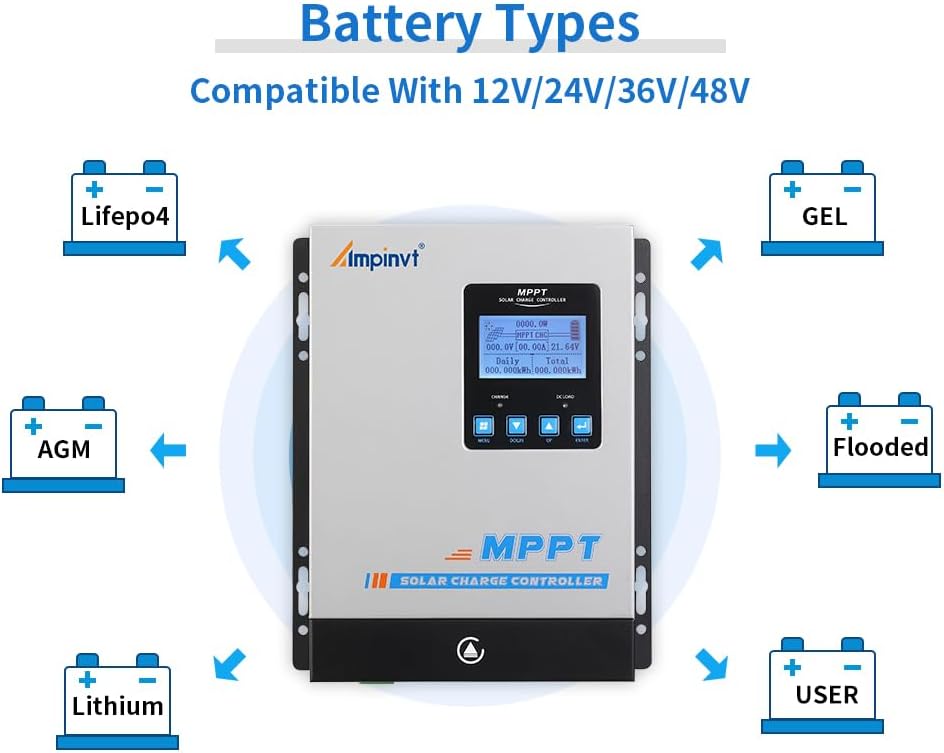
4.3. Battery Type Compatibility

The controller is compatible with various battery chemistries including LifePO4, GEL, AGM, Flooded, and Lithium batteries, as well as a user-defined setting.
The controller supports multiple battery types. Ensure you select the correct battery type in the settings to optimize charging parameters and prolong battery life. Refer to the Operating section for instructions on how to change battery type settings.
5. Petunjuk Pengoperasian
The controller features an LCD display and four buttons (Menu, Down, Up, Enter) for navigation and setting adjustments.
5.1. Tampilan Navigasi
Press the 'Menu' button to cycle through different display screens showing real-time system data such as PV voltage, volume bateraitage, charging current, and daily/total energy generated. Use the 'Up' and 'Down' buttons to navigate within menus or adjust values. Press 'Enter' to confirm a selection or enter a sub-menu.
Video demonstrating the menu navigation and setting adjustments on the MPPT solar charge controller's LCD display.
5.2. Pengaturan Parameter
To access advanced settings, navigate to the 'Parameter Setting' menu. A password may be required (refer to the included manual for default password). Key adjustable parameters include:
- Jenis Baterai: Select the type of battery connected (Sealed, Gel, Flooded, Lithium, User). This is critical for correct charging.
- Nilai Voltage: Mengatur volume nominaltage of your battery system (12V, 24V, 36V, 48V).
- Arus Pengisian: Adjust the maximum charging current.
- Vola Muatan Mengambangtage: Mengatur voltage at which the controller maintains the battery after it's fully charged.
- Biaya Penyetaraan Voltage: For certain battery types, this setting allows for periodic overcharging to balance cell voltagyaitu.
- Mode Kontrol Beban: Configure how the DC load output operates (e.g., always on, dusk to dawn, timer).
Always consult the detailed parameter tables in the full product manual for specific voltage and current recommendations for your battery type.
6. Pemeliharaan
Perawatan rutin memastikan umur panjang dan kinerja optimal pengontrol pengisian daya surya Anda.
- Pembersihan: Periodically clean the exterior of the controller with a dry cloth to remove dust and debris.
- Ventilasi: Ensure adequate airflow around the controller. Maintain a space of approximately 20cm (8 inches) around the unit for proper heat dissipation.
- Kipas Pendingin: The controller is equipped with a cooling fan. If you hear a buzzing sound, it indicates the fan is operating to dissipate heat, which is normal. Ensure the fan is not obstructed.
- Pemeriksaan Koneksi: Regularly inspect all wiring connections to ensure they are secure and free from corrosion. Loose connections can lead to overheating and poor performance.
- Kondisi Lingkungan: Avoid installing the controller in direct sunlight or areas with high temperatures to prevent power loss due to overheating.
7. Penyelesaian masalah
This section provides guidance for common issues. For complex problems, contact customer support.
| Masalah | Kemungkinan Penyebab | Larutan |
|---|---|---|
| Tidak ada tampilan atau daya | Baterai tidak terhubung atau tegangan rendahtage; loose wiring. | Ensure battery is connected first and has sufficient charge. Check all wiring connections for tightness. |
| Tidak ada pengisian daya dari panel surya. | Solar panels not connected; insufficient sunlight; PV voltage terlalu rendah. | Verify solar panel connections. Check for adequate sunlight. Ensure PV voltage lebih tinggi dari baterai voltage. |
| Charging current is low or zero | Insufficient solar input (cloudy day); battery fully charged (floating charge). | This can be normal during cloudy conditions or when the battery is in float charge mode. |
| Controller buzzing/fan running constantly | Normal operation for heat dissipation; high ambient temperature. | Ensure proper ventilation around the controller. Avoid direct sunlight. |
| Pemuatan tidak berfungsi | Load control settings; over-discharge protection; overload. | Check load control settings. Verify battery voltage is above low voltage disconnect. Reduce load if overloaded. |
8. Spesifikasi
| Fitur | Spesifikasi |
|---|---|
| Nomor Model | OAE-40Amp |
| Nilai Arus | 40A |
| Sistem Baterai Voltage | Auto 12V/24V/36V/48V |
| Tegangan Masukan PV Makstage | 150V |
| Max PV Input Power (12V) | 570W |
| Max PV Input Power (24V) | 1130W |
| Max PV Input Power (36V) | 1710W |
| Max PV Input Power (48V) | 2270W |
| Jenis Tampilan | DIPIMPIN |
| Dimensi Produk | 8.7"P x 3.1"L x 6.3"T (220mm x 80mm x 160mm) |
| Berat Barang | 5.77 pon (2.62 kg) |
| Bahan | Logam |
| Warna | Perak |
| Komponen yang Termasuk | Pengendali |
9. Informasi Keselamatan Penting
Please read and understand all safety instructions before installing or operating the OAE MPPT Solar Charge Controller. Failure to follow these instructions may result in electric shock, fire, or severe injury.
- This controller is designed for use with solar panels and batteries only. Do not connect other power sources.
- Always disconnect all power sources (solar panels and battery) before performing any installation, wiring, or maintenance on the controller.
- Pasang pengontrol di area yang berventilasi baik, jauhkan dari bahan yang mudah terbakar dan sinar matahari langsung.
- Gunakan ukuran kawat yang sesuai untuk semua sambungan guna mencegah panas berlebih.
- Pastikan pentanahan sistem benar.
- Do not attempt to disassemble or repair the controller yourself. Refer all servicing to qualified personnel.
- Keep children away from the solar power system components.
10. Garansi dan Dukungan
For warranty information, technical support, or service inquiries, please refer to the contact details provided with your product packaging or visit the official OAE websitus. Simpan struk pembelian Anda sebagai bukti pembelian untuk klaim garansi.