
Perkenalan
This manual provides essential information for the safe and efficient operation of your DuraPro 55-Inch Outdoor 4K UHD LED TV. Please read these instructions thoroughly before installation and use, and retain them for future reference.
The DuraPro 55-Inch Outdoor 4K UHD LED TV is designed for outdoor entertainment in partially shaded areas. It features a 4K display with HDR, 500-nit brightness, and a rugged, weatherproof IP54-rated exterior with tempered glass for protection against environmental elements.
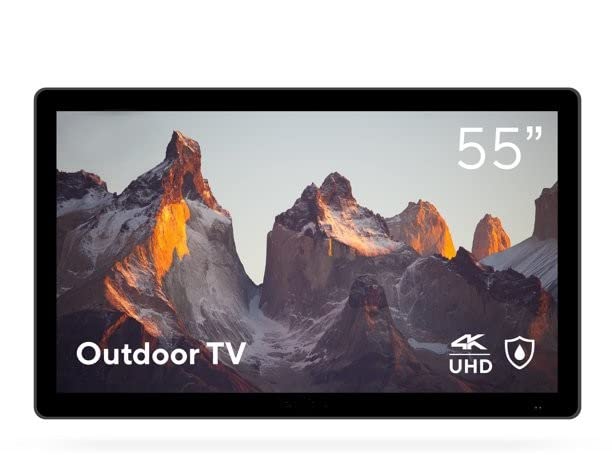
Image: DuraPro 55-Inch Outdoor 4K UHD LED TV.

Image: DuraPro TV mounted on an outdoor wall, showcasinaku suka WebOS smart platform.

Image: DuraPro TV displaying 4K UHD and HDR capabilities.

Image: DuraPro TV demonstrating IP54 weatherproof rating with water resistance.
Fitur Utama
- Optimized for Outdoors: Designed for use in outdoor spaces like covered patios and gazebos.
- 4K UHD HDR Screen: Delivers crisp 4K resolution with High Dynamic Range and 500-nit brightness for enhanced clarity.
- Perlindungan Segala Cuaca: IP54-rated exterior and tempered glass screen provide protection against rain, dust, and UV rays.
- Komponen Terintegrasi: Includes built-in speakers, an IP55 waterproof remote, and a compatible TV wall mount.
- Konektivitas Ramah Pengguna: Equipped with 3 HDMI 2.0 inputs (HDCP 2.2 compatible) and 1 USB input for various media sources.
Apa yang ada di dalam kotak
Verifikasi bahwa semua komponen tersedia sebelum melanjutkan instalasi.
- DuraPro 55-Inch Outdoor 4K UHD LED TV
- Kabel listrik
- IP55 Waterproof Remote Control
- Compatible Wall Mount Bracket

Image: Included wall mount bracket for DuraPro outdoor TV.
Informasi Keselamatan
Selalu ikuti tindakan pencegahan keselamatan dasar saat menggunakan produk ini untuk mengurangi risiko kebakaran, sengatan listrik, dan cedera pada orang.
- Do not expose the TV to direct sunlight for extended periods. This TV is designed for partially shaded outdoor areas.
- Pastikan ventilasi di sekitar TV baik. Jangan halangi lubang ventilasi.
- Use only the power cable supplied with the TV. Connect to a grounded outdoor-rated power outlet.
- Jangan mencoba untuk memperbaiki produk ini sendiri. Rujuk semua servis ke personel servis yang berkualifikasi.
- Keep the remote control dry. While it is IP55 waterproof, prolonged submersion or exposure to harsh chemicals should be avoided.
- Securely mount the TV using the provided wall mount and follow all installation instructions carefully to prevent injury or damage.
Pengaturan
1. Pemasangan di Dinding
The DuraPro 55-Inch Outdoor TV includes a compatible wall mount. Follow the instructions provided with the wall mount for secure installation. Ensure the mounting surface is structurally sound and capable of supporting the TV's weight (approximately 72 pounds).

Gambar: Belakang view of DuraPro TV showing VESA mounting points and rugged exterior.
2. Menghubungkan Perangkat
Locate the input ports on the back or side of the TV. Connect your external devices (e.g., streaming box, game console) using HDMI cables. The TV supports HDMI 2.0 and HDCP 2.2 for 4K sources. A USB port is also available for media playback.
- HDMI: Connect up to three HDMI devices.
- Kabel USB: Insert a USB drive for viewing photos or playing videos.
3. Koneksi Daya
Connect the supplied power cable to the TV's power input and then to a suitable outdoor-rated, grounded electrical outlet.
4. Pengaktifan Awal dan Pengaturan Jaringan
Press the power button on the remote control or on the TV. Follow the on-screen prompts to complete the initial setup, including language selection, time zone, and network connection for smart TV features (WebSistem Operasi (OS).

Image: DuraPro Outdoor TV with WebOS interface on a patio.
Petunjuk Pengoperasian
Menggunakan Kontrol Jarak Jauh
The included IP55 waterproof remote control allows full functionality of your TV. Familiarize yourself with the button layout for power, volume, channel, input selection, and smart TV navigation.

Image: DuraPro IP55 waterproof remote control with water droplets.
Fungsi Dasar TV
- Daya Hidup/Mati: Tekan tombol Kekuatan tombol.
- Kontrol Volume: Gunakan Volume Naik/Turun tombol.
- Pemilihan Input: Tekan tombol Masukan button to cycle through connected sources (HDMI 1, HDMI 2, HDMI 3, USB).
Fitur Smart TV (WebSistem Operasi (OS)
Your DuraPro TV is powered by WebOS, providing access to various streaming applications and smart features. Connect the TV to your home Wi-Fi network during initial setup to enable these functions.
- Dasbor Beranda: Access your favorite apps, inputs, and settings from the home screen.
- Toko Aplikasi: Download and install additional streaming applications.
- Pengaturan Jaringan: Manage your Wi-Fi connection and other network preferences.

Image: DuraPro TV displaying the WebAntarmuka TV pintar OS.
Pemeliharaan
Regular maintenance helps ensure the longevity and optimal performance of your outdoor TV.
- Membersihkan Layar: Usap layar secara perlahan menggunakan kain lembut bebas serat. Untuk noda membandel, dampBasahi kain dengan air atau pembersih layar yang lembut dan non-abrasif. Jangan semprotkan cairan langsung ke layar.
- Membersihkan Bagian Luar: Wipe the TV's exterior casing dengan lembut, damp kain. Hindari bahan kimia keras atau pembersih abrasif.
- Perlindungan Cuaca: While the TV is IP54-rated, it is designed for partially shaded areas. For prolonged periods of extreme weather (heavy rain, snow, direct intense sunlight), consider using a protective cover (not included) to extend the product's life.
- Manajemen Kabel: Ensure all cables are securely connected and routed to prevent water ingress or damage.
Penyelesaian Masalah
Jika Anda mengalami masalah dengan TV Anda, lihat masalah umum dan solusi berikut sebelum menghubungi dukungan pelanggan.
| Masalah | Solusi yang mungkin |
|---|---|
| Tidak ada daya / TV tidak menyala. |
|
| Tidak ada gambar, tetapi ada suara. |
|
| Tidak ada suara. |
|
| Kontrol jarak jauh tidak berfungsi. |
|
| Tidak dapat terhubung ke Wi-Fi. |
|
Spesifikasi
| Fitur | Detil |
|---|---|
| Merek | DuraPro |
| Nomor Model | DP-55 |
| Ukuran Layar | 55 inci |
| Teknologi Tampilan | DIPIMPIN |
| Resolusi | Resolusi 4K UHD |
| Tingkat Penyegaran | 120Hz |
| Fitur Khusus | Flat, HDR, Weatherproof (IP54), Tempered Glass |
| Teknologi Konektivitas | 3x HDMI 2.0 (HDCP 2.2), 1x USB |
| Jenis Pembicara | Terintegrasi |
| Rasio Aspek | 16:9 |
| Dimensi Produk (P x L x T) | 7x45.5x28.5 inci |
| Berat Barang | 72 pon |
| Warna | Hitam |
| Komponen yang Termasuk | Power Cable, Remote, Wall Mount |
Garansi dan Dukungan
For warranty information and technical support, please refer to the warranty card included with your product or visit the official DuraPro website. You may also contact DuraPro customer service directly for assistance with product registration, troubleshooting, or service requests.
Please note: Specific warranty terms and conditions may vary by region and purchase date. Keep your proof of purchase for warranty claims.