
1. Pengamanan Penting
Saat menggunakan peralatan listrik, tindakan pencegahan keselamatan dasar harus selalu diikuti untuk mengurangi risiko kebakaran, sengatan listrik, dan cedera pada orang. Bacalah semua petunjuk dengan saksama sebelum mengoperasikan peralatan ini.
- Jangan sentuh permukaan yang panas. Gunakan gagang atau kenop.
- Untuk melindungi dari sengatan listrik, jangan merendam kabel, steker, atau unit utama dalam air atau cairan lainnya.
- Pengawasan ketat diperlukan saat peralatan apa pun digunakan oleh atau di dekat anak-anak.
- Cabut kabel dari stopkontak saat tidak digunakan dan sebelum dibersihkan. Biarkan dingin sebelum memasang atau melepas komponen.
- Jangan mengoperasikan peralatan apa pun dengan kabel atau steker yang rusak, atau setelah peralatan tersebut mengalami kegagalan fungsi atau telah rusak dengan cara apa pun.
- Penggunaan aksesori tambahan yang tidak direkomendasikan oleh produsen alat dapat menyebabkan cedera.
- Jangan gunakan di luar ruangan.
- Jangan biarkan kabel menggantung di tepi meja atau meja dapur, atau menyentuh permukaan panas.
- Jangan menaruhnya di atas atau di dekat kompor gas atau listrik yang panas, atau di dalam oven yang sedang dipanaskan.
- Kehati-hatian yang ekstrim harus digunakan saat memindahkan peralatan yang berisi minyak panas atau cairan panas lainnya.
- Selalu pasang steker ke alat terlebih dahulu, lalu colokkan kabel ke stopkontak. Untuk melepas, putar kontrol ke posisi "off", lalu cabut steker dari stopkontak.
- Jangan menggunakan alat ini untuk tujuan lain selain yang dimaksudkan.
- Pastikan alat tersebut diletakkan di permukaan yang stabil dan tahan panas, jauh dari dinding dan peralatan lain agar udara dapat bersirkulasi dengan baik.
2. Produk Lebihview
The ZAFRO 27-Quart 14-in-1 Air Fryer Oven is a versatile kitchen appliance designed for air frying, roasting, dehydrating, and more. It features a large capacity and multiple preset functions for convenient cooking.
Komponen dan Aksesoris
- Main Air Fryer Oven Unit
- Piring Pemanggang
- Set Garpu Rotisserie
- Crumb Tray (removable)
- Panduan Pengguna
- Buku Resep
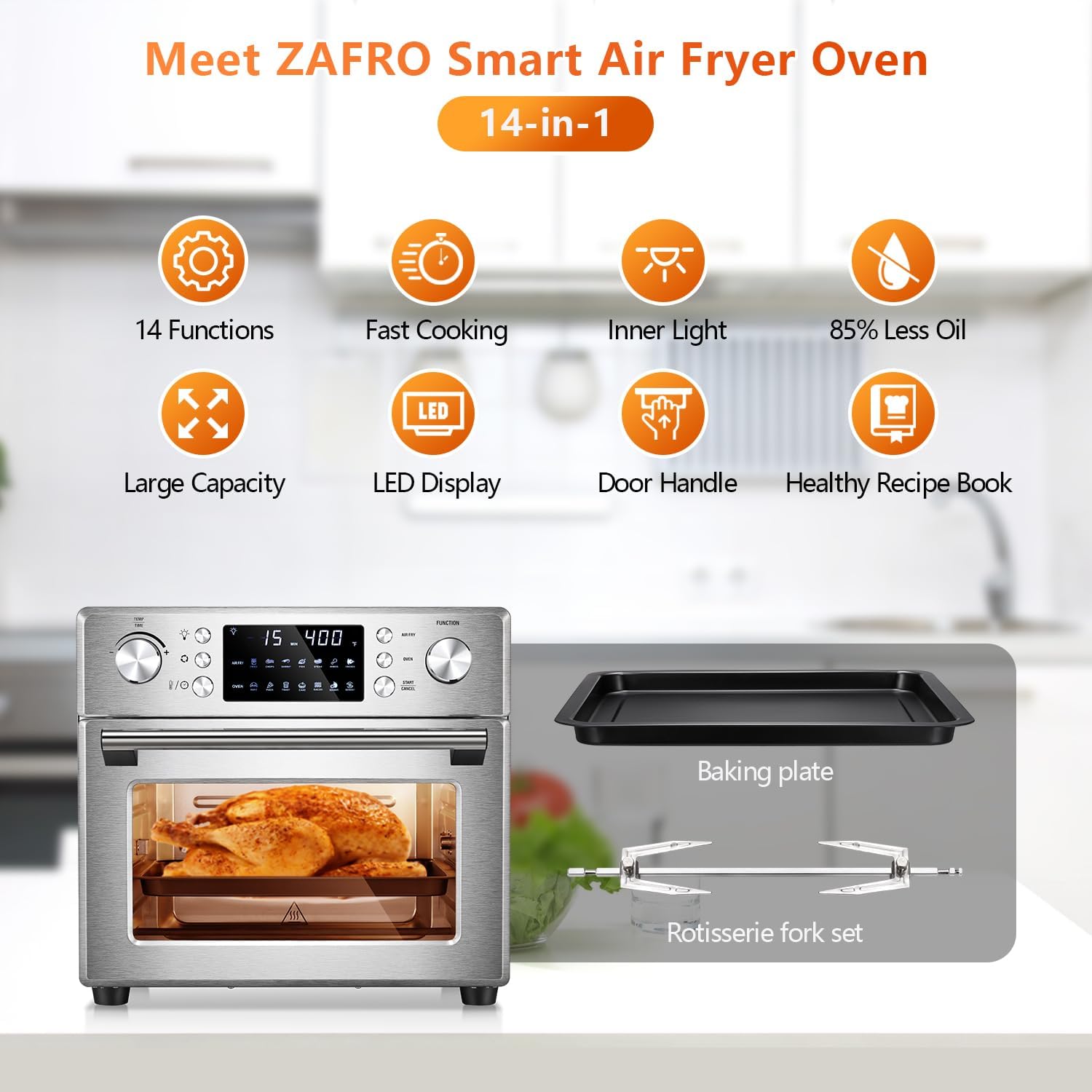
Image: The ZAFRO Air Fryer Oven shown with its primary accessories, including the baking plate and rotisserie fork set.
3. Sebelum Penggunaan Pertama (Pengaturan)
- Buka Kemasan Peralatan: Carefully remove all packaging materials, stickers, and labels from the air fryer oven and its accessories.
- Komponen Bersih: Wash the baking plate, rotisserie fork set, and crumb tray in warm, soapy water. Rinse thoroughly and dry completely. Wipe the interior and exterior of the main unit with a damp kain.
- Penempatan: Place the air fryer oven on a stable, level, and heat-resistant surface. Ensure there is at least 6 inches (15 cm) of clear space on all sides and above the appliance for proper ventilation. Do not place it directly against a wall or under cabinets.
- Pembakaran Awal: Before cooking food, run the appliance empty for approximately 15 minutes at 350°F (175°C) to eliminate any manufacturing odors. A slight odor or smoke may be present during this initial use; this is normal. Ensure the area is well-ventilated.
4. Petunjuk Pengoperasian
Panel Kontrol Berakhirview

Gambar: Detail view of the ZAFRO Air Fryer Oven's digital control panel, highlighting various buttons and their functions.
- Time/Temp Setting Dial: Used to adjust cooking time and temperature.
- Tombol Lampu: Activates the interior light to monitor cooking progress.
- Tombol Rotasi: Engages the rotisserie function for even cooking.
- Display LED: Shows current time, temperature, and selected preset.
- Tombol Goreng Udara: Selects the air frying mode.
- Tombol Oven: Selects the conventional oven mode.
- Tombol Mulai/Batal: Memulai atau menghentikan proses memasak.
- Panggilan Fungsi: Used to select from the 14 preset cooking functions.
Operasi Dasar
- Nyalakan: Colokkan alat tersebut ke stopkontak listrik yang memiliki ground. Layar akan menyala.
- Pilih Fungsi: Use the Function Dial to choose a desired cooking preset (e.g., French fries, Chicken, Bake). Alternatively, press the 'Air Fry' or 'Oven' button for manual mode.
- Sesuaikan Waktu dan Suhu: If using manual mode or adjusting a preset, use the Time/Temp Setting Dial to set the desired cooking time (1-60 minutes) and temperature (180°F to 400°F).
- Mulai Memasak: Press the 'Start/Cancel' button to begin the cooking process.
- Pantau Memasak: Use the 'Light' button to check food without opening the door.
- Berhenti Memasak: Press the 'Start/Cancel' button again to pause or stop cooking. Unplug the appliance when finished.
Menggunakan Fungsi yang Sudah Ditetapkan Sebelumnya
The ZAFRO Air Fryer Oven includes 14 one-touch presets for common dishes:
- Kentang goreng
- Tulang rusuk
- Udang
- Kue
- Kaki Ayam
- Steak
- Ikan
- Memanggang
- Pizza
- Roti panggang
- daging babi asap
- Menjadi kering
- Menghilangkan bekuan es
To use a preset, simply turn the Function Dial to select the desired icon on the display, then press 'Start/Cancel'. The appliance will automatically set the optimal time and temperature for that dish. You can adjust these settings manually after selecting a preset if needed.

Image: The control panel showing icons for different food presets, illustrating the appliance's versatility.
Menggunakan Fungsi Rotisserie
The rotisserie function is ideal for cooking whole chickens or roasts, ensuring even browning and crispiness.
- Secure the food onto the rotisserie spit according to the recipe.
- Masukkan tusuk rotisserie ke dalam slot yang telah ditentukan di dalam oven.
- Select the appropriate cooking function and set time/temperature.
- Press the 'Rotation' button to activate the rotisserie mechanism.
- Press 'Start/Cancel' to begin cooking.
5. Panduan Memasak
For optimal results, consider the following general guidelines:
- Pemanasan awal: For best results, preheat the air fryer oven for 3-5 minutes before adding food.
- Penggunaan Minyak: While air frying uses significantly less oil than traditional deep frying, a light coating of oil on some foods can enhance crispiness and flavor.
- Menggoyangkan/Membalik: For even cooking, especially with smaller items like fries or wings, shake the basket or flip the food halfway through the cooking time.
- Tingkat kematangan: Always ensure food is cooked to a safe internal temperature. Cooking times may vary based on food quantity, density, and desired crispiness.
- Kisaran Suhu: The appliance operates within a temperature range of 180°F to 400°F.
- Rentang waktu: Cooking times can be set from 1 to 60 minutes.
Refer to the included recipe book for specific cooking times and temperatures for various dishes.
6. Pembersihan dan Pemeliharaan
Pembersihan rutin memastikan kinerja optimal dan memperpanjang umur peralatan Anda.
- Sebelum Membersihkan: Selalu cabut alat penggorengan udara dari stopkontak dan biarkan dingin sepenuhnya sebelum membersihkan.
- Aksesoris Pembersih: The baking plate, rotisserie fork set, and crumb tray are nonstick. Wash them in warm, soapy water using a non-abrasive sponge. Rinse and dry thoroughly. Catatan: These accessories are bukan aman untuk mesin pencuci piring.
- Membersihkan Interior: Lap bagian dalam oven dengan iklanamp cloth and a mild detergent. For stubborn food residue, a non-abrasive sponge can be used. Ensure the interior is completely dry before next use.
- Membersihkan Bagian Luar: Bersihkan permukaan luar dengan kain lembut dan kering.amp kain. Jangan gunakan pembersih abrasif atau sabut gosok, karena dapat merusak lapisan akhir.
- Penyimpanan: Once clean and dry, store the appliance and its accessories in a cool, dry place.

Image: A person cleaning the interior of the air fryer oven with a cloth, demonstrating easy maintenance.
7. Penyelesaian masalah
If you encounter issues with your ZAFRO Air Fryer Oven, refer to the following common problems and solutions:
| Masalah | Kemungkinan Penyebab | Larutan |
|---|---|---|
| Alat tidak menyala. | Tidak tercolok; stopkontak rusak; alat rusak. | Pastikan kabel daya terpasang dengan benar ke stopkontak yang berfungsi. Periksa pemutus arus Anda. Jika masalah berlanjut, hubungi dukungan pelanggan. |
| Makanan tidak dimasak secara merata. | Terlalu padat; pengocokan/pembalikan yang tidak memadai; suhu/waktu yang tidak tepat. | Jangan mengisi area memasak terlalu penuh. Kocok atau balik makanan di tengah proses memasak. Sesuaikan suhu dan waktu sesuai kebutuhan. |
| Asap putih keluar dari alat. | Grease residue from previous use; fatty foods cooking. | Clean the appliance thoroughly after each use. For fatty foods, place a small amount of water in the crumb tray to reduce smoke. |
| Makanannya tidak renyah. | Too much moisture; not enough oil; overcrowding. | Pat food dry before cooking. Lightly brush or spray with oil. Cook in smaller batches. |
8. Spesifikasi Produk
Detailed specifications for the ZAFRO 27-Quart 14-in-1 Air Fryer Oven:
- Kapasitas: 27 liter
- Apatage: 1000 watt
- Kisaran Suhu: 180°F hingga 400°F (82°C hingga 204°C)
- Rentang waktu: 1 hingga 60 menit
- Bahan: Stainless Steel (Inner Material), Aluminum (Outer Material)
- Metode Kontrol: Kontrol Sentuh
- Lapisan Anti Lengket: Yes (on accessories)
- Aman untuk Mesin Pencuci Piring: No (for accessories)
- Penggunaan yang Direkomendasikan: Roast, Dehydrate, Air Fry

Image: The ZAFRO Air Fryer Oven with key dimensions indicated, showing its compact design.
9. Garansi dan Dukungan
For warranty information, please refer to the warranty card included with your purchase or contact ZAFRO customer support. If you have any questions, require assistance, or need to report a problem, please reach out to the manufacturer's customer service department. Contact details can typically be found on the product packaging or the official ZAFRO weblokasi.