
Perkenalan
The Wouxun KG-905G Plus is a professional-grade GMRS two-way radio designed for reliable communication. This manual provides essential information for setting up, operating, and maintaining your radio, ensuring optimal performance and longevity. It features Bluetooth audio, USB-C charging, and a rugged IP66 build, making it suitable for various environments and activities.
Isi Paket
Saat membongkar kemasan, harap verifikasi bahwa semua barang yang tercantum di bawah ini ada dan dalam kondisi baik:
- Wouxun KG-905G Plus Radio
- 2600 mAh Li-Ion Battery with USB-C Charging Port
- Antena yang Dapat Dilepas
- Klip Sabuk
- Tali Pergelangan Tangan
- Pengisi Daya Desktop
- Kabel AC
- Manual Pemilik (dokumen ini)

Image: Contents of the Wouxun KG-905G Plus package, including the radio, battery, antenna, desktop charger, AC cord, belt clip, wrist strap, and user manual.
Produk Selesaiview
Familiarize yourself with the various components and controls of your KG-905G Plus radio:
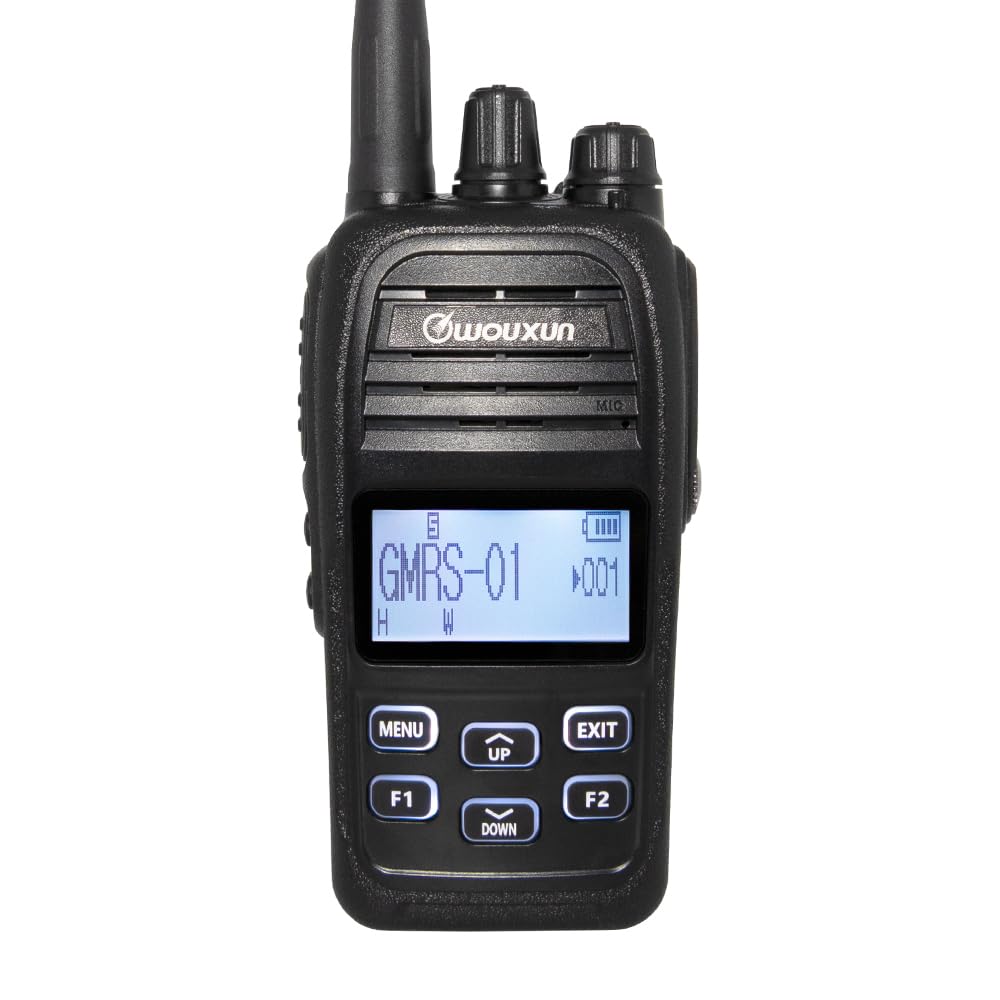
Gambar: Depan view diagram of the Wouxun KG-905G Plus radio, highlighting and labeling its key components and controls for easy identification.
- Antena: Untuk mengirim dan menerima sinyal radio.
- Tombol Saluran: Rotates to select desired GMRS channels.
- Kenop Daya/Volume: Turns the radio on/off and adjusts speaker volume.
- RX/TX LED (Green/Red): Indicates receiving (green) or transmitting (red) status.
- Jack Earphone: Connects compatible audio accessories.
- Transmit PTT Key: Tekan dan tahan untuk mengirim, lepaskan untuk menerima.
- Pembicara: Output menerima audio.
- Mikropon: Menangkap suara Anda untuk transmisi.
- S1 Key (Short Press/Long Press): Tombol fungsi yang dapat diprogram.
- S2 Key (Short Press/Long Press): Tombol fungsi yang dapat diprogram.
- Menampilkan: Shows channel number, battery status, and other radio information.
- Menu/Masuk: Accesses the radio's menu and confirms selections.
- Tombol Atas/Bawah: Menavigasi melalui opsi menu dan menyesuaikan pengaturan.
- Keluar/Batal: Keluar dari menu atau membatalkan operasi yang sedang berlangsung.
- F1 Key (Short Press/Long Press): Tombol fungsi yang dapat diprogram.
- F2 Key (Short Press/Long Press): Tombol fungsi yang dapat diprogram.
Pengaturan
1. Pemasangan dan Pengisian Baterai
- Sejajarkan baterai dengan alur di bagian belakang radio.
- Geser baterai ke atas hingga berbunyi klik dan terpasang dengan benar.
- To charge, connect the AC cord to the desktop charger and plug it into a power outlet. Place the radio (with battery) into the desktop charger. The charging indicator will illuminate.
- Alternatively, the 2600 mAh Li-Ion battery features a built-in USB-C port. Connect a standard USB-C cable (not included) to the battery and a USB power source for direct charging.
- Pastikan baterai terisi penuh sebelum digunakan pertama kali.
2. Pemasangan Antena
- Pasang antena searah jarum jam ke konektor di bagian atas radio hingga kencang dengan tangan. Jangan terlalu kencang.
3. Belt Clip and Wrist Strap Attachment
- Attach the belt clip to the designated area on the back of the radio using the provided screws.
- Thread the wrist strap through the loop on the side or top of the radio.
Petunjuk Pengoperasian
1. Daya Hidup/Mati dan Penyesuaian Volume
- Untuk menghidupkan perangkat, putar kenop Daya/Volume searah jarum jam hingga terdengar bunyi klik.
- Untuk mematikan daya, putar kenop Daya/Volume berlawanan arah jarum jam hingga Anda mendengar bunyi klik.
- Adjust the volume by rotating the Power/Volume knob while the radio is on.
2. Pemilihan Saluran
- Rotate the Channel Knob at the top of the radio to select one of the 22 GMRS simplex channels or 8 GMRS repeater channels.
- The selected channel number will be displayed on the LCD.
3. Mengirim dan Menerima
- To transmit, press and hold the Transmit PTT Key on the side of the radio. Speak clearly into the microphone. The RX/TX LED will glow red.
- Release the PTT Key to stop transmitting and return to receive mode. The RX/TX LED will glow green when receiving a signal.

Gambar: Samping view of the Wouxun KG-905G Plus radio, illustrating the location of the Push-To-Talk (PTT) key and the two programmable side keys (S1 and S2).
4. Menu Navigation and Programmable Keys
- Tekan tombol MENU key to enter the radio's menu.
- Gunakan UP Dan TURUN keys to navigate through menu options.
- Tekan MENU again to confirm a selection or enter a sub-menu.
- Tekan tombol EXIT key to return to the previous menu or exit the menu entirely.
- The S1, S2, F1, and F2 keys are programmable. Refer to the advanced settings section (or PC programming software) for assigning specific functions to short and long presses of these keys.
5. Audio Bluetooth
- The KG-905G Plus supports Bluetooth audio for hands-free operation.
- To pair with a compatible Bluetooth headset, access the Bluetooth menu option (refer to your radio's on-screen menu for exact steps).
- Follow the pairing instructions provided with your Bluetooth headset.
6. Nada CTCSS/DCS
- To reduce interference and communicate with specific groups, you can set CTCSS (Continuous Tone-Coded Squelch System) or DCS (Digital Coded Squelch) tones.
- Access the CTCSS/DCS settings through the radio's menu. You can set standard and non-standard tones, split tones, and perform tone scans to match existing group settings.
7. Kustomisasi Tampilan
- The professional LCD allows for user-defined channel names and 7 selectable backlight colors.
- You can set different backlight colors for transmit, receive, and standby modes for quick visual identification. Adjust these settings in the radio's menu.

Image: A collection of Wouxun KG-905G Plus radios, each demonstrating a different customizable backlight color on its display, including blue, red, purple, green, light blue, yellow, and white.
8. Fitur Tambahan
The KG-905G Plus includes several advanced features:
- SUARA: Voice-activated transmission for hands-free communication.
- Pemindaian Saluran: Scans through channels to find active transmissions.
- Pemindaian Prioritas: Memantau saluran prioritas sambil memindai saluran lainnya.
- Timeout Timer (TOT): Membatasi durasi transmisi untuk mencegah transmisi yang terlalu lama secara tidak sengaja.
- Selectable Power: Adjust transmit power (high/low) to conserve battery or extend range.
- Bandwidth Lebar/Sempit: Selects appropriate bandwidth for communication.
- Jil.tage Meteran: Menampilkan volume baterai saat initage.
- English Voice Prompts: Memberikan umpan balik berupa suara untuk pengoperasian.
- Radio FM: Penerima siaran FM terintegrasi.
- Stopwatch: Integrated timing function.
- Dapat diprogram PC: Customize radio settings and channels using optional PC software and cable.
Pemeliharaan
Pembersihan
- Bersihkan permukaan radio dengan kain lembut dan kering.amp kain. Jangan gunakan bahan kimia keras atau pembersih abrasif.
- Ensure the earphone jack and USB-C port covers are securely closed to maintain IP66 water resistance.
Perawatan Baterai
- Avoid overcharging or completely discharging the Li-Ion battery for extended periods.
- Simpan baterai di tempat sejuk dan kering bila tidak digunakan.
Tahan Air (IP66)
The KG-905G Plus is rated IP66, meaning it is dust-tight and protected against powerful water jets. While it can withstand rain and splashes, it is not designed for submersion. Always ensure all port covers are sealed to maintain water resistance.
Penyelesaian Masalah
- Tidak Ada Daya: Pastikan baterai terpasang dan terisi dengan benar. Periksa apakah kenop Daya/Volume sudah dinyalakan.
- Tidak dapat mengirimkan: Verify the PTT key is fully pressed. Check if the channel is busy or if a timeout timer has been activated. Ensure the antenna is securely attached.
- Cannot Receive: Adjust the volume. Check if the squelch level is set too high. Ensure you are on the correct channel and CTCSS/DCS settings match the transmitting party.
- Kualitas Audio Buruk: Check antenna connection. Ensure you are within range of the other radio or repeater. Adjust volume.
- Masalah Pemasangan Bluetooth: Ensure the radio's Bluetooth is enabled and in pairing mode. Check that the headset is also in pairing mode and within range.
Spesifikasi
| Fitur | Spesifikasi |
|---|---|
| Merek | Wouxun |
| Nomor Model | KG-905G |
| Warna | Hitam |
| Jumlah Saluran | 16 (Pre-programmed GMRS channels, up to 400 custom channels via PC programming) |
| Rentang Frekuensi | 462 MHz - 467 MHz (GMRS) |
| Jangkauan Bicara Maksimum | 5 Miles (Varies based on terrain and conditions) |
| Tingkat Tahan Air | IP66 (Dust-tight, protected against powerful water jets) |
| Perangkat yang Kompatibel | PC (for programming), standard power sources, audio accessories |
| Protokol Konektivitas | GMRS, Bluetooth |
| Jenis Tuner | Gelombang UHF |
| Baterai | 2600 mAh Li-Ion with USB-C charging |
| Pabrikan | QUANZHOU Wouxun Electronics Co., Ltd |
Informasi Garansi
The Wouxun KG-905G Plus radio comes with a 1-year Wouxun manufacturer warranty. This warranty covers defects in materials and workmanship under normal use. Please retain your proof of purchase for warranty claims. For specific terms and conditions, refer to the official Wouxun warranty policy or contact customer support.
Mendukung
For technical assistance, troubleshooting beyond this manual, or warranty inquiries, please contact Wouxun customer support. Contact information can typically be found on the official Wouxun webdi situs web atau pada kemasan produk Anda.