
Perkenalan
This manual provides detailed instructions for the safe installation, operation, and maintenance of your bimar Wi-Fi Ceiling Fan, Model 1 (Ø 132). Please read this manual thoroughly before using the product and retain it for future reference.
Tujuan Penggunaan: This high-performance ceiling fan is designed for ventilation in indoor domestic environments. Any other use is considered improper and potentially hazardous. The manufacturer cannot be held responsible for any damages resulting from improper use or repairs performed by unqualified personnel.
Petunjuk Keselamatan Penting
Untuk mengurangi risiko kebakaran, sengatan listrik, atau cedera pada orang, perhatikan hal berikut:
- Baca semua petunjuk sebelum memasang kipas.
- Pemasangan harus dilakukan oleh teknisi listrik yang berkualifikasi sesuai dengan semua peraturan kelistrikan lokal dan nasional.
- Pastikan lokasi pemasangan mampu menopang berat kipas (sekitar 6.2 kg).
- Selalu putuskan aliran listrik pada pemutus sirkuit utama sebelum pemasangan atau perawatan.
- Jangan mengoperasikan kipas angin dengan kabel atau steker listrik yang rusak.
- Keep hands, hair, and clothing away from moving blades.
- Do not insert any objects into the fan blades while it is operating.
- Peralatan ini tidak ditujukan untuk digunakan oleh orang (termasuk anak-anak) dengan keterbatasan fisik, sensorik, atau mental, atau kurang pengalaman dan pengetahuan, kecuali mereka telah diberi pengawasan atau petunjuk mengenai penggunaan peralatan oleh orang yang bertanggung jawab atas keselamatan mereka.
- Anak-anak harus diawasi untuk memastikan mereka tidak bermain-main dengan peralatan tersebut.
Apa yang ada di dalam kotak
Your bimar Wi-Fi Ceiling Fan package includes the following components:
- bimar Wi-Fi Ceiling Fan unit (with 3 blades)
- Kontrol Jarak Jauh
- Perlengkapan pemasangan (sekrup, braket, dll.)
- Instruksi Manual (dokumen ini)

Image: The bimar Wi-Fi Ceiling Fan, featuring three light-colored wooden blades and a brushed metal motor housing and downrod.
Pengaturan dan Instalasi
1. Pemasangan Kipas Angin
Pemasangan profesional oleh teknisi listrik yang berkualifikasi sangat disarankan. Ensure the ceiling structure can safely support the fan's weight and that all wiring complies with local electrical codes.
- Siapkan Lokasi Pemasangan: Turn off power at the circuit breaker. Securely attach the mounting bracket to a ceiling joist or a fan-rated outlet box.
- Assemble the Downrod and Motor: Pasang batang penyangga ke rumah motor kipas.
- Gantung Kipas Angin: Angkat rakitan kipas dengan hati-hati dan gantungkan pada braket pemasangan.
- Hubungkan Kipas Angin: Connect the electrical wires (live, neutral, ground) from the ceiling to the fan's wiring, following the wiring diagram provided in the separate installation guide (if applicable).
- Pasangkan Bilahnya: Securely fasten the three blades to the motor housing.
- Amankan Kanopi: Raise the canopy to cover the wiring and mounting bracket, securing it in place.

Gambar: Samping view of the bimar ceiling fan, illustrating the angle of the light wood blades and the connection to the downrod.
2. Koneksi Wi-Fi dan Aplikasi
The bimar Wi-Fi Ceiling Fan is compatible with the Bimar Live Smart app for advanced control and scheduling.
- Unduh Aplikasi: Pencarian untuk "Bimar Live Smart" in your smartphone's app store (iOS or Android) and install it.
- Buat Akun: Buka aplikasi dan ikuti petunjuk di layar untuk membuat akun pengguna baru atau masuk jika Anda sudah memilikinya.
- Tambahkan Perangkat: Power on the ceiling fan. In the Bimar Live Smart app, tap "Add Device" or the "+" icon. Select "Ceiling Fan" or the appropriate device type.
- Hubungkan ke Wi-Fi: Follow the app's instructions to put the fan into pairing mode (usually by pressing a button on the fan or remote for a few seconds). Connect the fan to your home 2.4GHz Wi-Fi network.
- Sebutkan nama perangkatnya: Once connected, you can name your fan for easy identification within the app.

Image: A modern living room featuring the bimar ceiling fan installed, with a smartphone displaying the Bimar Live Smart app interface, indicating Wi-Fi and voice control capabilities.
Petunjuk Pengoperasian
Your bimar Wi-Fi Ceiling Fan offers multiple control options for convenience.
1. Operasi Kontrol Jarak Jauh
The included remote control allows direct access to all fan functions.
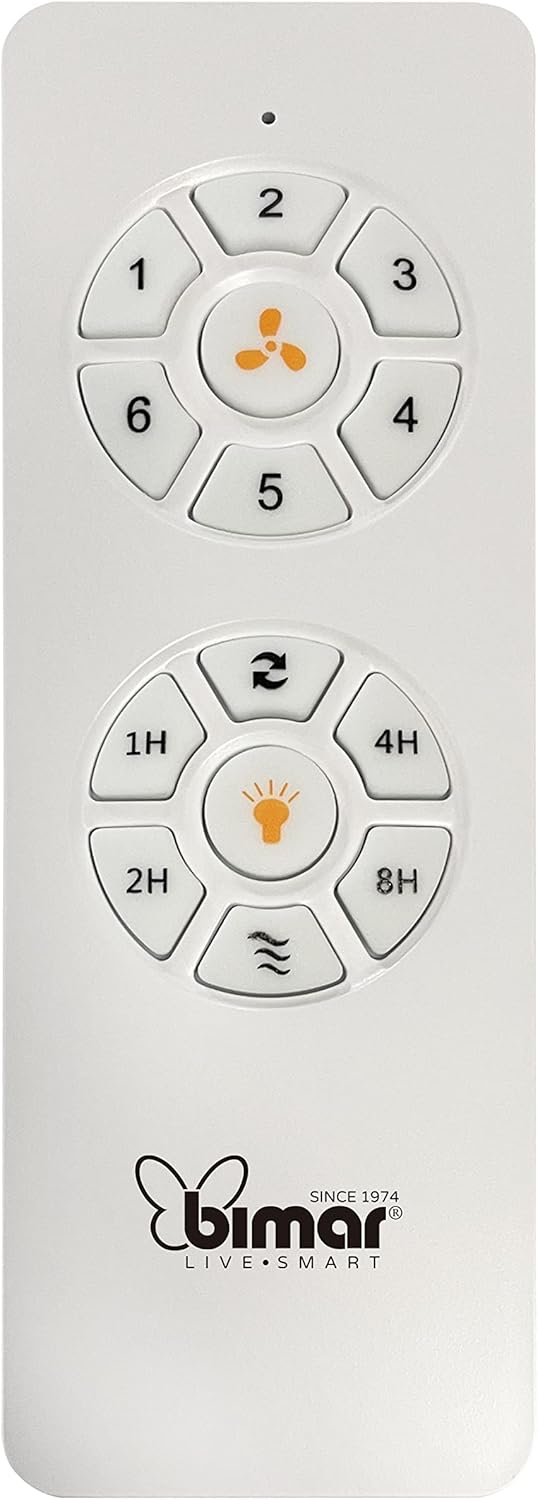
Image: The white remote control for the bimar ceiling fan, showing buttons for fan speed (1-6), fan on/off, timer (1H, 2H, 4H, 8H), mode selection, and reverse function.
- Daya Hidup/Mati: Tekan tombol ikon kipas untuk menghidupkan atau mematikan kipas.
- Penyesuaian Kecepatan: Use buttons 1-6 to select one of the six available fan speeds.
- Fungsi Pengatur Waktu: Press 1H, 2H, 4H, or 8H to set the fan to automatically turn off after the selected duration.
- Pemilihan Mode: Use the mode button (often represented by waves or arrows) to cycle through Normal, Natural, Sleep, and Breeze modes.
- Mode musim panas/dingin: The reverse button (often two arrows forming a circle) changes the blade rotation direction.
2. App Control (Bimar Live Smart)
Once connected to the Bimar Live Smart app, you can access enhanced features:
- Operasi Jarak Jauh: Control all fan functions from anywhere with an internet connection.
- Penjadwalan: Program daily and weekly on/off times for automated operation.
- Pengatur waktu: Adjust the timer from 1 to 8 hours.
- Mode and Speed Selection: Easily switch between the 6 speeds and 4 operating modes.
3. Kontrol Suara
The bimar Wi-Fi Ceiling Fan is compatible with popular voice assistants like Amazon Alexa and Google Assistant. After connecting the fan to the Bimar Live Smart app, link your Bimar account to your voice assistant app (e.g., Alexa app or Google Home app).
ExampPerintah Suara:
- "Alexa, nyalakan kipas langit-langit."
- "Hey Google, set ceiling fan speed to 3."
- "Alexa, turn off the ceiling fan in 1 hour."
4. Operating Modes and Speeds
- 6 Kecepatan Ventilasi: Adjust the airflow intensity to your preference.
- Modus Normal: Aliran udara yang konsisten pada kecepatan yang dipilih.
- Modus Alami: Mensimulasikan angin sepoi-sepoi alami dengan mengubah kecepatan kipas.
- Mode tidur: Beroperasi pada kecepatan yang lebih rendah dan lebih tenang untuk istirahat yang tidak terganggu.
- Modus Angin: Provides a gentle, intermittent airflow.
5. Summer/Winter Function
The reversible blade function allows for year-round use:
- Mode Musim Panas (Rotasi berlawanan arah jarum jam): Creates a downward airflow, generating a cooling breeze.
- Mode Musim Dingin (Rotasi searah jarum jam): Menciptakan aliran udara ke atas, mengedarkan udara hangat yang terperangkap di dekat langit-langit, sehingga meningkatkan efisiensi pemanasan.

Image: A diagram illustrating the airflow patterns for summer (indirect ventilation, pushing air upwards) and winter (direct ventilation, pulling air downwards) modes of a ceiling fan.
Pemeliharaan
Perawatan rutin memastikan kinerja optimal dan umur kipas langit-langit Anda.
- Pembersihan: Before cleaning, ensure the fan is turned off and power is disconnected at the circuit breaker. Use a soft, damp cloth to wipe down the blades and motor housing. Do not use abrasive cleaners or solvents.
- Inspeksi Pisau: Periodically check the blades for any signs of damage or warping. Ensure all blade screws are tight.
- Pelumasan Motor: The fan's DC motor is designed for maintenance-free operation and does not require lubrication.
- Kencangkan Pengencang: Over time, some fasteners may become loose. Check and tighten all screws and connections annually.

Gambar: Close-up view of the bimar ceiling fan's brushed metal motor housing and the attachment points for the light wood blades, highlighting areas for cleaning and inspection.
Penyelesaian Masalah
| Masalah | Kemungkinan Penyebab | Larutan |
|---|---|---|
| Kipas tidak mulai | No power supply; Remote control battery low; Incorrect wiring. | Check circuit breaker and wall switch. Replace remote batteries. Verify wiring connections (consult electrician). |
| Kipas bergetar | Pisau atau perangkat pemasangan yang longgar; Pisau tidak seimbang. | Ensure all blade screws and mounting screws are tight. Use a balancing kit (not included) if necessary. |
| Kontrol jarak jauh tidak berfungsi | Low battery; Obstruction between remote and receiver; Remote not paired. | Replace remote batteries. Ensure clear line of sight. Refer to pairing instructions in the full manual. |
| Masalah koneksi Wi-Fi | Incorrect Wi-Fi password; Router too far; 5GHz network selected. | Verify Wi-Fi password. Move router closer or use a Wi-Fi extender. Ensure you are connecting to a 2.4GHz network. Reset fan and re-attempt pairing. |
| Kipas berisik | Loose screws; Blades hitting an obstruction; Motor issue. | Check and tighten all screws. Ensure nothing is obstructing the blades. If noise persists, contact customer support. |
Spesifikasi
| Fitur | Detil |
|---|---|
| Merek | bimar |
| Nomor Model | 1 |
| Dimensi Produk | 132 x 132 x 27.5 cm (Diameter x Diameter x Tinggi) |
| Berat | 6.2 kg |
| Jumlah Bilah | 3 |
| Bahan | Kayu |
| Warna | Black (Note: Blades are light wood finish as shown in images) |
| Tipe Motor | DC (Brushless, energy-saving) |
| Konsumsi Daya | 35W |
| Metode Pengendalian | Remote Control, Bimar Live Smart App, Voice Control (Amazon Alexa, Google Assistant) |
| Kecepatan Kipas | 6 |
| Mode Operasi | Normal, Natural, Sleep, Breeze |
| Pengatur waktu | 1 hingga 8 jam |
| Fitur Tambahan | Silent operation, Summer/Winter mode (reversible blades) |
| Sumber Daya | Listrik |
| Jenis Instalasi | Pemasangan di Langit-langit |

Image: The three light wood fan blades, detached and laid flat, showcasing their design and texture.


Gambar: Dua views of the bimar ceiling fan, illustrating different downrod lengths: one with a 25 cm downrod and another with a 13 cm downrod, affecting the overall height of the fan.
Garansi dan Dukungan
For warranty information, technical support, or service inquiries, please refer to the warranty card included with your product or visit the official bimar websitus. Simpan bukti pembelian Anda untuk klaim garansi.
Pabrikan: Bimar S.r.l.
Kontak: Silahkan kunjungi the bimar store on Amazon or the official bimar websitus untuk rincian kontak.