Perkenalan
This manual provides detailed instructions for the Goodmans Bluetooth Aqua Speakers. Please read this manual thoroughly before using the product to ensure proper operation and to maximize its lifespan. Keep this manual for future reference.
Informasi Keselamatan
- Jangan biarkan speaker terkena suhu ekstrem, sinar matahari langsung, atau kelembapan tinggi.
- While the speaker features internal water jets, it is not designed to be submerged in water. Avoid exposing the exterior to excessive water or liquids.
- Use only the provided Micro USB charging cable.
- Jangan mencoba membongkar, memperbaiki, atau memodifikasi speaker. Hal ini akan membatalkan garansi dan dapat menyebabkan kerusakan atau cedera.
- Jauhkan dari jangkauan anak-anak.
- Pastikan ventilasi yang tepat saat mengoperasikan.
Isi Paket
Verifikasi bahwa semua item ada dalam paket:
- Goodmans Bluetooth Aqua Speakers (2 units)
- Kabel Pengisian Daya Mikro USB
- 3.5mm Line-in Audio Cable
- Instruksi Manual (dokumen ini)
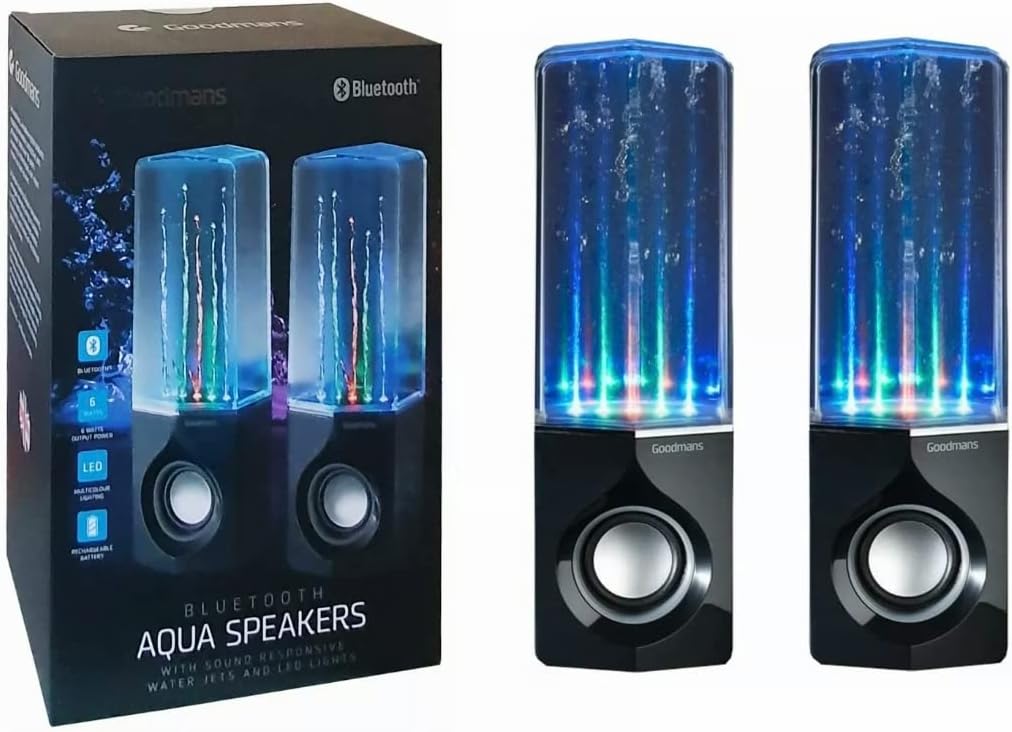
Image: Goodmans Bluetooth Aqua Speakers shown alongside their retail packaging, illustrating the product as it appears when unboxed.
Produk Selesaiview
The Goodmans Aqua Speakers feature a sleek design with integrated LED lights and sound-reactive water jets that pulse to your music. Each speaker unit includes a main speaker driver and control buttons.

Gambar: Depan view of two Goodmans Bluetooth Aqua Speakers, showcasing the active water jets and vibrant LED lights during operation.
Komponen Pembicara
- Ruang Air: Transparent upper section containing water and LED lights.
- Kisi-kisi Pembicara: Protects the audio driver.
- Panel Kontrol: Located on the side or rear of the main speaker unit.
- Port USB Mikro: Untuk mengisi daya baterai internal.
- Masukan Audio 3.5 mm: Untuk koneksi kabel ke perangkat audio.

Gambar: Samping view of one Goodmans Bluetooth Aqua Speaker, highlighting the location of control buttons and input/output ports.
Pengaturan
1. Mengisi Baterai
- Hubungkan kabel pengisi daya Micro USB ke port Micro USB speaker.
- Hubungkan ujung kabel lainnya ke adaptor daya USB (tidak disertakan) atau port USB komputer.
- Lampu indikator pengisian daya akan menyala. Setelah terisi penuh, lampu mungkin berubah warna atau mati.
- A full charge typically takes 2-3 hours and provides several hours of playback.
2. Menghidupkan/Mematikan
- To power on, press and hold the Power button (usually marked with a power symbol) for a few seconds until you hear an audible prompt or see the LED lights activate.
- Untuk mematikan, tekan dan tahan tombol Daya lagi hingga speaker mati.
Pengoperasian
1. Pemasangan Bluetooth
- Ensure the speaker is powered on and within close proximity (within 10 meters) of your Bluetooth-enabled device.
- Speaker akan secara otomatis memasuki mode pemasangan Bluetooth, yang ditunjukkan oleh lampu LED yang berkedip atau bunyi peringatan.
- Pada perangkat Anda (smartphone, tablet, komputer), buka pengaturan Bluetooth dan aktifkan Bluetooth.
- Pencarian untuk available devices. The speaker should appear as "Goodmans Aqua Speakers" or a similar name.
- Select the speaker from the list to pair. Once paired, you will hear a confirmation sound, and the LED light may change to a solid color.
- You can now play audio from your device through the Aqua Speakers.
2. Input Tambahan (AUX)
For devices without Bluetooth, or if you prefer a wired connection:
- Hubungkan salah satu ujung kabel audio 3.5 mm ke port AUX-in pada speaker.
- Hubungkan ujung kabel yang lain ke jack headphone atau output audio perangkat Anda.
- The speaker should automatically switch to AUX mode, or you may need to press a mode button if available.
3. Music Playback and Volume Control
- Putar/Jeda: Press the Play/Pause button (often marked with a triangle or || symbol) to start or stop playback.
- Volume Naik/Turun: Use the volume buttons (+/-) on the speaker or your connected device to adjust the volume.
- Lacak Lewati: Some models may have dedicated buttons for skipping tracks forward or backward. Refer to the specific button layout on your speaker.
4. LED Lights and Water Jets
The LED lights and water jets are sound-reactive, meaning they will pulse and change color in sync with the audio being played. This feature is automatic and does not typically require manual control.
Pemeliharaan
- Pembersihan: Use a soft, dry cloth to wipe the exterior of the speaker. Do not use abrasive cleaners or solvents. For the transparent water chamber, a slightly damp cloth can be used, but ensure no water enters the electronic components.
- Penyimpanan: Simpan speaker di tempat yang sejuk dan kering, jauh dari sinar matahari langsung dan suhu ekstrem saat tidak digunakan dalam jangka waktu lama.
- Perawatan Baterai: Untuk memperpanjang masa pakai baterai, hindari sering-sering menguras baterai sepenuhnya. Isi daya speaker secara teratur, meskipun tidak digunakan terus-menerus.
Penyelesaian Masalah
| Masalah | Solusi yang mungkin |
|---|---|
| Speaker tidak menyala. | Pastikan baterai terisi penuh. Sambungkan speaker ke sumber daya menggunakan kabel Micro USB. |
| Tidak dapat dipasangkan melalui Bluetooth. | Make sure the speaker is in pairing mode. Disable and re-enable Bluetooth on your device. Ensure no other device is currently connected to the speaker. Move the speaker closer to your device. |
| Tidak ada suara atau volume rendah. | Check the volume levels on both the speaker and your connected device. Ensure the correct input mode (Bluetooth or AUX) is selected. If using AUX, check the cable connection. |
| Water jets or LED lights not working. | Ensure music is playing and the volume is sufficient for the sound-reactive features to activate. Check if the speaker is fully charged. |
| Audio terdistorsi. | Reduce the volume on both the speaker and your device. Ensure the speaker is not too far from the Bluetooth source. |
Spesifikasi
| Fitur | Detil |
|---|---|
| Nama Model | Pembicara Aqua |
| Teknologi Konektivitas | Bahasa Indonesia: Bluetooth |
| Jenis Pembicara | Stereo |
| Mode Keluaran Audio | Stereo |
| Daya Keluaran Maksimum Speaker | 6 Watt |
| Sumber Daya | Bertenaga Baterai (Dapat Diisi Ulang) |
| Fitur Khusus | Integrated Rechargeable Battery, Bluetooth Enabled, 3.5mm Line-in Cable Included, Micro USB Charging Cable Included, Sound-Reactive LED Lights and Water Jets |
| Metode Kontrol | Tombol Tekan |
| Berat Barang | 1.58 Kilogram |
| Warna | Hitam |
| Bahan | Waterproof Material (for internal water chamber) |
| Dimensi Produk | Ukuran 35x22.7x13.7 cm |
Garansi dan Dukungan
Goodmans products are designed to meet high-quality standards. For warranty information, please refer to the warranty card included with your purchase or contact your retailer. Keep your proof of purchase for any warranty claims.
For further assistance or technical support, please contact the retailer where you purchased the product or visit the official Goodmans websitus untuk rincian kontak.