
1. Produk Lebihview
The Kuephom Portable CD Player (Model PM11-Black) is a versatile audio device designed for personal and multi-user listening. It features a built-in speaker, rechargeable battery, and anti-skip protection, making it suitable for various environments including home, car, and travel. The player supports multiple audio formats and offers adjustable playback speed for learning purposes.

Image 1.1: Kuephom Portable CD Player and accessories.
Fitur Utama:
- Baterai Isi Ulang: Integrated 1500mAh battery provides up to 8 hours of playback with earphones or 5 hours with the built-in speaker on a 4-hour charge.
- Speaker internal: Allows direct listening without external headphones or speakers.
- Perlindungan Anti-Lewati: Ensures uninterrupted audio playback during movement or light shocks.
- Memory Playing: Resumes playback from the last played track when the device is turned on again.
- Kompatibilitas Luas: Mendukung format CD, CD-R, CD-RW, MP3, dan WMA.
- Beberapa Pilihan Konektivitas: Includes 3.5mm AUX input/output, USB port, and headphone jack.
- Adjustable Playback Speed: Useful for language learning or musical practice.
2. Panduan Pengaturan
2.1 Mengisi Daya Perangkat
Before initial use, fully charge the CD player. The device features a built-in rechargeable battery, eliminating the need for disposable AA batteries.
- Locate the charging port on the side of the CD player.
- Connect the provided USB charging cable to the player and a compatible USB power source (e.g., wall charger, power bank, car charger, computer USB port).
- Lampu indikator pengisian daya akan menyala. Pengisian daya hingga penuh biasanya membutuhkan waktu sekitar 4 jam.

Image 2.1: Charging options for the CD player.
2.2 Memuat CD
The CD player supports standard CD, CD-R, CD-RW, MP3, and WMA disc formats.
- Locate the 'OPEN' switch on the side of the player.
- Slide the switch to the 'OPEN' position to release the lid.
- Gently place the CD onto the central spindle with the label side facing up. Ensure the CD is securely seated.
- Tutuplah tutupnya rapat-rapat hingga terkunci pada tempatnya.
Video 2.2: Demonstrates the basic functions and usage scenarios of the Kuephom Portable CD Player, including loading a CD and identifying ports.
2.3 Menghubungkan Perangkat Eksternal
- Headphone: Plug the included earbuds or your preferred 3.5mm headphones into the headphone jack (blue port).
- Koneksi AUX: Use the provided 3.5mm audio cable to connect the player's AUX port (green port) to external speakers or a car's AUX input.
- Pemutaran USB: Insert a USB flash drive into the USB port to play compatible audio file(MP3, WMA).

Image 2.3: Connecting the CD player to a car's audio system.
3. Petunjuk Pengoperasian
3.1 Daya Hidup/Mati
Locate the power switch on the side of the player. Slide it to the 'ON' position to power on the device. Slide it to 'OFF' to power off.
3.2 Kontrol Pemutaran Dasar
The control panel on the top of the player features intuitive buttons:
- Play/Pause (►▮): Tekan untuk memulai atau menjeda pemutaran.
- Lagu Sebelumnya (◀◀): Press once to go to the beginning of the current track. Press twice to go to the previous track.
- Next Track (►►): Tekan untuk melompat ke trek berikutnya.
- Volume Naik (+): Meningkatkan volume.
- Volume Turun (-): Mengurangi volume.
3.3 Advanced Playback Functions
- Repeat (REP): Cycles through repeat modes (e.g., repeat one, repeat all, random).
- Modus (MODE): Switches between different playback modes (e.g., CD, USB, AUX).
- A-B Repeat (A-B): Allows repeating a specific segment of audio.
- Program (PROG): Enables programming a custom playback order for tracks.
- Speed Adjustment (SPEED +/-): Adjusts the playback speed, useful for language learning or transcribing audio.

Image 3.1: The adjustable playback speed feature is beneficial for learning.
3.4 Anti-Skip and Memory Functions
- Perlindungan Anti-Lewati: This function is automatically activated when the player is turned on, providing a buffer against minor shocks and vibrations to ensure continuous playback.
- Memory Playing: The device remembers the last played track and position, resuming from that point when powered on again.
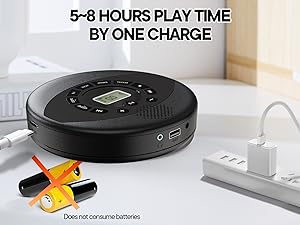
Image 3.2: Anti-shock protection for active use.
4. Pemeliharaan
4.1 Cleaning the CD Player
- Gunakan kain lembut dan kering untuk membersihkan bagian luar pemutar musik.
- For the lens, use a specialized CD lens cleaning kit. Do not touch the lens directly.
- Hindari penggunaan pembersih atau pelarut yang bersifat abrasif.
4.2 Perawatan Baterai
- Untuk memperpanjang masa pakai baterai, hindari mengosongkan baterai sepenuhnya secara sering.
- Simpan perangkat di tempat yang sejuk dan kering saat tidak digunakan dalam jangka waktu lama.
- Charge the device at least once every three months if unused to prevent deep discharge.
4.3 Perawatan CD
- Pegang CD pada bagian tepinya untuk menghindari sidik jari dan goresan.
- Bersihkan CD dengan kain lembut dan bebas serat, usap dari tengah ke luar.
- Store CDs in their cases to protect them from dust and damage.
5. Penyelesaian masalah
| Masalah | Kemungkinan Penyebab | Larutan |
|---|---|---|
| Pemutar tidak menyala. | Baterai habis. Saklar daya mati. | Charge the battery. Ensure the power switch is in the 'ON' position. |
| Tidak ada suara. | Volume is too low. Headphones/AUX cable not connected properly. CD/USB not playing. | Increase volume. Check connections. Ensure CD/USB is playing and not paused. |
| CD tersendat atau tidak berputar. | CD is dirty or scratched. CD is not properly seated. Incorrect CD format. | Clean the CD. Re-seat the CD. Ensure the CD format (CD, CD-R, CD-RW, MP3, WMA) is supported. |
| Pemutaran USB tidak berfungsi. | USB drive not properly inserted. Incompatible file format. | Pastikan drive USB terpasang sepenuhnya. Periksa apakah files are MP3 or WMA format. |
6. Spesifikasi Produk
| Fitur | Detil |
|---|---|
| Nomor Model | PM11-Black |
| Dimensi Produk | 5.7x5.7x1.2 inci |
| Berat Barang | 1.01 pon |
| Jenis Baterai | 1 baterai Lithium Polymer (termasuk) |
| Konektivitas | Tambahan, USB |
| Fitur Khusus | Anti-Skip Protection, Portable, Programmable Memory, Rechargeable |
| Komponen yang Termasuk | CD player X 1, Earbuds X 1, Audio cable X 1, Charging cable X 1, Pouch X 1 |
| Format yang Didukung | CD, CD-R, CD-RW, MP3, WMA |
7. Garansi & Dukungan
For warranty information and customer support, please contact Kuephom directly. Details regarding product warranty periods and service procedures are typically provided with your purchase documentation or can be found on the official Kuephom weblokasi.
If you encounter any issues not covered in this manual, please reach out to Kuephom customer service for assistance.