
1. Pendahuluan
Thank you for choosing the NUBWO USB C Headset, Model HW02. This headset is designed for clear communication and comfortable use in various environments, including office, home, and call centers. It features a noise-cancelling microphone, in-line controls, and broad compatibility with USB-C enabled devices. This manual provides essential information for setting up, operating, maintaining, and troubleshooting your headset to ensure optimal performance.
2. Isi Paket
Harap verifikasi bahwa semua item ada dalam paket Anda:
- NUBWO USB C Headset (Model HW02)
- USB-C Cable (integrated with in-line control)
- User Manual (dokumen ini)
3. Petunjuk Penyiapan
Follow these steps to set up your NUBWO USB C Headset:
- Hubungkan Headset: Plug the USB-C connector of the headset directly into an available USB-C port on your laptop, phone, or computer. The headset is plug-and-play, requiring no additional drivers for most operating systems (Windows 7/8/10, Android, iOS).

Image: NUBWO USB C Headset connected to a laptop, illustrating its wide compatibility with PC, laptop, tablet, and smartphone devices running Android, iOS, Windows 7, Windows 8, and Windows 10.
- Sesuaikan untuk Kenyamanan: Adjust the headband to fit comfortably on your head. The headset features an adjustable headband and breathable ear muffs for extended wear.

Image: Diagram highlighting the comfortable design elements of the headset, including a 180-degree rotatable microphone, breathable earmuffs, and an adjustable headband for personalized fit.
- Posisikan Mikrofon: Rotate the microphone boom to position it optimally near your mouth for clear voice capture. The microphone is 180-degree rotatable.
Video Demonstrasi Pengaturan
Video: Penjelasan terperinciview of the NUBWO USB C Headset, demonstrating its lightweight design, in-line controls, and overall comfort for various uses. This video is provided by a seller and offers practical insights into the product's features.
4. Petunjuk Pengoperasian
The NUBWO HW02 headset features convenient in-line controls for easy management of audio and microphone functions:
- Kontrol Volume: Use the '+' and '-' buttons on the in-line control unit to adjust the speaker volume.
- Mikrofon Bisu: Press the microphone icon button to mute or unmute the microphone. A red indicator light will typically show when the microphone is muted.
- Pembicara Bisu: Press the speaker icon button to mute or unmute the headset speakers. A red indicator light will typically show when the speakers are muted.
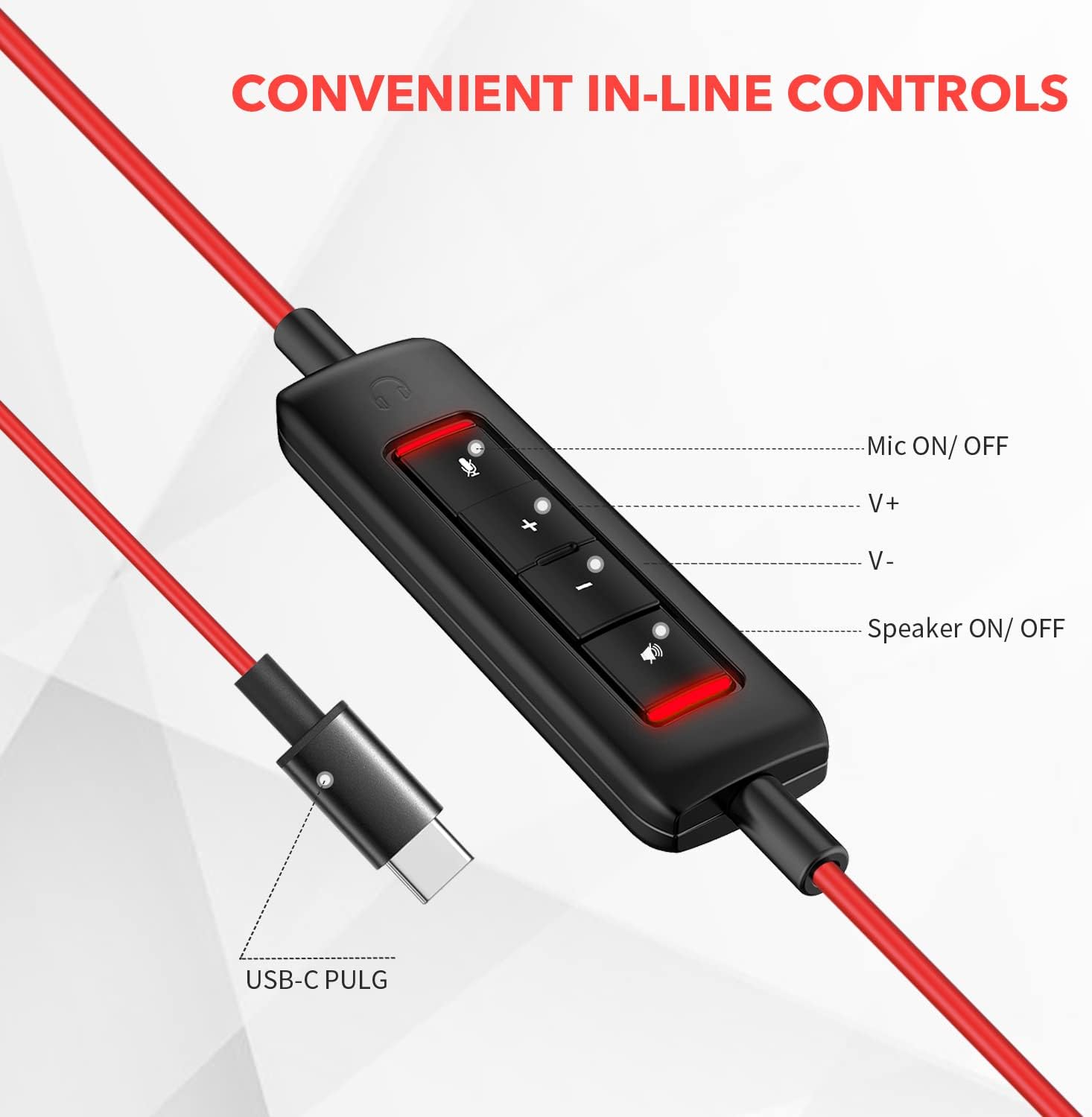
Gambar: Close-up view of the in-line control unit, detailing the buttons for microphone mute/unmute, volume up, volume down, and speaker mute/unmute. The USB-C plug is also shown.
5. Pemeliharaan
To ensure the longevity and optimal performance of your NUBWO USB C Headset, follow these maintenance guidelines:
- Pembersihan: Use a soft, dry cloth to wipe down the headset and cable. Avoid using harsh chemicals or abrasive materials.
- Penyimpanan: When not in use, store the headset in a clean, dry place, preferably in the provided velvet bag, to protect it from dust and damage.
- Perawatan Kabel: Hindari tekukan tajam atau tarikan berlebihan pada kabel untuk mencegah kerusakan kawat di dalamnya.
- Kondisi Lingkungan: Jangan biarkan headset terkena suhu ekstrem, kelembapan, atau sinar matahari langsung. Headset ini tidak tahan air.
6. Penyelesaian masalah
If you encounter issues with your NUBWO USB C Headset, refer to the following common solutions:
- Tidak Ada Suara dari Headset:
- Ensure the USB-C connector is fully inserted into the device's port.
- Check the in-line control unit to ensure the speaker is not muted (red indicator light off).
- Increase the volume using the '+' button on the in-line control and your device's system volume settings.
- Pastikan headset telah dipilih sebagai perangkat output audio default di pengaturan suara komputer Anda.
- Mikrofon Tidak Berfungsi:
- Ensure the microphone is not muted on the in-line control unit (red indicator light off).
- Check that the microphone boom is correctly positioned.
- Verify that the headset microphone is selected as the default input device in your device's sound settings or communication application settings.
- Test the microphone with another application or device to rule out software-specific issues.
- Kualitas Audio Buruk:
- Pastikan sambungan terpasang dengan aman dan bebas dari kotoran.
- Avoid using the headset in environments with high electromagnetic interference.
- Adjust the audio settings on your device.
7. Spesifikasi
| Fitur | Spesifikasi |
|---|---|
| Merek | TIDAK ADA |
| Nomor Model | HW02 |
| Teknologi Konektivitas | Berkabel (USB-C) |
| Penempatan Telinga | Di Telinga |
| Impedansi | 32 Ohm |
| Rentang Frekuensi | 20 Hz - 20,000 Hz |
| Jenis Kontrol | Volume Control, Microphone Mute, Speaker Mute (in-line) |
| Kontrol Kebisingan | Peredam Kebisingan Aktif (Mikrofon) |
| Berat Barang | 0.17 Kilogram |
| Bahan | Plastik |
| Fitur Tambahan | Adjustable Headband, Lightweight, Microphone Included |
| Perangkat yang Kompatibel | Laptops, Phones, Computers (with USB-C) |
8. Informasi Garansi
The NUBWO USB C Headset (Model HW02) comes with a Garansi Produsen 2 Tahun. For details regarding warranty claims and coverage, please refer to the official NUBWO websitus atau hubungi dukungan pelanggan.
Additionally, products purchased through Amazon may be eligible for a 30-day refund/replacement return policy, subject to Amazon's terms and conditions.
9. Dukungan
For further assistance, technical support, or inquiries regarding your NUBWO USB C Headset, please visit the official NUBWO websitus web atau hubungi layanan pelanggan mereka. Informasi kontak biasanya dapat ditemukan pada kemasan produk atau situs web resmi merek tersebut.