
Perkenalan
This manual provides detailed instructions for the setup, operation, maintenance, and troubleshooting of your Keychron V5 Wired Custom Mechanical Keyboard. The Keychron V5 is a 96% layout keyboard featuring QMK/VIA programmability, hot-swappable switches, double-shot PBT keycaps, and compatibility with macOS, Windows, and Linux systems.
Isi Paket
Harap verifikasi bahwa semua item ada dalam paket Anda:
- Keyboard Mekanik Kustom Berkabel Keychron V5
- Kabel USB-C ke USB-C
- Adaptor USB-A ke USB-C
- Penarik Keycap
- Sakelar Penarik
- Additional Keycaps for Windows/macOS
Pengaturan
Menghubungkan Keyboard
To connect your Keychron V5 keyboard:
- Cari port USB-C di bagian belakang keyboard.
- Connect one end of the provided USB-C to USB-C cable to the keyboard.
- Connect the other end of the cable to a USB-C port on your computer. If your computer only has USB-A ports, use the provided USB-A to USB-C adapter.
- Keyboard akan dikenali secara otomatis oleh sistem operasi Anda.
System Toggle (Mac/Windows)
The Keychron V5 includes a system toggle switch to ensure full compatibility with both macOS and Windows operating systems. This switch is typically located on the back or side of the keyboard.
To switch between operating systems:
- Locate the 'Win/Mac' toggle switch.
- Slide the switch to the 'Mac' position for macOS or 'Win' position for Windows.
- The keyboard will adjust its key mappings accordingly.

Gambar: Samping view of the Keychron V5 keyboard, highlighting the system toggle switch and USB-C port for system compatibility.
Ergonomic Angle Adjustment
The keyboard features adjustable feet to customize the typing angle for improved ergonomics.
To adjust the typing angle:
- Flip the keyboard over to access the feet on the underside.
- Gently pull out the feet to extend them to your desired angle. There are usually two levels of adjustment.

Image: The Keychron V5 keyboard with its adjustable feet extended, demonstrating the ergonomic angle design.
Petunjuk Pengoperasian
Fungsi Utama dan Tata Letak
The Keychron V5 features a 96% layout with 97 keys, efficiently retaining function keys and a num pad while saving desk space. The keyboard comes with pre-installed double-shot PBT keycaps in an OSA profile, designed for a comfortable fingertip feel and excellent oil resistance.
Gambar: Lengkap view of the Keychron V5 keyboard, showcasing tata letak 96% dan desain keycap-nya.
Kustomisasi QMK/VIA
The Keychron V5 supports QMK/VIA firmware, allowing for comprehensive customization of key mappings, macros, and backlight effects. VIA is a graphical user interface that simplifies the programming process.
Untuk menyesuaikan keyboard Anda:
- Unduh perangkat lunak VIA dari situs resmi Keychron. website or the VIA GitHub repository.
- Connect your keyboard to your computer.
- Launch the VIA software. The software should automatically detect your Keychron V5.
- Use the intuitive interface to remap keys, create macros, and adjust lighting settings across multiple layers.
For detailed instructions on using QMK/VIA, refer to the official Keychron documentation or community guides.

Image: A visual representation of the VIA software interface, demonstrating how users can customize key layouts and macros for the Keychron V5.
Programmable Knob
The Keychron V5 features a programmable rotary knob, which can be customized via QMK/VIA to control various functions such as volume, zoom, or scrolling.
To customize the knob's function:
- Open the VIA software.
- Navigate to the knob customization section.
- Assign desired functions for clockwise rotation, counter-clockwise rotation, and pressing the knob.

Gambar: Close-up view of the programmable rotary knob on the Keychron V5 keyboard, highlighting its textured surface.
Sakelar yang dapat ditukar dengan panas
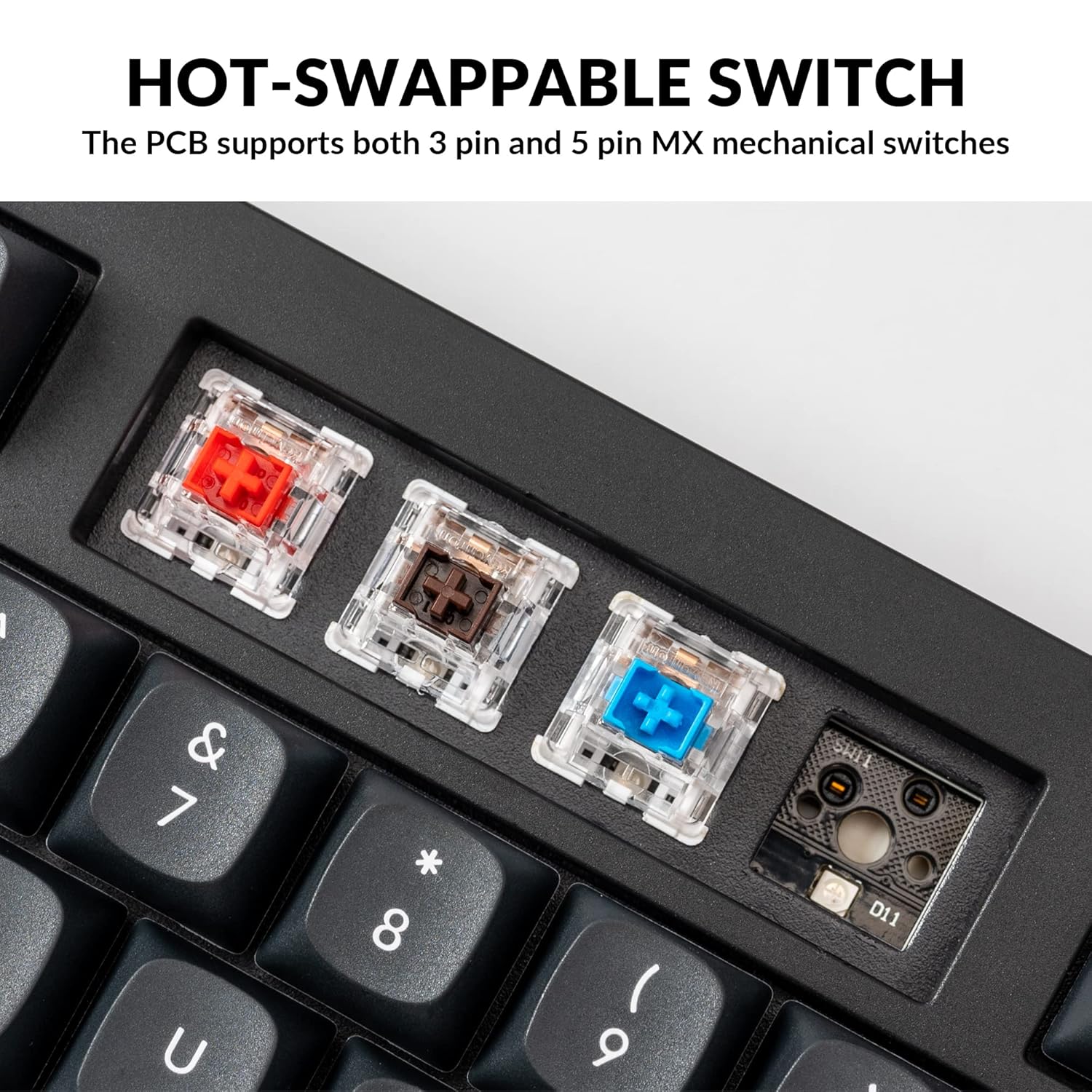
The Keychron V5 is equipped with hot-swappable sockets, allowing you to change mechanical switches without soldering. It supports most 3-pin and 5-pin MX mechanical switches (e.g., Cherry, Gateron, Kailh, Panda).
The keyboard comes with pre-lubed K Pro Red linear switches, offering a smooth and responsive typing experience with a lifespan of up to 50 million keystrokes.
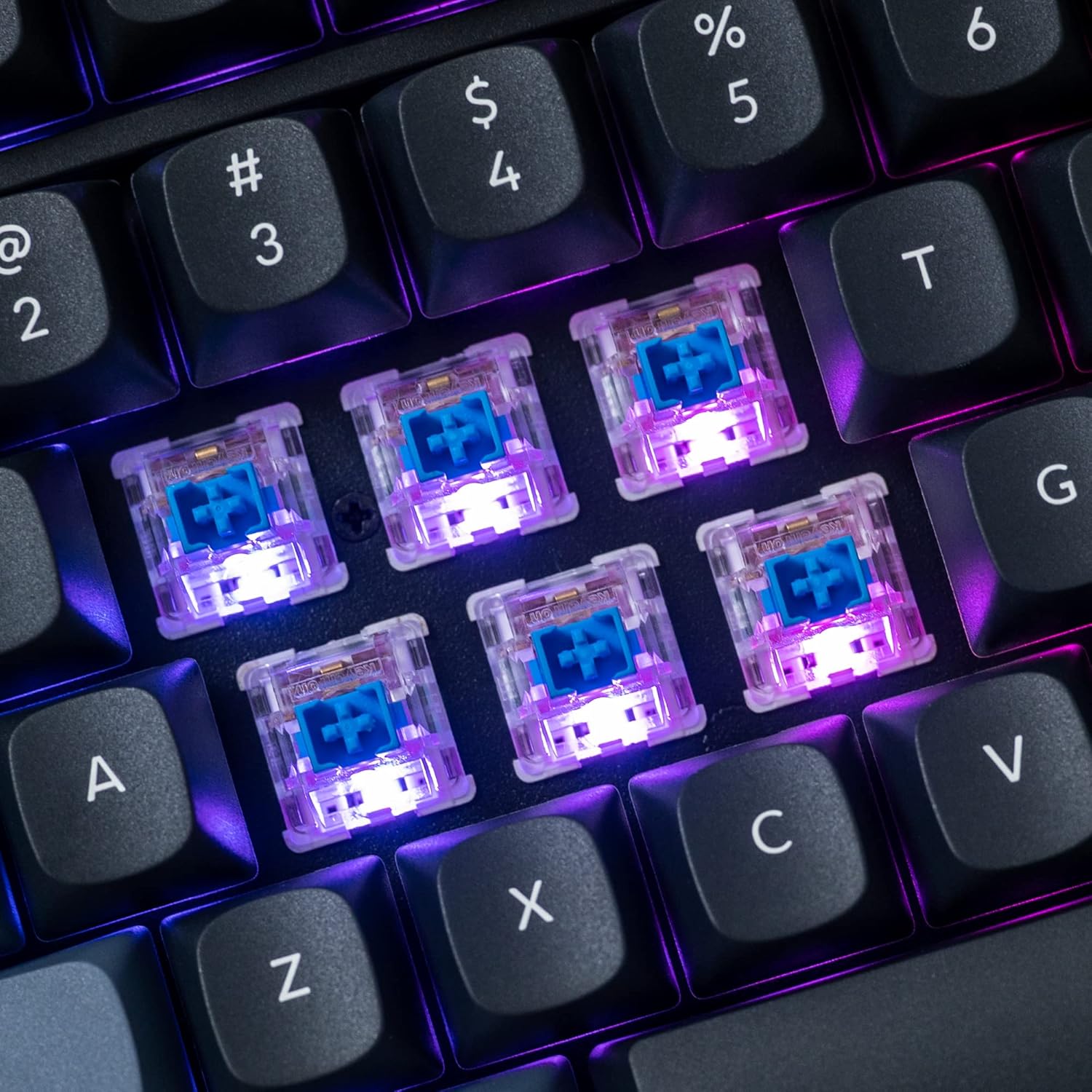
Gambar: Detail view of the hot-swappable mechanical switches on the Keychron V5 keyboard, illuminated by RGB backlighting.
Pencahayaan latar
The V5 features south-facing RGB backlighting, designed to better illuminate the keyboard from the typist's angle and prevent interference when using Cherry-profile keycaps. You can customize the backlight effects and colors using the VIA software.

Image: A close-up of the double-shot PBT keycaps on the Keychron V5 keyboard, showcasing their texture and legends.
Pemeliharaan
Pembersihan
Untuk menjaga kebersihan dan umur panjang keyboard Anda:
- Tombol kunci: Gunakan alat pelepas keycap untuk melepas keycap. Bersihkan keycap dengan larutan sabun lembut dan kain lembut, lalu bilas dan keringkan hingga benar-benar kering sebelum memasangnya kembali.
- Badan Papan Ketik: Wipe the keyboard body with a soft, damp kain. Hindari menggunakan bahan kimia keras atau bahan abrasif.
- Debu: Gunakan udara bertekanan untuk menghilangkan debu dan kotoran dari sela-sela tombol dan sakelar.
Penggantian Saklar
Untuk mengganti sakelar:
- Dengan menggunakan alat pelepas keycap yang tersedia, lepaskan keycap dari switch yang ingin Anda ganti dengan hati-hati.
- Insert the switch puller tool around the top and bottom clips of the switch.
- Gently squeeze the clips and pull the switch straight up to remove it from the PCB.
- Sejajarkan pin sakelar baru dengan lubang pada PCB. Pastikan pin-pin tersebut lurus.
- Press the new switch firmly into place until it clicks. Ensure it is seated properly and not bent.
- Pasangkan kembali penutup kunci.
Penggantian Tutup Tombol
Untuk mengganti penutup tombol:
- Use the keycap puller to gently remove the existing keycap by hooking it onto the keycap and pulling upwards.
- Align the new keycap with the cross-shaped stem of the switch.
- Press the new keycap firmly down until it is fully seated.
Penyelesaian Masalah
- Keyboard Tidak Merespons:
Ensure the USB cable is securely connected to both the keyboard and the computer. Try a different USB port or cable. Verify the system toggle switch is set correctly for your operating system. - Kunci Tidak Terdaftar:
If specific keys are not working, the switch might be faulty or not fully seated. Try removing and re-inserting the switch. If the issue persists, replace the switch. - Masalah Cahaya Latar:
Check VIA software settings to ensure backlighting is enabled and configured correctly. If only certain LEDs are not working, it might indicate a faulty LED or switch. - Perangkat Lunak QMK/VIA Tidak Mendeteksi Keyboard:
Ensure the keyboard is connected via USB. Close and reopen the VIA software. Make sure you have the correct firmware loaded if you have flashed custom firmware. - Keycaps Feel Loose:
Ensure keycaps are fully pressed onto the switch stems. If a keycap consistently feels loose, the switch stem might be damaged, or the keycap's cross-mount might be worn.
Spesifikasi
| Fitur | Spesifikasi |
|---|---|
| Merek | Kunci Kronik |
| Model | V5 |
| Deskripsi Papan Ketik | Mekanis |
| Tata Letak Papan Ketik | QWERTY, 96% Layout (97 Keys) |
| Teknologi Konektivitas | Berkabel (USB-C) |
| Perangkat yang Kompatibel | PC (macOS, Windows, Linux) |
| Jenis Sakelar | Linear (K Pro Red) |
| Hot-swappable Support | Yes (3-pin and 5-pin MX mechanical switches) |
| Kartu kunci | Double-shot PBT, OSA Profile |
| Lampu latar | RGB menghadap ke selatan |
| Bahan Penutup | Polybutylene Terephthalate, Silicone |
| Fitur Tambahan | QMK/VIA Programmable, Programmable Knob, Screw-in Stabilizers |
Garansi dan Dukungan
Keychron products are typically covered by a limited warranty. For specific warranty terms, duration, and conditions, please refer to the warranty information provided with your product packaging or visit the official Keychron weblokasi.
For technical support, troubleshooting assistance, or to inquire about replacement parts, please contact Keychron customer service through their official website's support portal. When contacting support, please have your product model (Keychron V5) and purchase details ready.