
Lenovo TS33-BK
Lenovo thinkplus Desktop Sound Bar TS33BK User Manual
Model: TS33-BK
1. Pendahuluan
Thank you for choosing the Lenovo thinkplus Desktop Sound Bar TS33BK. This soundbar is designed to enhance your audio experience, providing stereo sound for your desktop computer, multimedia presentations, and other applications. Its compact design allows for easy integration with compatible Lenovo ThinkVision Monitors or any desktop setup without occupying excessive space. Please read this manual thoroughly before using your soundbar to ensure proper operation and maintenance.
2. Informasi Keselamatan Penting
- Sumber Daya: Use only the specified power source (USB) for this device. Ensure the voltage and current are compatible to prevent damage.
- Penempatan: Place the soundbar on a stable, flat surface. Avoid placing it near heat sources, direct sunlight, or in areas with high humidity or dust.
- Ventilasi: Jangan menghalangi lubang ventilasi apa pun. Pastikan aliran udara yang cukup di sekitar perangkat.
- Air dan Kelembaban: Do not expose the soundbar to water, rain, or moisture. Do not place objects filled with liquids, such as vases, on or near the device.
- Pembersihan: Cabut daya sebelum membersihkan. Gunakan kain lembut dan kering. Jangan gunakan pembersih cair atau aerosol.
- Pelayanan: Jangan mencoba untuk memperbaiki produk ini sendiri. Rujuk semua servis ke personel servis yang berkualifikasi.
- Anak-anak: Jauhkan perangkat dan aksesorinya dari jangkauan anak-anak.
3. Isi Paket
Silakan periksa paket untuk item berikut:
- Lenovo thinkplus Desktop Sound Bar TS33BK
- Panduan Pengguna
4. Produk Lebihview
The Lenovo thinkplus Desktop Sound Bar TS33BK features a sleek design with integrated controls and dynamic RGB lighting.
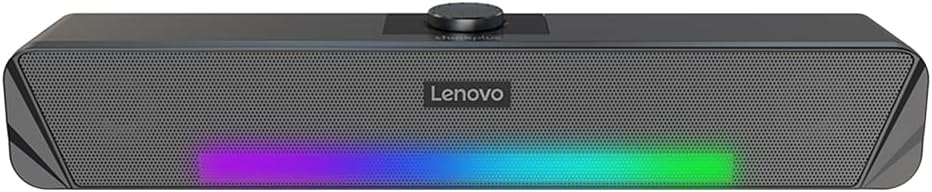
Gambar 4.1: Depan view of the Lenovo thinkplus Desktop Sound Bar TS33BK, showcasing the speaker grille, Lenovo branding, and integrated RGB lighting strip. The central knob is for volume control.
The soundbar is equipped with dual speakers, providing a stereo audio experience. The top panel includes a rotary knob for convenient volume adjustment.
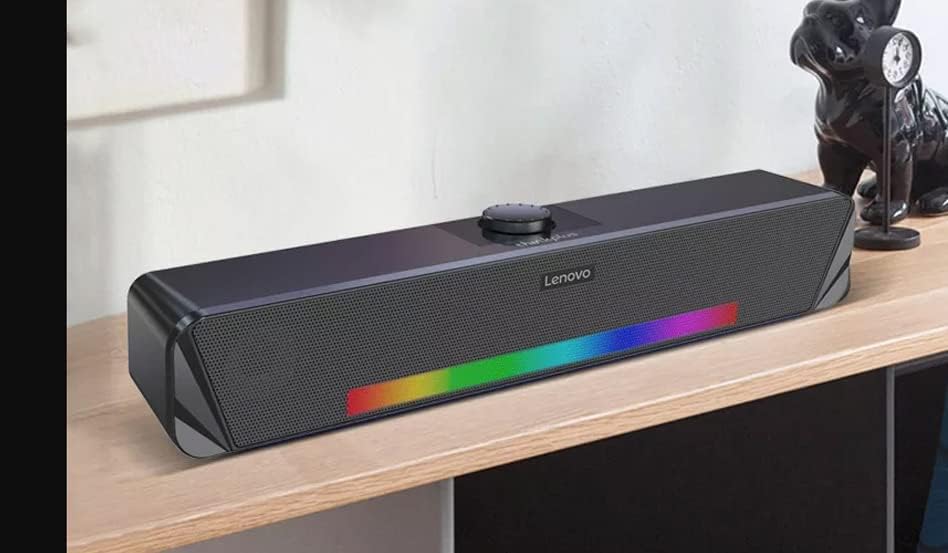
Gambar 4.2: bersudut view of the soundbar, highlighting its compact and modern design suitable for desktop placement.
Consider the dimensions for optimal placement on your desk or under your monitor.
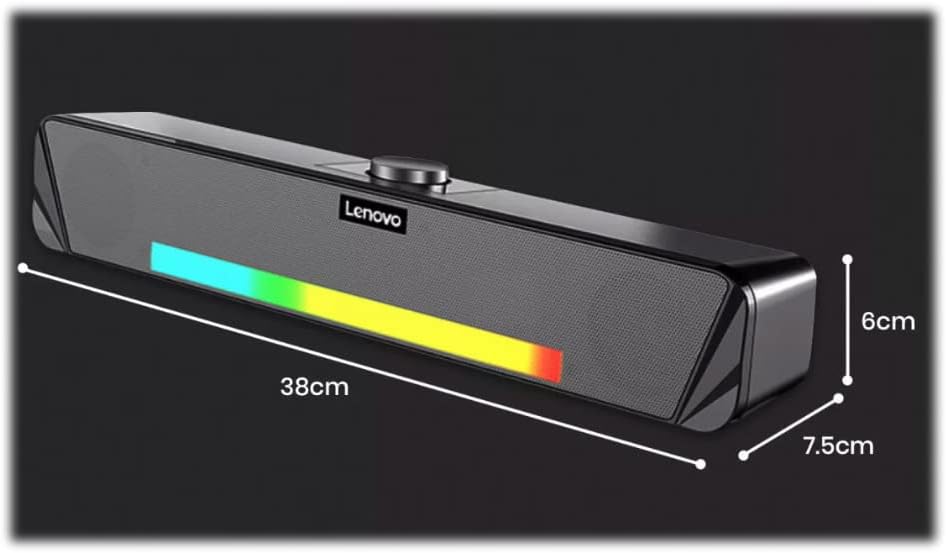
Gambar 4.3: Dimensions of the soundbar: approximately 38cm (width) x 7.5cm (depth) x 6cm (height).
5. Petunjuk Penyiapan
5.1. Connecting to a Computer via USB
- Penempatan: Position the Lenovo thinkplus Desktop Sound Bar TS33BK on a stable surface, such as your desk, directly in front of or below your monitor.
- Koneksi USB: Locate the USB cable attached to the soundbar. Plug the USB connector into an available USB port on your computer or a compatible USB power adapter.
- Nyalakan: The soundbar will typically power on automatically once connected to a powered USB port. The RGB lighting may illuminate.
- Pilihan Output Audio: On your computer, navigate to your sound settings (e.g., Windows: Sound Settings > Playback Devices; macOS: System Preferences > Sound > Output). Select the "Lenovo thinkplus Sound Bar" or similar USB audio device as your default audio output.
- Penyesuaian Volume: Adjust the volume using the rotary knob on the soundbar or through your computer's system volume controls.
5.2. Bluetooth Connection (If applicable to your model)
Note: Some variations of the TS33 model may not include Bluetooth functionality. Refer to your product packaging or specific model designation for confirmation.
- Aktifkan Bluetooth: Ensure the soundbar is powered on. Activate Bluetooth pairing mode on the soundbar (specific method may vary, often involves a dedicated button or long-pressing the power/mode button). An indicator light may flash.
- Menyandingkan Perangkat: On your mobile device or computer, enable Bluetooth and search for available devices. Select "Lenovo TS33" or similar from the list.
- Konfirmasi: Once paired, the soundbar will typically indicate a successful connection (e.g., a solid indicator light or an audible prompt).
6. Petunjuk Pengoperasian
6.1. Daya Hidup/Mati
The soundbar typically powers on automatically when connected to a powered USB port. To power off, disconnect the USB cable from the power source.
6.2. Kontrol Volume
Adjust the audio volume by rotating the central knob located on the top of the soundbar. Turning it clockwise increases the volume, and counter-clockwise decreases it. The soundbar's volume is also linked to your PC's audio control.
6.3. Pencahayaan RGB
The soundbar features integrated RGB lighting. The lighting effects are typically automatic and may cycle through various colors. There is no dedicated control for the RGB lighting on the soundbar itself.
6.4. Keluaran Audio
The soundbar provides stereo audio output. Ensure your computer's audio settings are configured to output sound through the connected USB audio device.
7. Pemeliharaan dan Perawatan
- Pembersihan: Regularly wipe the surface of the soundbar with a soft, dry, lint-free cloth. Do not use abrasive cleaners, waxes, or solvents.
- Debu: Use a soft brush or compressed air to gently remove dust from the speaker grilles.
- Penyimpanan: If storing the soundbar for an extended period, disconnect it from the power source and store it in a cool, dry place, away from direct sunlight and extreme temperatures.
- Hindari Dampak: Protect the soundbar from strong impacts or vibrations, which can damage internal components.
8. Penyelesaian masalah
| Masalah | Kemungkinan Penyebab | Larutan |
|---|---|---|
| Tidak ada suara dari soundbar. |
|
|
| Suara terdistorsi atau tidak jelas. |
|
|
| Pencahayaan RGB tidak berfungsi. |
|
|
| Masalah koneksi Bluetooth. |
|
|
9. Spesifikasi
| Nama Model | TS33-BK |
| Merek | Lenovo |
| Jenis Pembicara | bilah suara |
| Teknologi Konektivitas | USB, Bluetooth |
| Mode Keluaran Audio | Stereo |
| Konfigurasi Saluran Suara Surround | 2 |
| Total Daya Keluaran Speaker | 2.5 Watts (1.25W + 1.25W) |
| Sumber Daya | Bertenaga Listrik Berkabel (melalui USB) |
| Item Dimensions (W x D x H) | 38cm x 7.5cm x 6cm (kira-kira) |
| Penggunaan yang Direkomendasikan | Personal Computer, Televisions |
| Fitur Khusus | Bass Boost, RGB Lighting |
| Metode Kontrol | Rotary Volume Knob, PC Audio Control |
| Jangkauan Maksimum (Bluetooth) | 20 Meter |
10. Garansi dan Dukungan
10.1. Garansi Terbatas
The Lenovo thinkplus Desktop Sound Bar TS33BK comes with a Garansi Terbatas. For detailed terms and conditions of your warranty, please refer to the warranty card included with your product or visit the official Lenovo support website. This warranty covers manufacturing defects under normal use.
10.2. Dukungan Pelanggan
If you encounter any issues not covered in the troubleshooting section or require further assistance, please contact Lenovo Customer Support.
- Dukungan online: Kunjungi dukungan resmi Lenovo. website for FAQs, drivers, and service information.
- Informasi Kontak: Refer to your product packaging or the Lenovo webSitus untuk nomor kontak regional dan dukungan email.
Dokumen Terkait - TS33-BK
 |
Thinkplus-X3 Pro 骨传导耳机 用户手册 Thinkplus-X3 Pro Panduan Pengguna图解、注意事项和保修声明。了解如何使用和保养您的无线蓝牙耳机。 |
 |
FAQ Aplikasi Thinkplus Pocket & 会记 - Pemecahan Masalah dan Panduan Pengguna FAQ dan panduan pemecahan masalah komprehensif untuk speakerphone konferensi portabel thinkplus Pocket dan Aplikasi thinkplus 会记, yang mencakup masalah koneksi, audio, perangkat lunak, dan firmware. |
 |
DS18 JL24-SBAR22LD Loaded Jeep Overhead Sound Bar Owner's Manual and Installation Guide Comprehensive owner's manual and installation guide for the DS18 JL24-SBAR22LD Loaded Jeep Overhead Sound Bar. Features include digital LED lighting, plug-and-play harness, and detailed specifications for Jeep JL/JLU/JT models. |
 |
Lenovo thinkplus X7 Csontvezetéses Fejhallgató Felhasználói Kézikönyv Részletes útmutató a Lenovo thinkplus X7 csontvezetéses fejhallgató használatához, beállításához, funkcióihoz, karbantartásához és jótállási feltételeihez. |
 |
Lenovo XT53 Bluetooth Earphones: User Manual & Product Guide User manual for the Lenovo XT53 Bluetooth Earphones (also known as Lenovo GM2 Pro Max). Discover key features like high-fidelity audio, noise cancellation, and ergonomic fit. This guide provides operating instructions, safety warnings, and answers to frequently asked questions for these TWS wireless headphones. |
 |
Pena Kapasitor Lenovo Thinkplus BP16: Spesifikasi dan Panduan Pengguna Spesifikasi terperinci, tindakan pencegahan produk, dan petunjuk pengoperasian untuk Lenovo Thinkplus BP16 Capacitor Pen, stylus kontrol sentuh untuk berbagai perangkat. |
Ask a question about this manual
Ask about setup, troubleshooting, compatibility, parts, safety, or missing instructions. Manuals+ will review the question and use this page’s manual context to help answer it.