1. Pendahuluan
This manual provides comprehensive instructions for the Generic AN-MR20GA Replacement Voice Remote Control. It covers setup, operation, maintenance, and troubleshooting to ensure optimal use with your compatible LG 4K Smart UHD TV models 75UN9070AUD and 86UN9070AUD.
2. Produk Lebihview
The AN-MR20GA is a replacement voice-enabled remote control designed to function with specific LG 4K Smart UHD TV models. It features standard navigation, numeric keys, and dedicated buttons for streaming services, along with voice command capabilities.
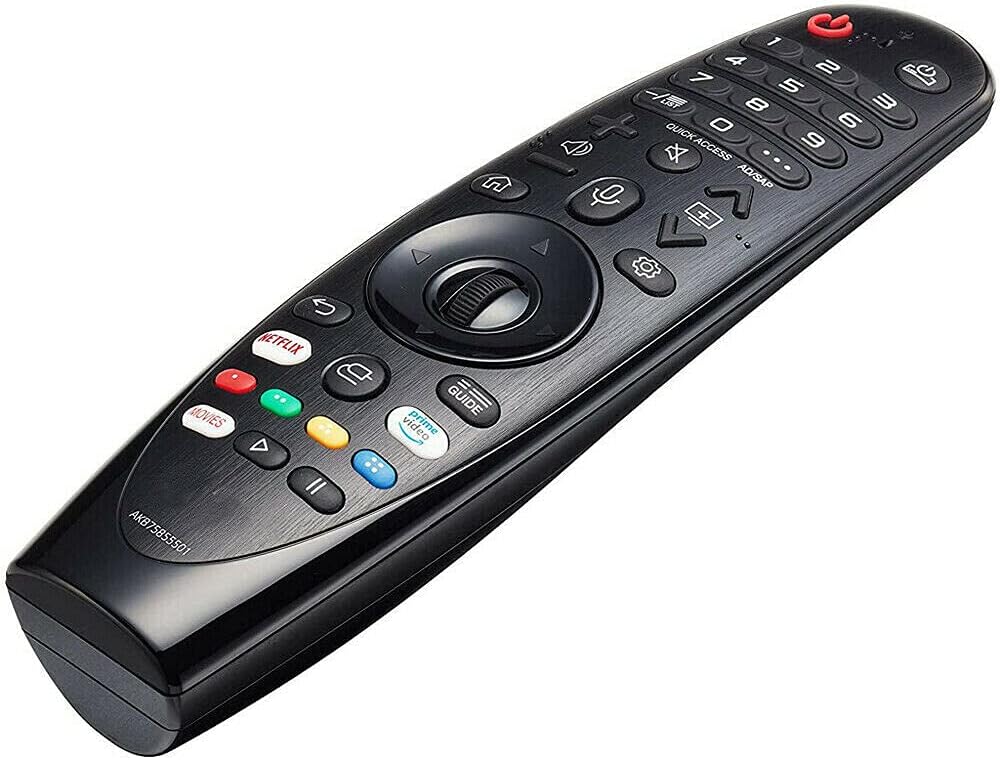
Gambar 2.1: Depan view of the AN-MR20GA remote control, showing various buttons including power, numeric keypad, navigation wheel, volume, channel, and dedicated streaming service buttons.
2.1 Kompatibilitas
This remote control is compatible with the following LG 4K Smart UHD TV models:
- LG 75UN9070AUD 75-inch 4K Smart UHD TV
- LG 86UN9070AUD 86-inch 4K Smart UHD TV
It may also be compatible with other LG models listed in the product description, such as various SK, UK, and OLED series TVs. Please refer to your TV's manual or the product listing for a complete list of compatible models.
3. Pengaturan
3.1 Pemasangan Baterai
The remote control requires two (2) 1.5V AAA Alkaline batteries (not included).
- Temukan penutup kompartemen baterai di bagian belakang remote control.
- Geser penutup ke bawah atau tekan kait untuk membukanya.
- Masukkan dua baterai AAA, pastikan terminal positif (+) dan negatif (-) sejajar dengan tanda di dalam kompartemen.
- Pasang kembali penutup ruang baterai, geser kembali ke tempatnya hingga terkunci dengan aman.

Gambar 3.1: Kembali view of the remote control with the battery compartment open, illustrating correct battery placement.
3.2 Pairing the Remote Control (Magic Remote Function)
To use the voice and pointer functions of this remote, it must be paired with your LG TV. This process is often referred to as 'registering' the Magic Remote.
- Ensure your TV is powered on and the batteries are correctly installed in the remote.
- Point the remote control directly at your TV screen.
- Tekan tombol Roda (OK) button located in the center of the navigation pad.
- The TV should display a message indicating that the remote is registered or paired.
Catatan: If the TV fails to register the remote, turn the TV off and then back on, and repeat the pairing steps.
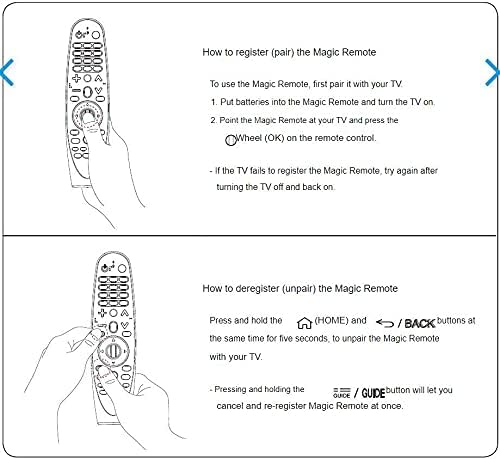
Gambar 3.2: Visual guide for pairing the Magic Remote by pressing the Wheel (OK) button, and unpairing by holding HOME and BACK buttons simultaneously.
3.3 Unpairing the Remote Control
If you need to unpair (deregister) the remote control from your TV, follow these steps:
- Tekan dan tahan tombol RUMAH tombol (
 ) dan KEMBALI tombol (
 ) simultaneously for approximately five seconds.
 - The TV should display a message confirming the remote has been unpaired.
Tip: Menekan dan menahan tombol MEMANDU button will allow you to cancel and re-register the Magic Remote at once.
4. Petunjuk Pengoperasian
4.1 Fungsi Dasar
- Tombol Daya: Menyalakan atau mematikan TV.
- Papan Tombol Numerik (0-9): Masukkan nomor saluran secara langsung.
- Volume Naik/Turun: Adjusts the TV's volume.
- Saluran Atas/Bawah: Mengganti saluran TV.
- Tombol Navigasi (Atas/Bawah/Kiri/Kanan): Moves the cursor or selection on the screen.
- Tombol Roda (OK): Confirms selections or activates the pointer function.
- Tombol Kembali: Kembali ke layar atau menu sebelumnya.
- Tombol Home: Accesses the TV's main menu or Smart TV interface.
4.2 Kontrol Suara
To use the voice control feature:
- Tekan dan tahan tombol Mikropon pada kendali jarak jauh.
- Speak clearly into the microphone located on the remote.
- Lepaskan tombol saat Anda selesai berbicara.
Example perintah suara: "Change to Channel 5", "Open Netflix", "Pencarian untuk action movies", "What's the weather?"
4.3 Tombol Khusus
- Tombol Netflix: Directly launches the Netflix application.
- Tombol Video Utama: Directly launches the Amazon Prime Video application.
- Tombol Panduan: Menampilkan panduan program elektronik (EPG).
- Quick Access / AD/SAP Button: Provides quick access to frequently used apps or functions, or activates Audio Description/Secondary Audio Program.
5. Pemeliharaan
5.1 Pembersihan
To clean your remote control:
- Ensure the batteries are removed before cleaning.
- Usap permukaan dengan kain lembut, kering, dan bebas serat.
- Untuk kotoran membandel, sedikit dampBasahi kain dengan air atau pembersih lembut yang tidak abrasif. Jangan menyemprotkan pembersih langsung ke remote.
- Hindari penggunaan bahan kimia keras, pelarut, atau bahan abrasif, karena dapat merusak lapisan permukaan atau komponen internal remote.
5.2 Penyimpanan
When not in use for extended periods, remove the batteries to prevent leakage and corrosion. Store the remote in a cool, dry place away from direct sunlight and extreme temperatures.
6. Penyelesaian masalah
6.1 Remote Tidak Merespons
- Periksa Baterai: Ensure batteries are inserted correctly and are not depleted. Replace with fresh AAA alkaline batteries if necessary.
- Pandangan: Ensure there are no obstructions between the remote and the TV's infrared receiver.
- Pasangkan ulang Remote: If the remote uses Bluetooth (Magic Remote function), try re-pairing it with the TV as described in Section 3.2.
- TV Power Cycle: Turn off the TV, unplug it from the power outlet for a few minutes, then plug it back in and turn it on. Try the remote again.
6.2 Kontrol Suara Tidak Berfungsi
- Pasangan: Ensure the remote is properly paired with the TV (Section 3.2), as voice functionality relies on this connection.
- Tombol Mikrofon: Make sure you are pressing and holding the Microphone button while speaking.
- Berbicara dengan Jelas: Berbicaralah dengan jelas dan pada volume normal.
- Koneksi Internet: Some voice commands may require the TV to be connected to the internet.
7. Spesifikasi
| Fitur | Detil |
|---|---|
| Nomor Model | AN-MR20GA |
| Merek | Umum |
| Perangkat yang Kompatibel | LG 75UN9070AUD, 86UN9070AUD 4K Smart UHD TVs, and other compatible LG models |
| Teknologi Konektivitas | Infrared, Bluetooth (for Magic Remote functions) |
| Catu Daya | 2 x 1.5V AAA Alkaline Batteries (not included) |
| Fitur Khusus | Voice Control, Ergonomic Design |
| Warna | Hitam |
8. Garansi dan Dukungan
Specific warranty information for this Generic replacement remote control is not provided in the product details. Please refer to the seller's return policy or contact the seller directly for details regarding warranty coverage and customer support.


